दोस्तों, इन दिनों Funny AI Video Prompts से बनाई गई ऐसी मजेदार videos काफी देखने को मिल रही हैं, लेकिन इस trend में असली मजा तब आता है जब कहानी थोड़ी unexpected हो। 😄 सोचो, एक लड़का सड़क किनारे बैठी एक लड़की के पास जाता है और पूछता है, “तुम कौन हो?” लड़की रोते हुए किसी दोस्त का नाम लेकर कहती है, “मैं उसकी पत्नी हूं, मुझे उसके पास जाना है।” इसके बाद लड़का उसी दोस्त का नाम लेकर बोल देता है, “भाई, ले जा अपनी पत्नी को… ये यहां बहुत रो रही है!” 😂
अब इसी तरह की funny video आप भी अपने दोस्तों के नाम और अपने या अपने दोस्तों के face के साथ बनाकर group में हंसी-मजाक के लिए इस्तेमाल कर सकते हो। बस जिस दोस्त का नाम या face इस्तेमाल कर रहे हो, उसकी permission लेकर ही video बनाना बेहतर रहेगा।
एक जरूरी बात—इस तरह की video सीधे text से बनाने के बजाय पहले AI से एक realistic image तैयार करनी होगी, क्योंकि वही image आगे video का base बनेगी। इसके बाद उसी image को AI video tool में डालकर dialogue, expressions और movement के साथ छोटा video बनाया जा सकता है।
इस article में मैंने Latest Trending AI Video Prompts के साथ यही पूरा process Latest Viral Funny Video Kaise banaye आसान तरीके से समझाया है—पहले image बनाने का prompt, फिर image से video बनाने का prompt, और आखिर में इसे YouTube Shorts या Reels के लिए तैयार करने का practical तरीका।
ये Funny AI Video Trend इतना मजेदार क्यों लग रहा है?
इस तरह के Viral AI Video Prompts की खास बात ये है कि funny part सिर्फ dialogue में नहीं होता, बल्कि पूरा scene ही थोड़ा unexpected रखा जाता है। Real-looking character, serious acting और अचानक आने वाला funny dialogue—यही combination video को entertaining बनाता है।
इसी idea को ध्यान में रखकर नीचे Viral Funny AI Video Prompt दिया है। इसमें पहले एक realistic image तैयार होगी और फिर उसी image को animate करके talking video बनाया जाएगा।
एक जरूरी बात: ये content सिर्फ entertainment और दोस्तों के बीच हल्के-फुल्के मजाक के लिए है। किसी की photo या face इस्तेमाल करने से पहले उसकी permission जरूर लें। किसी व्यक्ति को बदनाम, परेशान या धोखा देने के लिए इन prompts का इस्तेमाल न करें।
Step 1: पहले AI Image बनाएं
दोस्तों, यहां एक बात ध्यान से समझ लेना—सीधे image से video बनाने के बजाय पहले सही reference image तैयार करना ज्यादा useful रहेगा।
इस prompt में location, कपड़े, characters और expressions पहले से define हैं। इसलिए सबसे पहले अपनी reference photo upload करके नीचे दिया गया AI Prompts for Viral Funny Videos वाला image prompt इस्तेमाल करो।
Funny AI Video के लिए Realistic Image Prompt
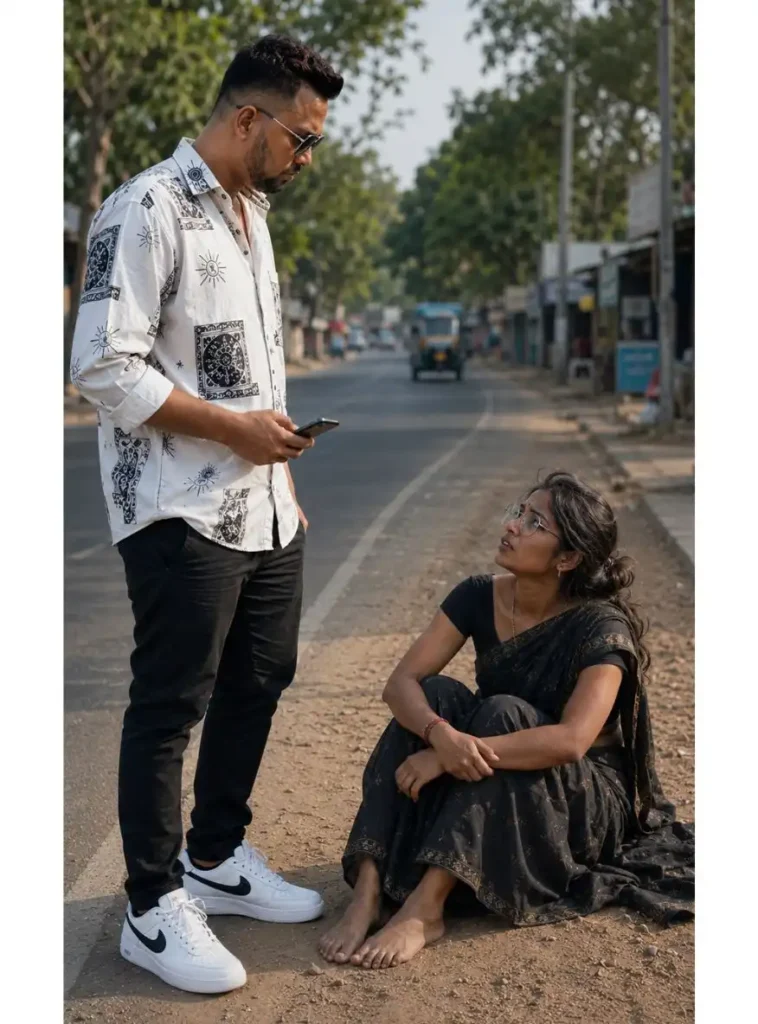
इस image को बनाते समय reference photo में जिस व्यक्ति का face इस्तेमाल कर रहे हो, उसकी permission जरूर होनी चाहिए। Image तैयार होने के बाद एक बार face, हाथ, कपड़े और पूरा background check कर लेना। अगर image में कोई बड़ी गलती है तो उसी stage पर उसे ठीक करना video बनाने के मुकाबले आसान रहता है।
Step 2: इसी Image से Funny AI Video बनाएं
अब असली मजा यहां से शुरू होगा। 😄
Image तैयार हो जाने के बाद उसी image को video generation tool में reference के तौर पर upload करना है। इससे AI को character की appearance, कपड़े और scene को समझने के लिए एक fixed visual reference मिलता है।
नीचे दिया गया Trending AI Video Prompts वाला video prompt इसी image को animate करने के लिए है।
Viral Funny AI Video Prompt
Prompt में dialogue भी दिया गया है। आप उसमें अपने मुताबिक बदलाव करके इस्तेमाल कर सकते हैं। बस dialogue में ही बदलाव करें; बाकी Prompt में कोई नया बदलाव न करें। जिस AI video tool में Hindi speech/lip-sync support मिलता है, वहाँ result ज्यादा useful हो सकता है। Generation के बाद dialogue और चेहरे के expressions जरूर check करना, क्योंकि हर generation में lip-sync बिल्कुल समान नहीं आता।
YouTube Shorts में AI से Funny Video कैसे बनाएं?
अगर तुम YouTube Shorts में ही AI से छोटी video बनाना चाहते हो, तो YouTube के available AI tools में text prompt और reference image की मदद से short clips तैयार किए जा सकते हैं। बस ध्यान रहे, ये features हर country और हर account में एक जैसे available हों, यह जरूरी नहीं है। इसलिए अगर आपके YouTube में AI option दिखाई नहीं दे रहा है, तो घबराने की जरूरत नहीं है—availability अलग हो सकती है।
तरीका:
- YouTube app खोलें।
- Create option पर जाएं।
- अगर आपके account में AI video feature available है, तो Create video / AI video वाला option चुनें।
- Reference image available option में अपनी बनाई हुई image add करें।
- अपना Viral AI Video Prompt डालें।
- Video generate होने के बाद preview देखें।
- जरूरत हो तो Short में edit करके publish करें।
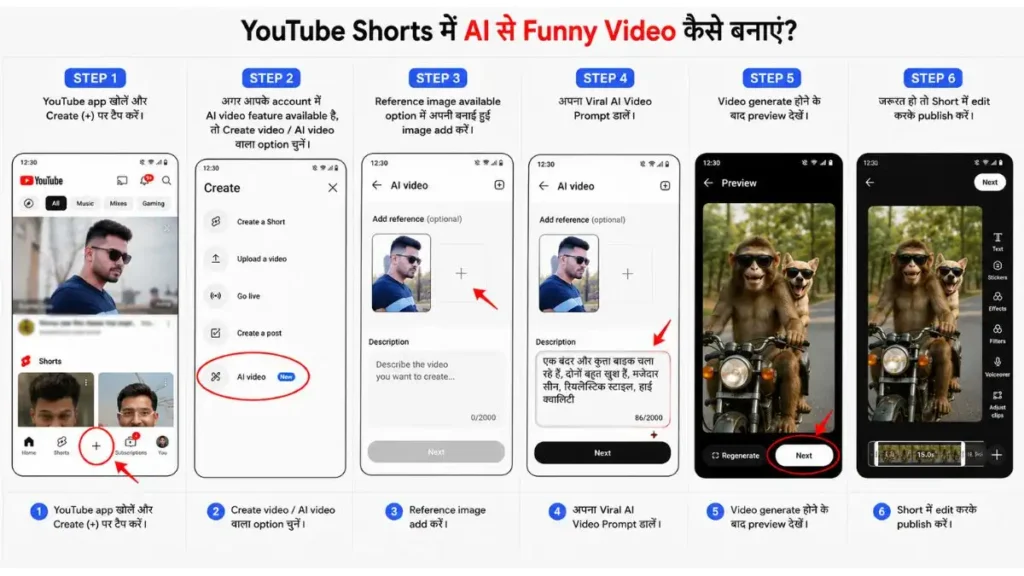
YouTube के AI features experimental हो सकते हैं और सभी users/regions में एक जैसे available नहीं होते, इसलिए अगर आपके app में option दिखाई नहीं दे रहा है तो यह जरूरी नहीं कि आपके phone में कोई problem हो।
Gemini से Funny AI Video कैसे बनाएं?
अगर तुम्हारे Gemini में video generation का option available है, तो तैयार की गई image को सीधे video में बदलना काफी आसान हो जाता है। Gemini में Create video option खोलकर अपनी image/reference upload करो और फिर उसी scene के हिसाब से prompt डालकर video generate कर सकते हो। ध्यान रहे, यह feature हर account में available हो, ऐसा जरूरी नहीं है और personal accounts में इसकी availability आपके Google AI plan पर भी depend कर सकती है।
Gemini Steps:
- Gemini खोलें।
- Create video option चुनें।
- अपनी बनाई हुई AI image upload करें।
- ऊपर दिया गया Funny AI Video Prompt paste करें।
- Video generate होने दें।
- Result में face, expressions और dialogue check करें।
- सही result मिलने पर video download/share करें।
Gemini में generated video को बाद में prompt देकर edit भी किया जा सकता है, इसलिए पहली generation perfect न हो तो छोटे बदलाव करके फिर try कर सकते हो।
Google Flow में Image से Video कैसे बनाएं?
अगर तुम reference image से video बनाने वाला experiment कर रहे हो, तो Flow भी try कर सकते हो। इसमें existing image को animate करके उसके movement को prompt के जरिए describe किया जा सकता है। मेरे हिसाब से ऐसे clips में पहले image का composition सही रखना ज्यादा जरूरी है, क्योंकि वही final video का base बनता है।
Flow में तरीका:
- Google Flow खोलें।
- नया project शुरू करें।
- अपनी बनाई हुई image upload करें।
- Image select करके Animate option चुनें।
- Video prompt paste करें।
- Video orientation और generation settings check करें।
- Generate करें।
- Result देखकर जरूरत हो तो prompt में छोटा बदलाव करके दोबारा generate करें।
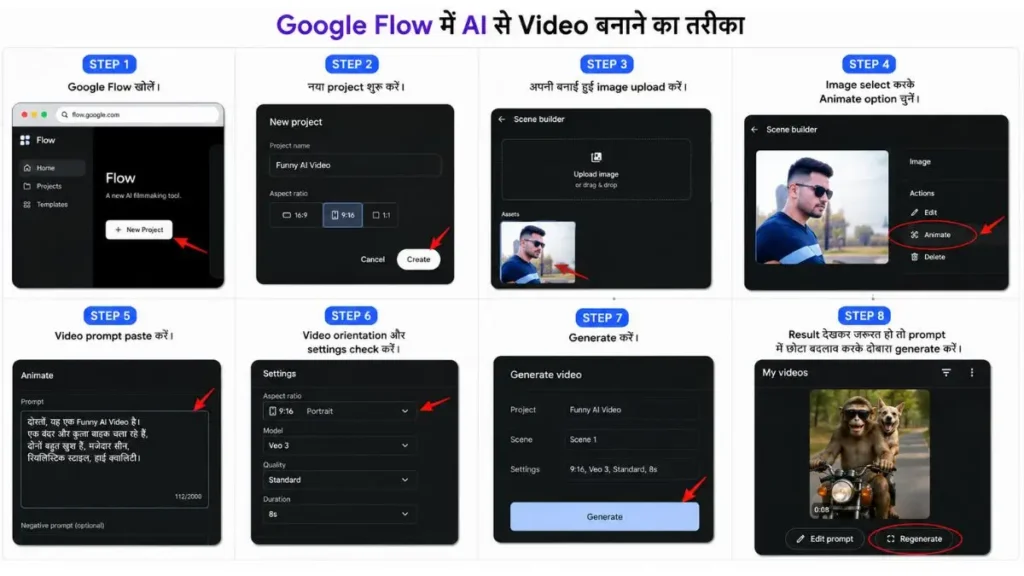
Flow में reference images का इस्तेमाल करके scene और characters को ज्यादा consistent रखने की कोशिश की जा सकती है। बस एक practical बात ध्यान रखना—reference image में जो दिख रहा है, prompt में उससे उलटी या conflicting instruction दोगे तो result उम्मीद के मुताबिक नहीं आ सकता। इसलिए image साफ रखो और prompt में वही चीजें describe करो जो final video में चाहिए।
ध्यान दें: Flow के features और availability हर user के लिए एक जैसी नहीं होती। आपके country, age और Google AI subscription के हिसाब से कुछ options अलग हो सकते हैं।
Funny AI Video को ज्यादा Natural बनाने के 5 Practical Tips
1. Image पहले सही बनाओ
अगर base image में face या हाथ खराब है, तो video में वही problem और ज्यादा noticeable हो सकती है।
2. Dialogue छोटा रखो
बहुत लंबा dialogue रखने पर lip-sync और expressions बिगड़ने की संभावना बढ़ सकती है।
3. Serious scene + funny dialogue try करो
इस तरह के Latest Trending AI Video Prompts में यही contrast video को ज्यादा entertaining बना सकता है।
4. एक ही generation पर मत अटकना
अगर पहला result ठीक है लेकिन expression या lip-sync कमजोर है, तो prompt में छोटा बदलाव करके दूसरा result निकालना ज्यादा practical है।
5. किसी अनजान व्यक्ति का face मत लगाना
अपने दोस्त या जान-पहचान वाले की permission लेकर ही ऐसी funny videos बनाएं। Entertainment के चक्कर में किसी की privacy या reputation को नुकसान नहीं होना चाहिए।
FAQ: Funny AI Video Prompts
1. क्या इन prompts से अपने दोस्त की funny AI video बना सकते हैं?
हाँ, लेकिन दोस्त की permission लेकर उसका face/reference photo इस्तेमाल करें।
2. पहले Image बनाना जरूरी क्यों है?
इससे video AI को character, कपड़े और scene का एक clear visual reference मिल जाता है।
3. Funny AI Video Prompt कहां इस्तेमाल कर सकते हैं?
इसे ऐसे AI video tools में इस्तेमाल कर सकते हैं जो text prompt और reference image से video generation support करते हैं।
4. Video में face बदल जाए तो क्या करें?
बेहतर reference image इस्तेमाल करें और prompt में identity/face preservation instructions साफ रखें। जरूरत हो तो दोबारा generation करें।
5. क्या ऐसी video YouTube Shorts पर डाल सकते हैं?
हाँ दोस्तों, video publish करने से पहले एक बार YouTube की current policies जरूर देख लेना। AI से बनाई गई video होने का मतलब यह नहीं है कि उस पर YouTube के बाकी rules लागू नहीं होंगे। खासकर किसी दूसरे व्यक्ति का face या ऐसा content इस्तेमाल कर रहे हो, तो permission और platform guidelines का ध्यान रखना बेहतर है।
निष्कर्ष
दोस्तों, इस पूरे Funny AI Video Prompts वाले trend में सबसे जरूरी चीज सिर्फ funny dialogue नहीं है। पहले एक अच्छी reference image बनाओ, फिर उसी image को video में animate करो—इससे result पर ज्यादा control रहता है।
अगर तुम Latest Trending AI Video Prompts से अपने दोस्तों के लिए ऐसी मजेदार Reel या Short बनाना चाहते हो, तो ऊपर वाला Image → Video workflow सबसे आसान तरीका रहेगा। बस मजाक को मजाक तक ही रखो और किसी की photo इस्तेमाल करने से पहले उसकी permission जरूर ले लेना।
नीचे लिखे अन्य लेख भी देखे आपको जरूर पसंद आएंगे:-