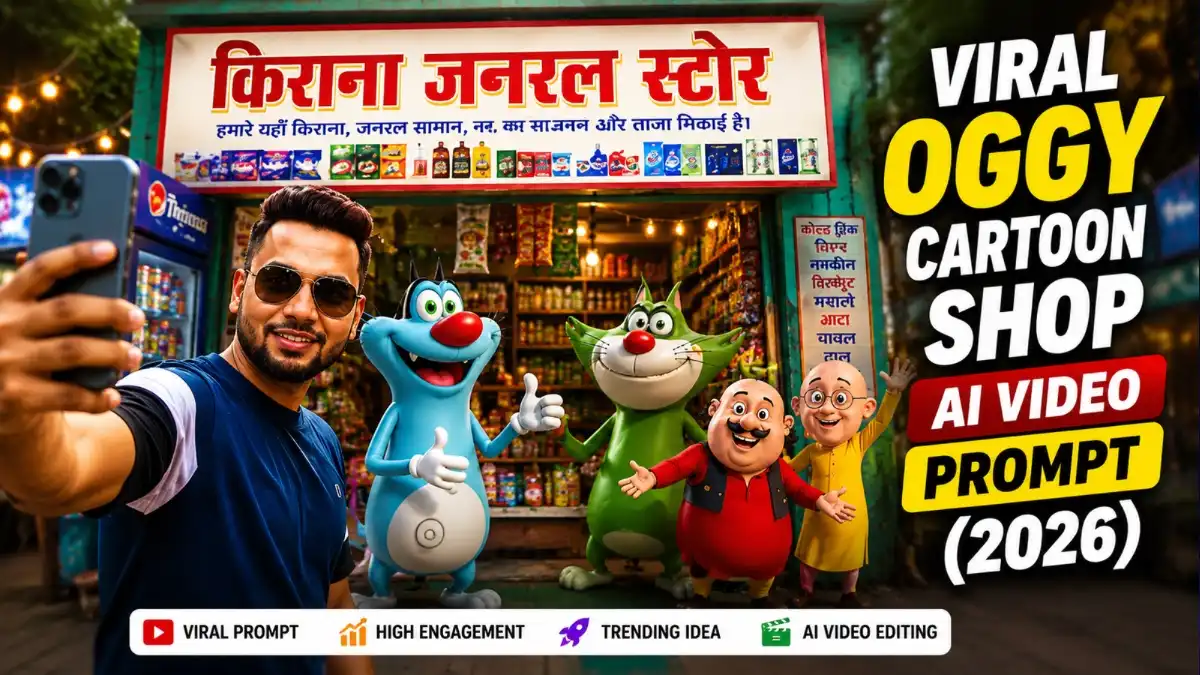
सोचिए दोस्तों, आपकी असली दुकान के सामने Oggy और Jack खड़े हों और उसी Shop का नाम लेकर उसका Promotion करने लगें—वो भी किसी Funny Commercial Ad की तरह। यही नया Oggy Cartoon AI Video Editing Prompt वाला Trend सबसे ज्यादा मजेदार लगता है।
इससे पहले हमने Motu Patlu Shop Promotion AI Video Editing Prompts बनाया था, जिसे काफी अच्छा Response मिला। अब उसी Idea को Oggy और Jack के साथ Try करने पर Video का Look थोड़ा अलग और ज्यादा Fun लगता है। मैंने इसे अलग-अलग Shop Photos पर Try किया और साफ Front View व Readable Signboard वाली Images में Result ज्यादा Natural मिला।
इस Guide में हम आपकी Shop Photo से पहले Oggy-Jack वाली Promotional Image और फिर उसी से Talking AI Video बनाएंगे। साथ में Ready-to-Use Prompts और बेहतर Result के जरूरी Tips भी मिलेंगे।
Step 1: Oggy Cartoon Shop Promotion AI Photo कैसे बनाएं?
किसी भी Oggy Cartoon Shop Promotion AI Video Editing Prompt का पहला और सबसे जरूरी हिस्सा उसकी AI Image होती है। Video बाद में बनता है, लेकिन उसकी पूरी Quality इसी शुरुआती Image पर निर्भर करती है। अगर Shop, Characters और Background शुरुआत में सही तैयार हो जाएं, तो Final Video भी ज्यादा Professional दिखाई देता है।
AI Photo बनाने के लिए कई Tools मौजूद हैं, लेकिन अगर बात Character Accuracy, Shop Details और Overall Quality की हो, तो मेरे अनुसार ChatGPT और Google Gemini दोनों अच्छे विकल्प हैं।
- अगर आपको Shop की Details और Premium Image Quality चाहिए, तो ChatGPT बेहतर रहता है।
- अगर आपका Focus Natural Composition और साफ Output पर है, तो Google Gemini भी अच्छा विकल्प हो सकता है।
इस Guide में आगे दिए गए Steps ChatGPT के अनुसार समझाए गए हैं, लेकिन यही Oggy AI Video Editing Prompt और Cartoon AI Video Prompt Gemini जैसे दूसरे AI Platforms पर भी लगभग इसी तरीके से इस्तेमाल किए जा सकते हैं।
Oggy Cartoon Shop Promotion AI Photo Prompt
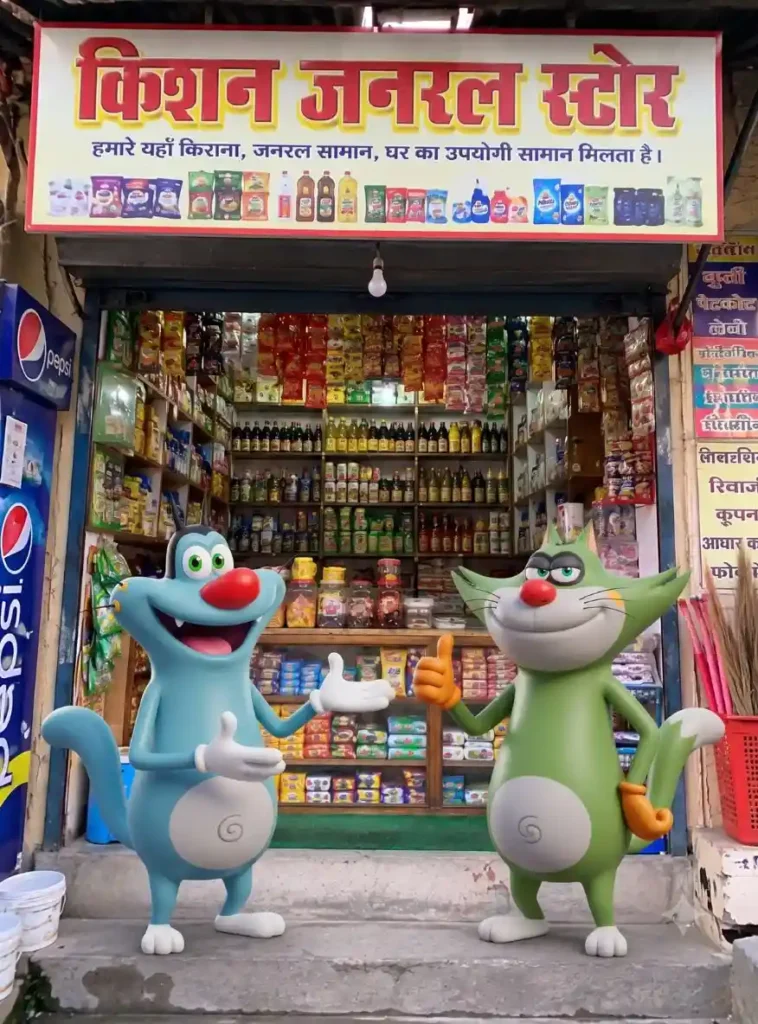
Shop Promotion AI Photo बनाने का तरीका
अगर आप पहली बार Oggy Cartoon AI Video Editing Prompt इस्तेमाल कर रहे हैं, तो पूरा Process काफी आसान है। बस नीचे दिए गए Steps उसी क्रम में Follow करें।
- सबसे पहले ChatGPT या Google Gemini खोलें।
- अपनी Shop की Front Side से ली गई साफ़ और HD Photo तैयार रखें।
- अब + (Plus) आइकन पर क्लिक करके Shop Photo Upload करें।
- ऊपर दिए गए Oggy Cartoon Shop Promotion AI Photo Prompt को View Prompt से Copy करके Prompt Box में Paste करें।
- Prompt Submit करें और कुछ सेकंड इंतज़ार करें।
- AI आपकी Shop के सामने Oggy और Jack के साथ Promotional Image तैयार कर देगा।
- अगर Image पसंद आए, तो उसे Download या Save कर लें क्योंकि अगले Step में इसी Image से Video बनाया जाएगा।
ध्यान दें: अगर पहली बार में Characters बहुत छोटे दिखाई दें या Shop का Signboard सही न दिखे, तो तुरंत नया Prompt लिखने की जरूरत नहीं है। पहले वही Prompt दोबारा Generate करके देखें। मेरे अनुभव में कई बार दूसरी Generation में Character Placement और Shop Details पहले से बेहतर मिली।
Step 2: Oggy Cartoon Shop Promotion AI Video कैसे बनाएं?
जब आपकी AI Image तैयार हो जाए, तब अगला Step उसे Video में बदलने का होता है। यहीं पर Oggy Cartoon AI Video Editing Prompt अपना असली असर दिखाता है। सही Prompt इस्तेमाल करने पर Oggy और Jack सिर्फ आपकी Shop के सामने खड़े नहीं रहते, बल्कि Camera की तरफ देखकर आपकी दुकान के बारे में बात भी करते हैं।
यही वजह है कि अभी Cartoon Shop Promotion AI Video Editing Prompt वाला Trend Instagram Reels, Facebook Reels और YouTube Shorts पर तेजी से दिखाई दे रहा है। कम समय में Shop Promotion करने का यह तरीका बाकी सामान्य Advertisement Videos से काफी अलग महसूस होता है।
मेरे हिसाब से इस काम के लिए Flow AI सबसे आसान विकल्प है। इसका Interface Beginner Friendly है और Character Animation, Lip Sync तथा Camera Movement भी काफी Smooth मिलते हैं। अगर आपके पास कोई दूसरा AI Video Tool उपलब्ध है, तो वहां भी यही Viral Cartoon AI Video Prompt इस्तेमाल किया जा सकता है।
Oggy Cartoon Shop Promotion AI Video Prompt
Flow AI से Video बनाने के Steps
- सबसे पहले Flow AI की Website खोलें और अपने Account से Login करें।
- Create Video या New Project वाला विकल्प चुनें।
- अब + (Plus) आइकन पर क्लिक करके पहले Ai से बनाई गई Oggy Shop Promotion AI Photo Upload करें।
- इस लेख में ऊपर दिया गया Oggy Cartoon Shop Promotion AI Video Prompt Copy करके Prompt Box में Paste करें।
- अपनी जरूरत के अनुसार 9:16 या 16:9 Aspect Ratio चुनें।
- अब Generate पर क्लिक करें और Video तैयार होने का इंतजार करें।
- Video बनने के बाद उसे Preview करें। अगर Result पसंद आए, तो उसे Download करके सीधे Instagram Reels, YouTube Shorts या Facebook Reels पर इस्तेमाल किया जा सकता है।
Step 3: Oggy Cartoon AI Vlog Style Image कैसे बनाएं?
अगर आप सिर्फ Shop Promotion तक सीमित नहीं रहना चाहते और Oggy के साथ एक मजेदार Vlog Style Thumbnail या Blog Featured Image बनाना चाहते हैं, तो यह Prompt जरूर Try करें।
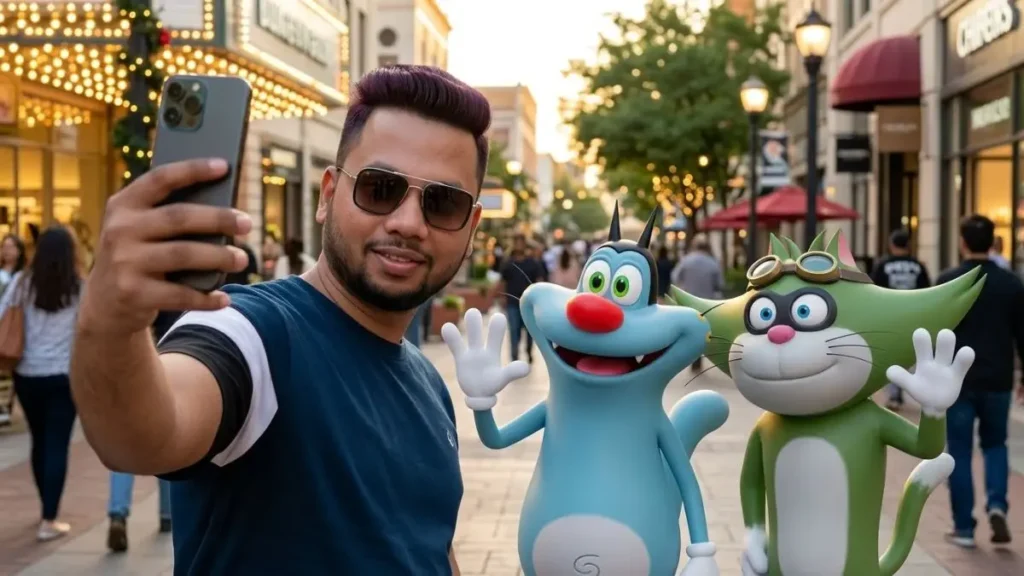
इस Prompt में Oggy और Jack आपकी Shop के सामने नहीं, बल्कि आपके साथ Vlog Record करते हुए दिखाई देते हैं। सही Reference Photo इस्तेमाल करने पर ऐसा लगता है जैसे आप दोनों Cartoon Characters के साथ किसी Shopping Street में घूम रहे हों। यही वजह है कि Oggy Cartoon AI Video Prompt वाले इस Style को कई Creator Thumbnail और Blog Banner के लिए भी इस्तेमाल कर रहे हैं।
Oggy Cartoon AI Vlog Style Image Prompt
Step 4: Oggy Cartoon AI Vlog Video कैसे बनाएं?
जब आपकी Vlog Style Image तैयार हो जाए, तब उसी Image को Animate करके Video बनाया जा सकता है।
इस Cartoon Shop Promotion AI Video Prompt में आप Camera हाथ में लेकर Selfie Vlog करते हुए दिखाई देते हैं, जबकि Oggy और Jack आपके साथ चलते हुए बात करते हैं। सही Lip Sync और Camera Movement मिलने पर पूरा Video किसी Animated Vlogger जैसा महसूस होता है।
Note:- प्रॉम्प्ट में आप अपने हिसाब से डायलॉग बदल सकते है बाकि प्रॉम्प्ट का दूसरा हिस्सा ना बदले।
Gemini AI में यही Video Prompt कैसे इस्तेमाल करें?
अगर आपके Gemini Account में Image to Video Feature उपलब्ध है, तो अलग से नई Image बनाने की जरूरत नहीं है। आपने जो Shop Promotion AI Photo पहले तैयार की है, उसी का इस्तेमाल यहां भी किया जा सकता है।
Gemini AI से Video बनाने के Steps
- Gemini AI में नया Chat खोलें।
- Create Video या Image to Video विकल्प चुनें।
- पहले बनाई गई Oggy Cartoon Shop Promotion AI Photo Upload करें।
- इस लेख में दिया गया “Cartoon Shop Promotion AI Video Editing Prompt” Prompt Box में Paste करें।
- अब Generate पर क्लिक करें और Video तैयार होने का इंतजार करें।
अगर पहली Generation में Lip Sync, Character Movement या Camera Motion आपकी उम्मीद के मुताबिक न लगे, तो उसी Prompt के साथ एक और Generation करके Compare करें। मेरे अनुभव में कई बार दूसरी Generation ज्यादा Smooth Animation और बेहतर Expressions के साथ तैयार हुई।
यह Trend Shop Promotion के लिए इतना तेजी से Viral क्यों हो रहा है?
इस Trend की सबसे अच्छी बात यही है कि देखने वाले को यह किसी Traditional Advertisement जैसा महसूस नहीं होता। Video की शुरुआत एक सामान्य Cartoon Scene की तरह होती है और कुछ ही सेकंड में Oggy और Jack सीधे आपकी Shop के बारे में बात करने लगते हैं। यही वजह है कि Viewer बिना Skip किए पूरा Video देखने की संभावना ज्यादा रहती है।
इसी कारण आज कई छोटे Business Owners Apni dukan ke name se Oggy Cartoon AI Banaye वाले Trend का इस्तेमाल करके अपनी Grocery Shop, Medical Store, Clothing Shop, Restaurant, Mobile Shop, Bakery और दूसरी Local Shops का Creative Promotion कर रहे हैं। कम समय में लोगों का ध्यान खींचने के लिए Oggy AI Video Editing Prompt एक अलग और आकर्षक तरीका बनता जा रहा है।
कौन-सा AI Tool चुनना बेहतर रहेगा?
अगर आपका उद्देश्य जल्दी Video तैयार करना है, तो Flow AI इस्तेमाल करना आसान रहता है क्योंकि इसमें Character Animation और Lip Sync कम मेहनत में तैयार हो जाते हैं।
वहीं अगर आप पहले Premium Quality की Shop Promotion Image बनाना चाहते हैं, तो ChatGPT और Google Gemini दोनों अच्छे विकल्प हैं। मेरी सलाह यही रहेगी कि एक ही Shop Photo को दोनों Platforms पर Generate करके Compare करें। जिस Image में Shop, Oggy और Jack ज्यादा Natural दिखाई दें, उसी Image को Video के लिए इस्तेमाल करें। इससे Final Output पहले से ज्यादा Professional और आकर्षक दिखाई देता है।
अक्सर पूछे जाने वाले सवाल (FAQs)
क्या Oggy Cartoon AI Video Editing Prompt सभी AI Tools में काम करता है?
हाँ। अगर आपका AI Platform Image और Video Prompts को सपोर्ट करता है, तो इस Oggy Cartoon AI Video Editing Prompt को अलग-अलग Tools पर इस्तेमाल किया जा सकता है। हालांकि Final Result उस Platform की क्षमता के अनुसार थोड़ा अलग हो सकता है।
क्या Shop की अपनी Photo Upload करना जरूरी है?
हाँ। अगर आप चाहते हैं कि Video में आपकी असली Shop दिखाई दे, तो Front Side से ली गई साफ़ और HD Photo Upload करना सबसे अच्छा रहता है। इससे AI Shop के Signboard और बाकी Details को बेहतर तरीके से पहचान पाता है।
क्या Shop का नाम बदला जा सकता है?
बिल्कुल। Prompt में जहां Shop Name इस्तेमाल किया गया है, वहां आप अपनी Shop का नाम लिख सकते हैं। इसी वजह से Cartoon Shop Promotion AI Video Editing Prompt अलग-अलग Business के लिए आसानी से इस्तेमाल किया जा सकता है।
Video बनने में कितना समय लगता है?
यह आपके इस्तेमाल किए गए AI Tool और Internet Speed पर निर्भर करता है। आमतौर पर अच्छी Connection होने पर कुछ सेकंड से लेकर 2–3 मिनट के भीतर Video तैयार हो जाता है।
क्या इस Video को Instagram Reels और YouTube Shorts पर Upload कर सकते हैं?
हाँ। अगर आप Video को 9:16 Vertical Ratio में Generate करते हैं, तो उसे Instagram Reels, Facebook Reels और YouTube Shorts पर बिना किसी अतिरिक्त Editing के इस्तेमाल किया जा सकता है।
निष्कर्ष
अगर आप अपनी Shop के लिए ऐसा Promotion करना चाहते हैं जो सामान्य Advertisement से अलग दिखाई दे, तो Oggy Cartoon AI Video Editing Prompt एक अच्छा विकल्प हो सकता है। सही Shop Photo, सही Workflow और Cartoon Shop Promotion AI Video Editing Prompt की मदद से कुछ ही मिनटों में ऐसा AI Video तैयार किया जा सकता है जो देखने में आकर्षक भी लगे और आपकी Shop की तरफ लोगों का ध्यान भी खींचे।
मेरी सलाह यही रहेगी कि पहले AI Photo तैयार करें और उसी Image से Video बनाएं। इससे Character, Shop और Background की Consistency बनी रहती है और Final Result पहले से ज्यादा Natural दिखाई देता है। अगर पहली Generation बिल्कुल वैसी न बने जैसी आपने सोची थी, तो Prompt बदलने की बजाय एक बार उसी Setup के साथ दोबारा Generate करके जरूर देखें। कई बार छोटा-सा अंतर ही बेहतर Output दे देता है।
नीचे लिखे अन्य लेख भी देखे आपको जरूर पसंद आएंगे:-

Humko hamari ek gadi ki video banana hai aap banaa do Motu patalu wali video nagdwar Yatra Ravan ho rahi hai jis kisi ko bhi jana hai to yah number per call kar sakte ho 82249xxxxx Rajesh Goregaon