नमस्ते दोस्तों, इस बार मैंने सोचा कि सिर्फ AI Image Prompts शेयर करने के बजाय कुछ ऐसे AI Cinematic Video Prompts तैयार किए जाएँ जिनसे Video देखने पर सच में Movie जैसा Feel आए। इसी वजह से पिछले कुछ दिनों में एक-एक Scene, Camera Movement, Face Lock और Character Expressions पर कई बार बदलाव किए। जब Result लगातार Natural मिलने लगा, तब जाकर इन Prompts को Final किया।
इनमें से कुछ Prompts को मैंने Gemini और Flow Ai दोनों पर अलग-अलग तरीके से Generate करके भी देखा। सही Reference Photo और Face Lock के साथ AI Cinematic Video Output काफी Realistic मिला। अगर सामने वाले को पहले से पता न हो, तो कई बार पहली नज़र में यह समझना मुश्किल हो जाता है कि Video AI से बनी है या Camera से Shoot की गई है।
अगर आप भी Ai se apni real jaise Ai video banaye वाला Trend Try करना चाहते हैं, तो इस Guide में वही AI Cinematic Video Prompts दिए गए हैं जिन्हें मैंने खुद तैयार किया है। नीचे पहले आसान तरीका समझेंगे, फिर एक-एक करके सभी Movie Style AI Video Prompts देखेंगे।
अच्छी Cinematic Video सिर्फ Prompt से नहीं बनती
एक चीज़ मैंने Prompt बनाते समय Notice की। कई लोग पूरा ध्यान सिर्फ Prompt पर देते हैं, जबकि Final AI Cinematic Video Result पर आपकी Reference Photo और Face Lock का भी उतना ही असर पड़ता है।
अगर Reference Photo में Face साफ नहीं है, Photo Blur है या AI को Identity ठीक से समझ नहीं आती, तो कितना भी अच्छा Prompt क्यों न हो, Video में Face बदल सकता है या Character हर Scene में अलग दिख सकता है।
इसी वजह से नीचे दिए गए AI Cinematic Video Prompts इस्तेमाल करने से पहले हमेशा साफ Reference Photo Upload करें। इससे Character पूरे Video में ज्यादा Consistent रहता है और Result भी पहले से ज्यादा Natural दिखाई देता है।
AI Cinematic Video बनाने का तरीका
दोस्तों, अगर आपने पहले कभी AI Video Generate नहीं की है, तो घबराने की बिल्कुल जरूरत नहीं है। मैंने पूरा तरीका जितना आसान हो सके उतना रखा है। यही Process Google Gemini, Flow Ai और ज्यादातर Image to Video AI Tools में लगभग एक जैसा रहता है।
Step 1: AI Cinematic Video Prompt चुनें
सबसे पहले नीचे दिए गए किसी भी AI Cinematic Video Prompt को चुनें और उसे Copy कर लें।
Step 2: Flow AI या Google Gemini खोलें
अब Flow AI या Google Gemini खोलें। अगर आपके Account में Image to Video Feature उपलब्ध है, तो उसी विकल्प को चुनें।
Step 3: अपनी Reference Photo Upload करें
अब Plus (+) आइकन पर क्लिक करके अपनी साफ और HD Reference Photo Upload करें। अगर Prompt में FACE LOCK दिया गया है, तो उसे बिल्कुल न हटाएँ। इससे पूरे Video में Face ज्यादा Consistent और Natural दिखाई देता है।
Step 4: Prompt Paste करें
अब ऊपर Copy किया गया Movie Style AI Video Prompt Prompt Box में Paste कर दें।
Step 5: Video Ratio चुनें
अगर Aspect Ratio चुनने का विकल्प मिले, तो 9:16 Vertical Select करें। यही Format Instagram Reels, Facebook Reels और YouTube Shorts के लिए सबसे बेहतर रहता है।
Step 6: Video Generate करें
अब Generate पर क्लिक करें और Video तैयार होने का इंतज़ार करें। अगर पहली बार में Motion, Lip Sync या Character Movement आपकी उम्मीद के अनुसार न हो, तो उसी Prompt के साथ दोबारा Generate करें। मेरे Experience में दूसरी Generation कई बार पहले से ज्यादा Natural और Smooth Result देती है।
🎬 Emotional Forest AI Cinematic Video Prompt
अगर आपको Storytelling वाले Movie Style AI Video Prompts पसंद हैं, तो यह Prompt सबसे पहले जरूर Try करें। इसे तैयार करते समय मेरा Focus सिर्फ Visuals पर नहीं था, बल्कि Character की Feeling भी Natural दिखे। इसी वजह से Forest, Golden Light और Emotional Ending को धीरे-धीरे Build किया गया है, जिससे Video किसी Short Film का Scene महसूस होती है, सिर्फ AI Animation नहीं।
🎥 Viral AI Video Prompts
💡 छोटा अनुभव:
इस Prompt को Generate करते समय मुझे सबसे अच्छा Result तब मिला जब Reference Photo Front Face में थी और Face Lock पूरा रखा गया। इससे पूरे Video में Character की Identity काफी Consistent रही और Final Scene ज्यादा Emotional लगा।
🎬 Luxury Fashion Walk AI Video Prompt
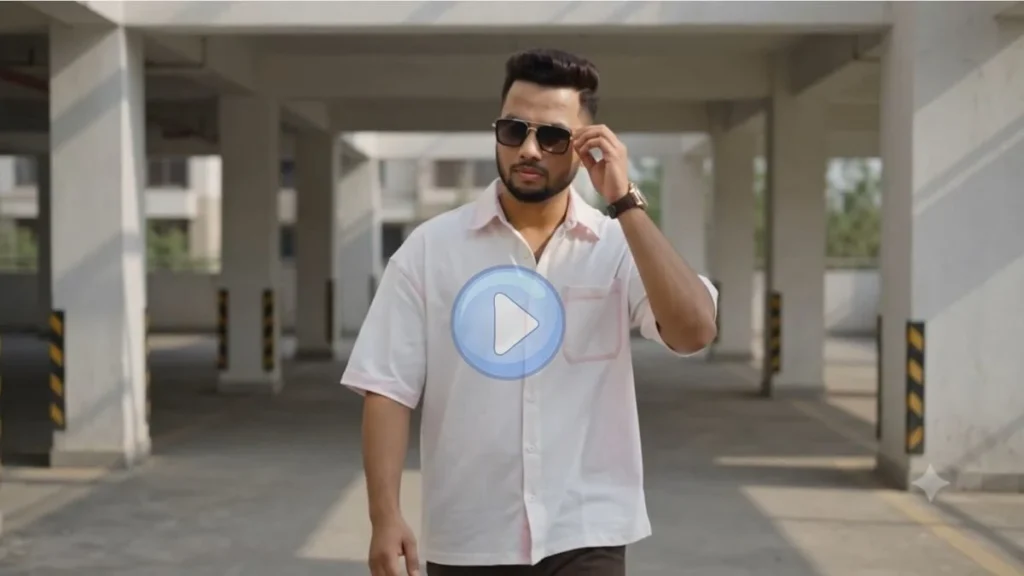
अगर आपका मकसद ऐसी Video बनाना है जिसमें पूरा Focus Personality, Outfit और Premium Cinematic Look पर हो, तो यह Movie Style AI Video Prompts में मेरा पसंदीदा Prompt है। मैंने इसे कई बार अलग-अलग Lighting के साथ Generate किया। सबसे अच्छा Result Daylight और Clean Background में मिला, जहाँ Walking Motion भी काफी Smooth दिखाई दी और Video किसी Fashion Brand Shoot जैसी लगी।
🎥 Cinematic AI Video Prompts
💡 छोटा अनुभव:
इस Prompt में अगर Face Lock पूरा रखा जाए और Reference Photo HD हो, तो Face पूरे Video में काफी Natural रहता है। Sunglasses, Walking Style और Camera Movement मिलकर Premium Cinematic Feel देते हैं।
🎬 Golden Hour Storytelling AI Video Prompt
हर Cinematic Video में Action होना जरूरी नहीं होता। कई बार Slow Motion, Simple Movement और Natural Expression भी Video को अलग बना देते हैं। यही सोचकर मैंने यह Prompt तैयार किया। इसमें ज्यादा Effects नहीं हैं, लेकिन पूरा Scene देखने पर एक शांत और Movie जैसा माहौल महसूस होता है।
🎥 Ultra Realistic AI Video Prompts
💡 छोटा अनुभव:
इस Prompt का Result मुझे Golden Hour Lighting में सबसे ज्यादा Natural लगा। Background Bokeh और Camera Zoom सही मिलने पर Video किसी Professional DSLR Shoot जैसी Feel देती है।
AI Video बनाने के लिए कौन-सा Tool बेहतर रहेगा?
अगर आपका Focus पहले अच्छी AI Image तैयार करने पर है, तो ChatGPT और Gemini दोनों अच्छे विकल्प हैं। लेकिन जब वही Image Video में बदलनी हो, तो ऐसा AI Tool चुनें जिसमें Image to Video, Character Consistency और Lip Sync अच्छे से काम करते हों।
मैं आमतौर पर पहले एक अच्छी Image Final करता हूँ, उसके बाद उसी Image को Video Tool में इस्तेमाल करता हूँ। इससे Final AI Cinematic Video Prompts का Result ज्यादा Stable और Realistic देखने को मिलता है। Image to Video बनाने के लिए आप Gemini या Ai Flow टूल्स का इस्तेमाल कर सकते है यह Ai video बनाने के लिए अच्छे विकल्प है। यह Top Ai tools Hindi 2026 best ai tools guide देख सकते हैं।
Video Generate करने से पहले ये छोटी-छोटी बातें याद रखें
मेरे Experience में इन बातों का ध्यान रखने पर Output काफी बेहतर मिलता है।
- हमेशा HD और साफ Reference Photo Upload करें।
- Prompt में दिया गया FACE LOCK हिस्सा Remove न करें, सिर्फ dialogue बदले, बाकी प्रॉम्प्ट का कोई हिस्सा नया बदले।
- पहली Generation को ही Final न मानें, एक-दो बार Compare जरूर करें।
- अगर Tool में Quality या Resolution चुनने का विकल्प हो, तो Highest Quality Select करें।
- Video बनने के बाद उसे बिना जरूरत ज्यादा Edit न करें, इससे Natural Look कम हो सकता है।
अक्सर पूछे जाने वाले सवाल (FAQs)
क्या ये AI Cinematic Video Prompts Ai Flow और Gemini दोनों में काम करेंगे?
हाँ, इन Prompts का Structure दोनों Platforms के लिए उपयुक्त है। Result इस्तेमाल किए गए AI Model के अनुसार थोड़ा अलग हो सकता है।
क्या Face Lock जरूरी है?
अगर आप चाहते हैं कि पूरे Video में आपका Face एक जैसा दिखाई दे, तो Face Lock हटाना नहीं चाहिए। इससे Identity ज्यादा Consistent रहती है।
क्या इन Videos को Reels और Shorts में इस्तेमाल कर सकते हैं?
बिल्कुल। 9:16 Ratio में Generate की गई Videos Instagram Reels, Facebook Reels और YouTube Shorts के लिए सबसे बेहतर रहती हैं।
अगर Result अच्छा न आए तो क्या करें?
उसी Prompt के साथ दोबारा Generate करें। कई बार दूसरी या तीसरी Generation पहले से ज्यादा Natural Result देती है।
निष्कर्ष
अगर आप बिना Professional Editing सीखे Movie Style AI Video Prompts की मदद से अपनी Real Face वाली Cinematic Videos बनाना चाहते हैं, तो इस Guide में दिए गए AI Cinematic Video Prompts एक अच्छी शुरुआत हो सकते हैं।
मेरी सलाह यही रहेगी कि पहले एक अच्छी Reference Photo तैयार करें, Face Lock को पूरा रखें और फिर एक-एक Prompt को अलग-अलग Try करके Compare करें। कई बार छोटा-सा बदलाव भी Final Video को पूरी तरह बदल देता है। उम्मीद है इस Article में दिए गए Prompts आपके अगले Viral Reel या Short के लिए उपयोगी साबित होंगे।
नीचे दिए गए अन्य लेख भी पढ़े आपको जरूर पसंद आएंगे:-