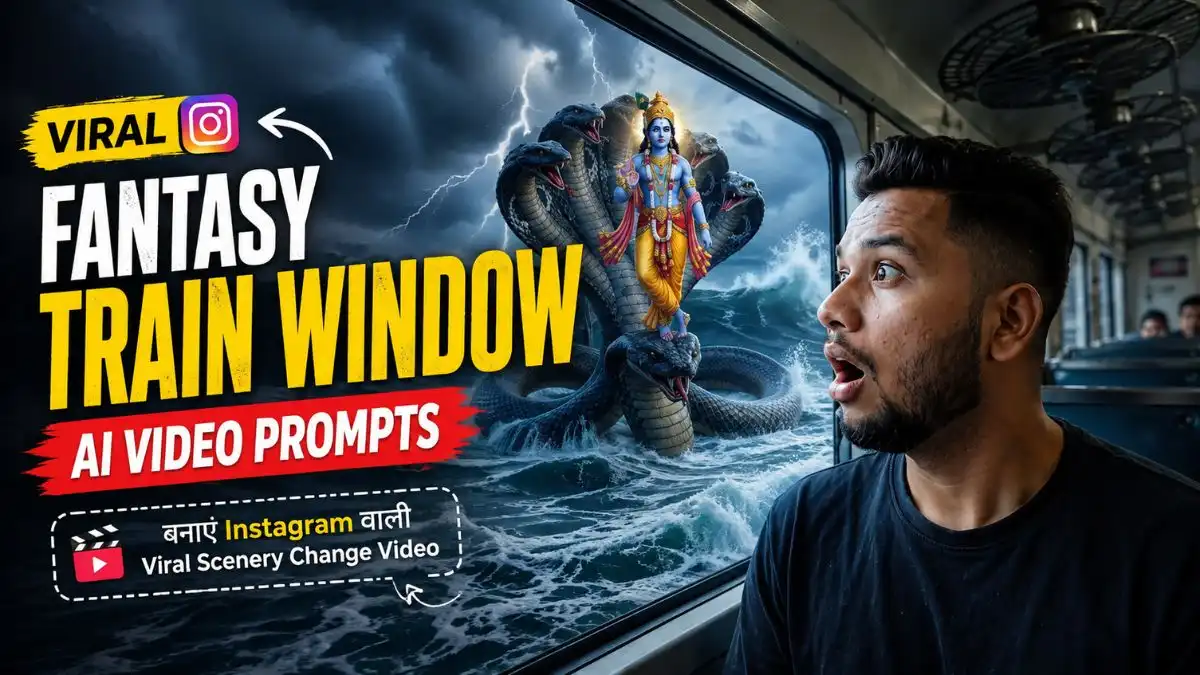
नमस्कार दोस्तों, मैं Lavit। सोचिए आप Train की Window के पास बैठे हैं, बाहर रोज की तरह Houses दिखाई दे रहे हैं और अचानक कुछ Seconds बाद वही नजारा तूफानी समुद्र और Lord Krishna में बदल जाए। फिर Window के बाहर Kurukshetra का Scene आए और Journey खत्म हो पानी के नीचे दिखाई देती Dwarka पर—यही Changing-Scenery Concept इस Video को शुरुआत से आखिर तक Interesting बनाए रखता है।
मैंने इसी Concept पर अपना Fantasy Train Window AI Video Prompt तैयार किया है, जिसमें सिर्फ अलग-अलग Fantasy Scenes जोड़ने के बजाय उनका सही Sequence और Timing भी रखी है। खास बात ये है कि Train, Window और Main Character वही रहते हैं, जबकि बाहर की दुनिया हर तीन Seconds में बदलती जाती है। इस लेख में आपको पूरा Viral AI Train Window Video Prompt, Flow AI में इसे बनाने का आसान तरीका और बेहतर Face व Smooth Scene Transition के लिए मेरे Practical Tips मिलेंगे।
Train की Window से Dwarka तक—इस Trend में असली कमाल क्या है?
दोस्तों, इस Trending AI Train Window Video Prompt में शुरुआत जानबूझकर Normal रखी गई है। पहले Modern Houses दिखते हैं और उसके बाद हर तीन Seconds में View इतना Unexpected होता जाता है कि Viewer के मन में अगला Scene देखने की Curiosity बनी रहती है।
मुझे इसमें सबसे Important चीज Continuity लगी। लड़का, Seat और Train Window लगभग Same रहें और सिर्फ बाहर की Scenery बदले—तभी पूरा Video अलग-अलग Clips के बजाय एक Viral Train Journey AI Video Prompt जैसा महसूस होता है।
यह भी देखे:- Viral Funny Baby AI Video Prompt
Fantasy Train Window AI Video Prompt – Modern Houses to Underwater Dwarka
इस Fantasy AI Video Prompt में चार अलग Worlds एक ही Train Journey में रखे गए हैं। खासकर Last में Dwarka और Glass तक आने वाला Peacock Feather Video को सिर्फ Scenery Transformation न रखकर एक छोटा Story Moment देता है।
AI Video Prompt 1
AI Video Prompt 2
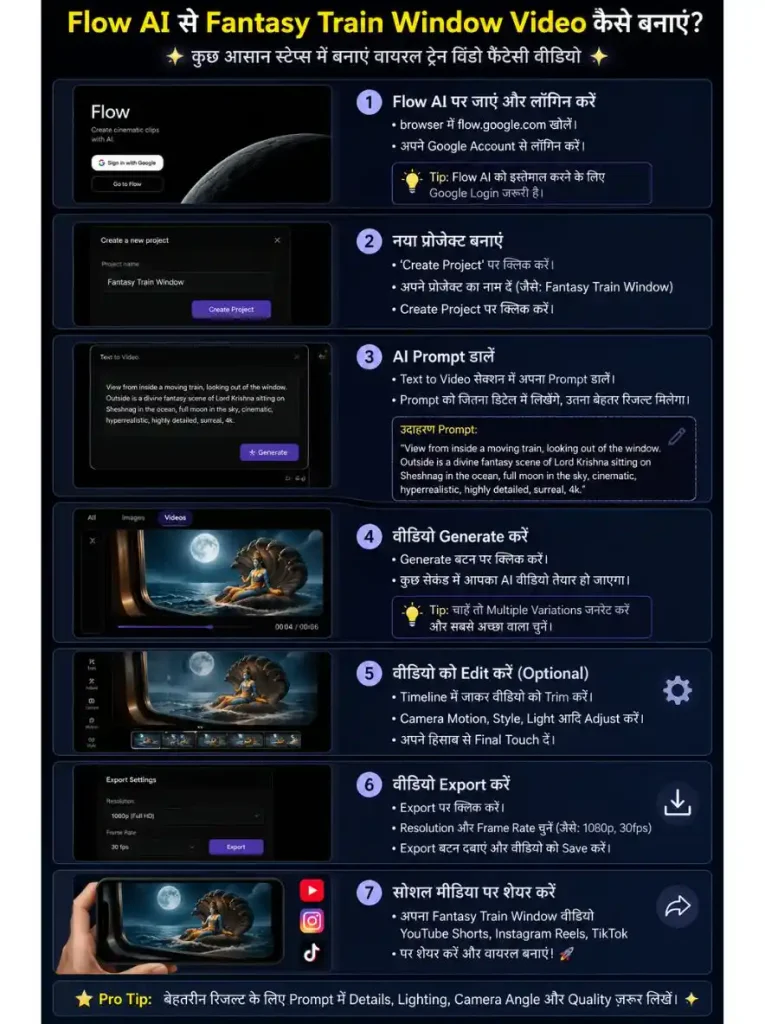
Flow AI से Fantasy Train Window Video कैसे बनाएं?
Original trend workflow में Prompt को Flow AI के video generator में इस्तेमाल करके scenery transformation बनाने का तरीका बताया गया है। आप ऊपर दिए Viral AI Train Window Video Prompt के साथ इस तरह Try कर सकते हैं:
- सबसे पहले Flow AI खोलें और नया Video Project शुरू करें।
- उपलब्ध Video Generation option में Text-to-Video या जरूरत के हिसाब से supported generation mode चुनें।
- ऊपर दिया पूरा Fantasy Train Window AI Video Prompt Copy करें।
- Prompt Box में इसे बिना Scenes का order बदले Paste करें।
- अपनी HD और साफ फोटो अपलोड करें, विडिओ में अगर अपना चेहरा साफ ओर रियल जैसा रखना चाहते हैं तो हमेशा Clear Face Photo इस्तेमाल करें।
- Video Generate करें और Result में सबसे पहले Face, Train Window और Seat की Consistency देखें।
- फिर Check करें कि Houses → Stormy Sea → Kurukshetra → Dwarka का बदलाव सही Sequence में हो रहा है।
- पहली Generation में कोई Scene खराब आए तो Prompt का पूरा Concept बदलने से पहले दूसरी Generation Try करें।
Changing Scenery को Real दिखाना है तो ये एक चीज जरूर देखें
दोस्तों, Train Window Changing Scenery AI Video में सिर्फ चार अच्छे Scenes बन जाना काफी नहीं है। Modern Houses से Sea और फिर Kurukshetra आते समय Lighting और Color भी Scene के साथ बदलने चाहिए। Original trend guide भी transitions के साथ lighting और color grade को narrative से match रखने पर जोर देती है।
मेरे हिसाब से सबसे अच्छा Result वही होगा जिसमें Train Interior और Character stable रहें, जबकि Window के बाहर World smoothly बदलता जाए। अगर हर Transition पर लड़का, Window या Train भी बदल गई तो Fantasy Journey वाला Effect कमजोर पड़ जाएगा।
Video में अपना Face Same रखना है तो Reference Photo ऐसी चुनें
दोस्तों, Viral AI Train Window Video Prompt में बाहर की Scenery बार-बार बदलती है, इसलिए Main Character का Face पूरे Video में Consistent रखना थोड़ा मुश्किल हो सकता है। यहां सिर्फ Prompt में “same face” लिखने से ज्यादा जरूरी आपकी Reference Photo की Quality है।
अपनी ऐसी Reference Image Upload करे जिसमें Face साफ और Sharp हो, अच्छी Natural Lighting हो, कोई Heavy Filter न हो और Eyes, Hairline व Facial Details साफ दिखाई दें। बहुत Dark, Blurry या Side-Angle Photo से बचना बेहतर रहेगा।
मेरे हिसाब से इस Fantasy AI Video Prompt में Front या हल्के Side Angle वाली Clear Photo ज्यादा काम की रहेगी, क्योंकि Character Train Window के पास बैठा है। साथ ही Prompt में same face, same clothes, same seat position and consistent camera angle throughout the video जैसी Instruction रखने से AI को साफ Direction मिलती है कि Fantasy सिर्फ Window के बाहर बदलनी है, Passenger नहीं।
यह भी देखे:- AI Prompts for Viral Funny Videos
पहली Generation खराब आए तो पूरा Prompt बदलने की जरूरत नहीं
दोस्तों, इतने सारे Transformations वाले Fantasy Train Window AI Video Prompt में पहली Generation में सब कुछ Perfect मिलना मुश्किल हो सकता है। कहीं Krishna Scene अच्छा होगा लेकिन Train बदल जाएगी, कहीं Dwarka शानदार होगी लेकिन Face drift कर सकता है।
ऐसे में पहले Problem पहचानें। अगर Train और Character सही हैं लेकिन कोई एक Transition खराब है, तो पूरे Viral AI Train Window Video Prompt का Concept बदलने के बजाय उसी Scene/Transition की Instruction को ज्यादा Clear करना बेहतर है। Reference article भी visual changes और transition alignment पर खास ध्यान देने की सलाह देता है।
FAQs अक्सर पूछे जाने वाले सवाल
Fantasy Train Window AI Video Prompt क्या है?
यह ऐसा AI Video Prompt है जिसमें Train और Passenger लगभग Same रहते हैं, जबकि Window के बाहर की Scenery लगातार अलग Fantasy Worlds में बदलती जाती है।
Viral AI Train Window Video Prompt से किस तरह का Video बनता है?
इस Prompt में Normal Houses से शुरुआत होकर Stormy Sea, Lord Krishna, Kurukshetra और Underwater Dwarka तक changing scenery journey बनाई जाती है।
इस Train Window Changing Scenery AI Video को Flow AI में बना सकते हैं?
Reference article scenery-transformation prompts को Flow AI video-generation workflow में इस्तेमाल करने का सुझाव देता है। उपलब्ध features आपके account/access के अनुसार अलग हो सकते हैं।
Train Window Video में Face बदल रहा हो तो क्या करें?
जहां Tool support करे वहां Clear Reference Image इस्तेमाल करें। Prompt में Person, Clothes, Seat और Camera Angle को पूरे Video में consistent रखने की Instruction दें और Fantasy Changes को Window के बाहर तक सीमित रखें।
Trending AI Train Window Video Prompt में सबसे जरूरी चीज क्या है?
मेरे हिसाब से continuity। Fantasy Scene कितना भी शानदार हो, Train Interior, Window और Main Character बार-बार बदल रहे हैं तो Journey वाला Illusion टूट जाता है।
निष्कर्ष
दोस्तों, इस Fantasy Train Window AI Video Prompt में मुझे सबसे Interesting चीज Underwater Dwarka अकेले नहीं लगी, बल्कि एक Normal Train Journey का हर तीन Seconds में बिल्कुल नई दुनिया में बदलना लगा। यही Surprise इस Viral AI Train Window Video Prompt को सामान्य Train Video से अलग करता है।
आप इसे Flow AI में Try करें और बताइए—Stormy Sea, Kurukshetra या Underwater Dwarka में से कौन-सा Scene सबसे अच्छा Generate हुआ? अगर Face या किसी Transition में Problem आई तो अपना Experience Comment में जरूर Share करें।