कभी आपने ऐसी Photo देखी है जिसमें Background बिल्कुल Black हो, लेकिन बालों और कपड़ों के किनारों पर सुनहरी रोशनी चमक रही हो? चेहरे पर हल्की Smile और पूरी Photo किसी महंगे Studio Photoshoot जैसी दिखे। ❤️
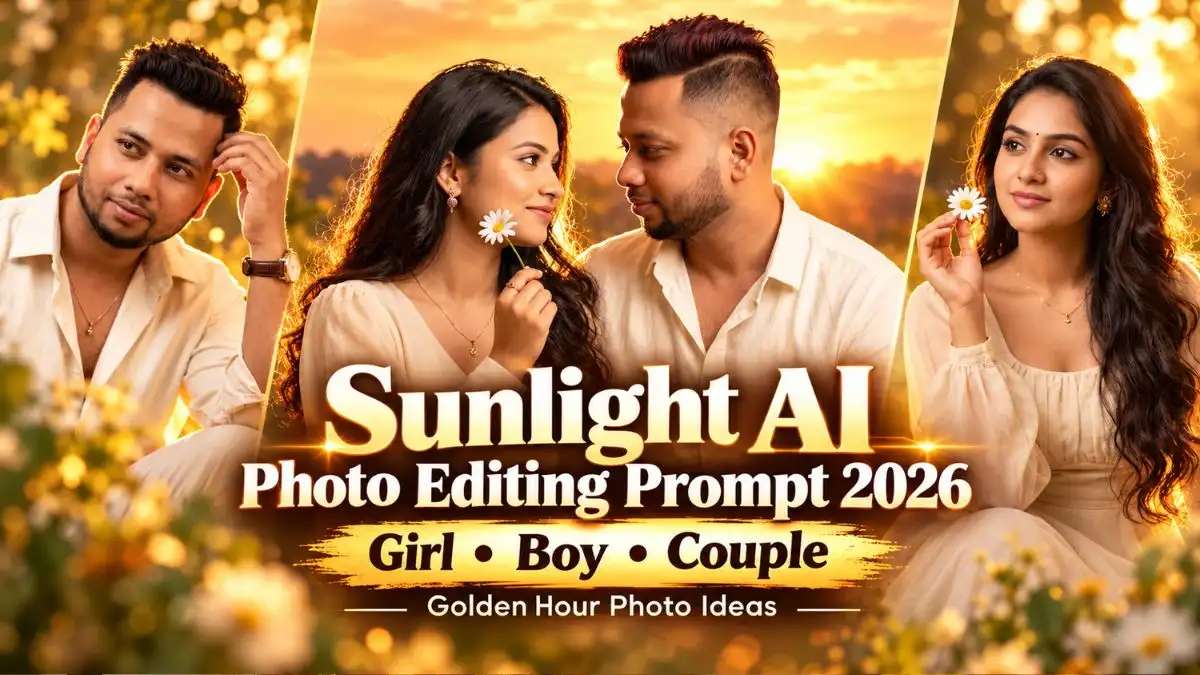
खास बात यह है कि ऐसा Look बनाने के लिए Sunset वाली Location या Professional Camera की जरूरत नहीं है।दोस्तों आज मैं आपके लिए Sunlight AI Photo Editing Prompt का एक खूबसूरत Collection लेकर आया हूं। इसमें Girls के लिए White Daisy वाला Dreamy Portrait, Boys के लिए Cream Shirt में Stylish Look और Couples के लिए Romantic Golden Light Photo शामिल है।
इन Golden Hour AI Photo Prompt की सबसे अलग बात इनकी Lighting है। यहां Sunlight सीधे चेहरे पर नहीं पड़ती, बल्कि पीछे से बालों और कपड़ों के किनारों को Highlight करती है। आगे आपको तीनों Looks के Ready-to-Use Prompts, उनकी Result Images और अपनी Photo से ऐसा Look बनाने का तरीका मिलेगा।
Golden Sunlight Portrait में क्या खास है?
आमतौर पर Golden Hour Photos के लिए Sunset, खुला आसमान या Garden Background चुना जाता है। लेकिन इस बार मैंने Dark Studio Background के साथ Golden Backlight वाला Look रखा है।
इसमें पीछे से आने वाली सुनहरी रोशनी बालों और Shoulders के चारों तरफ एक हल्की चमक बनाती है। Photography में इसे Rim Lighting कहते हैं। सामने से पड़ती Soft Warm Light चेहरे को साफ रखती है, जिससे Photo में Shadows भी रहती हैं और Facial Details भी दिखाई देती हैं।
तीनों Looks में Cream और Ivory Outfits रखे गए हैं, क्योंकि इन हल्के रंगों पर Golden Highlights खूबसूरती से उभरते हैं। हालांकि यह असली Sunset में खींची गई Photo नहीं, बल्कि Golden Hour से Inspired Cinematic Studio Portrait है।
Sunlight AI Photo Editing Prompts 2026 – Girls, Boys और Couples
अब बात करते हैं उन अलग-अलग Prompts की जिन्हें आप अपनी Photo के लिए चुन सकते हैं। हर Prompt में Outfit, Pose, Camera Angle और Lighting की Details पहले से मौजूद हैं।
1. Girl Golden Sunlight Portrait Prompt – White Daisy के साथ Dreamy Look
इस Latest Trending Ai photo Prompts Look में लड़की ने Ivory-Champagne Chiffon Gown पहना है। खुले Wavy Hair, छोटी Black Bindi, हल्की Gold Jewellery और हाथ में White Daisy Flower इसे एक Soft Romantic Feel देते हैं।
इस Golden Sunlight Portrait Prompt की सबसे खूबसूरत Detail बालों के पीछे से आती Golden Light है। Deep Black Background के कारण Gown के हल्के रंग और Flower दोनों साफ उभरकर दिखाई देते हैं। लड़की का चेहरा भी Soft Front Lighting की वजह से अंधेरे में नहीं छिपता।
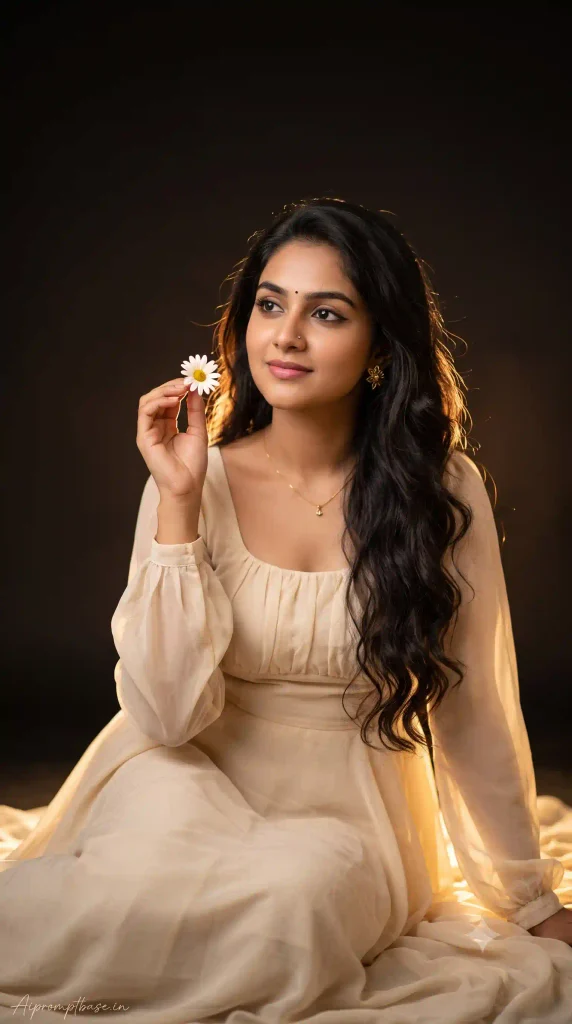
Image Source: Gemini Ai Generated
अगर आप इस Aesthetic Sunlight AI Photo Prompt को अपनी Photo के साथ इस्तेमाल कर रही हैं, तो Result में खासकर Flower पकड़ने वाली Fingers और चेहरे की बनावट देखें। AI कभी-कभी हाथों की Position या Flower की Shape बदल देता है।
2. Boy Golden Hour AI Photo Prompt – Cream Shirt में Premium Look
Boys के लिए इस बार कोई Heavy Jacket, Sunglasses या बाइक वाला Look नहीं रखा है। यहां एक Simple Cream Shirt, Matching Trousers और Relaxed Sitting Pose से Cinematic Portrait बनाया गया है।
एक हाथ घुटने पर और दूसरा हल्के से बालों के पास रखा गया है। चेहरे पर बहुत बड़ी Smile नहीं, बल्कि Natural Closed-Mouth Expression है। पीछे से आती Golden Light Hair और Shoulders को Highlight करती है, जबकि Cream Shirt पर हल्की सुनहरी चमक दिखाई देती है।

Image Source: Gemini Ai Generated
इस Sunlight AI Photo Editing Prompt में सबसे ज्यादा ध्यान Face, Hair और Shirt की Natural Folds पर दें। अगर AI हाथ को बालों के अंदर गलत तरीके से मिला दे, तो उस Detail को ठीक करवाकर दोबारा Image Generate करें।
3. Sunlight Couple AI Photo Prompt – Romantic Golden Light Portrait
Couple Photo बनाते समय सबसे जरूरी बात यह है कि दोनों के चेहरे असली जैसे दिखाई दें। खूबसूरत Background का क्या फायदा, अगर AI Husband या Wife की पहचान ही बदल दे? इसी बात को ध्यान में रखकर इस Sunlight Couple AI Photo Prompt में दोनों के लिए Strict Face, Hair और Identity Lock की Instructions रखी गई हैं।
इस Portrait में Couple पास-पास बैठा है। लड़के ने Ivory-Cream Shirt और लड़की ने Champagne-Ivory Gown पहना है। दोनों एक-दूसरे की तरफ देखकर हल्की Smile दे रहे हैं। लड़का लड़की का हाथ पकड़े हुए है और लड़की के हाथ में छोटा White Daisy Flower है।
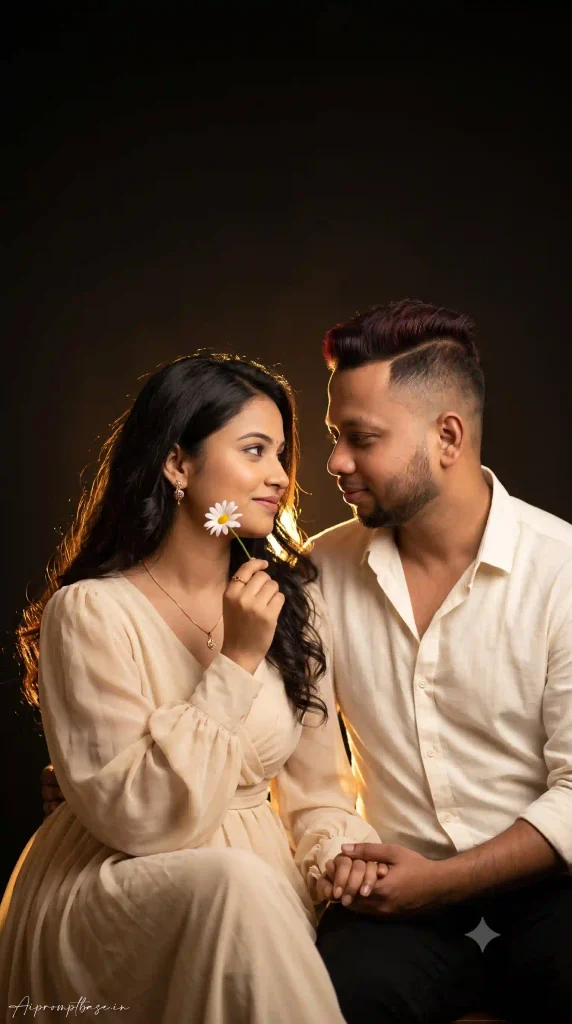
Image Source: Gemini Ai Generated
इस Look में एक बात जरूर याद रखें। Prompt दोनों के Original Hairstyles और Faces बनाए रखने को कहता है, लेकिन AI हमेशा Perfect Face Lock नहीं कर पाता। इसलिए Final Photo में दोनों के चेहरे, हाथ पकड़ने का तरीका और आंखों की Direction जरूर देखें।
अपनी Photo से Golden Hour AI Portrait कैसे बनाएं?
अब मान लीजिए आपके पास एक Normal Selfie है। Background साधारण है, Lighting भी कुछ खास नहीं। लेकिन आप उसी चेहरे के साथ ऊपर वाला Golden Studio Look बनाना चाहते हैं।
इसके लिए यह तरीका अपनाएं:
- ChatGPT या Gemini खोलें: ऐसा Version इस्तेमाल करें जिसमें Photo Upload और Image Generation की सुविधा उपलब्ध हो।
- अपनी Reference Photo चुनें: ऐसी Photo लें जिसमें चेहरा साफ दिखाई दे। Couple Look के लिए दोनों के चेहरे दिखने चाहिए।
- पसंद का Prompt Copy करें: ऊपर Girl, Boy या Couple में से अपना Look चुनें और पूरा Prompt Paste करें।
- Original Face बनाए रखने को कहें: खासकर Girl और Boy वाले Prompts में Reference Photo के साथ Identity Preserve करने की Instruction जोड़ें।
- Image Generate करें: Result में Golden Backlight, Outfit और Facial Details देखें।
- जरूरत हो तो सुधार करवाएं: अगर चेहरा बहुत Smooth है या Golden Light ज्यादा तेज है, तो उसी Chat में बदलाव बताकर नया Result बनवाएं।
एक छोटा-सा Example समझिए। अगर आपकी Photo में चेहरा सही है लेकिन पीछे की Golden Light बहुत तेज होने से बालों की Details गायब हो रही हैं, तो पूरा Prompt बदलने की जरूरत नहीं है। बस लिखें:
“Reduce the intensity of the golden backlight slightly. Keep the original face unchanged, preserve individual hair strands, and maintain soft natural illumination on the face.”
इस तरह आप पूरे Look को बदले बिना सिर्फ Lighting सुधारने की कोशिश कर सकते हैं।
बेहतर Golden Hour Photos बनाने के Pro Tips
दोस्तों, इन Prompts में Golden Light ही पूरी Photo की जान है। लेकिन सिर्फ ज्यादा चमक जोड़ देने से Photo Realistic नहीं बनती। कुछ छोटी Details Result में बड़ा फर्क डाल सकती हैं।
- Face पर भी Light जरूरी है: Golden Backlight बालों के पीछे होनी चाहिए, लेकिन सामने से हल्की Warm Light भी मिले ताकि आंखें और चेहरा साफ दिखें।
- Girl Portrait में Flower Check करें: Daisy की Petals और उसे पकड़ने वाली Fingers Natural दिखनी चाहिए। Extra Fingers वाला Result Final न रखें।
- Boy Portrait में Pose देखें: बालों को छूने वाला हाथ सही Position में हो और Shirt की Folds कपड़े जैसी दिखें, Plastic जैसी नहीं।
- Couple Photo में दोनों Faces Check करें: सिर्फ एक व्यक्ति का Face सही होना काफी नहीं है। दोनों की पहचान और Hairstyle Reference Photo से मिलाएं।
- Signature भी देखें: Prompts में नीचे Aipromptbase.in लिखने को कहा गया है। AI कभी-कभी Text गलत लिख सकता है, इसलिए Publish या Share करने से पहले Spelling Check करें।
मेरी एक Practical सलाह: अगर आपको Instagram Reel Cover या WhatsApp Status के लिए Photo चाहिए, तो इनका 9:16 Vertical Frame अच्छा रहेगा। लेकिन Instagram Feed पर डालते समय Preview जरूर देखें, ताकि Crop होने पर चेहरा या Flower न कटे।
ChatGPT या Gemini – Sunlight Photos के लिए कौन-सा बेहतर है?
दोस्तों, Sunlight AI Photo Editing Prompt से Photo बनाते समय सबसे बड़ा सवाल यही रहता है कि ChatGPT इस्तेमाल करें या Gemini? क्योंकि सिर्फ खूबसूरत Golden Light मिलना काफी नहीं है, Photo में आपका Original Face भी Natural दिखना चाहिए।
- ChatGPT: इसकी अच्छी बात यह है कि अगर Golden Light ज्यादा तेज हो जाए, Flower पकड़ने वाला हाथ गलत बने या चेहरे पर जरूरत से ज्यादा Smoothness आ जाए, तो उसी Chat में बदलाव बता सकते हैं। हालांकि हर बार बाकी Photo बिल्कुल वैसी ही रहे, यह जरूरी नहीं है।
- Gemini AI: इसमें भी Reference Photo Upload करके Golden Hour AI Photo Prompt से Cinematic Portrait बना सकते हैं। Cream Outfit, Dark Background और Golden Backlight जैसे Looks के लिए Detailed Instructions इस्तेमाल कर सकते हैं। लेकिन यहां भी Face और Hairstyle बदलने की संभावना रहती है।
मेरी सलाह: खासकर Couple Photo के लिए एक ही Reference Image और Prompt दोनों Tools में इस्तेमाल करके Results Compare करें। देखें कि किसमें दोनों के चेहरे, Hair और Natural Expressions ज्यादा सही आए हैं। जिस Photo में आपका असली चेहरा और Golden Sunlight Effect दोनों अच्छे लगें, उसी को Final रखें। सिर्फ ज्यादा चमकदार Result को बेहतर मानने की जरूरत नहीं है।
Sunlight AI Photo Editing से जुड़े FAQs
क्या Golden Hour AI Photo बनाने के लिए Sunset वाली Photo जरूरी है?
नहीं। इन Prompts में Dark Studio Background और Golden Backlight पहले से बताई गई है। आप अपनी साफ Reference Photo देकर भी ऐसा Look बनाने की कोशिश कर सकते हैं।
क्या ChatGPT और Gemini दोनों से ये Photos बन सकती हैं?
हां, दोनों में उपलब्ध Image Generation Features के जरिए इन Prompts को Try कर सकते हैं। हालांकि Result इस्तेमाल किए गए Model, Reference Photo और Instructions पर निर्भर करेगा।
क्या AI मेरी Original Photo का Face बिल्कुल Same रखेगा?
Prompt में Face Lock Instructions मदद कर सकती हैं, लेकिन 100% Same Face की Guarantee नहीं है। खासकर Couple Portrait में दोनों के चेहरे Final Image से मिलाकर देखें।
निष्कर्ष
तो दोस्तों, अगली बार अपनी Photo को Cinematic Look देना चाहें, तो सिर्फ Sunset Background बदलने के बजाय Golden Backlight और Dark Studio Portrait वाला Style भी Try कीजिए।
इस Sunlight AI Photo Editing Prompt Collection में Girl का White Daisy Look, Boy का Cream Shirt Portrait और Couple का Romantic Golden Hour Style रखा है। तीनों का Mood अलग है, लेकिन एक चीज Common है—Soft Golden Light और Natural Expressions।
आप अपनी पसंद का Golden Hour AI Photo Prompt लेकर ChatGPT या Gemini पर Try कर सकते हैं। बस Final Photo में अपना Face और छोटी Details जरूर Check कर लें। आपको कौन-सा Look सबसे ज्यादा पसंद आया—Girl का Dreamy White Daisy Portrait, Boy का Cream Shirt Look या Couple की Romantic Golden Light Photo? Comment में जरूर बताइए। ❤️
नीचे लिखे अन्य लेख भी देखे आपको जरूर पसंद आएंगे:-