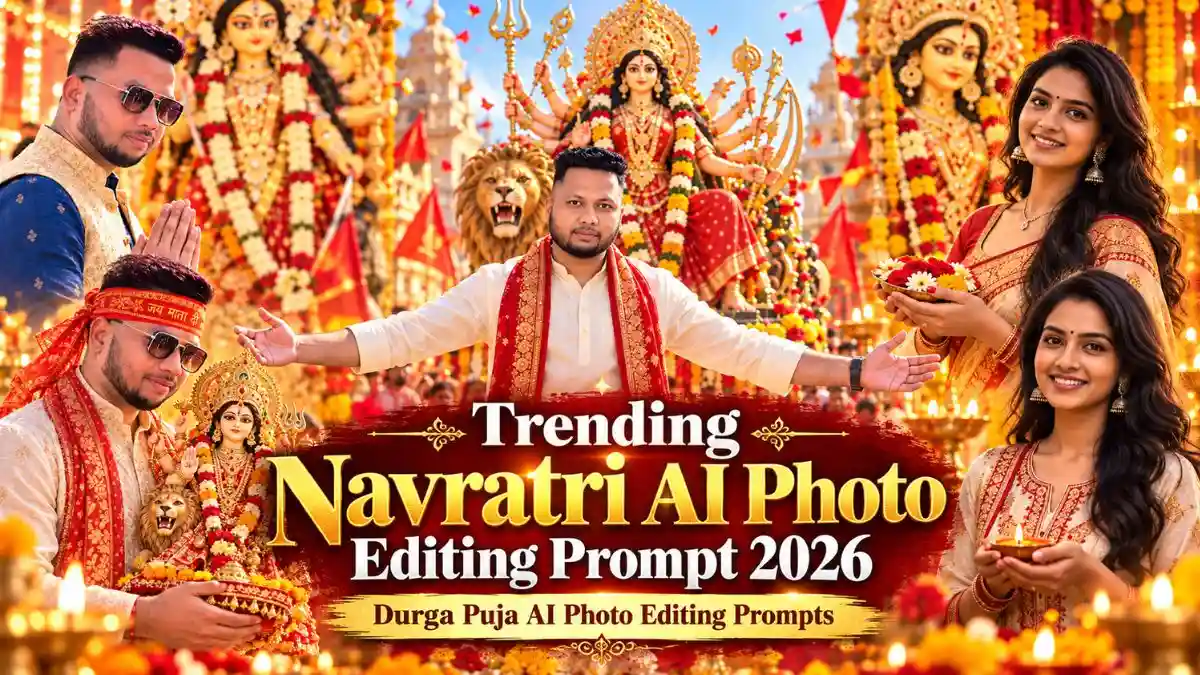
Trending Navratri AI Photo Editing Prompt 2026 | Durga Puja AI Photo Editing Prompts

नवरात्रि आते ही Maa Durga के साथ अपनी photo बनाने का trend शुरू हो जाता है। मैंने भी इस बार सोचा कि क्यों न ऐसे Trending Navratri AI Photo Editing Prompt तैयार किए जाएं, जिनसे सिर्फ background ही नहीं, बल्कि पूरी photo का festive look बदला जा सके।

इसी कोशिश में मैंने अलग-अलग looks के prompts तैयार किए हैं—कहीं Maa Durga के सामने Namaste वाला look है, कहीं pandal में close portrait और कहीं पूरा Navratri procession। आप अपनी पसंद का Durga Puja AI Photo Editing Prompt लेकर अपनी photo पर सीधे try कर सकते हैं।

इस article में आपको सिर्फ prompts ही नहीं मिलेंगे, बल्कि photo बनाने का सही तरीका, face को natural रखने के practical tips और AI photo में आने वाली common problems को ठीक करने के आसान तरीके भी मिलेंगे।

अपनी Photo से Navratri AI Image कैसे बनाएं?

अपनी normal photo को Navratri look देने के लिए किसी complicated editing की जरूरत नहीं है। बस एक साफ photo upload करें, पसंद का prompt डालें और AI से image generate करें।

Navratri AI Photo बनाने के Steps

  1. ChatGPT या Gemini खोलें और अपनी clear, natural photo upload करें।
  2. अपना पसंदीदा Prompt copy करें और photo के साथ paste करें।
  3. दो reference images हों तो अपनी photo को identity reference और दूसरी को scene/reference image रखें।
  4. Prompt send करें और AI को image generate करने दें।
  5. Final image check करें — face, hands, कपड़े और background में कोई गलती तो नहीं है।
  6. सही result मिलने पर full-quality image save करें।

ध्यान रखें: ऐसी original photo इस्तेमाल करें जिसमें face साफ दिखाई दे और बहुत ज्यादा beauty filter न लगा हो। इससे आपकी identity और natural facial features को बनाए रखना आसान रहता है।

एक ही photo से अलग-अलग looks भी बना सकते हैं—हर बार नई photo upload करने की जरूरत नहीं है। उसी reference photo के साथ अलग-अलग Trending Navratri AI Photo Editing Prompt try करें।

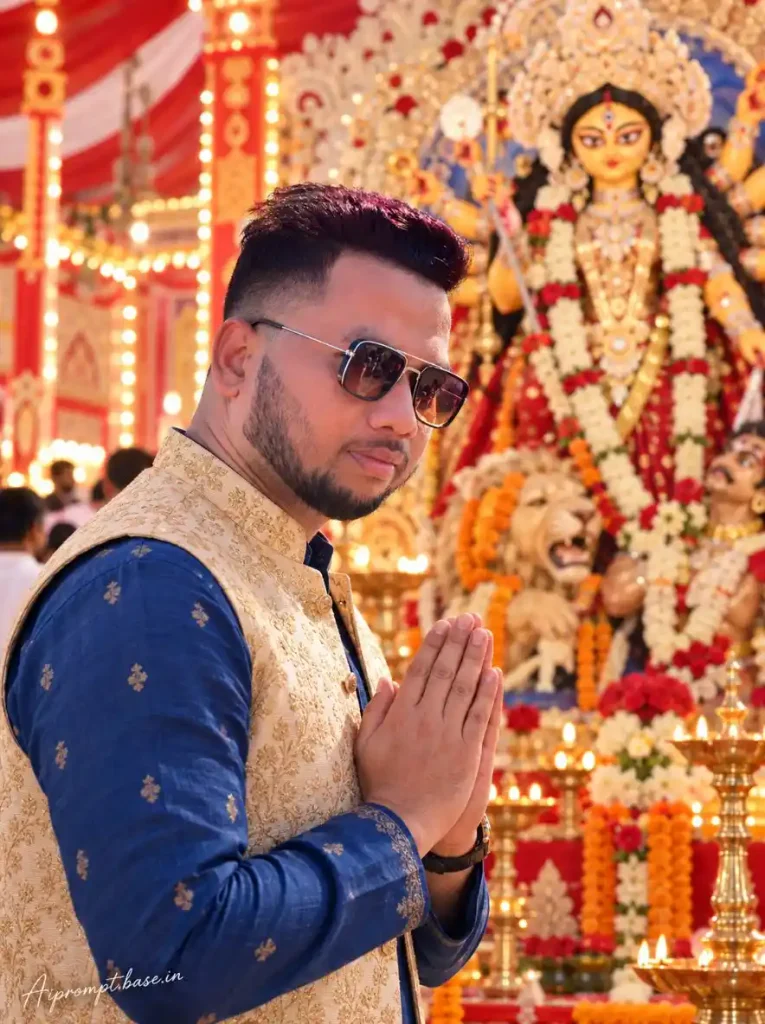
1. Trending Navratri AI Photo Editing Prompt – Maa Durga Namaste Pandal Look

अगर आपको अपनी photo में पूरा Navratri festival look चाहिए, तो यह prompt अच्छा option है। इसमें Namaste pose के साथ पीछे Maa Durga, red-gold pandal, marigold flowers और diyas रखे गए हैं। इस तरह के edit में face को natural रखते हुए background और outfit बदलने से result ज्यादा realistic दिखाई देता है।
Trending Navratri AI Photo Editing Prompt
Create an ultra-realistic professional DSLR photograph using the uploaded person photo as the STRICT IDENTITY REFERENCE. FACE LOCK: Keep the person’s exact real face, face shape, eyes, nose, lips, jawline, skin tone, facial hair and hairstyle exactly the same as the uploaded photo. Do not beautify, reshape or create a similar face; preserve natural skin texture and a completely real human appearance with no AI, cartoon, waxy or plastic effect. Show the same person standing in the foreground with both hands joined in a respectful Namaste pose, wearing an elegant off-white traditional kurta with a richly embroidered red-and-gold festive waistcoat. Keep the background closely matching the reference image: a large beautiful and realistic Maa Durga idol directly behind the person, wearing traditional red attire, ornate golden crown and jewellery, flower garlands, with her trishul and lion visible. Create the same grand red-and-golden Durga Puja/Navratri pandal atmosphere with marigold and red flowers, glowing diyas, golden decorations and warm festive lights. Natural DSLR photography, realistic skin, sharp face, warm lighting, shallow depth of field, highly photorealistic, no illustration or CGI look. ASPECT RATIO: 3:4 vertical TEXT / SIGNATURE: Add “Aipromptbase.in” bottom-left, handwritten signature-style, thin cursive strokes, small size, subtle premium elegance, white/soft off-white.

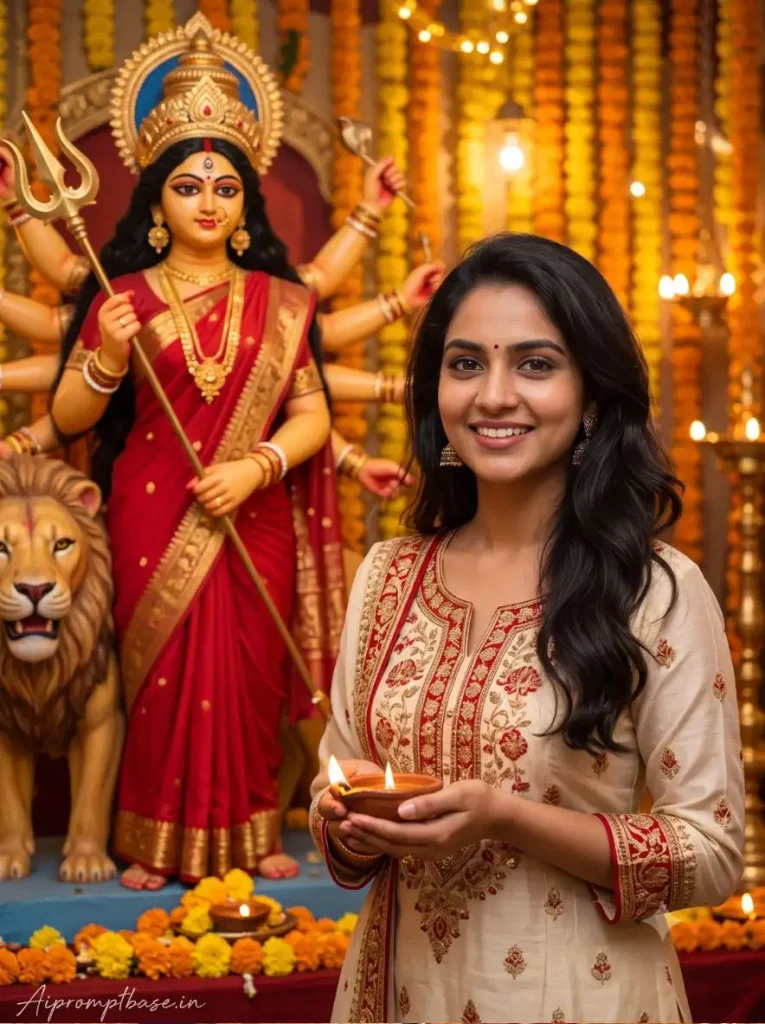
2. Durga Puja AI Photo Editing Prompt – Close-Up Maa Durga Portrait

Close-up photo में face और Maa Durga दोनों साफ दिखें, इसके लिए यह concept तैयार किया गया है। Red-golden pandal, flowers और warm lights background को festive feel देते हैं। अगर आप full-body की जगह face-focused Durga Puja photo चाहते हैं, तो यह look try कर सकते हैं।
Trending Navratri AI Photo Editing Prompt
Create an ultra-realistic professional DSLR festival photograph using the uploaded person photo as the STRICT IDENTITY REFERENCE and the provided Durga image as the SCENE/COMPOSITION REFERENCE. FACE LOCK: The person must have the exact same real face as the uploaded photo — preserve the original face shape, eyes, nose, lips, jawline, skin tone, hairstyle and natural facial details. Do not beautify, reshape or create a similar face. Keep realistic skin pores and a genuine human appearance with no AI, cartoon, waxy or plastic effect. Recreate the background and composition closely like the reference image: a large beautiful Maa Durga idol immediately beside and slightly behind the person on the LEFT side, with the same traditional red attire, large ornate golden crown, jewellery, red-yellow-white flower garlands, raised blessing hand, golden trishul behind her and the lion clearly visible at the lower-left. Keep Maa Durga’s idol appearance, scale, positioning and rich red-golden decoration close to the reference. Place the person on the RIGHT side, naturally smiling toward the camera, wearing an elegant cream/off-white traditional Indian outfit with rich red-and-gold embroidery. Surround them with marigold flowers, red flowers, glowing diyas and warm golden pandal lights. Close portrait composition, warm natural festival lighting, realistic colours, sharp real face, DSLR depth of field and authentic photographic quality. The final image must look like a real person photographed beside a real Durga Puja/Navratri idol, not digital artwork or CGI. 3:4 vertical.

3. Latest Navratri AI Photo Prompt – Maa Durga Idol के साथ Photo

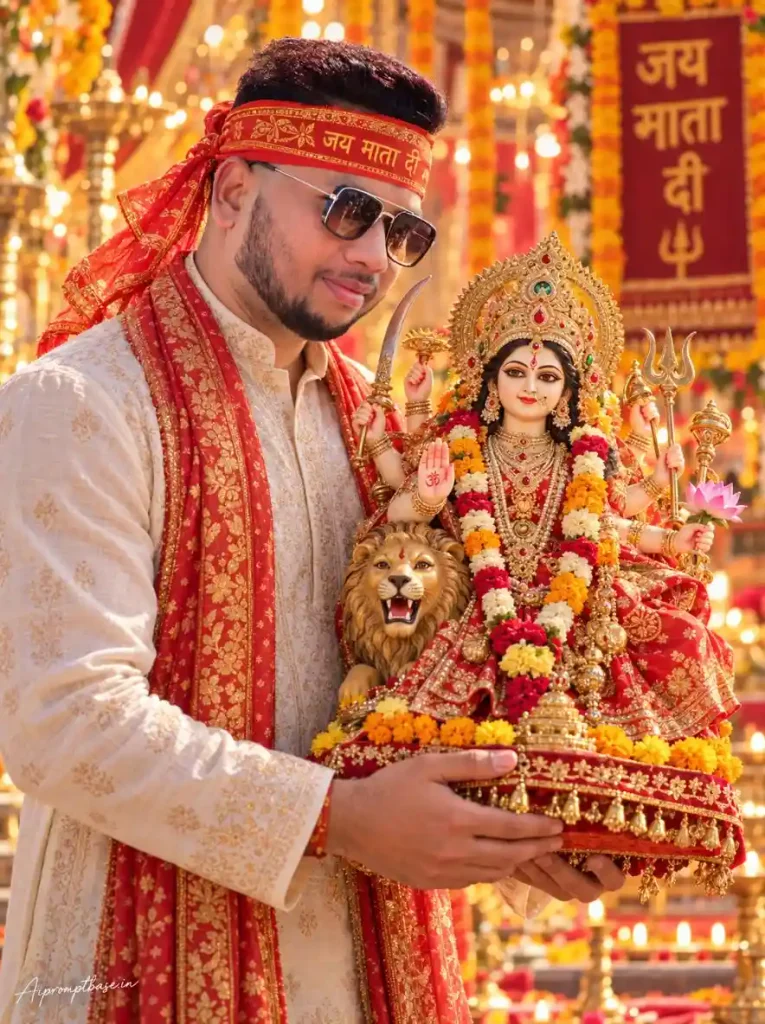
अगर pandal के सामने खड़ी हुई normal photo से कुछ अलग चाहिए, तो यह look ज्यादा unique है। इसमें person दोनों हाथों में beautifully decorated Maa Durga idol को hold करता हुआ दिखाई देता है। इस prompt में North Indian/UP-style Mata Rani look रखा गया है, ताकि photo का appearance traditional और अलग रहे।
Trending Navratri AI Photo Editing Prompt
Using the uploaded photo only as an identity reference, redesign the complete body, clothing, pose and environment into a new realistic festive portrait while keeping the person’s face naturally recognizable. A stylish young man smiling happily while carefully holding a beautifully decorated Maa Durga idol with both hands, wearing a premium traditional kurta and a stylish red-orange ceremonial chunari tied naturally around his head. The Goddess should have a beautiful traditional UP/North Indian-style divine face with realistic graceful features and a calm expression, not a Bengali-style Durga idol face. Marigold flowers, decorative lights, diyas and a joyful Navratri celebration atmosphere in the background, cinematic warm lighting, realistic details, beautiful depth of field, natural skin texture, premium DSLR photography, ultra realistic festive portrait. ASPECT RATIO: 3:4 vertical TEXT / SIGNATURE: Add “Aipromptbase.in” bottom-left, handwritten signature-style, thin cursive strokes, small size, subtle premium elegance, white/soft off-white.

4. Trending Navratri Special AI Photo Editing Prompt – Saree & Mata Rani Look

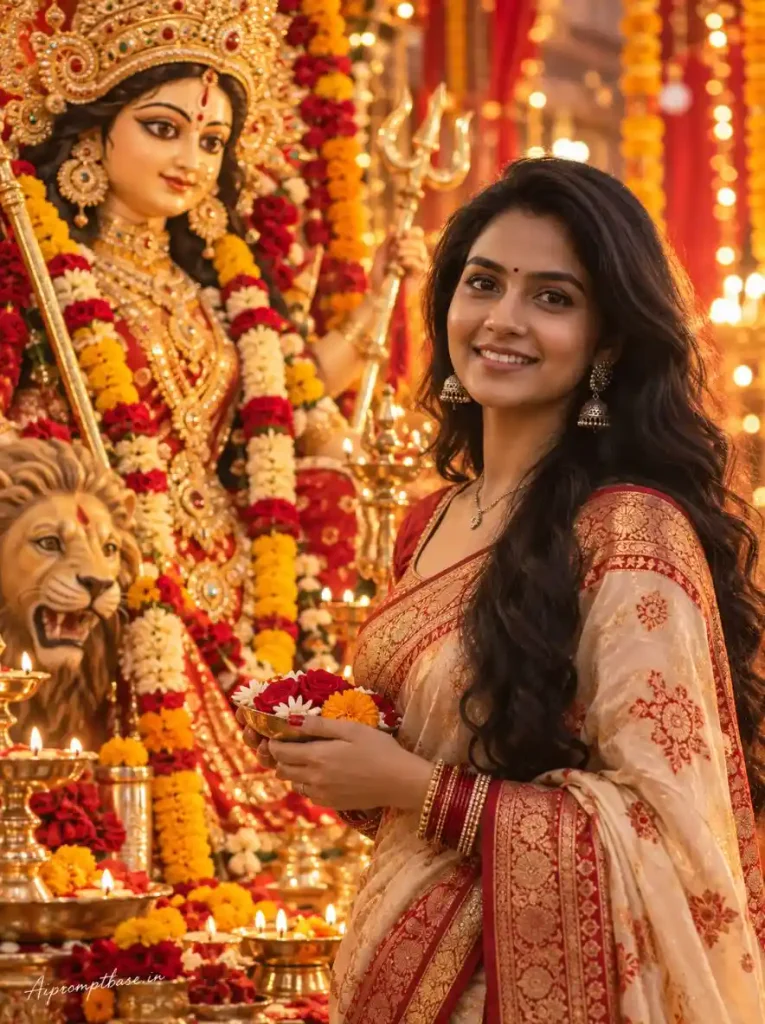
Traditional saree, jewellery और Mata Rani के साथ elegant festive portrait बनाने के लिए यह prompt बनाया गया है। इसमें woman को Maa Durga के पास flower offering के साथ रखा गया है।

इसमें बहुत ज्यादा cinematic effects की जगह natural skin, realistic lighting और simple festive setup पर focus रखा गया है।
Trending Navratri AI Photo Editing Prompt
Use only the face structure, facial features and identity from the uploaded photo as the reference. Create a completely new realistic body, pose and composition. A beautiful young woman standing elegantly beside a magnificent Maa Durga idol, gently holding a small decorative flower offering while smiling naturally and celebrating Navratri. The Goddess should look like a traditional UP/North Indian Mata Rani idol with a beautiful natural divine face, elegant eyes, graceful facial features and a peaceful expression, not a Bengali-style Durga Puja face. She is wearing a premium festive saree with elegant traditional jewelry, flowers, diyas, red and golden decorations and warm glowing lights creating a beautiful Navratri atmosphere. Soft cinematic lighting, shallow depth of field, realistic skin texture, natural body proportions, professional DSLR photography, ultra realistic and premium festive portrait. TEXT / SIGNATURE: Add “Aipromptbase.in” bottom-left, handwritten signature-style, thin cursive strokes, small size, subtle premium elegance, white/soft off-white.

5. Navratri AI Photo Prompt – Grand Durga Puja Procession Look

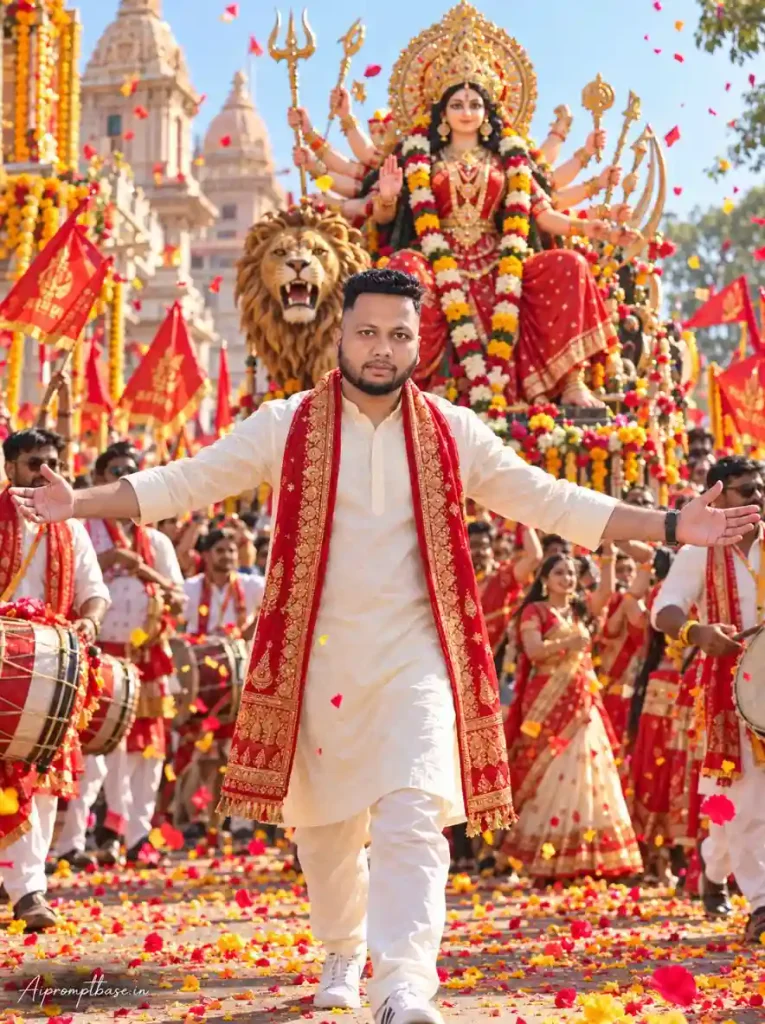
अगर सिर्फ pandal के सामने photo नहीं चाहिए, तो इस बार Navratri procession वाला look try करें। इसमें walking pose के साथ Maa Durga idol, dhol players, dancers, flags और festive crowd दिखाई देता है। Low-angle DSLR composition की वजह से photo में एक proper festival photography वाला feel आता है।
Trending Navratri AI Photo Editing Prompt
Create an ultra-realistic professional DSLR photograph using the uploaded person photo as the STRICT IDENTITY REFERENCE. FACE LOCK: Keep the exact same real face, facial features, skin tone, beard, hairstyle, hairline and sunglasses from the uploaded photo. Do not beautify, reshape or recreate the face. Preserve natural skin pores and real human texture — no AI-looking face, cartoon effect, waxy skin or plastic skin. Show the same person walking confidently toward the camera with both arms stretched wide open, wearing an elegant off-white traditional kurta-pajama with a long red-and-gold embroidered devotional stole. Directly behind him, show a huge, highly realistic Maa Durga idol seated majestically on a large lion, closely matching the reference scene — red traditional saree, magnificent golden crown, multiple arms holding traditional weapons including trishul, heavy jewellery and colourful flower garlands. Surround them with a grand Durga Puja/Navratri procession: dhol players, dancing men and women in traditional outfits, red religious flags, temple architecture, marigold decorations and colourful flower petals falling through the air. Bright warm festival daylight, natural shadows, realistic crowd, full-body composition, slightly low camera angle, sharp real face, photographic depth of field and true DSLR realism. No illustration, CGI or artificial AI effect. ASPECT RATIO: 3:4 vertical TEXT / SIGNATURE: Add “Aipromptbase.in” bottom-left, handwritten signature-style, thin cursive strokes, small size, subtle premium elegance, white/soft off-white.

6. Trending Durga Puja AI Photo Prompt – Royal Kurta Pandal Look

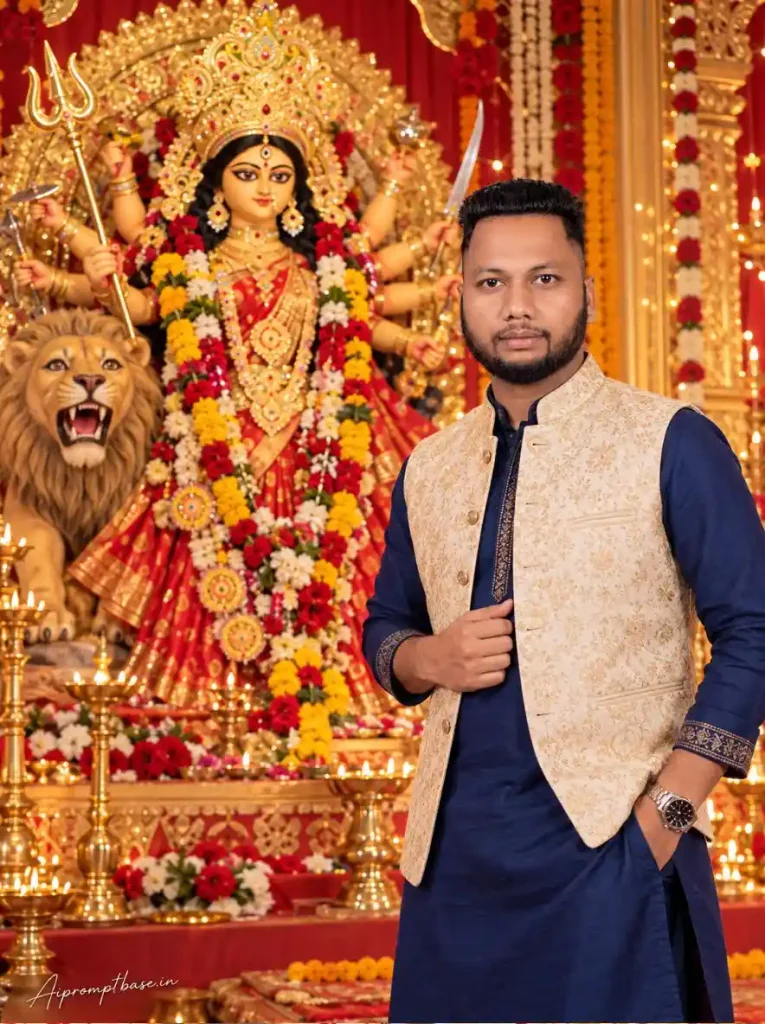
Royal और premium festive photo के लिए यह look तैयार किया गया है। Navy-blue kurta, cream-gold Nehru jacket और red-gold pandal का combination traditional के साथ stylish भी दिखाई देता है। Person और Maa Durga को अलग sides पर रखने से दोनों subjects frame में साफ और balanced दिखाई देते हैं।
Trending Navratri AI Photo Editing Prompt
Create an ultra-realistic professional DSLR photograph using the uploaded person photo as the STRICT IDENTITY REFERENCE. FACE LOCK: Keep the exact same real face, facial features, face shape, skin tone, beard, hairstyle and hairline from the uploaded photo. Do not beautify, reshape or recreate the face. Preserve natural skin pores and genuine human texture — absolutely no AI-looking, cartoon, waxy or plastic face. Show the same person standing confidently on the RIGHT SIDE of the frame, looking naturally at the camera, one hand casually in the kurta pocket and the other gently holding the front of his jacket. Dress him in a royal navy-blue traditional kurta with an elegant cream-gold embroidered Nehru jacket and wristwatch. Behind him on the LEFT, show a large realistic Maa Durga idol closely matching the reference scene — beautiful traditional face, huge ornate golden crown, red saree, multiple arms with trishul and traditional weapons, colourful red-yellow-white flower garlands, with her large lion clearly visible beside her. Create the same luxurious red-and-golden Durga Puja/Navratri pandal filled with brass diyas, glowing lamps, marigold garlands, red and white flowers and warm festive lights. Natural DSLR lighting, realistic skin tone, sharp human face, soft background depth, highly photorealistic. No CGI, illustration or artificial AI effect. ASPECT RATIO: 3:4 vertical TEXT / SIGNATURE: Add “Aipromptbase.in” bottom-left, handwritten signature-style, thin cursive strokes, small size, subtle premium elegance, white/soft off-white.

AI Photo में Face Same रखने के लिए क्या करें?

AI edit में face बदलना सबसे common problem है। बेहतर result के लिए ये छोटी-छोटी बातें ध्यान रखें:

  • Face बदल जाए तो: Prompt में identity instructions दोबारा जोड़कर same photo से regenerate करें।
  • Clear Photo: Face साफ और अच्छी lighting वाली photo लगाएं।
  • Strict Identity: Prompt में “strict identity reference” जरूर लिखें।
  • Face Details: Eyes, nose, jawline, beard और hairstyle preserve करने को कहें।
  • No Beautification: “No face reshaping, no beautification, natural skin texture” add करें।
  • Reference Photo: बहुत ज्यादा filter वाली photo की जगह original photo इस्तेमाल करें।

अगर पहली बार Result सही न आए तो क्या करें?

इन prompts को try करते समय एक चीज बार-बार देखने को मिली कि पहली generation में छोटी-मोटी गलती आ सकती है। ऐसे में मैंने पूरा prompt बदलने के बजाय सिर्फ जिस हिस्से में problem थी, उसी को दोबारा ठीक करवाया।

  • Face बदल गया: उसी photo के साथ face lock वाली instructions दोबारा भेजें।
  • Hands/Fingers खराब: सिर्फ hands को natural और correct करने का instruction दें।
  • कपड़े बदल गए: Outfit की details फिर से लिखकर regenerate करें।
  • Maa Durga की position बदल गई: Person और idol की position साफ-साफ दोबारा बताएं।
  • Photo ज्यादा AI जैसी लग रही है: Natural skin, realistic lighting और DSLR look जोड़ें।

मेरे experience में, छोटी गलती के लिए पूरा prompt दोबारा बनाने से पहले targeted correction करना ज्यादा आसान रहता है।

Realistic Navratri AI Photo के लिए मेरी Practical Tips

इन prompts को use करते समय कुछ छोटी चीजों का ध्यान रखने से result काफी बेहतर मिल सकता है:

  • 8K के पीछे न भागें: Natural skin, सही lighting और proportions ज्यादा जरूरी हैं।
  • Original Photo साफ रखें: बहुत ज्यादा filter वाली selfie न लगाएं।
  • Face Natural रखें: ज्यादा beauty या smooth skin से face AI जैसा लग सकता है।
  • Lighting देखें: Face और background की light एक जैसी होनी चाहिए।
  • Pose Simple रखें: शुरुआत में Namaste, standing या walking pose ज्यादा आसानी से सही बनते हैं।
  • 3:4 Ratio रखें: Festival portrait के लिए यह frame काफी अच्छा रहता है।
  • Hands जरूर Check करें: खासकर Namaste और idol वाले photos में।
  • Background भी देखें: सिर्फ face नहीं, पीछे Maa Durga, flowers और बाकी details भी check करें।

कौन-सा Durga Puja Pandal Photo Editing Prompt चुनें?

आपकी photo कैसी चाहिए, उसी हिसाब से prompt चुनें:

  • Simple पूजा वाली Photo: Namaste वाला prompt।
  • Face + Maa Durga Close-Up: Close-up portrait वाला prompt।
  • कुछ अलग चाहिए: Maa Durga idol holding वाला prompt।
  • Women के लिए Traditional Look: Saree और Mata Rani वाला prompt।
  • पूरा Festival Look: Navratri procession वाला prompt।
  • Men के लिए Royal Look: Kurta और Nehru jacket वाला prompt।

अगर पहली बार try कर रहे हैं, तो अपनी पसंद के हिसाब से कोई एक look बनाकर देखें और फिर बाकी prompts से अलग-अलग styles try कर सकते हैं।

Frequently Asked Questions

क्या मैं अपनी किसी भी photo को Navratri photo में बदल सकता हूं?

हां, लेकिन साफ face वाली photo से result बेहतर मिलने की संभावना रहती है। बहुत ज्यादा blur, filter या extreme angle वाली photo से identity match करना मुश्किल हो सकता है।

क्या अपनी photo के साथ Maa Durga की दूसरी image भी दे सकते हैं?

हां, अगर आपका image tool multiple reference images support करता है। अपनी photo को identity reference और दूसरी image को scene/composition reference के रूप में बताएं।

Face बार-बार बदल रहा है तो क्या करें?

पहले बेहतर quality वाली original photo इस्तेमाल करें। उसके बाद face structure, skin tone, hairstyle, beard आदि important identity details को preserve करने की instruction दें।

क्या AI मेरे कपड़े भी बदल सकता है?

हां। आप traditional kurta, saree, Nehru jacket या दूसरे festive outfits specify कर सकते हैं, जबकि face identity को original photo से preserve रखने के लिए कहा जा सकता है।

AI photo में skin बहुत smooth क्यों हो जाती है?

कई AI models portrait को automatically beautify कर देते हैं। Natural skin texture और no beautification जैसी instructions देने से इस effect को कम किया जा सकता है।

निष्कर्ष

उम्मीद है इन Trending Navratri AI Photo Editing Prompt में से आपको अपनी पसंद का look मिल गया होगा। इस बार मैंने जानबूझकर अलग-अलग तरह के concepts रखे हैं, ताकि हर कोई अपनी photo के हिसाब से कुछ नया try कर सके। Photo बनाते समय बस अपनी original photo साफ रखें और final image में face, hands और background एक बार जरूर check कर लें। अगर result पहली बार में perfect न आए, तो छोटी-सी correction देकर दोबारा try करें।

आपने इनमें से कौन-सा Durga Puja AI Photo Editing Prompt try किया और कैसा result आया? Comment में जरूर बताएं। अगर आपका कोई अलग Navratri photo idea है, तो वो भी नीचे share कर सकते हैं।

नीचे लिखे अन्य लेख भी देखे आपको जरूर पसंद आएंगे:-

About the Author

Lavit

नमस्कार! मैं लवित राव हूँ। मैं AI Prompts, Gemini AI, ChatGPT और AI Image Editing पर काम करता हूँ। इस वेबसाइट पर मैं केवल वही प्रॉम्प्ट्स और गाइड्स शेयर करता हूँ जिन्हें मैं खुद टेस्ट करता हूँ, ताकि आपको सही, उपयोगी और आसानी से समझ आने वाली जानकारी मिल सके।

Leave a Comment

Join WhatsApp Group