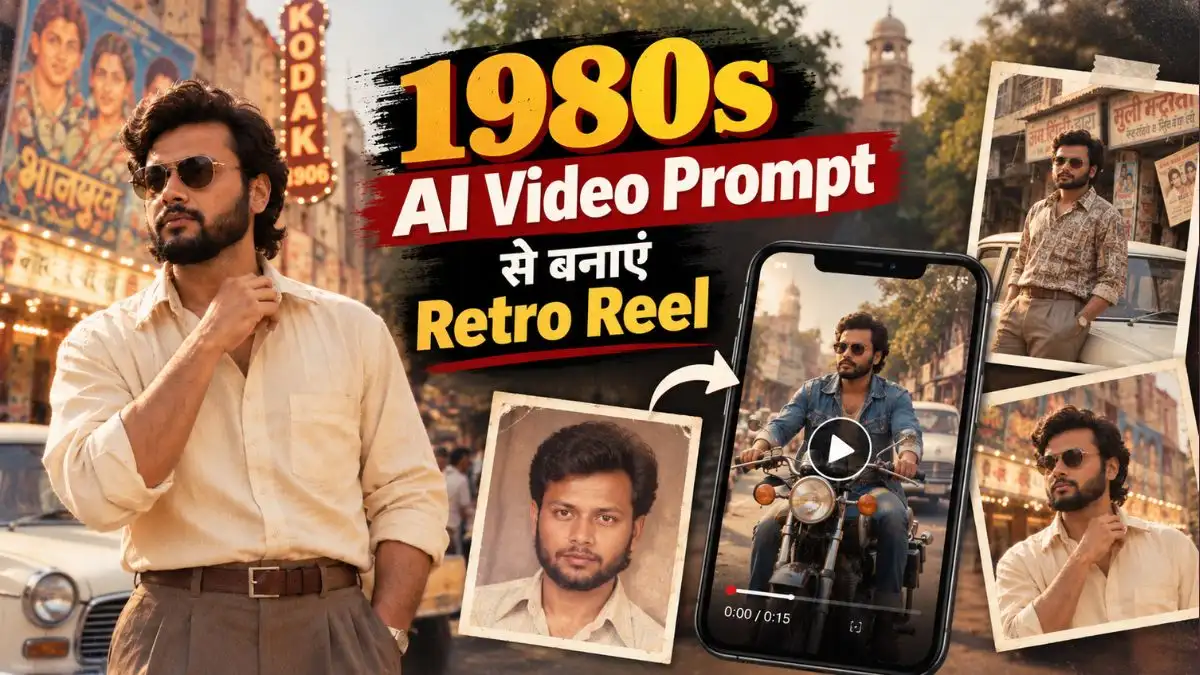
Photo तो 80s की बन गई, अब Video भी! इन 1980s AI Video Prompt से बनाएं Retro Reel

दोस्तों, आपने मेरा पिछला 80s AI Photo Prompt वाला article देखा होगा। उसमें अपनी आज की Photo को पुराने Bollywood Hero, Vintage Car और 1980s Album Look में बदलने वाले Prompts दिए थे, और इसी तरह की Retro Photos इन दिनों Social Media पर खूब देखने को मिल रही हैं।

लेकिन अब 80s Trend सिर्फ Photo तक नहीं रुका है। अब उन्हीं Retro Photos से ऐसी Videos बनाई जा रही हैं जिनमें आप पुराने Cinema Hall के बाहर खड़े दिखाई देते हैं, पीछे Ambassador और Premier Padmini गुजरती हैं, Chai Stall पर हलचल होती है या आप Vintage Bike पर किसी पुरानी Bollywood Film के Shot की तरह निकलते दिखाई देते हैं।

अगर आपकी 80s Photo पहले से बनी हुई है तो काम और आसान है। और नहीं बनी है तो कोई दिक्कत नहीं—पहले नीचे दिए 1980s AI Photo Prompt से Base Image बनाएंगे और फिर उसी Photo को 1980s AI Video Prompt की मदद से Video में बदलेंगे। मैंने इसके लिए Car & Chai Stall, 1987 Cinema Hall और Vintage Bike Ride के तीन अलग Scenes रखे हैं, जिन्हें आप Flow या Gemini में Try कर सकते हैं।

Step 1: सबसे पहले अपनी 80s Base Image तैयार करें

इस Trend में सीधे अपनी Normal Selfie से Video बनवाने के बजाय मुझे Image से Video वाला तरीका ज्यादा सही लगता है। पहले Photo में Face, Outfit, Hairstyle, Car और पूरा 80s Background set हो जाता है; उसके बाद Video Tool को नया Look invent करने के बजाय उसी तैयार Scene में movement देनी होती है।

  1. सबसे पहले ChatGPT खोलें।
  2. अपनी एक साफ और अच्छी Quality वाली Photo Upload करें, जिसमें Face स्पष्ट दिखाई दे।
  3. नीचे दिया गया 80s AI Photo Prompt Copy करें।
  4. इसे ChatGPT में अपनी Photo के साथ Paste करें।
  5. अब Generate पर Tap करें और Image बनने का इंतजार करें।
  6. अगर कई Results मिलते हैं, तो वह Photo चुनें जिसमें Face आपकी Original Photo के सबसे करीब और 80s Look natural दिखाई दे।
  7. इसी Final Photo को Save रखें—यही अगले Step में आपकी 1980s AI Video की Base Image होगी।
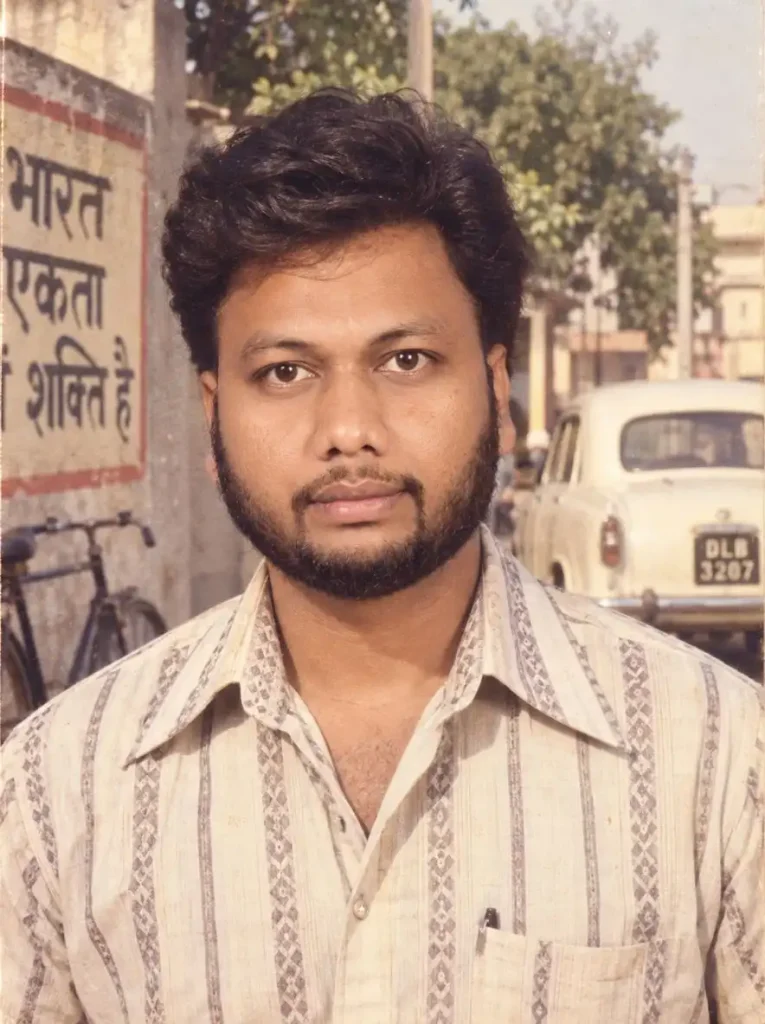
1980s AI Video Prompt
Transform my uploaded photo into an authentic 1980s Indian photograph while preserving my exact face, facial features, skin tone, body proportions, natural appearance and identity. Do not change my face, do not reshape my facial features, do not beautify me excessively, do not make me look like a different person, and keep me clearly recognizable as the same person in the original photo. Give me an authentic 1980s hairstyle and period-accurate Indian fashion, such as a vintage shirt with a slightly wide collar, high-waisted trousers, classic leather belt, retro wristwatch and subtle 1980s accessories. Make the outfit stylish but genuinely appropriate for the 1980s, not modern clothing with a retro filter. Completely change the background into a believable Indian setting from the 1980s, such as an old Indian street, railway station, cinema hall, local market, tea stall, old neighborhood, vintage shopfronts, Ambassador or Premier Padmini cars, bicycles, old buses, handwritten Hindi signs and period-accurate buildings. Remove all modern objects, smartphones, modern vehicles, contemporary architecture and other present-day elements. Make the image look like a real photograph that was actually taken in India during the 1980s, rather than a modern Al-generated image with a vintage filter. Use authentic 35mm analog film photography, warm natural sunlight, slightly faded colors, realistic skin texture, soft contrast, natural shadows, subtle lens softness, realistic exposure, fine film grain, slight color fading, tiny dust particles, minor scratches, subtle film imperfections and gentle vignette. Give the photograph the feeling of an old family album photo from around 1984-1988, with naturally imperfect framing and a genuine nostalgic atmosphere. Keep the pose natural and realistic, with believable body proportions, authentic clothing, realistic hands and facial details. Photorealistic, highly detailed, authentic Indian 1980s atmosphere, vintage 35mm film, documentary-style photography, natural lighting, realistic analog film texture, nostalgic old photograph, period-accurate styling.

Image बनने के बाद ऐसा Result चुनें जिसमें आपका Face Original Photo के सबसे करीब हो। Car या Background में छोटी कमी बाद में संभाली जा सकती है, लेकिन Base Image में Face ही बदल गया है तो उसी Image से Video बनाना सही नहीं रहेगा।

Step 2: Base Image तैयार है, अब इसी से 80s Video बनेगी

अब जो Retro Photo आपने ऊपर बनाई है, यही आपकी 80s Video की Base Image है। इसे बार-बार बदलने की जरूरत नहीं है।

इसी Image को Flow Ai या Gemini में Upload करके नीचे दिए 1980s AI Video Editing Prompt इस्तेमाल करने हैं। मैंने तीनों Prompts में अलग Scene और Movement रखा है ताकि सिर्फ एक Static Photo को Zoom करने वाली Video न बने, बल्कि आसपास भी 80s का माहौल चलता हुआ दिखाई दे।

1. Vintage Car और Chai Stall वाला 1980s AI Video Prompt

इसमें शुरुआत Premier Padmini के पास होती है, लेकिन पीछे Cycle, Chai की Steam, Poster और Vintage Traffic भी धीरे-धीरे move करते हैं। Main Action Sunglasses उतारकर Camera की तरफ हल्का Look देना है, इसलिए Scene cinematic रहता है लेकिन Face पर जरूरत से ज्यादा movement नहीं आती।

Use the uploaded image as the STRICT identity reference and transform it into a cinematic moving scene that feels like a lost piece of Indian footage filmed around 1986. ABSOLUTE FACE & IDENTITY LOCK: Keep the uploaded person’s exact recognizable face throughout every frame. Preserve facial structure, eyes, nose, lips, jawline, skin tone, age, hairline and facial hair. Never regenerate, beautify, reshape, morph or replace the face. SCENE: Create a beautiful late-1980s Indian street during warm golden evening light. An ivory Premier Padmini is parked beside an old chai stall, with vintage shopfronts, hand-painted Hindi signboards, old Bollywood posters, bicycles and period street details in the background. Absolutely no modern objects. The person is wearing a stylish authentic 1980s outfit — slightly loose vintage shirt tucked into high-waisted trousers, leather belt, classic wristwatch and retro sunglasses. Start with the person casually leaning against the Premier Padmini. A gentle breeze moves the shirt and hair while an old paper poster softly flutters in the background. The person slowly removes the sunglasses, looks toward the busy street for a moment, then turns toward the camera with a subtle confident 1980s Bollywood-style expression. The camera performs a slow cinematic push-in from a medium-wide shot to a medium close-up while keeping the face sharp and stable. Add subtle background movement: an old bicycle passes behind, chai steam rises naturally and a vintage vehicle slowly crosses far in the background. Authentic 35mm film look, warm golden sunlight, faded Kodak-style colors, soft highlights, natural film grain, slight analog flicker and realistic 1980s Indian cinema atmosphere. It should feel like genuine rediscovered footage from 1986, NOT a modern video with a vintage filter. STRICT VIDEO STABILITY: no identity drift, no face morphing, no changing facial features, no exaggerated smile, no talking, no fast head movement, no body distortion, no extra limbs, no flickering face, no blurry face, no modern cars, smartphones, LED boards or modern buildings. Keep the same face perfectly recognizable from the first frame to the final frame.

2. 1987 Cinema Hall वाला Viral 1980s AI Video Prompt

अगर पुरानी Bollywood Film वाली Feel चाहिए तो मैं इस Scene को जरूर Try करूंगा। आप Movie देखने के लिए पुराने Single-Screen Cinema के बाहर तैयार होकर खड़े हैं, पीछे लोग Tickets ले रहे हैं और Road पर Ambassador, Scooter और Cycle-Rickshaw चल रहे हैं।

Use the uploaded image as the STRICT FACE AND IDENTITY REFERENCE and create an ultra-realistic cinematic video set outside a busy Indian single-screen cinema hall in 1987. ABSOLUTE FACE LOCK: Preserve the uploaded person’s exact recognizable face, facial structure, eyes, eyebrows, nose, lips, jawline, skin tone, age, hairline, hairstyle and facial hair throughout every frame. Never regenerate, beautify, reshape, morph or replace the face. SCENE: It is a lively evening outside a grand old 1980s Indian cinema hall. Large hand-painted Bollywood movie posters and colorful film banners decorate the entrance. Warm tungsten bulbs glow around the ticket windows and cinema signage. Small groups of people in authentic 1980s Indian clothing are buying tickets, chatting and walking naturally behind the main person. On the road beside the cinema, Ambassador and Premier Padmini cars slowly pass by, along with a vintage scooter, motorcycle and cycle-rickshaw. Everything must be period-correct with absolutely no modern vehicles, phones, LED screens or modern clothing. The main person has dressed especially to watch a movie and looks stylish in authentic late-1980s fashion: a tucked-in vintage shirt with slightly wide collar, high-waisted trousers, leather belt, classic wristwatch, polished shoes and retro sunglasses. ACTION: Start with him standing casually near the cinema entrance, one hand relaxed inside his trouser pocket while he looks toward the movie posters. He gently adjusts his shirt collar, then slowly removes his sunglasses and holds them naturally in one hand. He briefly watches the passing traffic, gives a subtle confident smile and turns his eyes toward the camera as if a friend is filming him before they enter the movie. People continue walking naturally behind him while cars and scooters move along the road. A light evening breeze gently moves his hair, shirt and the large cinema posters. CAMERA: Begin with a slightly low-angle medium-wide shot showing the cinema hall, crowd and vintage traffic, then slowly move closer toward him with subtle authentic handheld camera movement. Keep his face sharp and stable at all times. Authentic 1987 Indian cinema atmosphere, warm evening light, glowing theatre bulbs, slightly faded Kodak-style colors, natural skin texture, realistic 35mm film grain, subtle analog imperfections and nostalgic cinematic depth. Make it feel like genuine restored footage recorded outside an Indian movie theatre in 1987, not a modern AI video with a retro filter. STRICT: same face from first frame to last frame, no identity drift, no facial morphing, no talking or lip-sync, no exaggerated expressions, no sudden head turns, no body distortion, no duplicate people, no frozen background crowd, no blurry face, no flickering, no modern objects.

इसकी खास बात Background है—यहां सिर्फ कपड़े 80s के नहीं हैं, बल्कि पूरा माहौल 1987 के Cinema Hall के बाहर का बनाया गया है।

3. Vintage Bike Ride वाला Retro 80s AI Video Prompt

तीसरा Prompt थोड़ा ज्यादा Action वाला है। इसमें Vintage Motorcycle चलती है और Camera Front, Side और Rear Tracking Shots देता है, इसलिए ये बाकी दोनों से ज्यादा Reel-style Video बना सकता है।

Create an ultra-realistic cinematic 1980s–1990s retro bike ride video featuring the same boy/girl from the reference image, preserving the exact face, facial structure, skin tone, hairstyle, body proportions, and identity. The character rides a classic vintage motorcycle through an old-school city street, wearing authentic 80s/90s fashion: retro denim jacket, fitted jeans, vintage sunglasses, leather boots, and a stylish classic look. For a girl, use an authentic 80s/90s denim or leather jacket, high-waisted jeans, vintage sunglasses, and natural retro hairstyle. Use a warm analog film aesthetic, slightly faded colors, realistic film grain, soft sunlight, subtle lens flare, period-correct motorcycles and cars, old buildings, street signs, and nostalgic roadside details. Camera starts with a low-angle front tracking shot of the motorcycle, then smoothly moves beside the rider, followed by a cinematic rear tracking shot. Add natural wind movement in the hair and clothes, realistic motorcycle suspension, wheel rotation, road reflections, and subtle body movement while riding. Authentic 80s/90s atmosphere, realistic motion, cinematic depth of field, soft vintage lighting, 35mm film look, detailed skin texture, natural expressions, smooth camera movement, high realism, 4K cinematic quality, vertical 9:16 video. No modern vehicles, no modern buildings, no futuristic elements, no face distortion, no extra fingers, no identity change, no text, no watermark.

Bike वाले Scene में मैं साफ Base Image को ज्यादा importance दूंगा, क्योंकि Rider, Bike और Camera तीनों move कर रहे होते हैं। Face पहले से weak हुआ तो Video में Identity drift ज्यादा दिखाई दे सकती है।

Flow AI से अपनी 80s Photo को Cinematic Video में कैसे बदलें?

अब आपकी 80s Base Image तैयार है। इसी Photo को Flow AI में Reference बनाकर ऊपर दिए Viral 1980s AI Video Prompt से चलती हुई Retro Reel बनानी है। यहां नई Photo Generate नहीं करनी है—Step 1 में बनी उसी Image का इस्तेमाल करें, ताकि Photo और Video का Look एक-दूसरे से जुड़ा रहे।

Flow AI में 80s Video बनाने के Steps

  1. सबसे पहले Flow Ai खोलें और अपने Google Account से Sign In करें।
  2. New Project शुरू करें और Video Generation में Frames to Video option चुनें।
  3. Step 1 में बनाई गई अपनी 80s Base Image को Starting Frame के रूप में Upload करें।
  4. अब ऊपर दिए तीन 1980s AI Video Prompt में से जिस Scene की Video बनानी है, उसका Prompt Copy करें।
  5. Prompt Box में उसे Paste करें और अपनी जरूरत के हिसाब से Video settings चुनें।
  6. अब Generate करें और Flow को उसी Base Image से Scene animate करने दें।
  7. Video बनने के बाद शुरुआत से अंत तक Face, Body और Movement जरूर देखें। सब natural है तो यही आपकी Final Retro Reel है।

Face बदल जाए तो पूरी Video का Scene मत बदलें

मेरे हिसाब से यहां सबसे जरूरी चीज पहले से अच्छी Base Image चुनना और Action को controlled रखना है। कई बार Scene बहुत अच्छा बनता है लेकिन Sunglasses उतारते समय या तेज Head Turn में Face बदलने लगता है।

ऐसे में पूरा 1980s AI Video Editing Prompt बदलने की जरूरत नहीं है। जिस Action पर Face बिगड़ रहा है, सिर्फ उसे आसान करें—जैसे remove sunglasses की जगह gently adjust sunglasses करवाएं। इससे Cinema Hall, Vintage Car या Chai Stall वाला अच्छा Scene बचा रहता है और AI को Face में बड़ा बदलाव करने की जरूरत भी कम पड़ती है।

Gemini से अपनी 80s Photo को Video में कैसे बदलें?

अगर आप Flow AI की जगह Gemini से 80s Video बनाना चाहते हैं, तो यहां भी Step 1 में तैयार की गई उसी 80s Base Image का इस्तेमाल करें। इससे AI को पहले से पता रहता है कि आपका Face, Outfit और Retro Look कैसा रखना है; अब उसका मुख्य काम उस Photo में natural movement जोड़ना है।

Gemini में 80s AI Video बनाने के Steps

  • सबसे पहले Gemini खोलें और अपने Google Account से Sign In करें।
  • Video बनाने का option चुनें और Step 1 में तैयार की गई अपनी 80s Base Image Upload करें।
  • ऊपर दिए 1980s AI Video Prompt में से पसंद वाला Scene Copy करें।
  • Prompt को अपनी Uploaded Image के साथ Paste करें।
  • अब Video Generate करें और Result तैयार होने दें।
  • Video बनने के बाद देखें कि शुरुआत से आखिर तक Face वही है या नहीं, और Body Movement natural लग रही है या नहीं।
  • Result सही है तो Video Save करके आगे Reel Editing के लिए इस्तेमाल कर सकते हैं।

80s Video में Face बदल रहा है तो पहले ये समझें

1980s AI Video Prompt से Video बनाते समय Face stable रखने के लिए Base Image में चेहरा साफ और front/हल्के side angle में रखें। Video Prompt में slow body movement और simple facial action रखें; तेज Head Turn, बोलना या बड़ा Expression एक ही Shot में न दें।

Face फिर भी बदल रहा हो तो Prompt में यह line add करें: “Keep the exact same face and identity from the first frame to the last frame; no face regeneration, morphing or identity drift.” इसके साथ Camera को Medium Shot में रखें—बहुत तेज Zoom-in या अचानक angle change न करवाएं। इससे AI को हर Frame में Face दोबारा interpret करने की जरूरत कम पड़ती है।

एक ही Base Image से तीन अलग 80s Reels बना सकते हैं

इस Trend की मुझे सबसे useful बात यही लगती है। अच्छी Base Image बन गई तो हर Video के लिए नई Photo Generate करने की जरूरत नहीं है।

उसी Character को पहले Vintage Car के पास, फिर Cinema Hall और फिर Bike Scene में इस्तेमाल किया जा सकता है। इससे तीनों Videos का Look अलग रहेगा लेकिन आपकी Identity और Retro Styling एक जैसी रखने में मदद मिलेगी। अगर Instagram पर 80s Series बनानी है तो यह तरीका और भी काम का है।

FAQ

1980s की Viral Video कैसे बनाएं?

पहले अपनी साफ Photo से 80s Base Image बनाएं। फिर उसी Image को Flow या Gemini में Upload करके 1980s AI Video Editing Prompt से Movement और cinematic Scene Generate करें।

क्या Normal Photo को सीधे Video में बदल सकते हैं?

कर सकते हैं, लेकिन अगर आपको पूरा Retro Outfit, Hairstyle और 1980s Background चाहिए तो पहले Base Image तैयार करना ज्यादा controlled तरीका है।

पहले से 80s Photo बनी है तो क्या नई Image बनानी पड़ेगी?

नहीं। अगर Face और Look सही है तो उसी Photo को Reference बनाकर सीधे Retro 80s AI Video Prompt Try करें।

Instagram Viral 80s AI Video के लिए कौन सा Scene अच्छा रहेगा?

Cinema Hall वाला Scene visually काफी interesting है क्योंकि Main Person के साथ Crowd, Posters, Theatre Lights और Vintage Traffic भी दिखाई देते हैं। Bike Scene ज्यादा movement वाली Reel के लिए बेहतर रहेगा।

Flow और Gemini में से किसे इस्तेमाल करें?

दोनों में Same Base Image और Prompt Try किया जा सकता है। जिस Tool में आपकी Photo का Face और Scene Movement ज्यादा stable मिले, उसी Generation को Final रखें।

निष्कर्ष

दोस्तों, पहले 80s AI Photo Trend में हम सिर्फ यह देख रहे थे कि 1986–87 में हमारी Photo कैसी दिखाई देती। अब 1980s AI Video Prompt उसी Photo को एक कदम आगे ले जा रहा है—आप सिर्फ पुराने Album में खड़े नहीं हैं, बल्कि उसी दौर की सड़क, Cinema Hall या Bike Scene में चलते हुए दिखाई दे सकते हैं।

मेरी सलाह यही रहेगी कि Video के पीछे भागने से पहले एक अच्छी Base Image तैयार करें। Face और 80s Look वहीं सही हो गया तो आगे Flow या Gemini में Video बनाना काफी आसान हो जाता है। अगर तीनों में से पहले एक Try करना हो तो मैं 1987 Cinema Hall वाला Scene चुनूंगा—उसमें सिर्फ Character नहीं, पूरा Background मिलकर पुराने Bollywood दौर की कहानी बनाता है।

नीचे लिखे अन्य लेख भी देखे:-

About the Author

Lavit

नमस्कार! मैं लवित राव हूँ। मैं AI Prompts, Gemini AI, ChatGPT और AI Image Editing पर काम करता हूँ। इस वेबसाइट पर मैं केवल वही प्रॉम्प्ट्स और गाइड्स शेयर करता हूँ जिन्हें मैं खुद टेस्ट करता हूँ, ताकि आपको सही, उपयोगी और आसानी से समझ आने वाली जानकारी मिल सके।

Leave a Comment

Join WhatsApp Group