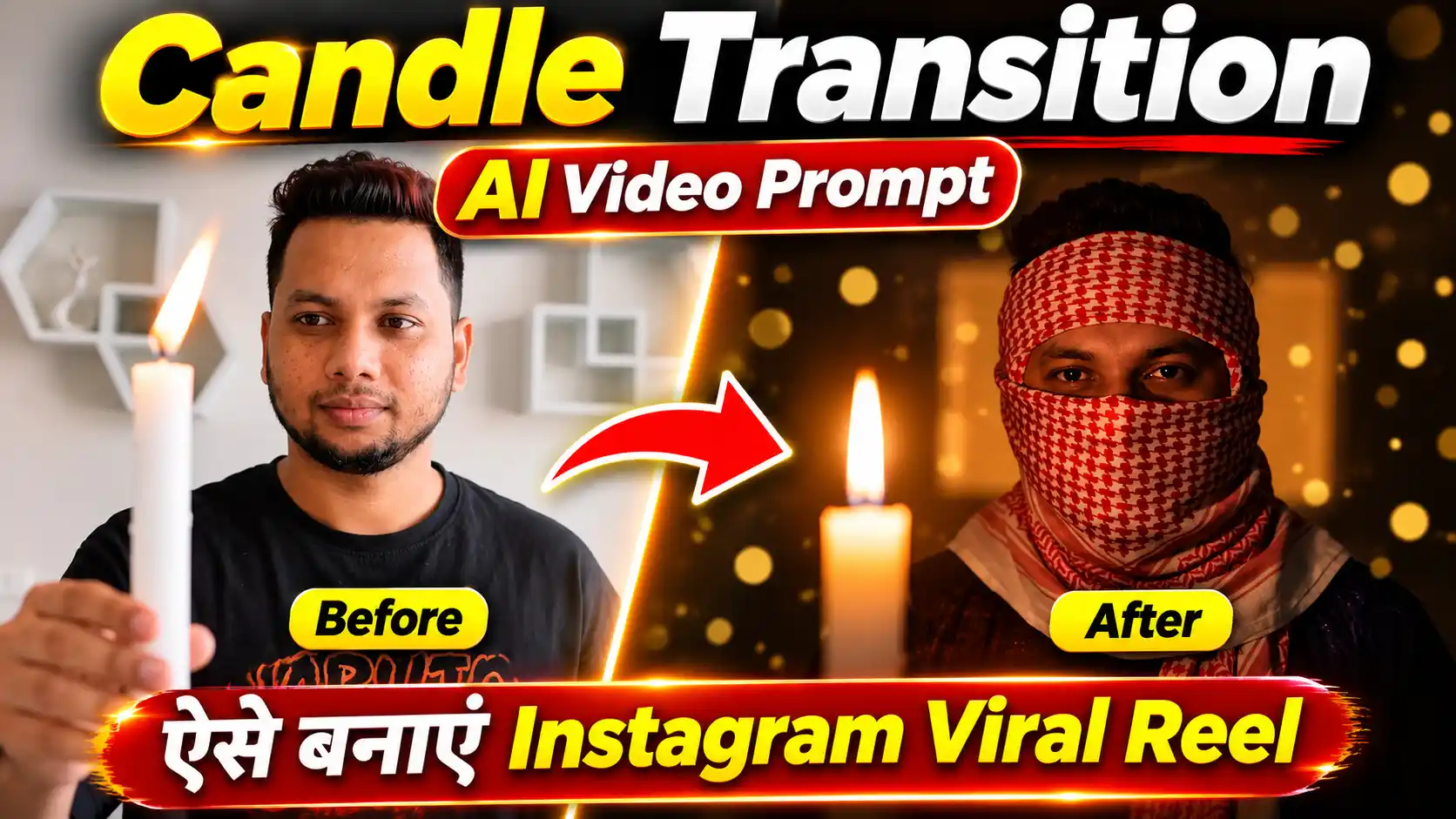
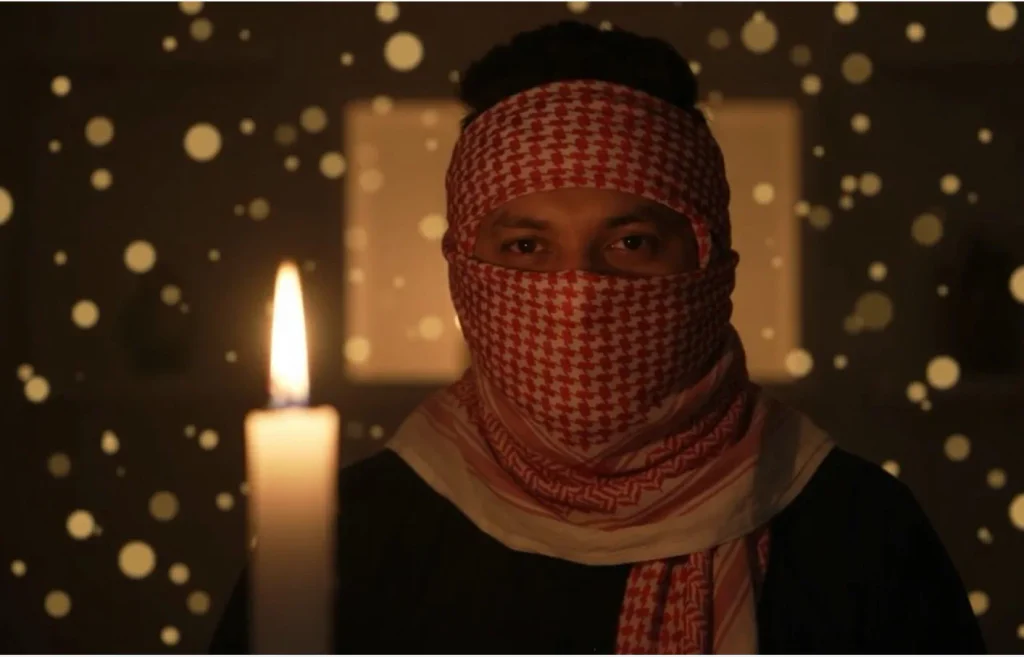
दोस्तों, इन दिनों Instagram पर Candle Transition AI Video वाला Trend काफी दिलचस्प लग रहा है। इसमें एक लड़का कैमरे के सामने जलती हुई Candle को दाएं से बाएं घुमाता है और जैसे ही Candle की Flame कैमरे के सामने आती है, पूरा Scene अचानक बदल जाता है। अगले ही पल वही लड़का Dark Orange Lighting में चेहरे पर Scarf लपेटे नजर आता है।
सबसे खास बात यह है कि यह कोई Normal Flash Transition नहीं है। पूरी Video में Candle की Movement से ही एक Look दूसरे Look में बदलता है, जिसे देखकर पहली बार में समझना मुश्किल होता है कि Transition कैसे हुआ।
अगर आप भी अपनी Photo से ऐसी Reel बनाना चाहते हैं, तो आज मैं आपके साथ Candle Transition AI Video Editing Prompt और Candle Transition AI Video Prompt शेयर कर रहा हूँ। साथ ही Google Flow AI से Video बनाने का तरीका और Face Change, गलत Candle Movement या Transition खराब होने जैसी परेशानियों के काम के Fixes भी जानेंगे।
Candle Transition AI Video Trend क्या है?
इस Trend की सबसे दिलचस्प बात यह है कि एक ही जलती Candle से दो बिल्कुल अलग Looks आपस में जुड़ जाते हैं। Camera अपनी जगह रहता है, लेकिन Candle को Lens के करीब लाने से उसकी Flame पूरे Frame को Cover करती है। इसी Moment पर होने वाला Transformation Video को एक ही Take में शूट हुई Reel जैसा Feel देता है।
इस Trending Candle Transition AI Video Prompt में असली Challenge Candle की Movement और Scene बदलने की सही Timing है। अगर Flame के कैमरे तक पहुंचने से पहले ही Look बदल जाए, तो Effect एक Normal Cut जैसा लगेगा।
मेरे हिसाब से यहां Close Camera Framing और Smooth Flame-Wipe सबसे जरूरी हैं। खासकर दोनों Scenes में Candle का Size और जलती Flame Natural दिखाई दे, तभी Transition ज्यादा Realistic और आकर्षक लगता है।
Candle Transition AI Video बनाने के लिए क्या चाहिए?
इस Video को बनाने के लिए मुख्य रूप से तीन चीजें तैयार रखें।
- Clear Face Photo: जिसमें आपका Face, Hairstyle और Skin Details साफ दिखाई दें।
- Google Flow AI: अपनी Photo और Video Prompt से Candle Transition Video बनाने के लिए।
अगर आपके Flow Model में Reference Video का Option उपलब्ध नहीं है, तो सिर्फ Photo और नीचे दिए गए Prompt से भी Video Generate कर सकते हैं। हालांकि Reference जैसी बिल्कुल Same Movement मिलना मुश्किल हो सकता है।
Instagram Viral Candle Transition AI Video Prompt – Copy & Paste
अगर आपको ऐसी Video बनानी है जिसमें Candle घुमाते ही पूरा Look बदल जाए, तो यह Prompt आपके काम आएगा। इस Instagram Viral Candle Transition AI Video Prompt में शुरुआत में लड़का Black NARUTO T-Shirt पहनकर Candle जलाता है। फिर Candle को कैमरे के सामने Right–Left–Right घुमाता है और आखिर में Flame-Wipe Transition के साथ Dark Orange Scarf Look दिखाई देता है।
मेरे हिसाब से इसमें सबसे जरूरी है कि Candle कैमरे के बिल्कुल पास और Face से बड़ी दिखाई दे। अगर AI Camera बहुत दूर रखेगा या Candle की Movement गलत बनाएगा, तो Original Trend जैसा Effect नहीं आएगा।
Candle Transition AI Video Prompt
Candle Transition AI Video Kaise Banaye Using Google Flow?
अब इस Candle Transition AI Video Editing Prompt से अपनी Photo की Video बनाने का तरीका समझ लेते हैं।
- Google Flow खोलें: सबसे पहले Google Flow AI खोलकर अपने Google Account से Sign In करें।
- New Project बनाएं: अब Video Generation का Option चुनें।
- अपनी Photo Upload करें: Ingredients/References में Clear Face Photo Add करें।
- Video Prompt Paste करें: ऊपर दिया गया पूरा Candle Transition AI Video Prompt Copy करके Paste करें।
- @image1 Linking Check करें: ध्यान दें कि Prompt में
@image1आपकी ही Uploaded Photo से Linked हो। - Video Settings चुनें: Compatible Model में 10 Seconds और 16:9 Landscape Ratio Select करें।
- Generate करें: Video तैयार होने पर Candle Movement, Flame Transition और Final Scarf Look Check करें। Result सही लगे तो Download कर लें।
ध्यान दें: यह Prompt 16:9 Landscape Video के लिए है। अगर इसे सीधे 9:16 में Crop करेंगे, तो Candle या Face Frame से बाहर जा सकता है। इसलिए पहले Original Ratio में Video बनाकर Check करें।
Candle Transition Video में Face या Movement खराब आ रही है तो क्या करें?
कई बार Viral Candle Transition AI Video Editing करते समय AI Candle को गलत Direction में घुमा देता है या Flame के बजाय अचानक Normal Cut से दूसरा Scene दिखा देता है।
ऐसी परेशानी में ये Practical Fixes काम आ सकते हैं।
- Face बदल रहा है: Clear और Front-Facing Photo इस्तेमाल करें। खासकर शुरुआती Scene में Face, Hairstyle और Eyes Check करें।
- Candle बहुत छोटी दिखाई दे रही है: Result में Candle और Face का Size Compare करें। Candle कैमरे के पास और बड़ी दिखनी चाहिए। Wide Shot वाला Result Final न रखें।
- Candle गलत Direction में घूम रही है: Movement का Order Check करें—पहले Right से Left, फिर Left से वापस Right। अगर AI Movement छोड़ रहा है, तो उस हिस्से को अलग Generate करके देखें।
- Candle बुझ जाती है: Flame पूरे Swipe के दौरान जलती रहनी चाहिए। अगर बीच में गायब हो जाती है, तो उसी Reference से दूसरा Result Try करें।
- Flame-Wipe Transition नहीं बन रहा: Final Swipe में Candle की Flame कैमरे के सामने आनी चाहिए। अगर AI Hard Cut बना रहा है, तो दोनों Looks की Clips लेकर VN या CapCut में Flame-Wipe जैसा Transition तैयार कर सकते हैं।
- Camera बहुत दूर है: शुरुआत में Face, Shoulders और Upper Chest साफ दिखाई देने चाहिए। Full-Body Shot वाला Result Reference से मेल नहीं खाएगा।
- Scarf वाला Look गलत बन रहा है: दूसरे Scene में Red-White Patterned Scarf को Forehead, Eyes, Nose, Mouth और Neck पर लिपटा होना चाहिए। सिर्फ गर्दन में Scarf डाल देना सही Result नहीं है।
- दोनों Scenes में Face अलग लग रहा है: पहले Scene में Original Face Check करें। दूसरे Scene में Face का ज्यादातर हिस्सा Scarf से ढका है, इसलिए वहां Hairstyle, Head Shape और Body Continuity पर ध्यान दें।
- Video में Extra Actions बन रहे हैं: Dance, Camera Rotation या बार-बार Head Movement वाली Generation Final न रखें। इस Trend में लड़का लगभग एक ही जगह बैठा रहता है।
- 10-Second Video नहीं बन रही: अपने Flow Model की Duration Settings Check करें। अगर 10 Seconds उपलब्ध नहीं हैं, तो शुरुआत और Scarf Reveal को अलग Clips में बनाकर सही Timing पर जोड़ सकते हैं।
Google Flow में Reference Video Error आए तो क्या करें?
कभी-कभी Reference Video Upload करने के बाद Flow में Policy Violation या Generation Failed जैसा Error दिखाई दे सकता है। ऐसा खासकर तब हो सकता है, जब Uploaded Video में किसी व्यक्ति का चेहरा हो या AI से उसके बोलने वाले हिस्से को बदलने के लिए कहा जा रहा हो।
इस स्थिति में पहले Check करें कि चुना हुआ Model Uploaded Video Editing Support करता है या नहीं। अपनी या अनुमति प्राप्त Photo इस्तेमाल करें और Video में Speech Generate करने की जरूरत न रखें।
अगर Reference Video स्वीकार नहीं हो रही, तो सिर्फ Face Photo और Candle Transition AI Video Prompt से नया Generation Try करें। इससे Policy Restrictions हटने की गारंटी नहीं है, लेकिन Reference Video के बिना Visual Sequence बनाने का एक वैकल्पिक तरीका मिल सकता है।
मेरा अनुभव: Candle Transition में सबसे जरूरी क्या है?
मेरे हिसाब से अच्छी Candle Transition AI Video Editing की पहचान सिर्फ Face Same रहने से नहीं होती। सबसे जरूरी है कि Candle का Size, उसकी Movement और Flame-Wipe सही दिखाई दे। कई बार शुरुआत में Face बिल्कुल Natural दिखता है, लेकिन जैसे ही Candle कैमरे के सामने घूमती है, AI उसकी Direction बदल देता है या अचानक दूसरे Scene पर Cut कर देता है।
इसलिए मैं Final Video में तीन चीजें जरूर Check करने की सलाह दूंगा—शुरुआत का Close Camera Frame, Candle का Right–Left–Right Movement और Flame से होने वाला Transition। खासकर आखिरी Scarf वाले Scene में Warm Orange Lighting और सामने जलती Candle सही आए, तो पूरा Look ज्यादा Cinematic लगता है।
बेहतर Candle Transition AI Video के लिए 4 जरूरी Tips
- साफ Reference Photo रखें: Face और Hairstyle अच्छी Lighting में दिखाई देने चाहिए।
- Camera Framing Check करें: Candle बड़ी और सामने हो, जबकि लड़का Close Frame में दिखाई दे।
- Transition की Timing देखें: Flame-Wipe लगभग 5.7 से 6.2 Seconds के बीच आना चाहिए।
- Final Scarf Look Check करें: Dark Background, Red-White Scarf और Golden Bokeh Lights सभी सही दिखाई देने चाहिए।
Candle Transition AI Video Prompt – FAQs
1. Candle Transition AI Video कैसे बनाएं?
Google Flow AI में अपनी Clear Face Photo Upload करें, फिर Candle Transition AI Video Prompt Paste करके 10-Second Video Generate करें। Result में Candle Movement और Flame-Wipe जरूर Check करें।
2. क्या Candle Transition Video के लिए Reference Video जरूरी है?
जरूरी नहीं है, लेकिन Original Reel जैसी Timing और Movement बनाने में Reference Video मदद कर सकती है। इसकी सुविधा आपके चुने हुए Flow Model पर निर्भर करती है।
3. Candle Transition Video में Face Same कैसे रखें?
अपनी Clear Photo को Identity Reference के रूप में इस्तेमाल करें। शुरुआत में Face और Hairstyle Check करें, क्योंकि दूसरे Scene में Scarf चेहरे का ज्यादातर हिस्सा ढक लेता है।
4. Candle Transition Video में Flame-Wipe नहीं बन रहा तो क्या करें?
पहले Check करें कि Candle सही Direction में घूम रही है या नहीं। अगर AI बार-बार Normal Cut बना रहा है, तो दोनों Scenes को अलग Generate करके Video Editor में Transition जोड़ सकते हैं।
5. क्या Candle Transition AI Video 10 Seconds में बन सकती है?
हां, Google Flow के Compatible Model में 10-Second Video Generation उपलब्ध है। इस Prompt में पहला Scene, Candle Movement और Final Scarf Reveal कुल 10 Seconds में रखे गए हैं।
निष्कर्ष
दोस्तों, Candle Transition AI Video Prompt की मदद से आप अपनी Photo को एक अलग Cinematic Candle Transformation Video में बदलने की कोशिश कर सकते हैं। इसमें शुरुआत का Normal Look और आखिर का Dark Scarf Look एक ही Flame-Wipe से जुड़ता है।
मेरे हिसाब से इस Trending Candle Transition AI Video Prompt में सबसे जरूरी है कि Candle की Movement सही हो और Transition के दौरान पूरा Scene Natural लगे। इसलिए Video Download करने से पहले Face, Camera Frame और Flame-Wipe जरूर Check करें।
वैसे आपको इस Candle Transition Video में सबसे अच्छा क्या लगा—जलती Candle वाला पहला Scene या Flame-Wipe के बाद Dark Orange Scarf Look? और Google Flow में Video बनाते समय Face या Transition की कोई परेशानी आई हो, तो नीचे Comment में जरूर बताएं।
नीचे लिखे अन्य लेख भी देखे आपको जरूर पसंद आएंगे:-