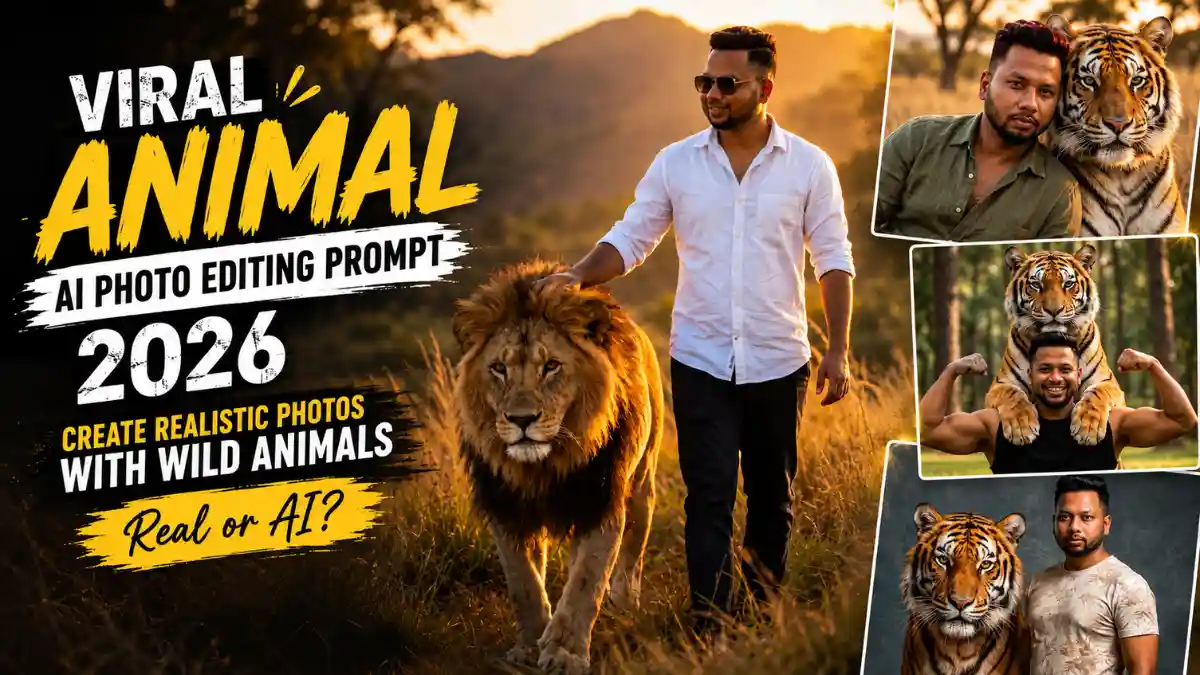
नमस्कार दोस्तों! अपनी Photo के ठीक पीछे खड़ा Bengal Tiger, कंधे पर उसके पंजे या Golden Sunset में साथ चलता Lion—सुनने में ये किसी Wildlife Movie के Scenes लगते हैं, लेकिन अब ऐसे Portraits AI से बनाए जा रहे हैं। मजेदार बात ये है कि Photo शानदार बनाना आसान है, पर उसे सच में खींची हुई Photo जैसा दिखाना थोड़ा मुश्किल है।
मैंने इसी चीज को ध्यान में रखकर अलग-अलग Viral Animal AI Photo Editing Prompt तैयार किए। Results देखते समय मुझे सबसे ज्यादा फर्क Tiger के Fur या 8K Quality से नहीं, बल्कि Face Identity, Animal का सही Size, Paws और Human-Animal Contact से पड़ा। इनमें से एक भी चीज गलत हो जाए तो आंख तुरंत पकड़ लेती है कि Photo AI वाली है।
इस लेख में अलग Realistic Animal AI Photo Editing Prompt हैं—Forest Tiger से लेकर Studio Portrait और Lion Walk तक। साथ में मैं बताऊंगा कि कौन-से Look में क्या Check करना है, Reference Photo कैसी रखें और Result को ज्यादा Realistic कैसे बनाएं।
Tiger या Lion सिर्फ साथ खड़ा हो, इतना काफी नहीं—Scene में Connection भी दिखना चाहिए
दोस्तों, Wild Animal AI Photo Editing Prompt for Boys में मुझे सबसे ज्यादा फर्क Animal के Look से नहीं, बल्कि उसके Interaction से पड़ता दिखा। Tiger पीछे शांत खड़ा हो, पास बैठा हो या उसके Paws Boy के Shoulders पर हों—Pose ऐसा होना चाहिए कि दोनों अलग-अलग Images को जोड़कर बनाए हुए न लगें।
इसी वजह से इन Prompts में हर बार सिर्फ Tiger का Background नहीं बदला गया। Forest का Confident Standing Look, Sunset में Close Portrait, Studio Photoshoot, Shoulder-Paw Moment और Lion के साथ Walking Scene—हर Concept की अपनी छोटी-सी Story है। यही Variety Photos को एक जैसे AI Template से बचाती है और हर Realistic Animal AI Photo Editing Prompt को अलग Visual Feel देती है।
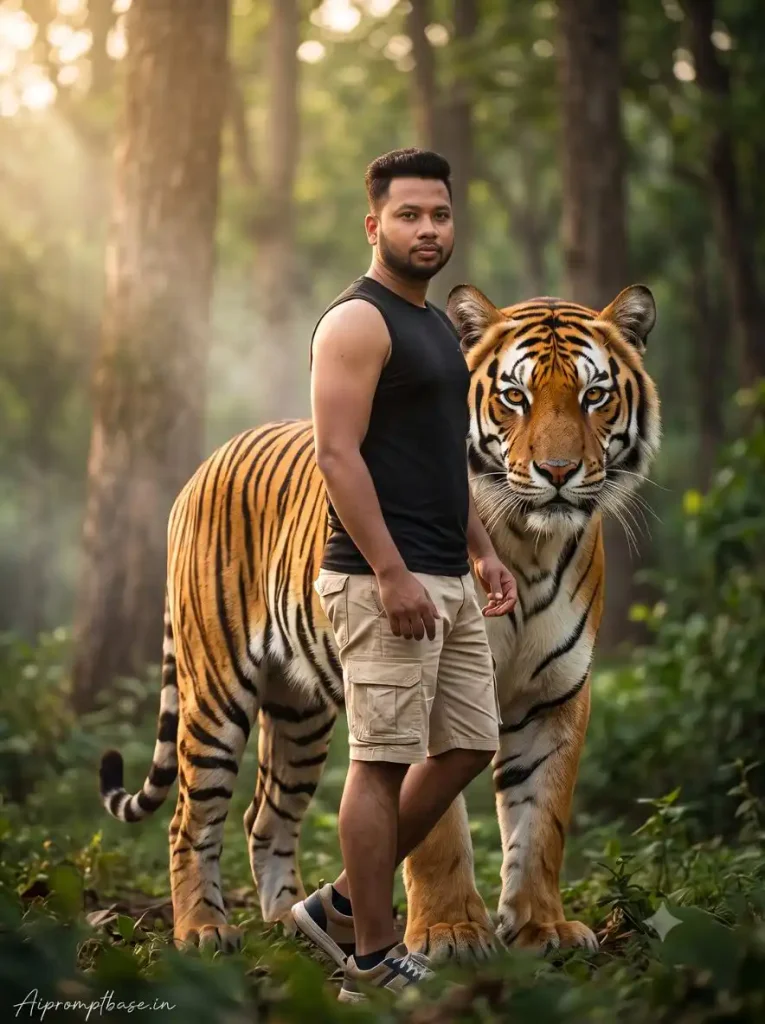
1. Forest में Bengal Tiger के साथ Powerful Cinematic Portrait
यह Tiger With Boy AI Photo Prompt Forest, Golden-Hour Light और पीछे खड़े Bengal Tiger के साथ Clean Wildlife Look देता है। Result में खासकर Tiger का Size और Boy से Distance देखें—दोनों सही हों तो Scene काफी Natural लगता है।
यह भी देखे:- Latest Trending Couples Joyful Photo Editing Prompt
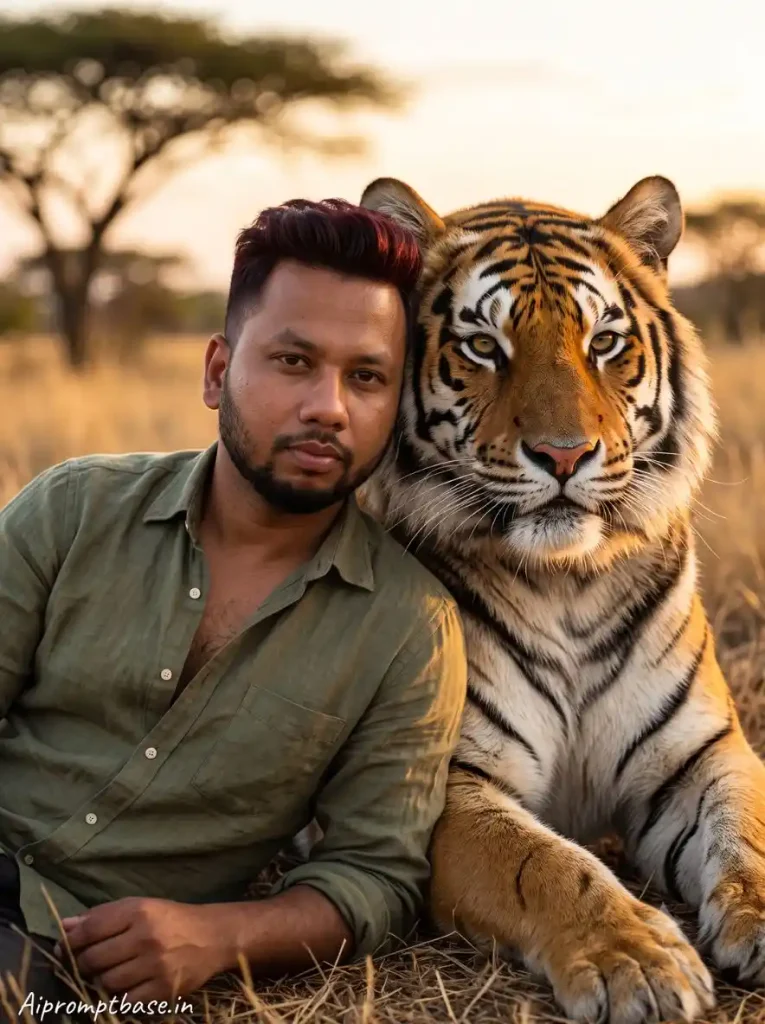
2. Sunset में Siberian Tiger के साथ Rugged Wildlife Look
Dry-Grass Meadow और Sunset Light इस Realistic Animal AI Photo Editing Prompt को Wildlife Photoshoot जैसी Feel देते हैं। मैंने ऐसे Look में Face के साथ Tiger के Fur पर पड़ती Sunset Light देखना ज्यादा जरूरी पाया—दोनों की Lighting Match हो तो Result काफी Real लगता है।
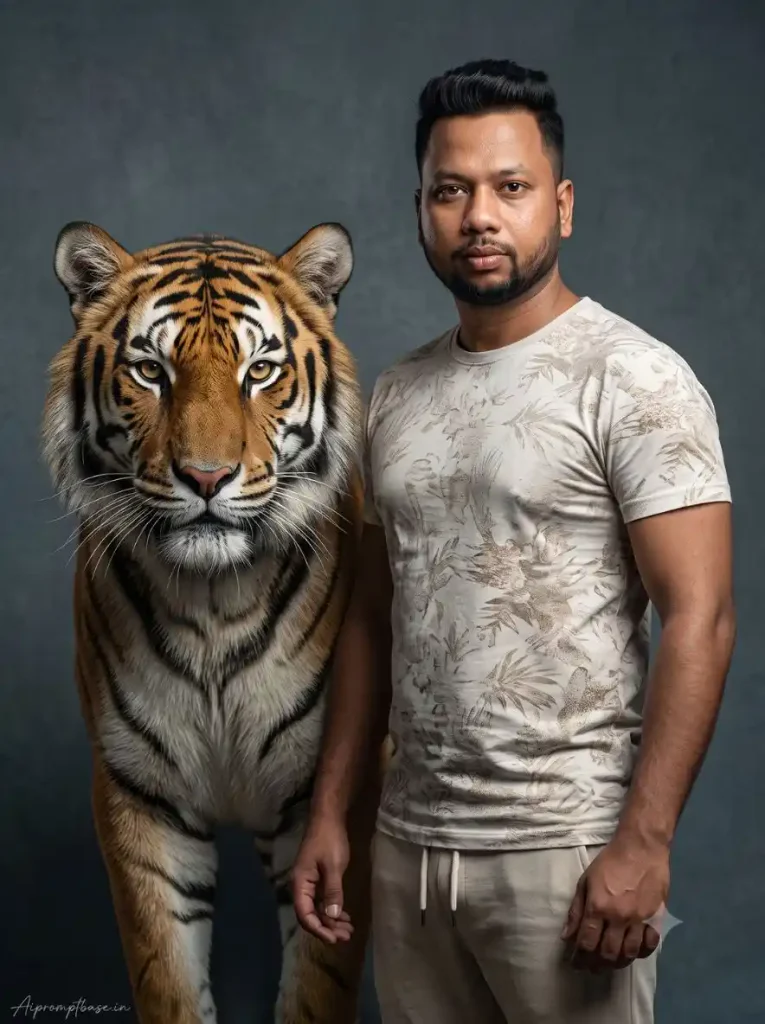
3. Bengal Tiger के साथ Premium Studio Photoshoot
यहां Forest नहीं, बल्कि Boy और Tiger को एक Clean Studio Portrait में रखा गया है। इस Viral Animal AI Photo Editing Prompt में Simple Background की वजह से Tiger Fur, Eyes और दोनों Subjects की Shadows ज्यादा साफ दिखती हैं—Final करते समय इन्हें जरूर Check करें।
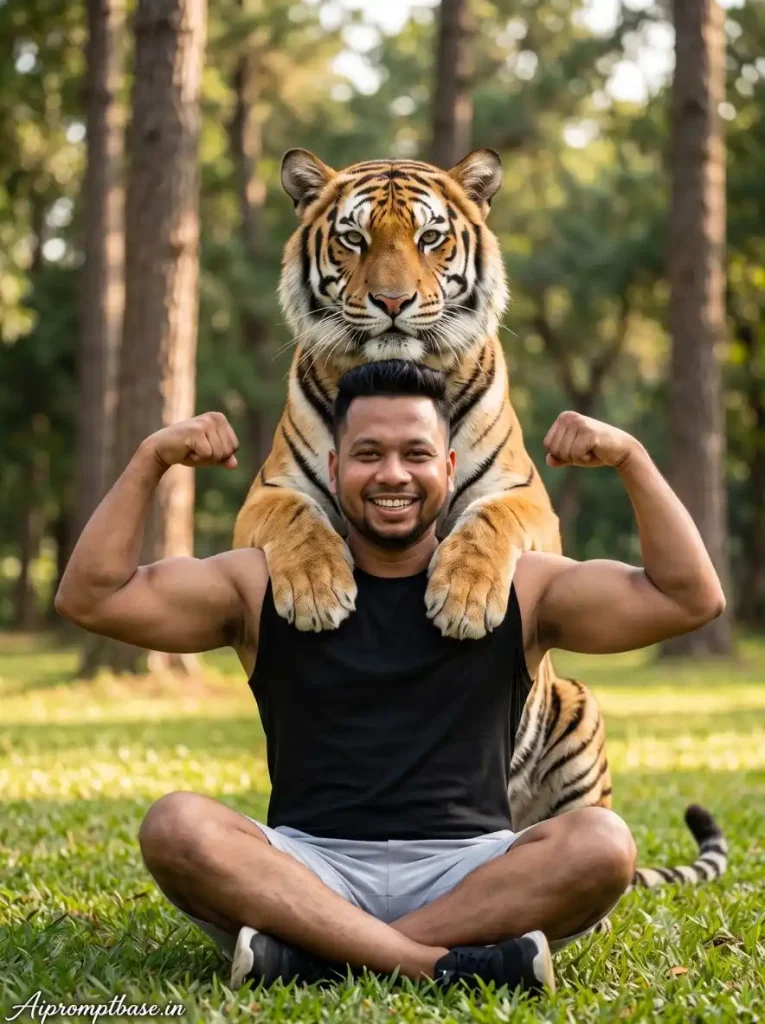
4. कंधों पर Tiger के Paws—इस Look पर नजर जरूर रुकेगी
यह पूरी List का सबसे Unusual Concept है—Boy Biceps Flex कर रहा है और पीछे Tiger के Paws उसके Shoulders पर हैं। इस Viral AI Photo Prompt for Boys 2026 में सबसे पहले Shoulder-Paw Contact देखें; यहीं छोटी Anatomy Mistake पूरे Scene को AI जैसा बना सकती है।
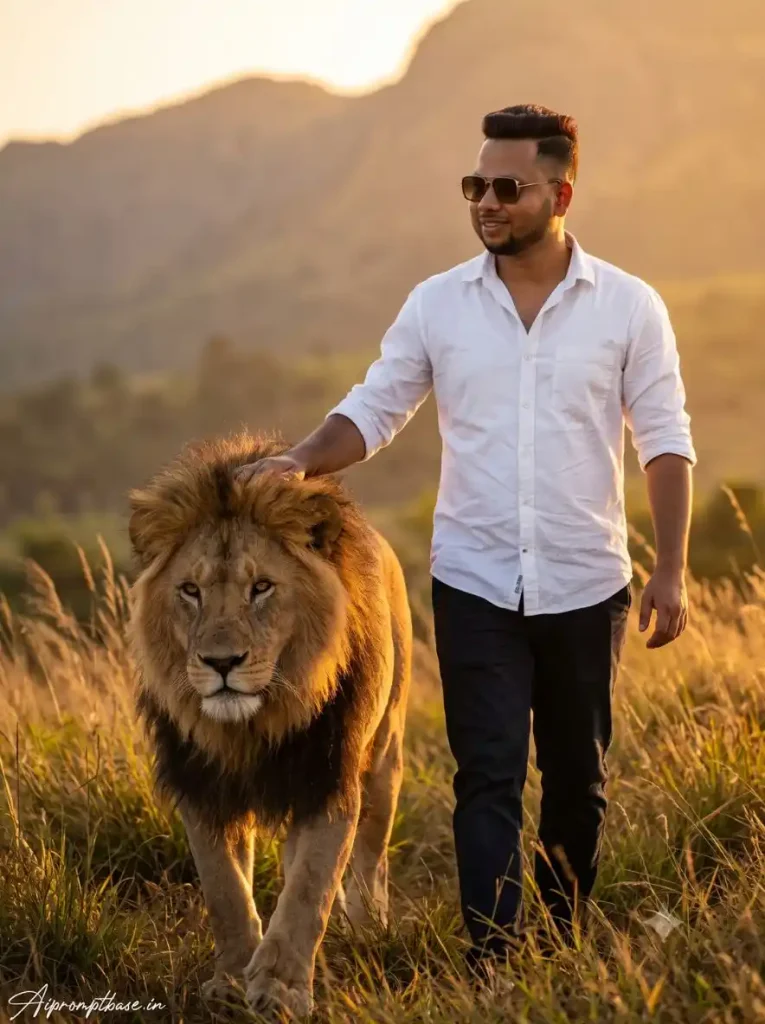
5. Lion के साथ Golden Sunset Walk – Powerful लेकिन Calm Look
इस बार Tiger की जगह Golden-Hour में साथ चलता Lion है, जिससे Photo का Mood बिल्कुल बदल जाता है। इस Realistic Animal AI Photo Editing Prompt में खासकर Lion की Mane पर रखा Hand और Walking Legs/Paws Natural निकलें तो पूरा Scene किसी Adventure Photoshoot जैसा लगता है।
अपनी Photo के साथ Tiger या Lion जोड़ना है? ये तरीका Follow करें
दोस्तों, अच्छा Viral Animal AI Photo Editing Prompt होने के बाद भी Result काफी हद तक आपकी Reference Photo पर निर्भर करता है। कोशिश करें कि ऐसी Photo लें जिसमें Face साफ, Skin Natural और Hair अच्छी तरह Visible हों। अगर Prompt में Full-body या Walking Scene है, तो सिर्फ बहुत ज्यादा Cropped Selfie के बजाय Body का कुछ हिस्सा दिखने वाली Photo ज्यादा काम की रहेगी।
- ऊपर दिए Looks में से पसंद का Realistic Animal AI Photo Editing Prompt पूरा Copy करें।
- ChatGPT या Gemini में अपनी Clear Reference Photo Upload करें।
- उसी के साथ पूरा Prompt Paste करके Image Generate करें।
- सबसे पहले Original Photo से Face, Hair और Skin Tone Match करके देखें।
- अब Tiger/Lion का Size, Eyes, Fur और Paws Check करें।
- जहां Animal और Boy Touch कर रहे हैं—जैसे Paw on Shoulder या Hand on Lion Mane—उस हिस्से को Zoom जरूर करें।
- आखिर में Ground देखें: Paws, Feet और Shadows सही जगह हों और Lighting दोनों Subjects पर एक Direction से आती लगे।
- Face सही है लेकिन Animal की कोई छोटी Detail खराब है, तो पूरा Prompt बदलने के बजाय उसी Prompt की एक और Generation Try करें।
इन Prompts को ChatGPT और Gemini AI Photo Editing Prompt for Boys दोनों तरह के compatible workflows में Try किया जा सकता है। मेरे हिसाब से यहां पहली Generation को ही Final मानने से बेहतर है 2–3 Results Compare करना—जिसमें Face आपका लगे और Tiger/Lion सच में उसी जगह खड़ा महसूस हो, वही सबसे अच्छा Result है।
यह भी देखे:- Instagram Viral Monsoon AI Photo Prompt for Girls, Boys, Couples
पहली Image शानदार हो सकती है, लेकिन क्या वह सच में Real लग रही है?
दोस्तों, Realistic Animal AI Photo Editing Prompt इस्तेमाल करते समय मैंने एक चीज Notice की—सबसे ज्यादा Cinematic दिखने वाला Result जरूरी नहीं कि सबसे अच्छा हो। किसी Image में Tiger बेहद शानदार बन सकता है, लेकिन अगर उसका Size थोड़ा गलत है, Paws जमीन पर ठीक से नहीं टिक रहे या Boy और Tiger की Shadows Match नहीं कर रहीं, तो Zoom करते ही AI Edit पकड़ में आ जाता है।
इसलिए मैं पहली Generation देखकर Final नहीं करूंगा। 2–3 Results Compare करके उस Photo को चुनना बेहतर है जिसमें Face Natural हो, Animal का Scale सही लगे और Human-Animal Contact believable हो। Effects थोड़े कम भी हों तो चलेगा—अच्छे Viral Animal AI Photo Editing Prompt की असली जीत यही है कि Viewer एक पल के लिए सोचे, “ये Photo सच में खींची गई है क्या?”
Photo AI वाली लग रही है? Prompt इस्तेमाल करते समय ये बातें काम आएंगी
दोस्तों, Realistic Animal AI Photo Editing Prompt से Natural Result चाहिए तो सिर्फ 8K और Cinematic Words पर भरोसा मत रखिए। मैंने ऐसे Animal Portraits में पाया कि Reference Photo, Camera Angle और Lighting का सही Match रखने से Tiger या Lion Scene में ज्यादा Naturally Fit होता है और Floating Paws, गलत Size या pasted-looking Animal जैसी Problems कम हो सकती हैं।
- Scene के हिसाब से Reference Photo दें: Standing Tiger Prompt के लिए साफ Standing/Medium-body Photo और Walking Lion Look के लिए Body दिखाई देने वाली Photo बेहतर रहेगी। इससे AI को Pose कम Guess करना पड़ेगा।
- बहुत Cropped Selfie Avoid करें: Full-body Wild Animal AI Photo Editing Prompt for Boys में सिर्फ Face वाली Selfie देने पर Body और Perspective का बड़ा हिस्सा AI को खुद बनाना पड़ता है।
- एक ही Lighting रखें: Prompt में Golden Hour है तो Human और Animal दोनों के लिए वही Light Direction रखें। अलग-अलग Lighting Instructions जोड़ने से pasted वाला Look आ सकता है।
- Animal का Scale साफ लिखें: Tiger/Lion को “massive” लिखने के साथ उसकी subject के पास natural, anatomically realistic proportion भी specify करें, ताकि Animal बेवजह Giant न बने।
- Ground Contact Prompt में बताएं:
paws naturally planted on the ground with realistic weight and contact shadowsजैसी Instruction Animal को Floating दिखने से बचाने में मदद कर सकती है। - Touch वाले Scene को स्पष्ट करें: Paw Shoulder पर है या Hand Lion की Mane पर—उस Contact को साफ describe करें। जितनी Ambiguous Instruction होगी, Fingers, Fur और Paws के Merge होने की संभावना उतनी बढ़ सकती है।
मेरे हिसाब से Viral Animal AI Photo Editing Prompt में सबसे काम की Trick यही है—AI को सिर्फ क्या बनाना है मत बताइए, बल्कि Human और Animal एक ही Real Photograph का हिस्सा कैसे दिखने चाहिए, यह भी Prompt में साफ रखिए। इससे Heavy Effects के बिना भी Result ज्यादा Natural और believable निकल सकता है।
Tiger के साथ Close Photo में Realism यहीं बनता या बिगड़ता है
दोस्तों, Tiger With Boy AI Photo Prompt में Tiger जितना Subject के करीब होगा, उतना ही AI के लिए दोनों को Naturally Connect करना मुश्किल हो सकता है। खासकर Tiger का Paw Shoulder पर रखना या Boy का हाथ Animal के Fur पर होना—ऐसे Scenes में anatomy और physical contact सही रखने की Instructions Prompt में साफ होना जरूरी है।
बेहतर Result के लिए Prompt में इन Details को Clear रखें:
- Natural Paws: Tiger के Paws anatomically correct हों और Shoulder पर realistic weight के साथ Rest करें।
- Correct Eye Direction: दोनों Eyes का आकार और Gaze Natural तथा Consistent रहे।
- Clean Fur Contact: Fur कपड़ों, Fingers या Skin के अंदर Merge न हो; Edges साफ और Natural रहें।
- Realistic Touch: Paw Shoulder पर हो या Hand Mane पर—Contact में सही pressure, shadow और depth दिखाई दे।
- Natural Animal Scale: Tiger Powerful और बड़ा दिखे, लेकिन Human और Camera Distance के हिसाब से proportion realistic रहे।
मेरे Experience में Realistic Animal AI Photo Editing Prompt में “Tiger beside the boy” जैसी छोटी Instruction से ज्यादा अच्छा Result तब मिलता है जब Tiger कहां है, कितना पास है और Human के साथ कैसे Interact कर रहा है यह साफ लिखा हो। AI को Scene Guess करने के लिए जितनी कम जगह मिलेगी, Close-contact Portrait उतना ज्यादा believable निकलने की संभावना रहती है।
एक ही Tiger Look क्यों? यहां हर Prompt का Mood अलग रखा है
अगर आपको Viral AI Photo Prompt for Boys 2026 के लिए कुछ अलग चाहिए, तो सिर्फ Forest वाला पहला Prompt ही Try करने की जरूरत नहीं है। Studio Look ज्यादा Premium है, Shoulder-Paw वाला Concept ज्यादा Unusual है और Lion Walk थोड़ा शांत लेकिन Powerful Portrait देता है।
यानी अपनी Reference Photo और पसंद के हिसाब से Look चुनिए। अच्छा Viral Animal AI Photo Editing Prompt वही नहीं जो सबसे ज्यादा Dramatic हो—जो आपकी Photo के साथ सबसे Natural बैठे, वही ज्यादा काम का है।
FAQ अक्सर पूछे जाने वाले सवाल
Tiger के साथ अपनी Realistic AI Photo कैसे बनाएं?
Clear Reference Photo Upload करके पसंद का Tiger With Boy AI Photo Prompt इस्तेमाल करें। Generate होने के बाद Face के साथ Paws, Fur, Scale और Shadows Check करें।
क्या ये Prompts Gemini में काम कर सकते हैं?
इन्हें compatible image-generation workflow में Gemini AI Photo Editing Prompt for Boys के रूप में Try किया जा सकता है।
Animal सही है लेकिन Face बदल गया तो?
Heavy-filter वाली Photo से बचें और Prompt में मौजूद Identity Instructions न हटाएं। उसी Prompt के साथ दूसरी Generation भी Try करें।
Tiger या Lion को Realistic कैसे दिखाएं?
सिर्फ Fur Detail नहीं—correct anatomy, natural size, ground contact, matching shadows और lighting ज्यादा जरूरी हैं।
निष्कर्ष
दोस्तों, Viral Animal AI Photo Editing Prompt का असली मजा सिर्फ Tiger या Lion के साथ Photo बनाने में नहीं, बल्कि ऐसा Scene तैयार करने में है जिसे देखकर एक पल के लिए लगे—ये Photo आखिर खींची कहां गई? Forest में साथ खड़ा Tiger हो, Shoulder पर उसके Paws हों या Sunset में Lion के साथ Walking Shot, हर Look का अपना अलग Moment है।
अगर आप Realistic Animal AI Photo Editing Prompt इस्तेमाल कर रहे हैं, तो Reference Photo और Prompt में Natural Proportions, सही Lighting और Human-Animal Interaction को Priority दें। यही छोटी चीजें Animal को Background में जोड़ा हुआ दिखाने के बजाय उसी Photograph का हिस्सा बनाने में मदद करती हैं। अब अपना पसंदीदा Look चुनिए और इस Wild Animal Trend को अपनी Photo के साथ Try कीजिए।
नीचे लिखे अन्य लेख भी देखे:-