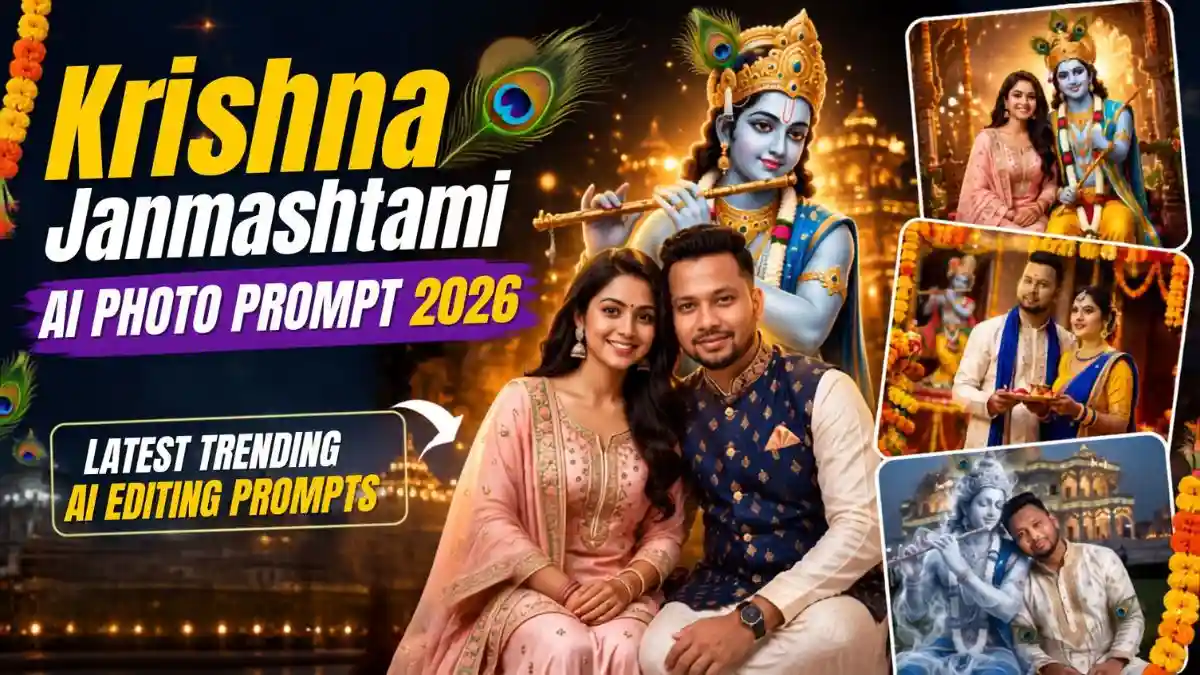
कृष्ण जन्माष्टमी भारत के सबसे रंगीन और खूबसूरत त्योहारों में से एक है। भगवान कृष्ण के जन्म का यह पर्व फूलों, दीयों, मोर पंख, मंदिर की रौनक और खूबसूरत traditional outfits से और भी खास बन जाता है। लेकिन 2026 में Janmashtami का यही खूबसूरत अंदाज AI Photo Editing में भी trend कर रहा है। लोग अपनी simple photos को Krishna, decorated temples, jhula और festive lights के साथ ऐसी images में बदल रहे हैं, जिन्हें Instagram, WhatsApp Status और profile picture पर खूब पसंद किया जा रहा है।
और दोस्तों, अच्छी बात यह है कि इसके लिए आपको professional photo shoot कराने की जरूरत नहीं है। सही Krishna Janmashtami AI Photo Prompt और अपनी clear reference photo से आप भी ऐसा look बना सकते हैं। इस लेख में आपको latest Janmashtami AI Photo Editing Prompts का सही इस्तेमाल और realistic result पाने का आसान तरीका मिलेगा। चलिए देखते हैं आपकी simple photo को इस Janmashtami कितना खास बनाया जा सकता है।
दोस्तों, सिर्फ “Krishna + Temple + 8K” लिख देने से realistic Janmashtami photo नहीं बनती। कई बार AI face बदल देता है, skin जरूरत से ज्यादा smooth कर देता है या पूरा scene cartoon जैसा दिखने लगता है। result के लिए मैंने इन prompts में तीन चीजों पर ज्यादा ध्यान दिया है—original face की identity, natural lighting और realistic scene composition। यानी AI को सिर्फ क्या बनाना है नहीं, बल्कि कैसे natural दिखाना है यह भी बताया गया है।
इसी वजह से नीचे मिलने वाले Krishna Janmashtami AI Photo Editing Prompt में Face Lock, skin texture, कपड़ों की detailing, pose और camera-style जैसी जरूरी बातें पहले से शामिल हैं। इससे आपको prompt को बार-बार खुद सुधारने की मेहनत कम करनी पड़ेगी।
Krishna Janmashtami AI Photo Prompt कैसे इस्तेमाल करें?
बहुत आसान है दोस्तों। आपको कोई complicated editing सीखने की जरूरत नहीं है।
Step 1: अपनी एक साफ और high-quality photo चुनें। Face सामने से या हल्के natural angle में हो तो बेहतर रहेगा।
Step 2:ChatGPT या Gemini को अपने मोबाईल में खोले, उसमें अपनी reference photo upload करें।
Step 3: नीचे दिए अपने पसंदीदा Krishna Janmashtami AI Photo Editing Prompt को पूरा copy करके paste करें।
Step 4: अगर tool aspect ratio चुनने देता है तो 3:4 vertical रखें। Instagram और mobile viewing के लिए यह format काफी अच्छा रहेगा।
Step 5: पहली image perfect न आए तो prompt बदलने के बजाय एक-दो बार regenerate करें। खासकर face और hands को ध्यान से check करें।
Important: Prompt में दिया गया Face Lock वाला हिस्सा हटाने की गलती न करें। अगर आपका main goal अपना original face रखना है, तो यही हिस्सा सबसे ज्यादा important है।
1. Krishna के साथ Grand Temple में Traditional Boy Portrait
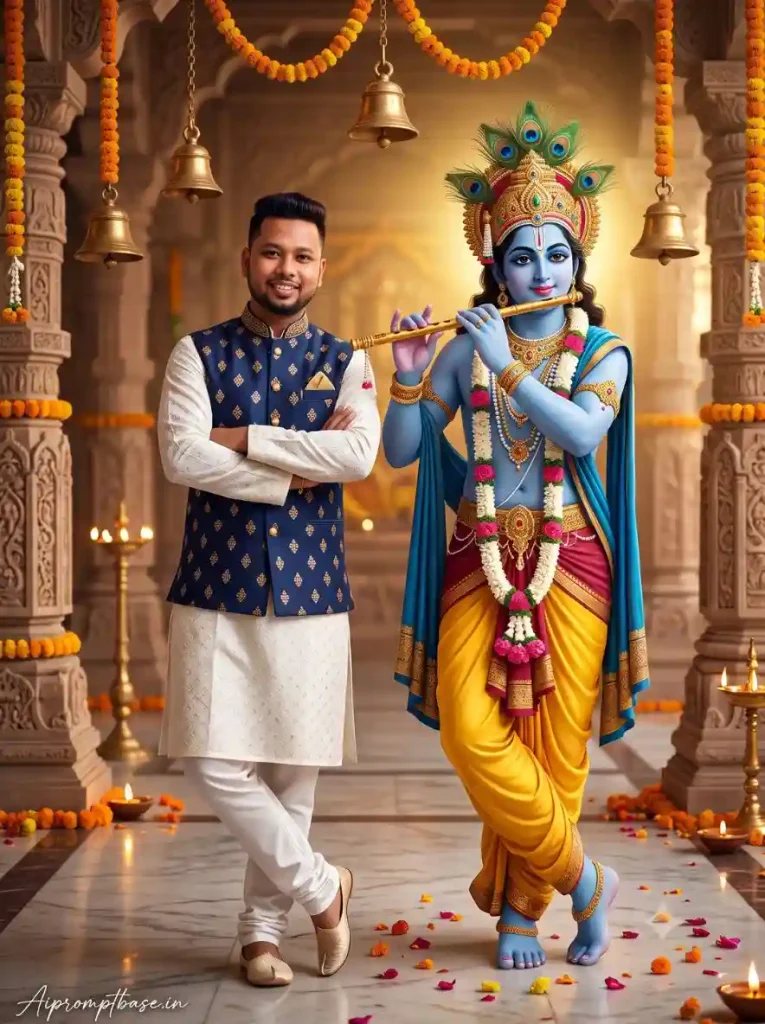
अगर आपको Boys के लिए Krishna Janmashtami AI Photo Editing करनी है और photo में traditional लेकिन premium look चाहिए, तो यह पहला prompt काफी शानदार है।
इसमें white kurta-pajama, embroidered Nehru jacket, Krishna की flute, peacock-feather crown और decorated temple का setup है। मेरे हिसाब से boys के लिए यह सबसे safe starting option है, क्योंकि इसमें festive look भी आता है और photo बहुत ज्यादा artificial भी नहीं लगती।
Create a photorealistic image of a young man standing beside Lord Krishna inside a grand, beautifully decorated Indian temple, matching the following exact composition: the young man is standing on the LEFT side of the frame with his arms crossed over his chest and one leg slightly crossed in front of the other. He is wearing a traditional white embroidered kurta-pajama with a dark navy blue heavily embroidered Nehru jacket featuring intricate golden floral patterns, golden buttons and a pocket square. He has thick, naturally styled black hair and a pleasant subtle smile, looking directly toward the camera. On the RIGHT side, Lord Krishna is standing beside him in a graceful pose, playing a golden flute near his lips, with blue skin, an elaborate golden jeweled crown decorated with peacock feathers, traditional gold jewelry, multiple necklaces and floral garlands, a bright yellow dhoti and a rich royal blue embroidered shawl. Krishna should have the exact traditional divine appearance, elegant posture and detailed ornaments. The entire scene is inside a luxurious Indian temple with carved cream-colored stone pillars, numerous hanging brass temple bells, orange and yellow marigold flower garlands hanging from the pillars and ceiling, warm glowing diyas placed throughout the temple, scattered pink and red flower petals on the polished marble floor, and a beautiful softly blurred temple background filled with warm golden lights. Use a centered full-body portrait composition, vertical framing, eye-level camera angle, realistic professional photography, warm cinematic golden lighting, shallow depth of field, highly detailed realistic clothing and jewelry, natural skin texture and realistic hands and feet. MOST IMPORTANTLY, use the uploaded image ONLY as the facial identity reference for the young man. Apply a strong face lock / identity lock and reproduce the exact facial identity from the uploaded reference image on the young man, preserving his recognizable face shape, facial proportions, eyes, eyebrows, nose, lips, cheeks, jawline, forehead, skin tone and natural facial characteristics. Do not create a similar-looking person and do not alter or beautify the referenced face. The uploaded face must remain clearly recognizable as the same person while naturally adapting to the head angle, expression, lighting and perspective of this scene. Keep everything else exactly as described: the man’s body, clothing, hairstyle, pose and proportions must remain natural and consistent, while Krishna, the temple, decorations, lighting and entire environment remain unchanged. The final result should look like a real professional photograph of the person from the uploaded face reference standing beside Krishna in this exact temple setting, not an illustration, painting, cartoon or generic AI character. ASPECT RATIO: 3:4 vertical TEXT / SIGNATURE: Add “Aipromptbase.in” bottom-left, handwritten signature-style, thin cursive strokes, small size, subtle premium elegance, white/soft off-white. negative prompt: no Ai Effect, no cartoonist effect, no face resheping.
2. Couple के लिए Vrindavan-Style Janmashtami Portrait
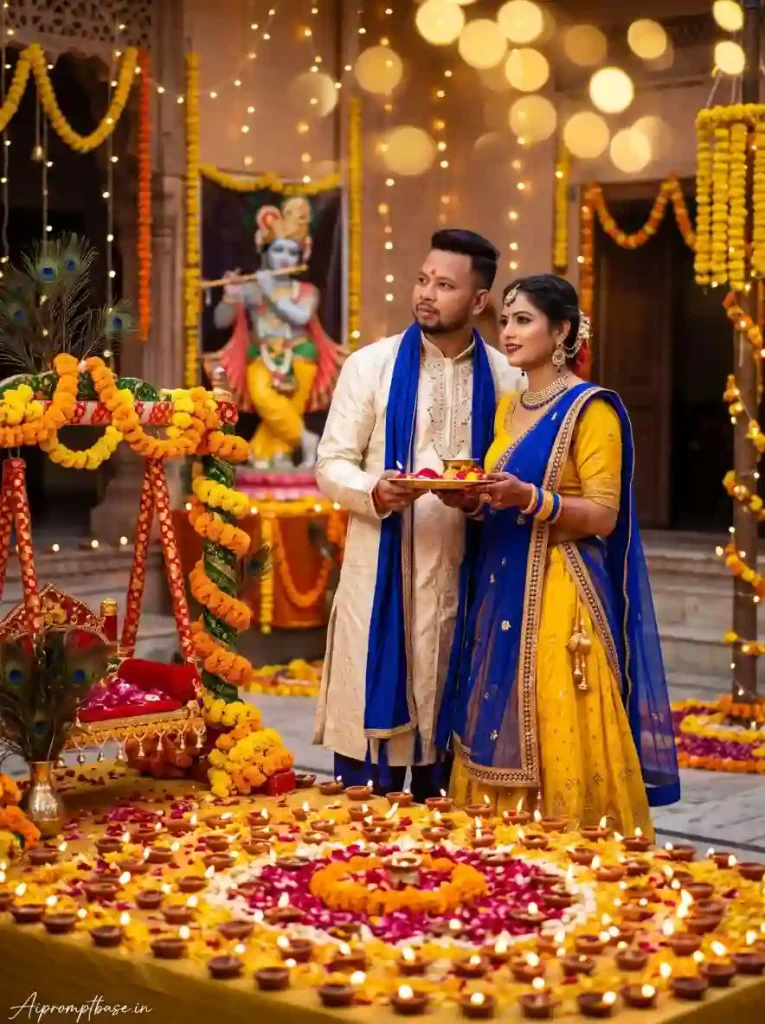
Couples के लिए यह Radha Krishna Janmashtami AI Prompt काफी सुंदर concept देता है। Boy और girl traditional outfits में Krishna idol के सामने दिखाई देते हैं और आसपास diyas, marigold flowers तथा warm lights का festive माहौल रहता है। ऐसी image बनाते समय दोनों की clear reference photos इस्तेमाल करना ज्यादा अच्छा रहता है। मैंने prompt में दोनों faces के लिए strict identity preservation रखा है ताकि AI unnecessary beautification न करे।
FACE LOCK – EXACT REFERENCE MATCH: Both uploaded reference photos must guide the facial appearance of the final result. Maintain an exact reference-based facial identity ultra HD with no creative changes to the face. Do not reshape, beautify, retouch, smooth, enhance, age, de-age, or reconstruct the face. Preserve the subject’s real facial structure, natural skin texture, hairstyle, age, and expression exactly as shown. Avoid artificial perfection and AI-generated facial characteristics. Ensure ultra-HD face quality, realistic skin detail, and authentic human appearance. Create a beautiful Krishna Janmashtami couple portrait in a decorated Vrindavan-inspired temple courtyard. Dress the boy in an ivory embroidered kurta with a royal-blue stole and the girl in a yellow lehenga with a royal-blue dupatta and traditional jewellery. Show them standing together holding a decorated puja thali while looking toward a beautiful Krishna idol in the background. Surround the courtyard with hundreds of diyas, marigold garlands, peacock-feather decorations, flower petals and warm fairy lights. Add a flower-decorated Krishna jhula nearby and dreamy golden bokeh. Premium festive photography, natural poses, cinematic lighting, DSLR realism, HDR, ultra-detailed, 8K, vertical 4:5. No face distortion, no text, no watermark. ASPECT RATIO: 3:4 vertical TEXT / SIGNATURE: Add “Aipromptbase.in” bottom-left, handwritten signature-style, thin cursive strokes, small size, subtle premium elegance, white/soft off-white.
3. Royal Jhula पर Krishna के साथ Girls Festive Look
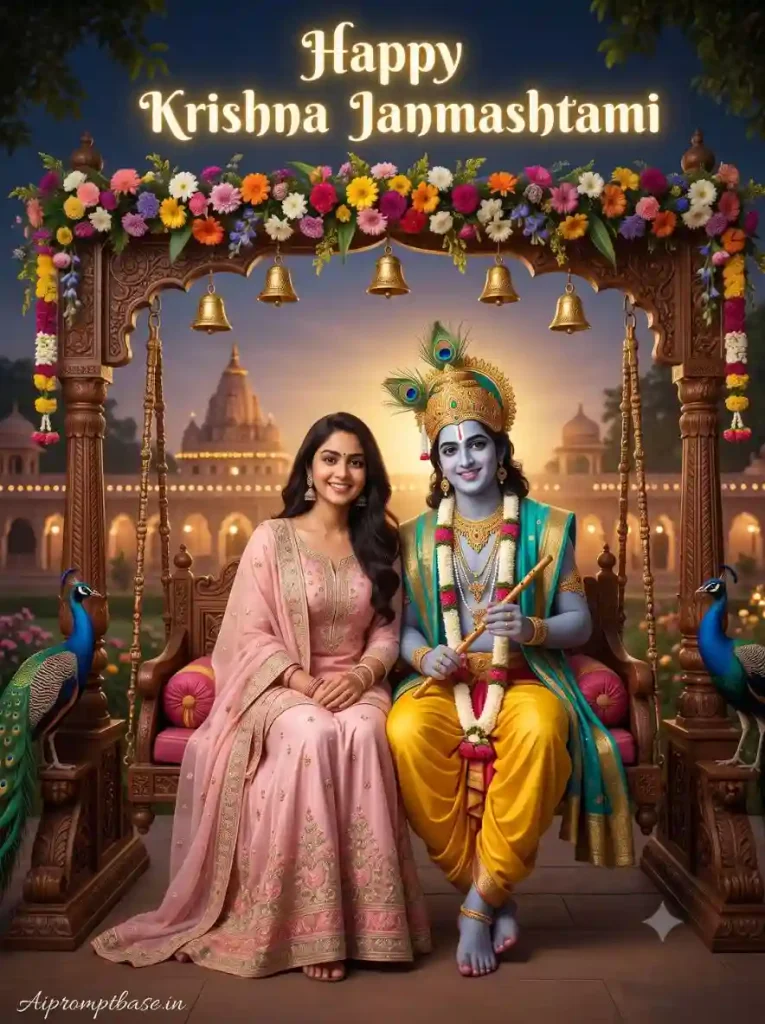
अगर आपको normal temple photo से थोड़ा हटकर dreamy और royal Janmashtami AI Photo Editing for Boys and Girls style चाहिए, तो यह prompt try कर सकते हैं। इसमें decorated royal jhula, Krishna, flowers, golden chains, peacocks और Vrindavan-style palace temple का combination है। Festival greeting या Instagram portrait के लिए यह look काफी eye-catching बन सकता है।
Use uploaded reference photos as fixed facial identity references. Keep the subject’s face unchanged and completely recognizable. Preserve the exact natural facial structure, proportions, eyes, nose, lips, cheeks, jawline, skin texture, hairstyle, age, and expression. No reshaping, beautification, retouching, skin smoothing, age transformation, or AI facial modification. The face should retain genuine human characteristics and realistic imperfections, with ultra-HD clarity and natural photographic detail. Base the female character’s appearance on my reference portrait, faithfully carrying forward her recognizable face, natural hairstyle, complexion and facial proportions. Create an extravagant Janmashtami evening portrait where she sits beside Lord Krishna on a richly carved royal wooden jhula suspended from ornate golden chains. Give her a flowing pastel-pink traditional outfit with delicate silver embroidery. Krishna wears a vibrant yellow dhoti, turquoise-gold shawl, jeweled crown and peacock feathers while holding his flute. Cover the swing canopy with colorful flowers and golden bells, place elegant peacocks around the scene, and show an illuminated Vrindavan-style palace-temple in the distance. Add tasteful glowing “Happy Krishna Janmashtami” typography above. Magical evening illumination, premium festival poster aesthetic, photorealistic details, HDR. ASPECT RATIO: 3:4 vertical TEXT / SIGNATURE: Add “Aipromptbase.in” bottom-left, handwritten signature-style, thin cursive strokes, small size, subtle premium elegance, white/soft off-white.
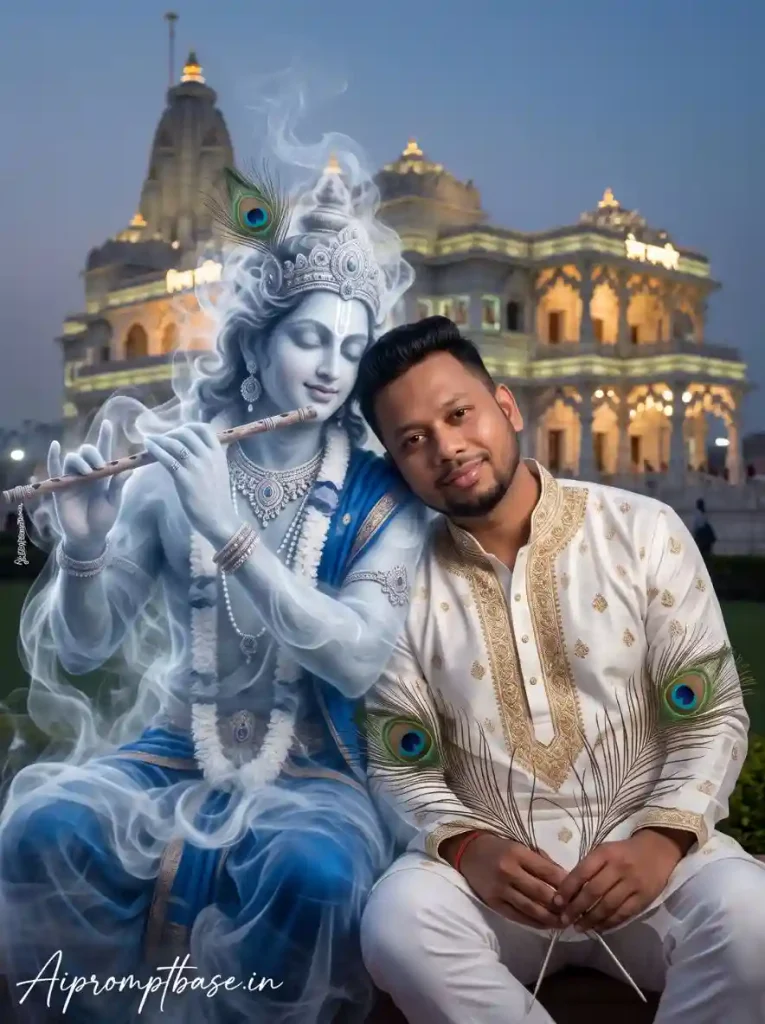
4. Prem Mandir के सामने Smoky Krishna Cinematic Look
कुछ अलग try करना है तो यह Janmashtami Photo Editing Prompt सबसे interesting options में से एक है। इसमें Krishna को normal idol की जगह ethereal smoke form में दिखाया गया है, जिससे पूरा scene cinematic और थोड़ा magical लगता है।
इस तरह के prompt में realism maintain करना थोड़ा मुश्किल होता है, इसलिए face को natural रखने और smoke effect को subtle रखने पर ज्यादा ध्यान दें। ज्यादा smoke होने पर image जल्दी AI-generated लग सकती है।
Use uploaded reference images and lock the subject’s original face throughout the generation. The final face must remain 100% the same person and consistent with both references. Do not redesign, reshape, beautify, retouch, smooth, or enhance facial features. Preserve natural skin pores and texture, facial proportions, bone structure, hairstyle, age, and expression exactly. Do not introduce AI facial artifacts or an artificial beauty effect. Maintain ultra-HD clarity with realistic, fully human facial detail. Ultra-realistic cinematic portrait of a man sitting gracefully beside a divine Krishna figure made entirely of ethereal smoke in front of Prem Mandir. Outfit: white kurta with intricate golden embroidery and white pant, he holds delicate peacock feathers in one hand. he is slightly leaning her head on krishnas. white smokey shoulder while looking gently toward the cemara. Beside her, krishnas smoky form guggests royal blue and golden attire with subtle jewelry hinst,a bansuri (flute). ASPECT RATIO: 3:4 vertical TEXT / SIGNATURE: Add “Aipromptbase.in” bottom-left, handwritten signature-style, thin cursive strokes, small size, subtle premium elegance, white/soft off-white.
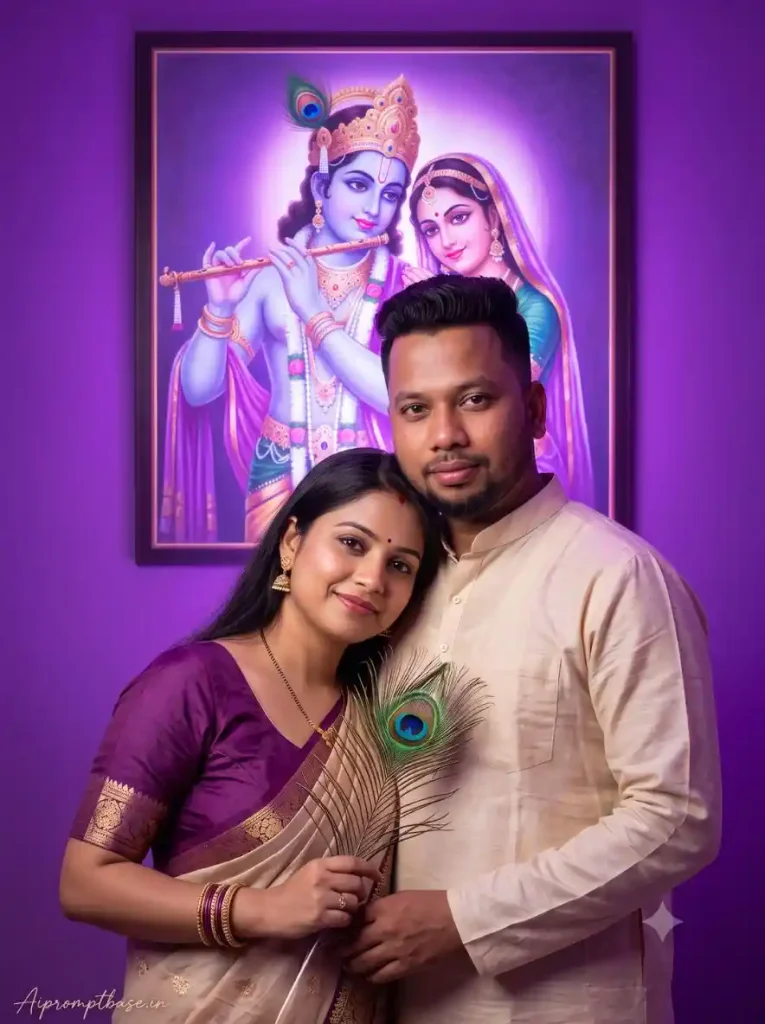
5. Glowing Radha-Krishna Painting के साथ Romantic Couple Photo
अगर आपको devotional के साथ थोड़ा romantic और Instagram-friendly look पसंद है, तो यह Radha Krishna Janmashtami AI Prompt आपके लिए है।
Purple background, glowing Radha-Krishna painting और peacock feather वाला setup couple portrait को काफी अलग feel देता है। Couple images में hands और face जरूर check करें, क्योंकि AI कभी-कभी pose सही होने के बावजूद fingers में छोटी mistakes कर देता है।
Use both reference photographs for high-fidelity facial preservation. The subject’s identity must remain visually identical to the original references. Do not change or optimize any facial feature. No reshaping, beautification, retouching, skin smoothing, age alteration, or artificial facial enhancement. Preserve the exact facial anatomy, natural proportions, skin texture, hairstyle, age, and expression shown in the references. The final output must maintain ultra-HD facial clarity and authentic real-human detail without an AI-generated appearance. Ultra-realistic 8K portrait of an Indian couple in a romantic pose against a vibrant purple background with a large, glowing Radhe-Krishna painting. Soft divine purple lighting. Pose: Girl slightly in front, leaning back on the boy’s chest. Boy stands behind her with one arm around her waist. Girl holds a beautiful peacock feather in her right hand and smiles softly at the camera. Boy also faces the camera directly with a warm, confident expression. Don’t change your face. ASPECT RATIO: 3:4 vertical TEXT / SIGNATURE: Add “Aipromptbase.in” bottom-left, handwritten signature-style, thin cursive strokes, small size, subtle premium elegance, white/soft off-white.
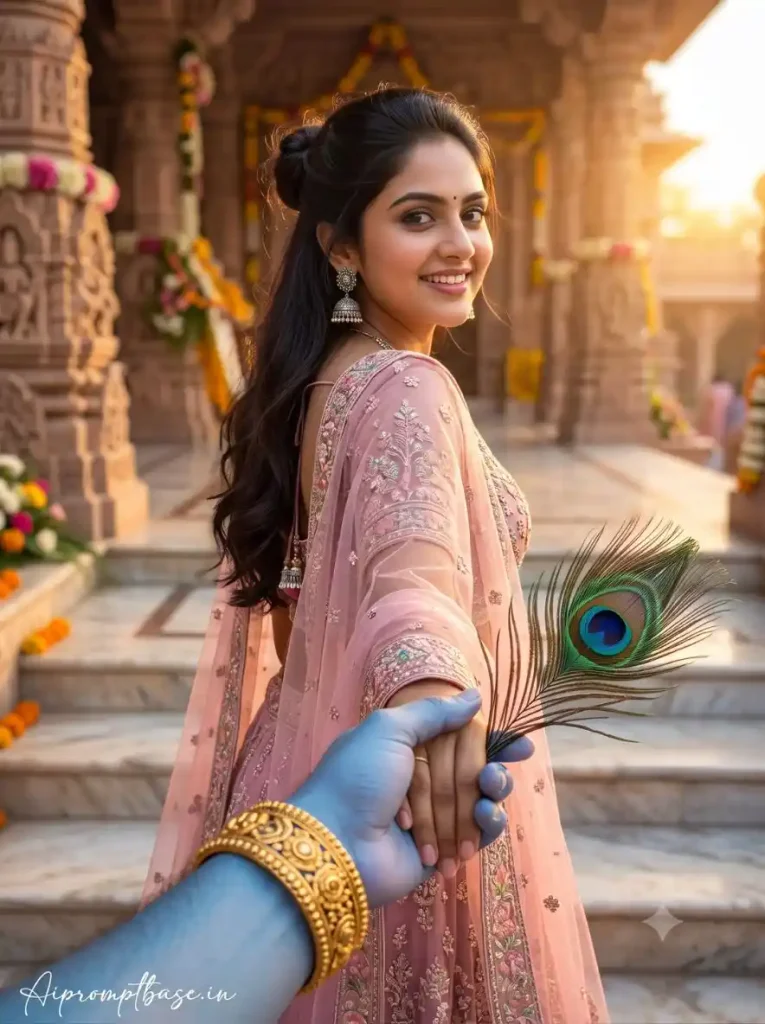
6. Krishna के साथ Follow-Me-To Temple Photo
यह वाला Janmashtami AI Prompts थोड़ा हटकर है और शायद इसी वजह से सबसे ज्यादा curiosity पैदा करता है। इसमें Krishna का blue hand foreground में दिखाई देता है और वह लड़की को हाथ पकड़कर मंदिर की तरफ ले जाते हुए दिखाई देते हैं।
इस Krishna Janmashtami AI Photo Prompt में perspective सबसे important है। अगर foreground hand natural size में आए और background सही depth में रहे, तो image काफी realistic और cinematic दिखाई दे सकती है।
Use uploaded reference photos and maintain strict consistency between the references and the final image. The face must be 100% faithful to the original person. No beautification, reshaping, facial enhancement, age adjustment, skin smoothing, feature replacement, or artificial reconstruction. Preserve every important identity characteristic, including facial structure, natural skin texture, hairstyle, age, and original expression. The final face should appear genuinely photographed, with ultra-HD detail, realistic skin pores, and fully human facial characteristics. A first-person “follow-me-to” style photograph. In the foreground, the blue-skinned hand of Lord Krishna is visible, wearing a golden ornate bracelet and holding a peacock feather. He is holding the hand of a beautiful young Indian woman from behind. The woman has long, wavy dark brown hair styled in a half-up bun, wearing elegant silver jhumka earrings. She is wearing a pastel pink heavily embroidered traditional lehenga choli with a sheer dupatta.The background is a grand ancient Indian temple with detailed marble carvings, temple steps, floral decorations, and warm golden sunlight. Cinematic composition, ultra realistic photography, soft natural lighting, shallow depth of field, dreamy spiritual atmosphere, highly detailed, realistic skin texture, luxury Indian aesthetic, 85mm lens look, ASPECT RATIO: 3:4 vertical TEXT / SIGNATURE: Add “Aipromptbase.in” bottom-left, handwritten signature-style, thin cursive strokes, small size, subtle premium elegance, white/soft off-white.
AI Photo को Realistic बनाने के लिए ये Tips जरूर आजमाएं
दोस्तों, prompt अच्छा होने के बाद भी result हर बार perfect आए, यह जरूरी नहीं है। मैंने ऐसे edits में सबसे ज्यादा फर्क reference photo और face preservation से देखा है, इसलिए ये छोटी-छोटी बातें जरूर ध्यान रखें।
Face Lock जरूर रहने दें: अगर चेहरा अपना ही रखना है तो prompt में दिया Face Lock हिस्सा हटाएं नहीं। सिर्फ “same face” लिखने से कई बार AI facial features को अपने हिसाब से बदल देता है।
Clear reference photo इस्तेमाल करें: Blur वाली selfie, ज्यादा filter या sunglasses वाली photo avoid करें। साफ चेहरा और natural lighting वाली image AI को identity समझने में ज्यादा मदद करती है।
पहले result को देखकर prompt पूरा मत बदलें: अगर face सही आया लेकिन background पसंद नहीं आया, तो सिर्फ background वाली चीज बदलें। हर बार पूरा prompt बदलने से अच्छा result मिलने के बजाय output और unpredictable हो सकता है।
Hands और eyes को जरूर check करें: Photo अच्छी दिख रही हो तो भी थोड़ा zoom करके fingers, eyes, jewellery और face proportions देख लें। AI images में छोटी mistakes अक्सर यहीं दिखाई देती हैं।
Over-editing से बचें: बहुत ज्यादा glow, smooth skin या beauty effect photo को artificial बना सकता है। Natural skin texture + soft cinematic lighting ज्यादा realistic और premium look देती है।
3:4 Ratio रखें: इन Janmashtami AI Photo Editing Prompts को vertical portrait के लिए तैयार किया गया है, इसलिए 3:4 ratio अच्छा रहेगा। इससे photo mobile screen, Instagram-style post और festive profile picture में भी अच्छी बैठती है।
अगर Face बदल जाए तो क्या करें?
यह problem काफी common है और इसका मतलब जरूरी नहीं कि Krishna Janmashtami AI Photo Prompt खराब है। सबसे पहले एक clearer reference photo लगाकर दोबारा generate करें। Face Lock instructions को हटाएं नहीं और अगर tool में reference strength या identity strength जैसी setting मिलती है, तो उसे ज्यादा consistent identity की तरफ रखें।
और हाँ, पहली generation में थोड़ा face difference दिखे तो तुरंत prompt को पूरी तरह बदलने की जरूरत नहीं है। कई बार अगली generation में वही prompt ज्यादा accurate result दे देता है।
हर AI Tool में Result एक जैसा क्यों नहीं आता?
दोस्तों, एक ही Krishna Janmashtami AI Photo Editing Prompt को अलग-अलग AI tools में चलाने पर result थोड़ा अलग आना बिल्कुल normal है। कोई tool face को बेहतर preserve कर सकता है, तो कोई background और lighting को ज्यादा अच्छे से handle करता है।
इसलिए किसी एक generation को देखकर prompt को judge न करें। Prompt की quality के साथ AI tool की image understanding भी final result पर असर डालती है।
FAQs अक्सर पूछे जाने वाले सवाल
Krishna Janmashtami AI Photo Prompt क्या है?
यह ऐसा AI prompt है जिसकी मदद से normal photo को Krishna Janmashtami theme में transform किया जा सकता है। इसमें Krishna, temple, diya, peacock feather, traditional outfits और festive lighting जैसे elements add किए जाते हैं।
क्या इन prompts में अपना face रख सकते हैं?
हाँ। इसके लिए अपनी reference photo upload करके prompt में दिए Face Lock / Identity Lock instructions का इस्तेमाल करें। हालांकि अलग-अलग AI tools में face preservation की accuracy अलग हो सकती है।
Janmashtami AI Photo Editing के लिए कौन-सी photo अच्छी रहेगी?
Clear, high-resolution और natural-light वाली photo सबसे बेहतर रहती है। बहुत ज्यादा filter लगी या blurry photo से face matching कमजोर हो सकता है।
क्या boys और girls दोनों के लिए ये Janmashtami AI Prompts काम करेंगे?
हाँ। इस collection में boys portrait, girls festive look और couple portraits तीनों तरह के concepts रखे गए हैं।
क्या AI से Radha Krishna वाली photo बनाई जा सकती है?
बिल्कुल। Prompt #5 में Radha-Krishna-inspired glowing background के साथ couple portrait का concept दिया गया है, जबकि दूसरे prompts में Krishna को temple और festive settings में दिखाया गया है।
Janmashtami AI Photo को Instagram पर लगाने के लिए कौन-सा ratio रखें?
Portrait images के लिए 3:4 vertical एक अच्छा option है। अगर किसी specific platform के लिए अलग size चाहिए, तो generation के बाद crop भी किया जा सकता है।
निष्कर्ष
Krishna Janmashtami AI Photo Prompt की सबसे अच्छी बात यही है कि इसके visuals पहले से ही इतने beautiful हैं—Krishna, peacock feather, flute, flowers, diyas, jhula और मंदिर की golden lights। इसलिए सही Krishna Janmashtami AI Photo Editing Prompt के साथ एक simple portrait भी काफी खास बन सकता है।
बस एक बात याद रखें दोस्तों—prompt जितना बड़ा होगा, result उतना अच्छा होगा, ऐसा जरूरी नहीं है। Clear reference photo, सही face lock और natural-looking scene ज्यादा important हैं।
अब ऊपर दिए 6 looks में से अपना favourite चुनिए, reference photo upload कीजिए और इस Janmashtami अपनी एक ऐसी photo बनाकर देखिए जिसे देखकर आपके दोस्त भी पूछ सकते हैं—“भाई, ये बनाई कैसे?” 😍 आपको कोन स prompt पसंद आया नीचे कमेन्ट करके जरूर बताए।
नमस्कार! मैं लवित राव हूँ। मैं AI Prompts, Gemini AI, ChatGPT और AI Image Editing पर काम करता हूँ। इस वेबसाइट पर मैं केवल वही प्रॉम्प्ट्स और गाइड्स शेयर करता हूँ जिन्हें मैं खुद टेस्ट करता हूँ, ताकि आपको सही, उपयोगी और आसानी से समझ आने वाली जानकारी मिल सके।

जन्माष्टमी