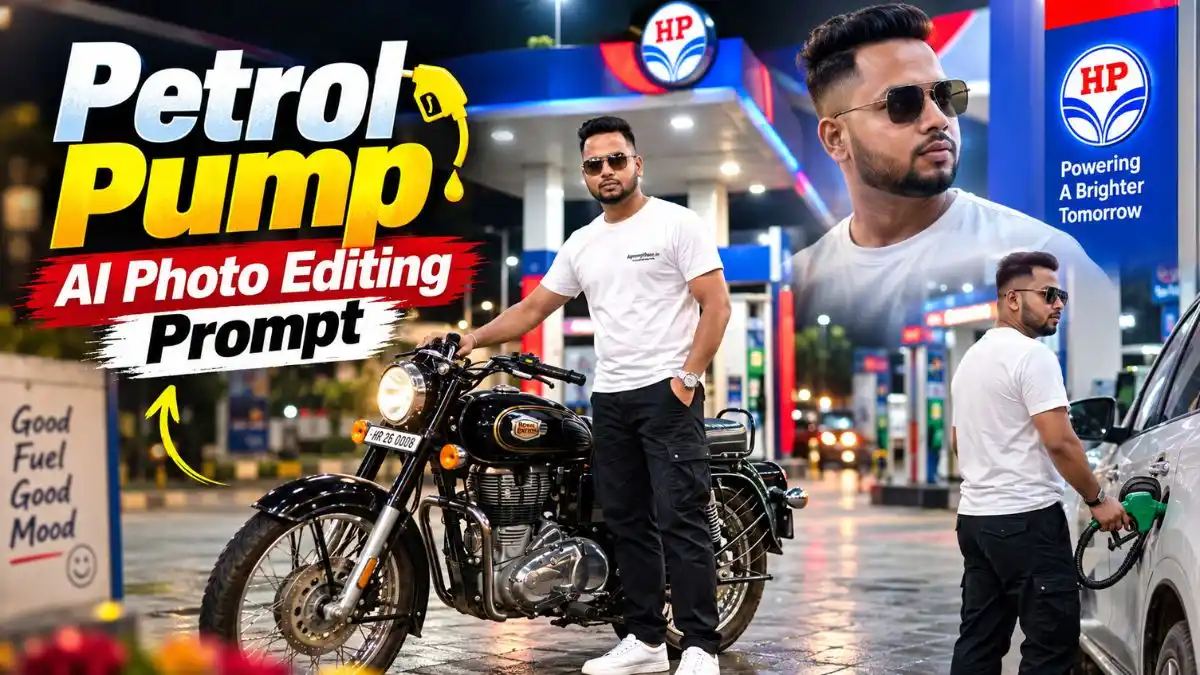
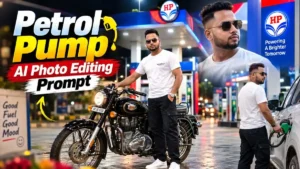
दोस्तों Social media पर इन दिनों Petrol Pump वाली AI Photos काफी देखने को मिल रही हैं। कोई रात में चमकते fuel station के सामने cinematic portrait बना रहा है, तो कोई bike, streetwear outfit और wet-road reflection के साथ पूरा photoshoot जैसा look तैयार कर रहा है। मजेदार बात यह है कि इसके लिए सच में Petrol Pump पर जाकर photoshoot करने की जरूरत नहीं है।
अपनी एक साफ Photo और सही Petrol Pump AI Photo Editing Prompt से ऐसा look बनाया जा सकता है। इस लेख में मैंने अलग-अलग Day, Evening और Night scenes के prompts रखे हैं, साथ में वो छोटी practical बातें भी बताई हैं जिनसे Photo सिर्फ stylish नहीं बल्कि natural और realistic भी लगे।
आखिर Petrol Pump वाली AI Photos इतनी पसंद क्यों आ रही हैं?
दोस्तों इस trend की सबसे खास बात इसका cinematic background है। रात में चमकता Petrol Pump, canopy की blue-white lights, fuel machines, wet road पर reflections और सामने stylish outfit में आपकी Photo—इन सबको साथ देखकर result किसी normal AI edit की बजाय proper outdoor photoshoot जैसा लगता है।
और हर Photo का look एक जैसा भी नहीं रखना पड़ता। इन्हीं Petrol Pump AI Photo Prompt से कहीं daylight streetwear look बनाया जा सकता है, कहीं evening walking shot और कहीं bike के साथ पूरा cinematic night scene। नीचे मैंने ऐसे ही 6 अलग-अलग looks के ready-to-use prompts दिए हैं, ताकि Photo देखकर आपको जो scene पसंद आए, उसे सीधे अपनी reference image के साथ बना सकें।
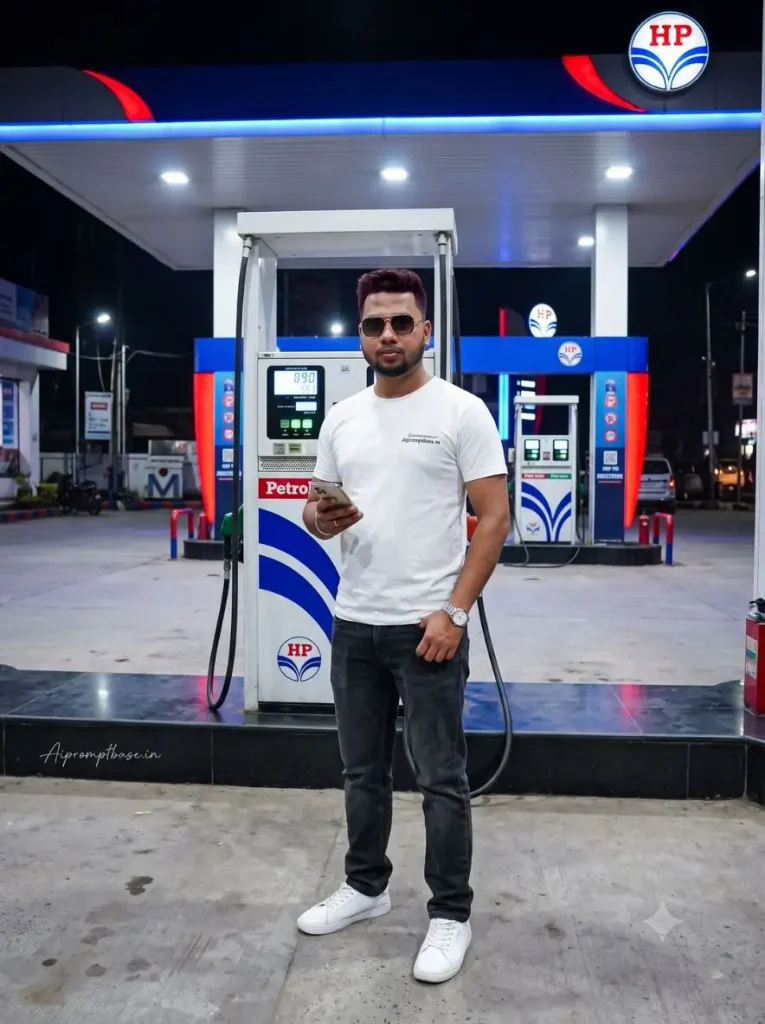
1. HP Petrol Pump Night Photo – Blue Lights के साथ Cinematic Look
इस Petrol Pump AI Photo Editing Prompt में white T-shirt और dark jeans के साथ HP Petrol Pump का night scene काफी clean लगता है। खासकर blue-white canopy lights और ground reflection Photo को बिना ज्यादा effects के cinematic feel देते हैं। बस final result में face और body का size fuel dispenser के मुकाबले natural जरूर देखें।
Create an ultra-realistic 8K HDR professional DSLR photograph using the uploaded person photo as the strict identity reference and the uploaded HP petrol pump photo as the exact background reference. ABSOLUTE FACE AND IDENTITY LOCK HIGHEST PRIORITY: Keep the exact same person and preserve the original face shape, forehead, eyebrows, eyes, nose, lips, cheeks, jawline, skin tone, age, hairline, hairstyle and natural facial proportions without any change. Do not beautify, reshape, smooth, stylize, regenerate or replace the face. Keep both eyes naturally sharp, realistic skin pores and authentic facial texture; the face must be the clearest element in the image. Change the outfit to a stylish white T-shirt with a small Aipromptbase.in logo on the chest, dark charcoal straight-fit jeans, white sneakers and a simple premium wristwatch, while keeping realistic head-to-body proportions. BACKGROUND LOCK: Keep the exact uploaded HP petrol pump scene unchanged, including the canopy, HP branding, fuel dispensers, forecourt, station layout, structures and nighttime environment; do not redesign or replace anything. Place the person naturally near the fuel dispenser, standing casually with one hand relaxed and the other lightly holding a smartphone. Match the existing blue-white nighttime station lighting, perspective, camera height, scale, shadows and subtle ground reflections so the person looks physically present in the original scene, not pasted into it. Professional full-frame DSLR, 50mm lens, realistic depth of field, natural skin texture, detailed hair and clothing, accurate hands and fingers, realistic body proportions, 8K HDR photorealism. No face change, blurry face, plastic skin, oversized body, small head, deformed hands, extra fingers, floating feet, wrong shadows, mismatched lighting, pasted-person effect, cartoon or CGI look. 3:4 vertical. Add Aipromptbase.in at the bottom-left in small, thin handwritten cursive, soft white/off-white.
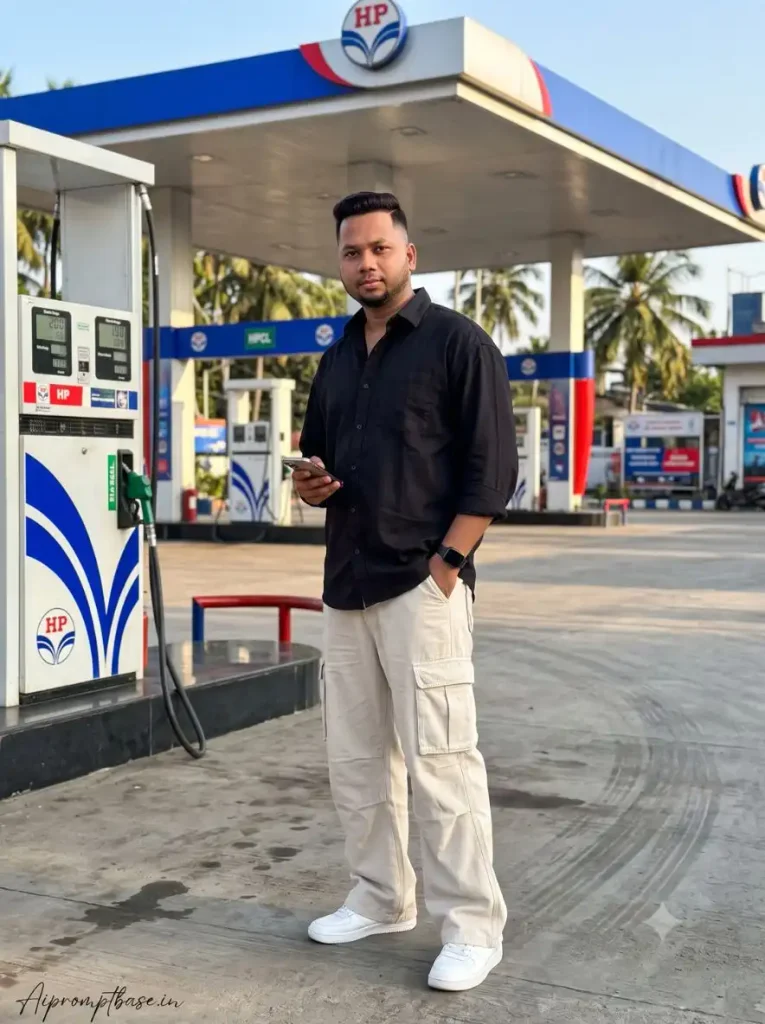
2. Daylight Petrol Pump Photo – Baggy Cargo Streetwear Look
अगर night वाली dark Photo से अलग bright look बनाना है, तो यह Trending Petrol Pump AI Photo Editing Prompt daylight में काफी अच्छा streetwear scene बनाता है। Black oversized shirt और beige baggy cargo pants Petrol Pump background के साथ naturally fit होते हैं। मैंने ऐसे full-body results में देखा है कि face के साथ feet, hands और body proportion सही हों तो Photo ज्यादा real लगती है।
Create an ultra-realistic 8K HDR professional DSLR photograph of the same person from the uploaded reference photo, naturally standing at the same HP petrol pump shown in the reference background. Identity preservation exact 100% face match: Use the uploaded person photo as the ONLY identity reference. Keep the EXACT SAME PERSON. Preserve the original facial identity, face shape, forehead, eyebrows, eyes, eyelids, nose, lips, cheeks, chin, jawline, skin tone, hairstyle, age appearance and natural facial proportions. Do not change the identity. Do not create a different person. Do not replace the face. Do not reshape or redesign any facial feature. Keep the face naturally recognizable as the same person from the uploaded reference. FACE CLARITY HD 8K QUALITY: Make the face extremely sharp, clear and highly detailed. Keep both eyes crystal clear with realistic iris details, natural catchlights and detailed eyelashes. Preserve realistic eyebrows, natural skin pores, fine skin texture and detailed lips. The face must remain the sharpest part of the image. No face blur, no plastic skin, no excessive smoothing and no artificial beauty filter. NEW OUTFIT: Change the original outfit completely. Dress the person in a stylish oversized black button-down shirt with a relaxed fit and slightly rolled sleeves. Pair it with loose-fitting light beige BAGGY CARGO PANTS with wide legs, realistic fabric folds, large side pockets and a modern streetwear style. Add clean white sneakers and a simple black wristwatch. Keep the outfit realistic, fashionable and naturally fitted to the persons original body proportions. POSE: The person is standing casually beside an HP fuel dispenser. His body is slightly angled away from the camera while his face turns toward the camera. One hand is placed naturally inside the cargo-pants pocket and the other hand holds a smartphone loosely near his waist. Maintain realistic hands, fingers, arms and body proportions. HP PETROL PUMP BACKGROUND: Use the uploaded HP petrol pump image as the exact environmental reference. Preserve the same HP canopy, fuel dispensers, station structure, signage, forecourt, palm trees and visible background elements. Do not replace the station with a generic petrol pump. LIGHTING: Create bright late-afternoon daylight with natural sunlight falling across the station. Match the light direction, brightness, shadows and color temperature between the person and the original background. Add realistic contact shadows beneath the sneakers and subtle natural reflections on the forecourt. PERSPECTIVE & SCALE: Match the persons height, size, camera distance and perspective to the reference background. Make the baggy pants, shoes and entire body correctly aligned with the ground. The person must look physically present at the petrol station, not pasted into the image. CAMERA: Professional full-frame DSLR, 50mm lens, eye-level camera angle, realistic depth of field, sharp facial focus, natural perspective, high dynamic range and professional street-fashion photography. IMAGE QUALITY: Ultra-realistic 8K HDR, HD face clarity, crystal-clear eyes, realistic skin pores, detailed hair, realistic shirt fabric, realistic baggy-pants folds, detailed cargo pockets, natural hands, accurate anatomy and professional DSLR quality. NEGATIVE INSTRUCTIONS: No identity change, no face replacement, no different person, no facial reshaping, no changed eyes, no changed nose, no changed lips, no blurry face, no plastic skin, no excessive beauty filter, no extra fingers, no missing fingers, no extra arms, no deformed hands, no distorted body, no tight pants, no skinny pants, no incorrect clothing folds, no floating feet, no wrong perspective, no mismatched lighting, no pasted-person effect, no cartoon, no illustration, no CGI appearance. TEXT/ SIGNATURE: Add Aipromptbase.in at the bottom-left corner, HANDWRITTEN SIGNATURE-STYLE typography, thin cursive strokes, small size, subtle premium elegance, white or soft off-white color. ASPECT RATIO 3:4 vertical
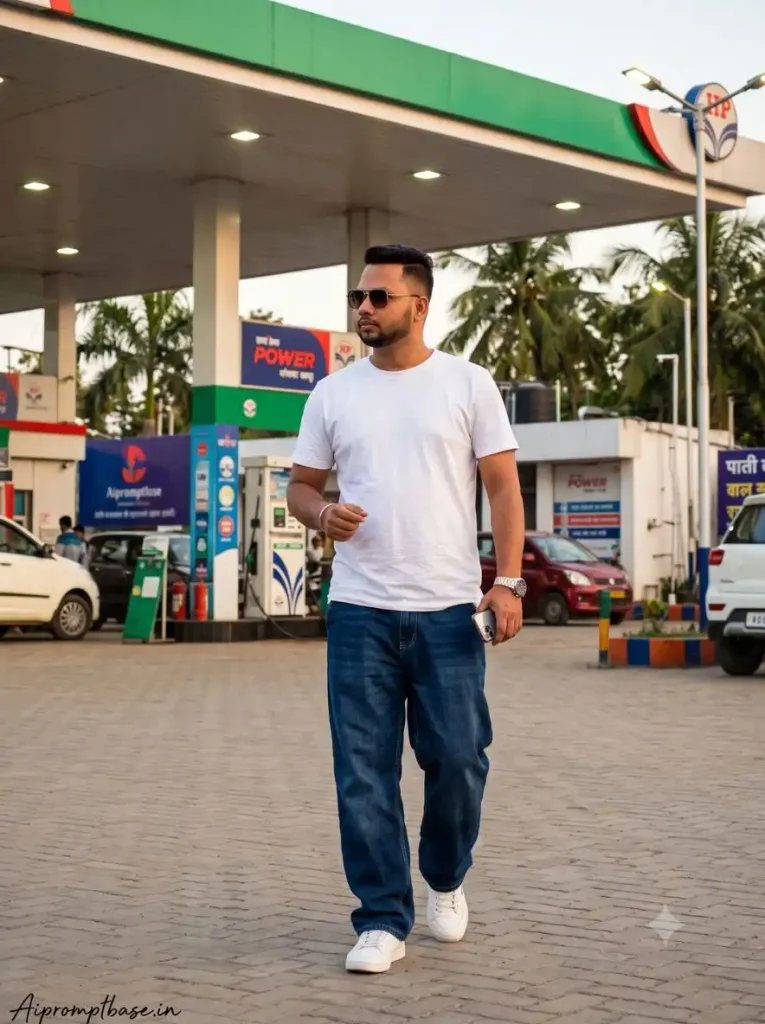
3. Walking Petrol Pump AI Photo Editing Prompt– Normal Pose से हटकर Cinematic Shot
इस Viral Petrol Pump AI Photo Prompt में सीधे खड़े होने की बजाय walking pose रखा गया है, इसलिए Photo में थोड़ा natural movement आता है। Evening sky, चालू canopy lights और denim look मिलकर इसे casual photoshoot वाली feel देते हैं। Walking result बनाते समय legs और shoes जरूर देखना, क्योंकि AI कई बार यहीं proportion बिगाड़ देता है।
Create an ultra-realistic 8K HDR professional DSLR photograph of the same person from the uploaded reference photo, naturally standing at the same HP petrol pump shown in the reference background. Identity preservation exact 100% face match: CREATE AN ULTRA-REALISTIC CINEMATIC 8K HDR PROFESSIONAL DSLR PHOTOGRAPH OF THE SAME PERSON FROM THE UPLOADED REFERENCE PHOTO NATURALLY WALKING THROUGH THE SAME HP PETROL PUMP ENVIRONMENT SHOWN IN THE BACKGROUND REFERENCE. STRICT IDENTITY EXACT 100% MATCH: Use the uploaded person photograph as the ONLY identity reference. Keep the EXACT SAME PERSON and preserve the original facial identity. Maintain the same face shape, forehead, eyebrows, eyes, eyelids, nose, lips, cheeks, chin, jawline, skin tone, hairstyle, age appearance and natural facial proportions. Do not replace, redesign, reshape or modify the face. Do not create a similar-looking model. The face must remain clearly recognizable as the same person from the uploaded photo. FACE CLARITY EXTREME HD: Render the face in extremely sharp 8K HD quality. Keep the eyes perfectly clear with realistic iris texture, natural catchlights and individual eyelashes. Preserve fine eyebrow hairs, natural skin pores, realistic skin texture and detailed lips. Keep the face in precise focus with no blur or artificial smoothing. NEW STREETWEAR OUTFIT: Completely change the persons original outfit. Dress him in a clean white plain T-shirt. Add dark blue DENIM JEANS, natural folds around the knees and realistic denim texture. The jeans must clearly look not slim or skinny. Add classic white sneakers with subtle grey details and a simple silver wristwatch. Keep the clothing realistic and naturally proportional to the persons body. POSE: Unlike the first prompt, the person is walking naturally across the petrol pump forecourt. His body faces slightly toward the camera while his face turns naturally toward the lens. One hand holds a smartphone casually and the other hand rests near the front pocket of the baggy jeans. Create natural walking movement with realistic leg positioning. Ensure both hands contain anatomically correct fingers. HP PETROL PUMP ENVIRONMENT: Use the uploaded HP petrol pump background as the exact reference. Preserve the recognizable HP green-and-white canopy, fuel dispensers, station signs, palm trees, forecourt and existing environmental arrangement. Do not generate a random petrol station. Keep the original perspective and station layout. EVENING LIGHTING: Create a beautiful early-evening atmosphere with a soft blue sky. The HP canopy lights are switched on, creating cool white and green illumination across the station. Add subtle warm evening light from the side of the frame. Match the lighting on the person with the surrounding petrol station. Create realistic shadows beneath the shoes and subtle reflections on the ground. COMPOSITION: Use a slightly lower camera angle to give the streetwear outfit a stylish fashion-photography appearance. Keep the persons face unobstructed and sharply focused. Show the baggy jeans clearly from waist to shoes while keeping the HP petrol pump recognizable in the background. PERSPECTIVE & SCALE: Correctly match the persons size, height, distance and perspective with the fuel dispensers and surrounding station structures. The shoes must naturally touch the ground. Make the entire person blend naturally into the original environment. CAMERA: Professional full-frame DSLR, 35mm lens, cinematic street-fashion photography, realistic depth of field, high dynamic range, natural perspective, sharp facial focus and realistic optical rendering. IMAGE QUALITY: Ultra-realistic 8K HDR, extreme HD facial clarity, crystal-clear eyes, realistic skin pores, detailed hair strands, realistic denim texture, natural T-shirt fabric, realistic oversized jacket, accurate baggy-jeans folds, realistic sneakers, anatomically correct hands and professional DSLR photorealism. MOOD: Modern, stylish, confident, youthful and natural. NEGATIVE INSTRUCTIONS: No identity change, no face swap, no different face, no generic model, no facial reshaping, no changed eyes, no changed nose, no changed lips, no blurry face, no plastic skin, no excessive smoothing, no skinny jeans, no tight pants, no slim-fit trousers, no extra fingers, no missing fingers, no extra arms, no deformed hands, no distorted legs, no floating feet, no wrong scale, no wrong perspective, no mismatched lighting, no pasted-person effect, no duplicate person, no cartoon, no painting, no illustration, no CGI appearance. TEXT/ SIGNATURE: Add Aipromptbase.in at the bottom-left corner, HANDWRITTEN SIGNATURE-STYLE typography, thin cursive strokes, small size, subtle premium elegance, white or soft off-white color. ASPECT RATIO 3:4 vertical
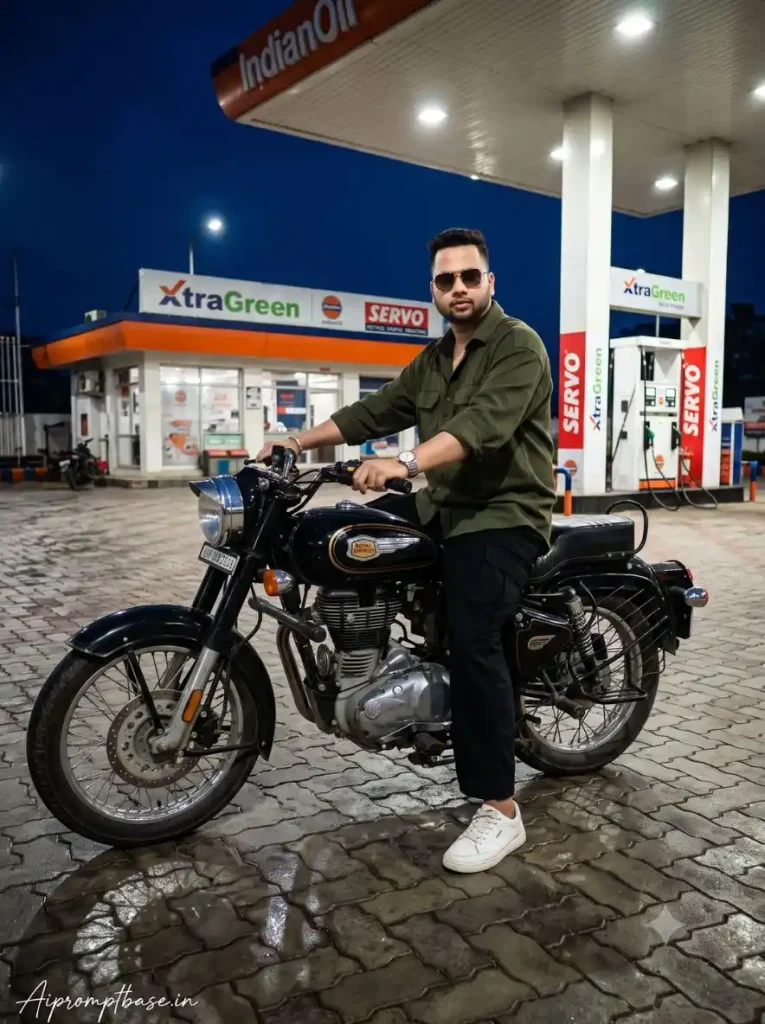
4. Bike के साथ Petrol Pump AI Photo Editing Prompt– Royal Enfield Cinematic Look
Petrol Pump की lights, Royal Enfield-style motorcycle और wet pavement का combination इस Petrol Pump Night AI Photo Prompt को काफी cinematic बनाता है। Night scene में bike पर पड़ती canopy lights और जमीन की reflections Photo में अच्छी depth लाती हैं। ऐसे result में मैंने face के साथ handlebar, wheels, hands और bike पर बैठने की position को check करना ज्यादा जरूरी पाया है।
Create an ultra-realistic 8K HDR professional DSLR photograph of the same person from the uploaded reference photo, naturally standing at the same HP petrol pump shown in the reference background. Identity preservation exact 100% face match: CREATE AN ULTRA-REALISTIC, HYPER-DETAILED CINEMATIC 8K HDR NIGHT PHOTOGRAPH OF THE SAME ADULT MAN FROM THE UPLOADED REFERENCE PHOTO, NATURALLY PRESENT AT THE SAME INDIANOIL PETROL PUMP SHOWN IN THE BACKGROUND REFERENCE. IDENTITY PRESERVATION EXACT 100% FACE MATCH: Use the uploaded person photo as the ONLY identity reference. Keep the EXACT SAME PERSON. Preserve the original facial identity, face shape, forehead, eyebrows, eyes, eyelids, nose, lips, cheeks, chin, jawline, skin tone, hairstyle, facial hair and natural facial proportions. Do not create a similar-looking person. Do not replace the face. Do not reshape, beautify, slim, widen, age or de-age the face. Do not change the eyes, nose, lips, beard or other recognizable facial features. FACE CLARITY EXTREME HD: The face must be extremely sharp, clear and highly detailed in 8K HD quality. Keep both eyes perfectly visible with realistic iris details, natural catchlights and individual eyelashes. Preserve realistic skin pores, natural skin texture, detailed eyebrows and authentic facial hair. The face must remain one of the sharpest areas of the photograph. No blurry face, no plastic skin, no excessive smoothing and no artificial beauty filter. MOTORCYCLE: Place the person naturally on a classic black Royal Enfield Bullet-style motorcycle. The motorcycle should have realistic chrome components, black fuel tank, detailed engine, round headlamp, realistic tires, mirrors, handlebars and authentic mechanical details. Do not distort the motorcycle or change its basic proportions. OUTFIT: Dress the person in a completely different stylish outfit: a dark olive-green oversized shirt, black relaxed-fit trousers, a simple silver wristwatch and clean white sneakers. Add realistic fabric folds and natural clothing texture. GLASSES: If glasses are present in the uploaded reference photo, preserve their recognizable shape and style. If not present, do not add unnecessary eyewear. POSE: The person is seated confidently on the motorcycle with both hands naturally holding the handlebars. His left foot rests firmly on the motorcycle footpeg while his right foot is planted naturally on the wet pavement for balance. Keep both legs anatomically correct and properly positioned. The body posture should look relaxed and confident, not exaggerated. PETROL PUMP BACKGROUND: Use the uploaded IndianOil petrol pump image as the exact environmental reference. Preserve the recognizable IndianOil station architecture, canopy shape, fuel dispensers, IndianOil branding, XtraGreen and Servo signage, lighting arrangement and surrounding structures. Do not replace the petrol station with a generic fuel station. NIGHT ENVIRONMENT: Create a deep dark-blue night sky with realistic petrol station illumination. The overhead canopy lights should glow brightly and naturally illuminate the motorcycle and subject. Add subtle red, orange, green and white light reflections from the petrol station signage and surrounding lights. GROUND: Preserve the wet grey interlocking-block pavement shown in the background reference. The wet surface should produce realistic reflections of the motorcycle wheels, canopy lights and colorful station lighting. Create accurate contact shadows beneath the motorcycle and the planted sneaker. LIGHTING: Use cinematic night lighting with cool ambient blue light and warm petrol-station highlights. Illuminate the persons face clearly without destroying the natural nighttime atmosphere. Add subtle rim light around the hair, shoulders and motorcycle edges. CAMERA: Professional full-frame DSLR camera, 50mm lens, f/1.8 aperture, eye-level three-quarter camera angle, realistic depth of field, cinematic bokeh, high dynamic range and professional night photography. COMPOSITION: Create a vertical cinematic composition with the motorcycle and person as the main foreground subjects. Keep the IndianOil canopy and station signage clearly recognizable in the background. Make the face sharp, the motorcycle highly detailed and the background naturally softened without losing the petrol-pump identity. IMAGE QUALITY: Ultra-realistic 8K HDR, extreme HD face clarity, realistic skin pores, detailed eyes, realistic hair, detailed facial hair, realistic clothing texture, accurate motorcycle mechanics, realistic chrome reflections, wet pavement reflections, natural shadows and professional DSLR photorealism. NEGATIVE INSTRUCTIONS: No identity change, no face replacement, no different person, no facial reshaping, no blurry face, no plastic skin, no excessive beauty filter, no distorted eyes, no extra fingers, no missing fingers, no extra arms, no extra legs, no deformed hands, no twisted legs, no floating feet, no distorted motorcycle, no bent wheels, no warped handlebars, no incorrect motorcycle anatomy, no wrong perspective, no unrealistic reflections, no pasted-person effect, no cartoon, no illustration, no CGI appearance. TEXT/ SIGNATURE: Add Aipromptbase.in at the bottom-left corner, HANDWRITTEN SIGNATURE-STYLE typography, thin cursive strokes, small size, subtle premium elegance, white or soft off-white color. ASPECT RATIO 3:4 vertical
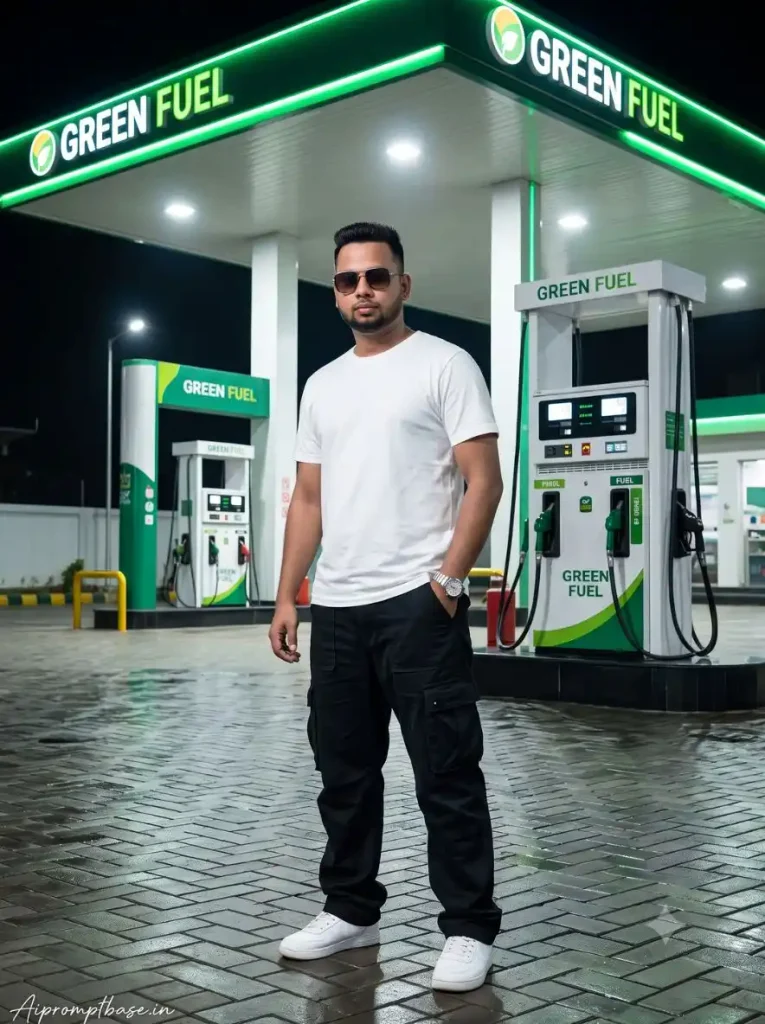
5. Green Fuel Petrol Pump Photo – Green Night Lighting वाला अलग Look
यह Petrol Pump AI Photo Editing Prompt traditional HP या IndianOil scene से हटकर Green Fuel station वाला modern night look देता है। Green-white canopy lighting और हल्का wet floor Photo को अलग visual feel देता है। यहां एक चीज जरूर देखें कि green light face पर बहुत ज्यादा न आए, वरना natural skin tone बदलकर Photo artificial लगने लगती है।
Create an ultra-realistic 8K HDR professional DSLR photograph of the same person from the uploaded reference photo, naturally standing at the same HP petrol pump shown in the reference background. Identity preservation exact 100% face match: Create an ultra-realistic cinematic 8K HDR professional DSLR photograph of the same person from the uploaded reference photo naturally standing at a modern Green Fuel petrol pump. Reference image instructions: Use the uploaded person photo as the ONLY identity reference for the person. If a petrol pump reference photo is uploaded, use it as the ONLY environmental reference. IDENTITY PRESERVATION EXACT 100% FACE MATCH: Keep the EXACT SAME PERSON from the uploaded reference photo. Preserve the original facial identity, face shape, forehead, eyebrows, eyes, eyelids, nose, lips, cheeks, chin, jawline, natural skin tone, hairstyle, facial hair if visible, age appearance and natural facial proportions. Do not replace the face. Do not create a similar-looking person. Do not reshape, redesign, beautify or modify the facial features. Do not age or de-age the person. FACE CLARITY EXTREME HD: Make the face extremely sharp, clear and highly detailed in 8K HD quality. Keep both eyes crystal clear with realistic iris details, natural catchlights and individual eyelashes. Preserve realistic eyebrow hairs, natural skin pores, fine facial texture and detailed lips. The face must remain the sharpest focal point of the photograph. No blurry face, no plastic skin, no excessive smoothing and no artificial beauty filter. NEW OUTFIT: Change the original outfit completely. Dress the person in a stylishplain white T-shirt. Pair it with BLACK BAGGY CARGO PANTS, realistic fabric folds and practical side pockets. Add clean white sneakers and a minimal silver wristwatch. The pants must clearly have a relaxed baggy streetwear fit, not skinny or tight. POSE: The person stands confidently near one of the fuel dispensers. His body is slightly turned toward the side while his face looks naturally toward the camera. One hand rests casually inside the baggy cargo-pants pocket while the other hand lightly holds the jacket near the chest. Keep the hands, fingers and arms anatomically correct. GREEN FUEL PETROL PUMP: Create a modern petrol station branded clearly as: GREEN FUEL The words GREEN FUEL must appear naturally on the main overhead canopy and station signage. Use a strong green-and-white visual identity throughout the station. Create a large modern green-and-white canopy, green structural pillars, clean fuel dispensers, digital price boards, safety cones and a spacious paved forecourt. The station should look like a realistic modern fuel station, not a fictional fantasy environment. GREEN FUEL BRANDING: Use clean, professional GREEN FUEL signage with green lettering on white panels and subtle darker-green accents. Keep the branding consistent across the canopy, fuel dispensers and small station signs. Do not use HP, IndianOil, Bharat Petroleum or any other petrol-company branding. NIGHT ENVIRONMENT: Create a deep blue night sky. The Green Fuel canopy is brightly illuminated with clean white and green LED lighting. The green lights should naturally illuminate the persons jacket, face and surrounding pavement. Add subtle reflections of the green-and-white lights on the slightly wet ground. LIGHTING: Use cinematic nighttime lighting. Combine cool blue ambient night light with bright green-and-white Green Fuel canopy illumination. Keep the face bright enough to show every facial detail while preserving the natural night atmosphere. Add a subtle green rim light around the jacket and hair. GROUND: Create realistic grey interlocking pavement with a slightly wet surface. Show believable reflections of the canopy lights, fuel dispensers, shoes and surrounding station lights. Add realistic contact shadows beneath the persons sneakers. COMPOSITION: Use a vertical environmental fashion composition. Keep the person in the center foreground and show a large portion of the Green Fuel station behind him. The GREEN FUEL canopy signage should be clearly visible without covering the persons face. CAMERA: Professional full-frame DSLR camera, 35mm wide-angle lens, eye-level camera height, realistic perspective, sharp facial focus, natural depth of field, cinematic night exposure and high dynamic range. IMAGE QUALITY: Ultra-realistic 8K HDR, HD face clarity, crystal-clear eyes, realistic skin pores, detailed hair strands, realistic jacket fabric, detailed baggy cargo pants, accurate hands, natural shadows, realistic reflections and professional DSLR photorealism. FINAL RESULT: The final image should look like a genuine professional fashion photograph captured at a real modern GREEN FUEL petrol pump at night. NEGATIVE INSTRUCTIONS: No HP logo, no IndianOil logo, no Bharat Petroleum logo, no other petrol brand, no identity change, no face replacement, no different person, no facial reshaping, no blurry face, no plastic skin, no skinny pants, no tight pants, no extra fingers, no missing fingers, no extra arms, no deformed hands, no floating feet, no wrong perspective, no mismatched lighting, no pasted-person effect, no duplicate person, no cartoon, no illustration, no CGI appearance. TEXT/ SIGNATURE: Add Aipromptbase.in at the bottom-left corner, HANDWRITTEN SIGNATURE-STYLE typography, thin cursive strokes, small size, subtle premium elegance, white or soft off-white color. ASPECT RATIO 3:4 vertical
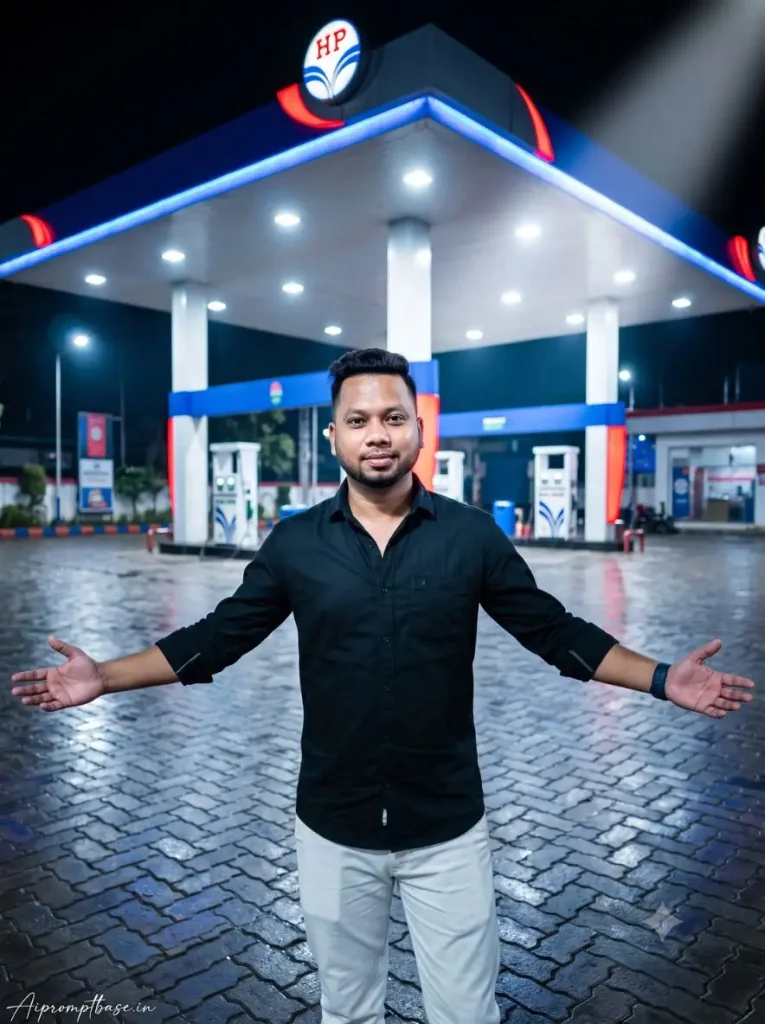
6. Open Arms Petrol Pump Photo – Instagram के लिए Eye-Catching Look
इस Petrol Pump AI Photo Prompt में open-arms pose और पीछे बड़ा illuminated HP canopy Photo को काफी wide और dramatic appearance देता है। Black shirt और white trousers का contrast night background में साफ दिखाई देता है, इसलिए Instagram Viral Petrol Pump AI Photo जैसे look के लिए composition अच्छा बैठता है। Result बनाते समय दोनों hands, fingers और shoulder proportion को zoom करके जरूर check करें।
Create an ultra-realistic cinematic 8K HDR professional DSLR photograph using the uploaded person photo as the strict face and identity reference. Recreate the reference scene at a modern HP petrol pump at night, with a large brightly illuminated white canopy with blue and red HP accents, clearly visible HP logo at the top, multiple fuel dispensers behind the person, bright canopy lights, dark night sky and a wet interlocking-tile forecourt reflecting blue, white and red station lights. ABSOLUTE FACE AND IDENTITY LOCK HIGHEST PRIORITY: Keep the exact same person from the uploaded photo with 100% recognizable identity. Preserve the exact face shape, forehead, eyebrows, natural eyes, nose, lips, cheeks, chin, jawline, skin tone, age, hairline, hairstyle and natural facial proportions. Do not beautify, reshape, smooth, stylize, regenerate or replace the face. Keep the face extremely clear and sharp with natural skin pores, realistic eyes and authentic skin texture. POSE: Position the person in the center foreground facing the camera, standing naturally with both arms stretched wide toward the sides at approximately waist/chest height, elbows slightly relaxed, palms open and facing slightly forward, exactly like a welcoming open-arms pose. Keep a subtle natural smile and relaxed confident body language. OUTFIT: Dress the person in a clean fitted black full-sleeve button-up shirt with sleeves slightly rolled near the wrists, loose straight-fit white trousers and a simple dark smartwatch, creating the same clean black-and-white styling. Keep realistic head-to-body ratio, shoulder width, hands, fingers and body proportions. COMPOSITION: Full-body vertical portrait from a slightly low eye-level camera angle, person large in the foreground while the illuminated HP canopy dominates the upper background and fuel pumps remain clearly visible behind. Match the cool blue-white petrol-pump lighting naturally across the face, hair and clothes, with realistic contact shadows and colorful reflections on the wet ground. The person must look physically present in the scene, not pasted onto the background. Professional full-frame DSLR, 35mm lens, realistic perspective, crisp face focus, natural depth of field, detailed hair strands and clothing texture, photorealistic night photography. No face change, different person, artificial beauty filter, plastic skin, distorted body, oversized torso, small head, extra fingers, deformed hands, floating feet, incorrect pose, fake background, mismatched lighting, pasted-person effect, cartoon or CGI appearance. ASPECT RATIO: 3:4 vertical TEXT / SIGNATURE: Add Aipromptbase.in bottom-left, handwritten signature-style, thin cursive strokes, small size, subtle premium elegance, white/soft off-white.
Gemini और ChatGPT से Petrol Pump AI Photo कैसे बनाएं?
इन Petrol Pump AI Photo Prompt को use करना काफी आसान है। आपको बस अपनी एक clear Photo, पसंद वाला prompt और जहां जरूरी हो वहां Petrol Pump की reference image ready रखनी है। इसके बाद Gemini या ChatGPT में नीचे दिए steps follow करें। Gemini या ChatGPT
सबसे पहले Gemini या ChatGPT खोलें और नया chat शुरू करें।
अपनी एक clear Photo upload करें जिसमें face अच्छी तरह दिखाई दे। कोशिश करें कि Photo बहुत ज्यादा blurred या beauty filter वाली न हो।
जिस Petrol Pump AI Photo Editing Prompt में HP या IndianOil Petrol Pump की exact background reference दी गई है, उसके साथ Petrol Pump की Photo भी upload करें।
अब ऊपर दिए गए looks में से जिस तरह की Photo बनानी है, उसका पूरा prompt copy करके chat में paste करें।
Prompt send करके image generate होने दें। Gemini या ChatGPT आपकी uploaded Photo को identity reference और prompt में दिए pose, outfit, lighting व Petrol Pump scene को generation instructions की तरह use करेगा।
Result आने के बाद सबसे पहले अपना face compare करें। इसके बाद hands, fingers, body proportion, shoes, Petrol Pump logo और background lighting भी एक बार zoom करके देखें।
अगर पहला result ठीक नहीं आया तो उसी Photo और complete prompt से एक और image generate कराएं। Prompt में बार-बार छोटी random correction lines जोड़ने के बजाय दूसरा generation कई बार ज्यादा natural result दे सकता है।
छोटी सी Tip: एक ही reference Photo को Gemini और ChatGPT दोनों में try करके देख सकते हैं। दोनों में generation अलग आ सकती है, इसलिए जिस result में face, body और Petrol Pump scene ज्यादा natural लगे, उसे final रखें।
Petrol Pump AI Photo में गलती आए तो ऐसे ठीक करें
Detailed prompt के बाद भी कभी-कभी छोटी गलती आ सकती है। ऐसे में prompt में नई lines जोड़ने के बजाय पहले ये आसान fixes try करें:
Face बदल रहा है: Clear, बिना filter वाली front-face photo upload करके उसी prompt से दोबारा generate करें।
Body बड़ी या head छोटा है: दूसरा generation बनाएं और natural head-to-body proportion वाला result चुनें।
Hands/Fingers खराब हैं: पहले regenerate करें; अगर tool selected-area editing देता है तो सिर्फ hand वाला हिस्सा ठीक करें।
Person pasted लग रहा है: ऐसा result चुनें जिसमें Petrol Pump की light, body shadow और shoes का ground contact natural दिखे।
Logo/Text बिगड़ा है: HP या IndianOil signage को zoom करके देखें; गलत हो तो localized edit या नया generation करें।
मेरी सलाह है कि prompt तभी बदलें जब एक ही गलती बार-बार आ रही हो। एक खराब result के लिए पूरे Petrol Pump AI Photo Prompt को बदलना जरूरी नहीं है।
Face बार-बार बदल रहा है? सही Reference Photo ऐसे चुनें
Petrol Pump AI Photo Editing Prompt में Face Lock देने के बाद भी result काफी हद तक आपकी uploaded photo पर depend करता है। मैंने देखा है कि जिस photo में face साफ, natural और अच्छी lighting में होता है, उसमें पहचान बनाए रखना आसान रहता है। इसलिए prompt बदलने से पहले एक बार अपनी reference photo जरूर check करें।
ऐसी photo लें जिसमें पूरा face साफ दिखाई दे और आंखें, eyebrows, nose, lips, jawline और hairstyle blur न हों।
Front-facing या हल्के side-angle वाली photo बेहतर रखें। बहुत ज्यादा side profile में चेहरे की दूसरी तरफ की details AI को साफ नहीं मिलतीं।
Instagram/Snapchat beauty filter, skin smoothing या पहले से AI-edited photo avoid करें। Natural camera photo ज्यादा useful reference रहती है।
बहुत दूर से ली गई photo में face छोटा हो तो उसे reference बनाने से बचें। Full-body Petrol Pump photo बनानी हो तब भी identity के लिए face का clear होना ज्यादा जरूरी है।
Sunglasses, mask, हाथ या बालों से face का बड़ा हिस्सा cover हो रहा हो तो दूसरी photo चुनें।
बहुत dark room या पीछे से तेज light वाली photo भी avoid करें, क्योंकि facial details और natural skin tone साफ नहीं मिलते।
अगर एक ही photo से लगातार face बदल रहा है, तो तुरंत Petrol Pump AI Photo Prompt को दोष देकर उसमें extra lines जोड़ना शुरू न करें। पहले उसी person की दूसरी clear reference photo लगाकर result बनाएं।
मेरे हिसाब से एक simple rule याद रखें—जिस photo को zoom करने पर भी आंखें और चेहरे की छोटी details साफ दिखाई दे रही हैं, वही Face Lock के लिए बेहतर reference है। अच्छी source photo मिलने के बाद Petrol Pump scene, outfit और pose बदलने पर भी natural identity बनाए रखने का बेहतर आधार मिलता है।
Day और Night Petrol Pump Photos में क्या फर्क पड़ता है?
Daylight Petrol Pump Photo में natural skin tone, कपड़ों की texture और body details आसानी से दिखाई देती हैं। यहां ज्यादा effects की बजाय सही sunlight और realistic shadow Photo को believable बनाते हैं।
Night look में मामला थोड़ा अलग है। Canopy lights, wet-road reflections और आसपास के colored lights Photo को ज्यादा cinematic बना सकते हैं, लेकिन यही lighting गलत हुई तो result artificial भी जल्दी दिखता है। इसलिए Petrol Pump Night AI Photo Prompt से बनी image में lighting और reflections पर थोड़ा ज्यादा ध्यान दें।
FAQ अक्सर पूछे जाने वाले सवाल
Petrol Pump AI Photo Editing Prompt क्या है?
यह ऐसा detailed image prompt है जिससे अपनी reference Photo को Petrol Pump के अलग-अलग Day, Evening या Night scenes में recreate किया जा सकता है। इसमें face identity, outfit, pose, lighting और background जैसी instructions पहले से दी जाती हैं।
Petrol Pump AI Photo Prompt के लिए कौन-सी Photo अच्छी रहती है?
Clear face वाली high-quality Photo सबसे बेहतर रहती है। Face पर heavy filter, ज्यादा blur या बहुत dark lighting वाली Photo से बचें।
क्या Petrol Pump AI Photo में Face same रखा जा सकता है?
Reference image और clear identity instructions face similarity maintain करने में मदद करती हैं, हालांकि AI-generated result हर बार बिल्कुल identical होना guaranteed नहीं होता। इसलिए final Photo चुनने से पहले facial features जरूर compare करें।
Petrol Pump Night AI Photo Prompt में wet road क्यों अच्छा लगता है?
Wet surface canopy और station lights की reflections दिखाती है, जिससे night scene में depth बढ़ती है। Reflection natural हो तो Photo ज्यादा cinematic दिखाई देती है।
Viral Petrol Pump AI Photo Prompt से Instagram Photo बना सकते हैं?
हां, 3:4 vertical composition वाले results Instagram post, profile content या reel cover जैसे uses के लिए अच्छे बैठ सकते हैं। Upload करने से पहले face, hands, logo और background details जरूर check कर लें।
आखिर में
तो दोस्तों, Petrol Pump वाली viral AI Photo बनानी है तो ऊपर आपको Day, Evening और cinematic Night—तीनों तरह के Petrol Pump AI Photo Prompt मिल जाएंगे। Photo देखकर जो look पसंद आए, अपनी clear reference photo upload करें और उसका prompt सीधे Gemini या ChatGPT में try करें।
अगर आपका result अच्छा बनता है तो अलग-अलग poses भी जरूर बनाकर देखें। कई बार एक ही Photo से ऐसा Petrol Pump look निकल आता है जो उम्मीद से कहीं ज्यादा real photoshoot जैसा लगता है। इनमें से आपको कौन-सा Petrol Pump look सबसे ज्यादा पसंद आया, नीचे Comment में जरूर बताइए।
नमस्कार! मैं लवित राव हूँ। मैं AI Prompts, Gemini AI, ChatGPT और AI Image Editing पर काम करता हूँ। इस वेबसाइट पर मैं केवल वही प्रॉम्प्ट्स और गाइड्स शेयर करता हूँ जिन्हें मैं खुद टेस्ट करता हूँ, ताकि आपको सही, उपयोगी और आसानी से समझ आने वाली जानकारी मिल सके।