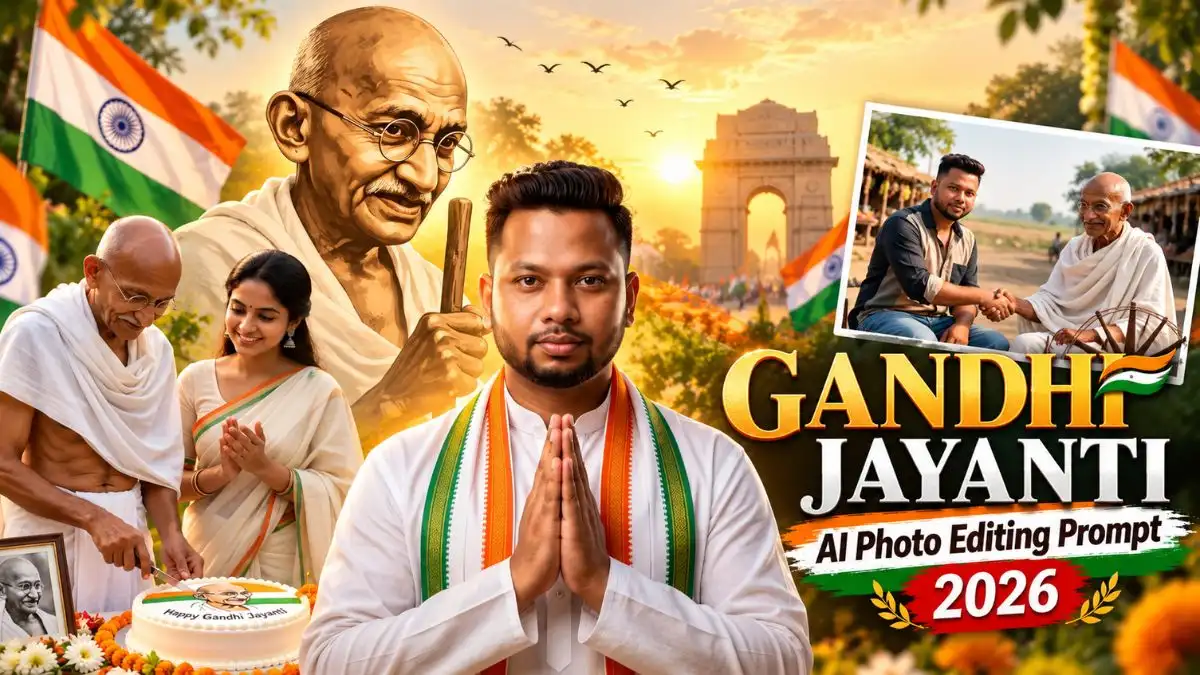
नमस्ते दोस्तों, 2 October के लिए Gandhi Jayanti वाली Photo तो हर साल देखने को मिलती है, लेकिन इस बार AI से कुछ ऐसे Photos बनाए जा सकते हैं जिनमें सिर्फ पीछे Gandhi Ji की Photo लगाने वाला पुराना edit नहीं है।
किसी Photo में आप Gandhi Ji के साथ cake-cutting moment में दिखाई देंगे, कहीं उनके साथ बैठकर हाथ मिलाते हुए और एक look में white kurta, Tiranga और पीछे Gandhi Ji का cinematic portrait मिलेगा। यानी अपनी normal Photo से काफी अलग Gandhi Jayanti Special AI Photo बनाई जा सकती है।
नीचे मैंने ऐसे ही अलग Gandhi Jayanti AI Photo Editing Prompt दिए हैं। अपनी Photo upload करके इन्हें ChatGPT या Gemini में use कर सकते हैं। चलिए सीधे पहले look से शुरू करते हैं।
Gandhi Jayanti AI Photo Prompt – Tiranga के साथ Patriotic Look
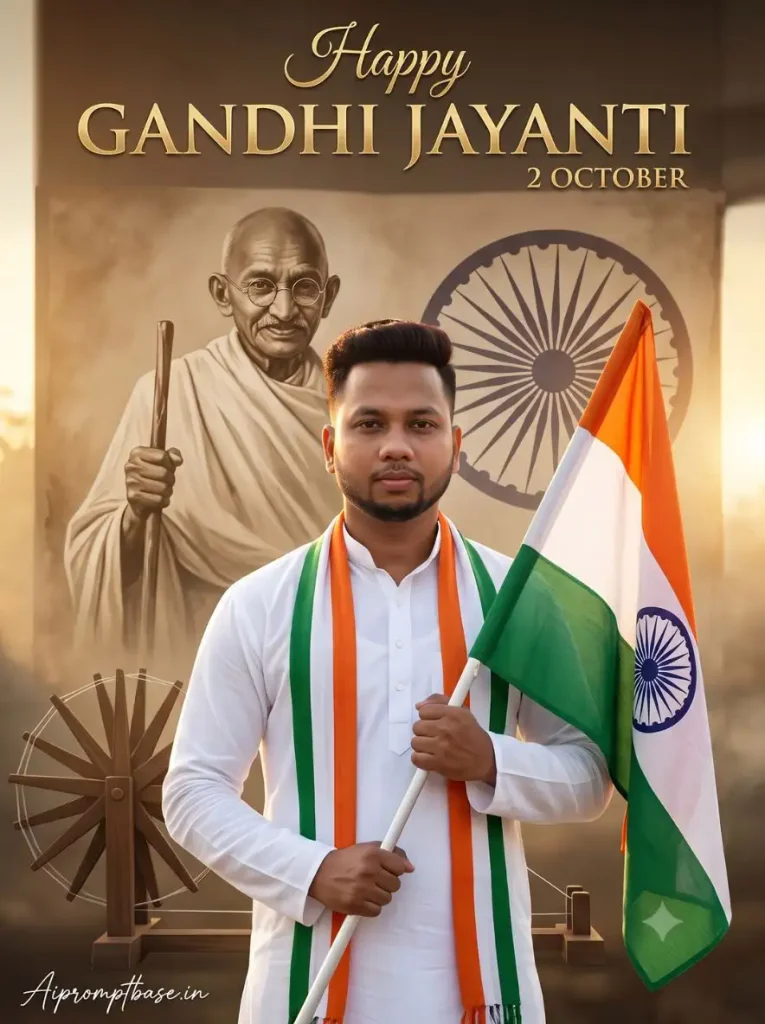
अगर आपको Gandhi Jayanti के लिए clean और respectful patriotic Photo चाहिए तो पहला look उसी style का है। इसमें white kurta और tricolor stole के साथ हाथ में Tiranga रहता है, जबकि पीछे Gandhi Ji का बड़ा sepia portrait, Charkha और Ashoka Chakra दिखाई देता है।
Golden sunrise और Happy Gandhi Jayanti – 2 October text इसे normal portrait की बजाय proper Gandhi Jayanti poster जैसी finishing देते हैं।
Create an ultra-realistic, cinematic Gandhi Jayanti portrait of a young Indian boy using the uploaded photo as the ONLY facial reference. Preserve his facial identity accurately, including face shape, skin tone, eyes, eyebrows, nose, lips, hairstyle, hairline, natural skin texture, and facial proportions. Do not change his identity or facial features. Show the boy standing confidently and respectfully, wearing a crisp white traditional kurta with a subtle Indian tricolor stole over one shoulder. He is gently holding the Indian national flag while looking toward the camera with a calm, proud and respectful expression. Create a premium patriotic background featuring a large artistic sepia portrait of Mahatma Gandhi with his iconic round spectacles and walking stick. Add a subtle Ashoka Chakra, traditional charkha, soft tricolor waves, and a beautiful golden sunrise with atmospheric haze and gentle clouds. Use cinematic DSLR lighting, realistic skin and fabric texture, shallow depth of field, volumetric sunlight, HDR, premium color grading and subtle film grain. Add elegant golden text at the top: “Happy GANDHI JAYANTI” and smaller text “2 OCTOBER”, ultra-detailed 8K quality, professional photography, realistic proportions, no watermark, no extra text. ASPECT RATIO: 3:4 vertical TEXT / SIGNATURE: Add “Aipromptbase.in” bottom-left, handwritten signature-style, thin cursive strokes, small size, subtle premium elegance, white/soft off-white.
Gandhi Ji के साथ Cake Cutting – Gandhi Jayanti Special AI Photo
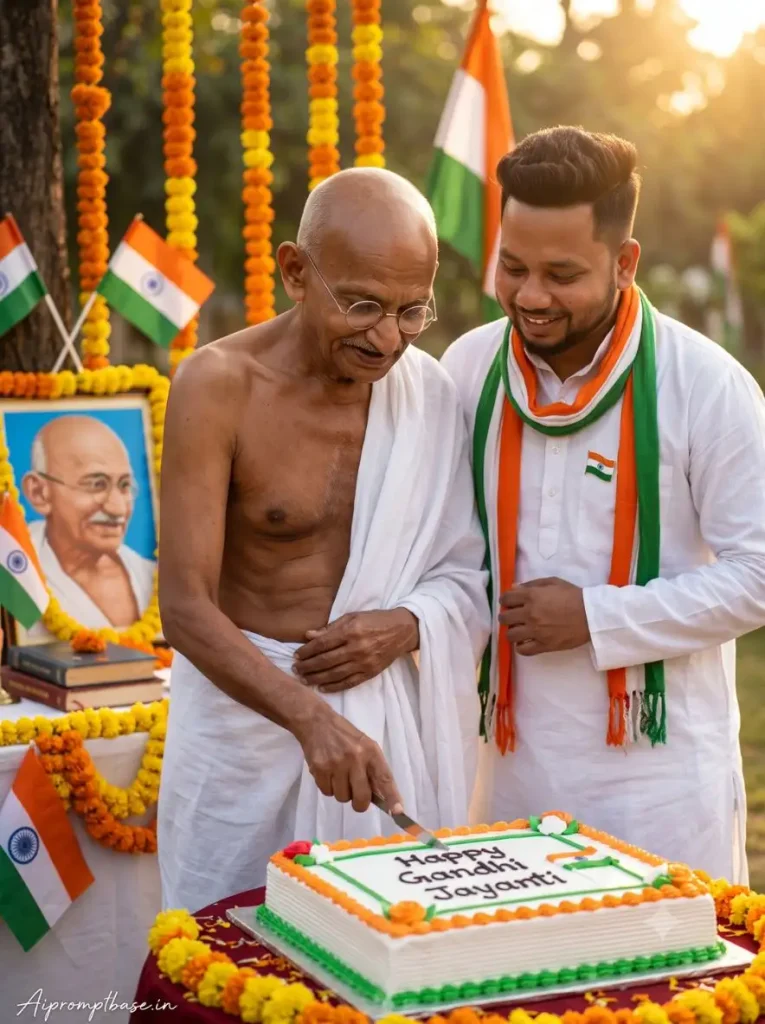
यह वाला Gandhi Jayanti Special AI Photo बाकी looks से बिल्कुल अलग है। इसमें आप Gandhi Ji के साथ एक Gandhi Jayanti celebration में खड़े दिखाई देते हैं और सामने Gandhi Ji cake cut कर रहे होते हैं।
White kurta, tricolor scarf, flowers, flags और पीछे Gandhi Jayanti decoration पूरे moment को event-photo जैसा look देते हैं। अगर आपको Gandhi Ji के साथ अपनी Photo वाला कुछ अलग scene चाहिए तो यह prompt ज्यादा interesting रहेगा।
Create an ultra-realistic cinematic 8K HDR professional DSLR photograph of a warm Gandhi Jayanti celebration in India. MAHATMA GANDHI — HISTORICALLY ACCURATE IDENTITY: Depict Mahatma Gandhi with his authentic, historically recognizable appearance based on well-known historical photographs: accurate facial structure, bald head, thin natural moustache, round wire-frame glasses, gentle expression, lean physique and traditional plain white dhoti and shawl. Preserve his distinctive real-world appearance and facial proportions. Do not modernize, beautify, stylize or create a generic look-alike face. UPLOADED PERSON — STRICT FACE LOCK: Use the uploaded boy’s photo as the primary identity reference. Preserve his exact facial identity, face shape, forehead, eyebrows, eyes, nose, lips, jawline, ears, hairstyle, hairline and natural skin tone. The generated boy must clearly remain the same person as the uploaded reference. Do not redesign, beautify, age, replace or blend his face with another person. SCENE: Show Mahatma Gandhi standing naturally beside the uploaded boy at an outdoor Gandhi Jayanti celebration during warm golden-hour sunlight. Gandhi is gently cutting a large round white celebration cake placed on a decorated table, while the boy stands closely beside him, smiling naturally and watching the cake-cutting moment. The boy wears an elegant clean white traditional kurta with a long Indian tricolour scarf draped naturally around his neck. Add a small Indian flag pin on his kurta. The cake should have tasteful saffron, white and green decorative details with a simple Gandhi-inspired illustration and “Happy Gandhi Jayanti” written clearly on top. In the background, include a beautifully decorated Gandhi Jayanti display with a respectful portrait/sketch of Mahatma Gandhi, marigold flower garlands, Indian tricolour flags and subtle festive decorations. Place a small tabletop Indian flag near the cake. Add a few books on the table related to Truth, Peace and Non-Violence, along with fresh white flowers and marigolds. COMPOSITION: Vertical 3:4 portrait photograph, both people clearly visible, Gandhi and the uploaded boy as the main subjects, natural body proportions, realistic hands and fingers, believable interaction, authentic fabric texture and detailed skin. Use shallow depth of field with softly blurred greenery and celebration decorations in the background. LIGHTING & QUALITY: Warm golden-hour sunlight, soft cinematic rim light, realistic shadows, natural Indian skin tones, professional full-frame DSLR photography, 50mm lens look, realistic depth of field, extremely detailed facial texture, crisp focus on both faces, photorealistic 8K HDR quality. IMPORTANT: Keep the uploaded boy’s face strictly locked to the reference image throughout the generation. Do not alter his identity. Mahatma Gandhi must retain his historically recognizable facial appearance. Avoid cartoon, painting, wax-statue appearance, artificial plastic skin, distorted hands, extra fingers, duplicate people, deformed anatomy, fake-looking faces or excessive AI smoothing. ASPECT RATIO: 3:4 vertical TEXT / SIGNATURE: Add “Aipromptbase.in” bottom-left, handwritten signature-style, thin cursive strokes, small size, subtle premium elegance, white/soft off-white.
Gandhi Ji के साथ Handshake – Charkha वाला AI Photo
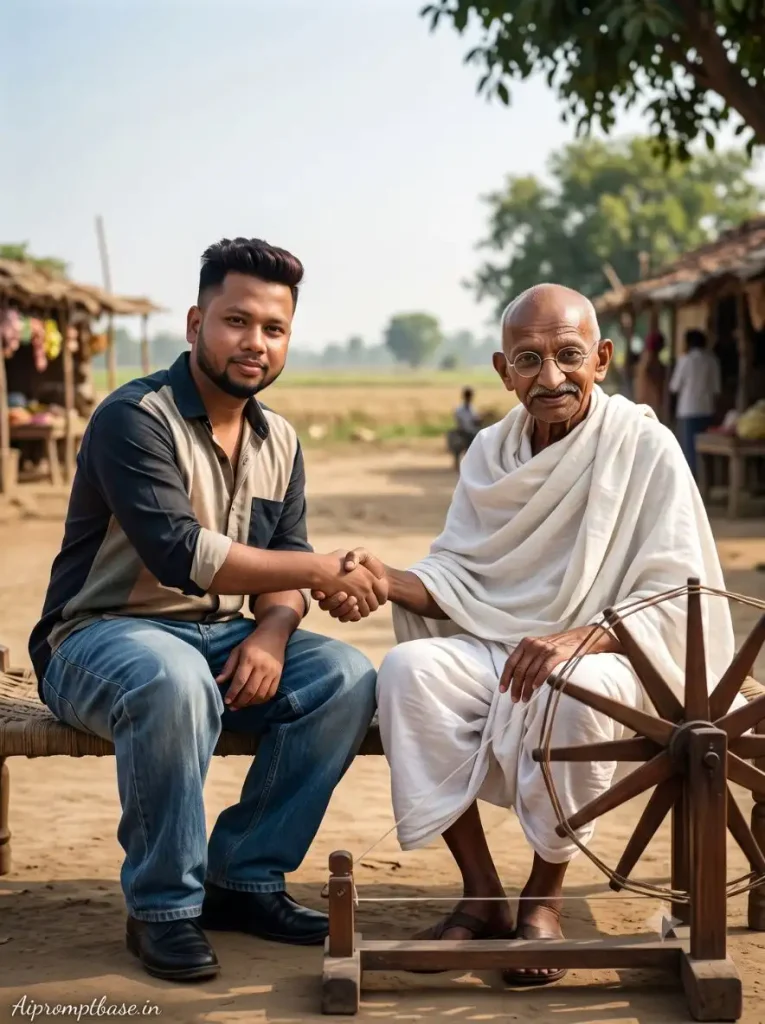
इस Gandhi Jayanti AI Photo Editing Prompt में poster जैसा pose नहीं बल्कि थोड़ा शांत और meaningful scene रखा गया है। आप Gandhi Ji के पास बैठकर उनसे हाथ मिलाते दिखाई देते हैं और साथ में traditional Charkha भी रहता है।
Rural Indian background और modern casual outfit की वजह से Photo में old और new generation का अच्छा contrast आता है। बाकी Gandhi Jayanti Photos के बीच यह look काफी अलग दिखाई देता है।
Create an ultra-realistic, cinematic photograph using the uploaded photo as the ONLY facial reference for the boy. Preserve his facial identity accurately, including face shape, skin tone, eyes, eyebrows, nose, lips, beard, hairstyle, hairline, natural skin texture, and facial proportions. Do not change, beautify, or replace his identity. Show the boy sitting beside Mahatma Gandhi in a peaceful rural Indian setting. Gandhi is wearing his iconic simple white dhoti and shawl, with round spectacles and a calm, gentle expression. A traditional wooden charkha (spinning wheel) is placed prominently beside Gandhi in the foreground. The boy is seated naturally on a simple wooden chair, wearing a stylish casual shirt with a relaxed fit, paired with loose-fitting baggy jeans and clean black shoes. The shirt and jeans should have realistic fabric texture, natural folds, and authentic proportions. Keep the outfit modern and youthful while maintaining the respectful atmosphere of the scene. The boy and Gandhi are warmly shaking hands, creating a meaningful moment representing respect, peace, and connection between generations. Both should have natural body posture and realistic hand anatomy, looking calmly toward the camera. Set the scene in an authentic rural Indian environment with an open field, subtle village stalls, a few distant people, trees, and a bright natural sky. Keep the background softly blurred with cinematic depth. Use professional DSLR photography, 85mm lens look, natural daylight, realistic skin pores, detailed fabric texture, shallow depth of field, soft bokeh, cinematic HDR, subtle atmospheric haze, realistic shadows, premium color grading, and fine film grain. The final image should look like a genuine professional photograph rather than an AI-generated image. Maintain accurate body proportions, realistic hands, natural expressions, and detailed environmental textures, ultra-detailed 8K, photorealistic, cinematic documentary photography, no watermark, no logo, no extra text. ASPECT RATIO: 3:4 vertical TEXT / SIGNATURE: Add “Aipromptbase.in” bottom-left, handwritten signature-style, thin cursive strokes, small size, subtle premium elegance, white/soft off-white.
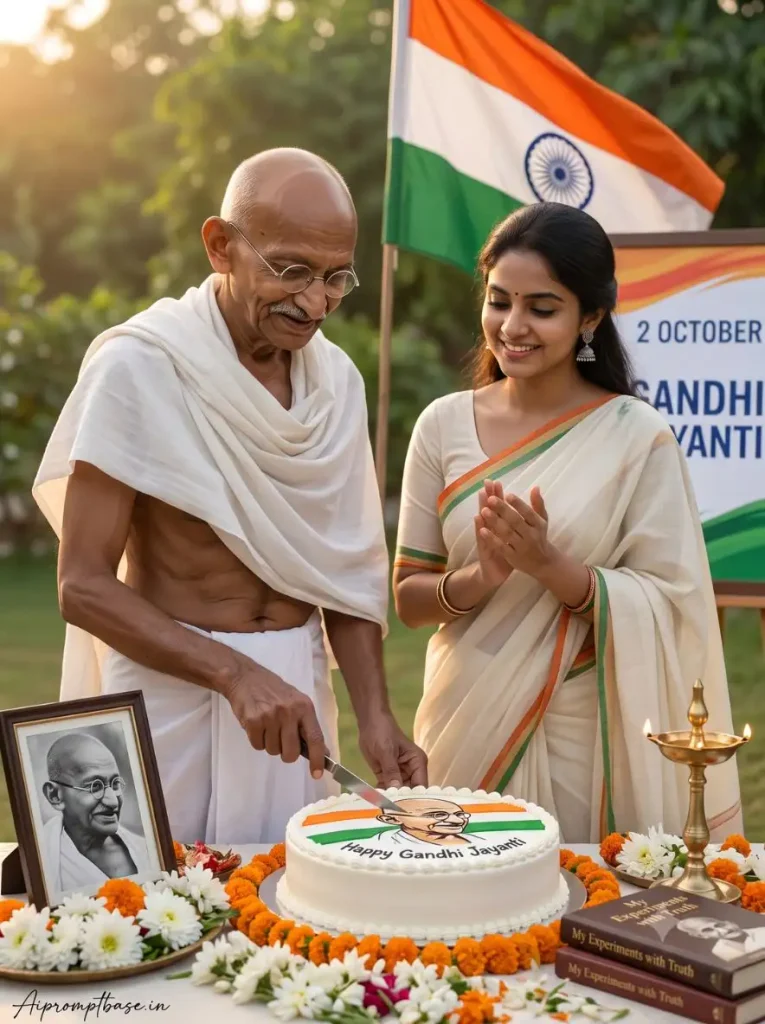
Girls के लिए Gandhi Jayanti Special AI Photo – Cake Cutting Look
Girls के लिए यह Gandhi Jayanti Photo Editing Prompt traditional look में रखा गया है। इसमें off-white saree के saffron-green border के साथ Gandhi Ji के पास cake-cutting celebration वाला scene बनता है।
सामने decorated cake, flowers और diya जबकि पीछे Tiranga और 2 October – Gandhi Jayanti display दिखाई देता है। इससे Photo festive भी रहती है और Gandhi Jayanti का theme भी साफ समझ आता है।
Create an ultra-realistic cinematic 8K HDR professional DSLR photograph of a peaceful Gandhi Jayanti celebration in India. MAHATMA GANDHI — HISTORICALLY ACCURATE IDENTITY: Depict Mahatma Gandhi with his authentic, historically recognizable appearance based on well-known historical photographs: accurate facial structure, bald head, thin natural moustache, round wire-frame glasses, lean physique, natural aged skin texture and gentle expression. He is wearing his iconic simple white traditional dhoti and shawl. Do not modernize, beautify, stylize or create a generic look-alike version of Gandhi. UPLOADED GIRL — STRICT FACE & IDENTITY LOCK: Use the uploaded girl’s photo as the primary identity reference. Preserve her exact facial identity, face shape, forehead, eyebrows, eyes, nose, lips, jawline, ears, natural skin tone and other recognizable facial features. Her generated face must clearly remain the same person as the uploaded reference photo. Do not redesign, beautify, reconstruct, blend or replace her face. SCENE: Show Mahatma Gandhi standing on the left side of the frame, naturally cutting a large round Gandhi Jayanti cake with a knife. The uploaded girl stands closely beside him on the right, smiling warmly while looking toward Gandhi and the cake, with both hands gently brought together in a natural appreciative/clapping gesture. OUTFIT: Dress the girl in an elegant traditional off-white Indian saree with a subtle saffron-and-green border inspired by the Indian tricolour. Keep the saree graceful and realistic with natural fabric folds. Add small traditional earrings, minimal jewellery and a tiny bindi for an elegant festive appearance. SETTING: Create a beautiful outdoor Gandhi Jayanti celebration in warm morning sunlight. Place a large Indian national flag naturally in the background. Behind the subjects, include a clean commemorative board displaying “2 OCTOBER” and “GANDHI JAYANTI” with tasteful tricolour detailing. On the foreground table, place a large round white cake decorated with subtle saffron, white and green icing, a tasteful Gandhi illustration and clearly written “Happy Gandhi Jayanti”. Add fresh white and orange flowers, a framed black-and-white portrait of Mahatma Gandhi, a traditional glowing brass diya and a few elegant dark-covered books associated with Truth, Non-Violence and Mahatma Gandhi. COMPOSITION: Vertical 3:4 portrait photograph. Gandhi and the uploaded girl should be equally important subjects and clearly visible from approximately knee/waist level upward. Keep the cake prominently visible in the foreground. Use natural human proportions, realistic hands and fingers, believable interaction and authentic clothing textures. LIGHTING & CAMERA: Warm natural morning/golden-hour sunlight, beautiful soft highlights, realistic shadows, subtle cinematic depth, softly blurred greenery in the background, professional full-frame DSLR photography, 50mm lens look, shallow depth of field, crisp focus on both faces, realistic skin pores and fabric details, photorealistic 8K HDR quality. CRITICAL IDENTITY REQUIREMENTS: The uploaded girl’s facial identity must remain strictly locked to the reference image. Do not change her face even when changing her hairstyle, pose, expression or clothing. Mahatma Gandhi must maintain his historically recognizable facial appearance and natural elderly features. NEGATIVE: No cartoon or illustration style, no wax-statue appearance, no artificial plastic skin, no generic Gandhi look-alike, no altered uploaded face, no face blending, no distorted anatomy, no malformed hands, no extra fingers, no duplicate limbs, no excessive beauty filter, no unrealistic skin smoothing, no fake AI-looking facial features. ASPECT RATIO: 3:4 vertical TEXT / SIGNATURE: Add “Aipromptbase.in” bottom-left, handwritten signature-style, thin cursive strokes, small size, subtle premium elegance, white/soft off-white.
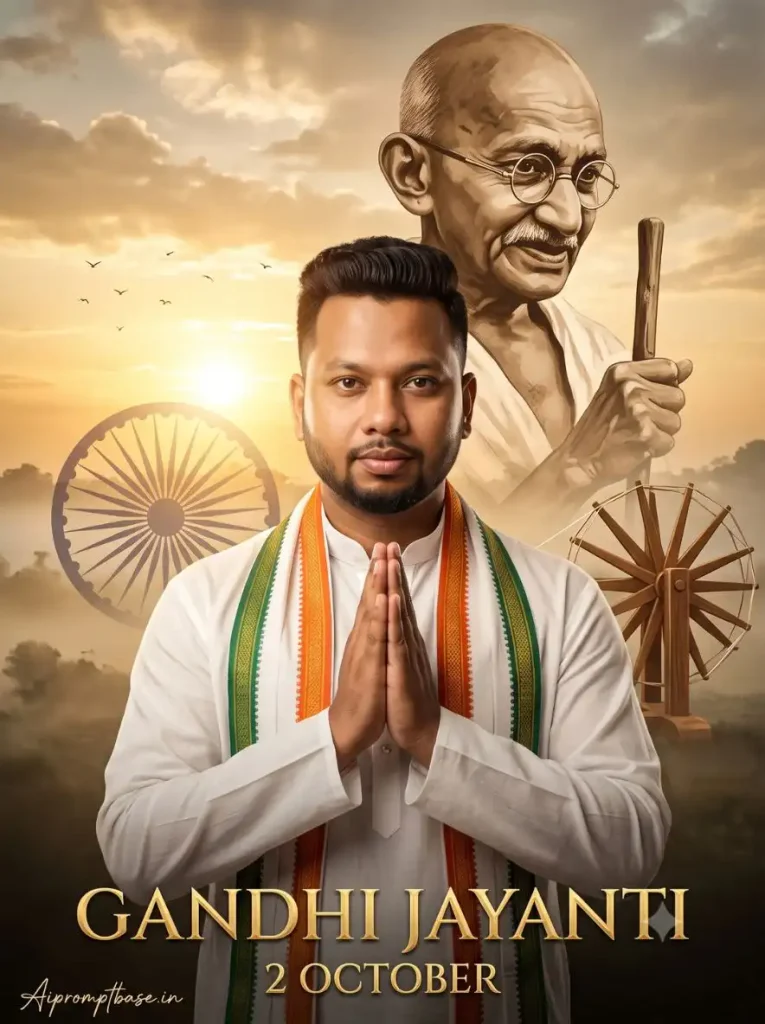
Gandhi Jayanti AI Poster – Namaste & Tricolor Look
अगर आपको Gandhi Ji के साथ direct interaction की बजाय अपनी profile या status के लिए poster-style Gandhi Jayanti Trending AI Photo चाहिए तो यह look ज्यादा सही रहेगा।
इसमें white kurta और tricolor stole पहनकर Namaste pose रहता है। पीछे Gandhi Ji का बड़ा sepia portrait, Ashoka Chakra, Charkha और sunrise मिलकर clean patriotic poster look बनाते हैं।
Create an ultra-realistic cinematic Gandhi Jayanti poster using the uploaded person’s photo as the ONLY facial reference. Preserve facial identity, face shape, skin tone, eyes, eyebrows, nose, lips, beard, hairstyle, natural texture, and proportions accurately. Show the person wearing a premium white traditional kurta with an elegant Indian tricolor stole, standing respectfully with hands joined in Namaste and a calm expression. Behind the subject, feature a large artistic sepia portrait of Mahatma Gandhi wearing his iconic round spectacles with his walking stick. Add a subtle Ashoka Chakra on the left and a traditional wooden charkha on the right. Create a beautiful sunrise background with warm golden sunlight, soft clouds, atmospheric haze, flying birds, and a peaceful Indian landscape. Use cinematic DSLR lighting, realistic skin and fabric texture, shallow depth of field, HDR, volumetric light, premium color grading, and subtle film grain. At the bottom, add elegant gold typography: “GANDHI JAYANTI” and “2 OCTOBER”, no watermark, no extra text. ASPECT RATIO: 3:4 vertical TEXT / SIGNATURE: Add “Aipromptbase.in” bottom-left, handwritten signature-style, thin cursive strokes, small size, subtle premium elegance, white/soft off-white.
ChatGPT या Gemini से Gandhi Jayanti AI Photo कैसे बनाएं?
इन Gandhi Jayanti AI Photo Editing Prompt को ChatGPT या Gemini में use करने का तरीका काफी आसान है:
ChatGPT या Gemini खोलें और अपनी clear Photo upload करें।
ऊपर से पसंद वाला Gandhi Jayanti AI Photo Prompt copy करें।
Photo के साथ पूरा Prompt paste करके send करें।
AI को image generate करने दें।
Photo तैयार होने के बाद full-quality result save कर लें।
एक ही Photo से अलग-अलग looks चाहिए तो हर बार नई Photo लगाने की जरूरत नहीं है। उसी clear reference Photo के साथ दूसरा Prompt use करके अगला scene बना सकते हैं।
आपकी Photo सही बनी, लेकिन Gandhi Ji का Face बदल गया तो?
Gandhi Jayanti AI Photo Editing Prompt से Photo बनाते समय एक चीज मैंने खास तौर पर prompts में ध्यान रखी है—सिर्फ आपका face same रखना काफी नहीं है। Gandhi Ji के साथ Cake Cutting या Handshake वाला scene तभी अच्छा लगेगा, जब Gandhi Ji भी अपनी असली और पहचान में आने वाली appearance में दिखें।
इसीलिए इन prompts में आपके लिए Face Lock के साथ Gandhi Ji के recognizable facial features, round spectacles, natural aged look और traditional outfit की details भी दी गई हैं।
अगर कभी आपकी Gandhi Jayanti Special AI Photo में आपका face बिल्कुल सही आए, लेकिन Gandhi Ji का चेहरा किसी दूसरे व्यक्ति जैसा लगे, तो Prompt की lines बदलने की बजाय उसी Prompt से एक बार फिर image generate करें। ऐसे scene में दोनों identities सही दिखना ही Photo को ज्यादा believable बनाता है।
अपनी Photo ऐसी चुनें कि Face बदलने की गुंजाइश कम रहे
Trending Gandhi Jayanti AI Photo Editing Prompt use करते समय बहुत ज्यादा filtered selfie देने से बचें। साफ lighting, visible face और natural skin वाली Photo बेहतर reference बनती है।
Cake-cutting या handshake जैसे scenes के लिए half-body Photo मिले तो और अच्छा है। AI को सिर्फ आपका face नहीं बल्कि नए pose में body proportion भी बनाना होता है।
Gandhi Jayanti Photo को अपना Look कैसे दें?
किसी Gandhi Jayanti AI Photo Editing Prompt का scene आपको पसंद है, लेकिन उसमें दिया outfit नहीं चाहिए तो पूरा Prompt बदलने की जरूरत नहीं है।
White Kurta की जगह Cream Embroidered Kurta, casual shirt की जगह White Khadi Shirt या Saree का colour और border अपनी पसंद के हिसाब से बदल सकते हैं। बस Prompt में दी गई Face Lock और Gandhi Ji की identity वाली instructions को वैसे ही रहने दें, ताकि look बदलने के चक्कर में चेहरे की पहचान न बदले।
इस छोटे से बदलाव से same scene को दोबारा तैयार किए बिना आप अपनी पसंद के outfit में Gandhi Jayanti Special AI Photo बना सकते हैं और Photo को थोड़ा ज्यादा personal look दे सकते हैं।
Cake Cutting या Poster Look – कौन-सा Prompt किसके लिए है?
अगर WhatsApp Status या Profile के लिए साफ और simple Gandhi Jayanti wish वाली Photo चाहिए, तो Tiranga और Namaste Poster वाले Prompts अच्छे रहेंगे। इनमें Gandhi Jayanti का theme पहली नजर में ही समझ आ जाता है।
लेकिन Instagram या Facebook के लिए normal Gandhi Jayanti poster से थोड़ा हटकर Gandhi Jayanti Special AI Photo बनानी है, तो Gandhi Ji के साथ Cake Cutting या Charkha के पास Handshake वाला scene try कर सकते हैं। इन Photos में सिर्फ pose नहीं, बल्कि Gandhi Ji के साथ एक पूरा moment दिखाई देता है।
इसीलिए मैंने सभी Gandhi Jayanti AI Photo Editing Prompt में एक ही pose और background repeat नहीं किया है। आप Photo कहां use करना चाहते हैं, उसके हिसाब से Poster, Cake Cutting या Handshake वाला look चुन सकते हैं।
FAQs
Gandhi Jayanti AI Photo Editing Prompt कहां use करें?
इन prompts को अपनी reference Photo के साथ ChatGPT या Gemini में use करके Gandhi Jayanti themed AI Photos बना सकते हैं।
Gandhi Jayanti Special AI Photo कैसे बनाएं?
अपनी clear Photo upload करें और ऊपर दिए looks में से पसंद वाला Gandhi Jayanti AI Photo Prompt उसके साथ paste करके image generate करें।
क्या Gandhi Ji के साथ अपनी AI Photo बना सकते हैं?
ऊपर cake-cutting और handshake वाले prompts इसी तरह के creative Gandhi Jayanti scenes के लिए दिए गए हैं।
Girls के लिए भी Gandhi Jayanti Photo Prompt है?
हां, traditional saree और Gandhi Ji के साथ cake-cutting वाला अलग Gandhi Jayanti Photo Editing Prompt दिया गया है।
क्या Prompt में अपने कपड़े बदल सकते हैं?
हां। Outfit description बदल सकते हैं, लेकिन Face Lock और Gandhi Ji की appearance वाली important instructions को वैसे ही रखें।
आखिर में
दोस्तों, इस बार Gandhi Jayanti AI Photo Editing Prompt में मैंने सिर्फ Tiranga पकड़कर खड़े होने वाले एक जैसे looks नहीं रखे हैं। Gandhi Ji के साथ cake cutting, Charkha के पास handshake और traditional poster—हर Prompt से अलग तरह की Photo बनाई जा सकती है।
अब अपनी पसंद वाला Gandhi Jayanti Special AI Photo चुनें, clear Photo upload करें और उसका Prompt ChatGPT या Gemini में try करें।
आपको इन 5 looks में कौन-सा सबसे अच्छा लगा—Cake Cutting, Handshake या Gandhi Jayanti Poster? नीचे Comment में जरूर बताना।
नमस्कार! मैं लवित राव हूँ। मैं AI Prompts, Gemini AI, ChatGPT और AI Image Editing पर काम करता हूँ। इस वेबसाइट पर मैं केवल वही प्रॉम्प्ट्स और गाइड्स शेयर करता हूँ जिन्हें मैं खुद टेस्ट करता हूँ, ताकि आपको सही, उपयोगी और आसानी से समझ आने वाली जानकारी मिल सके।