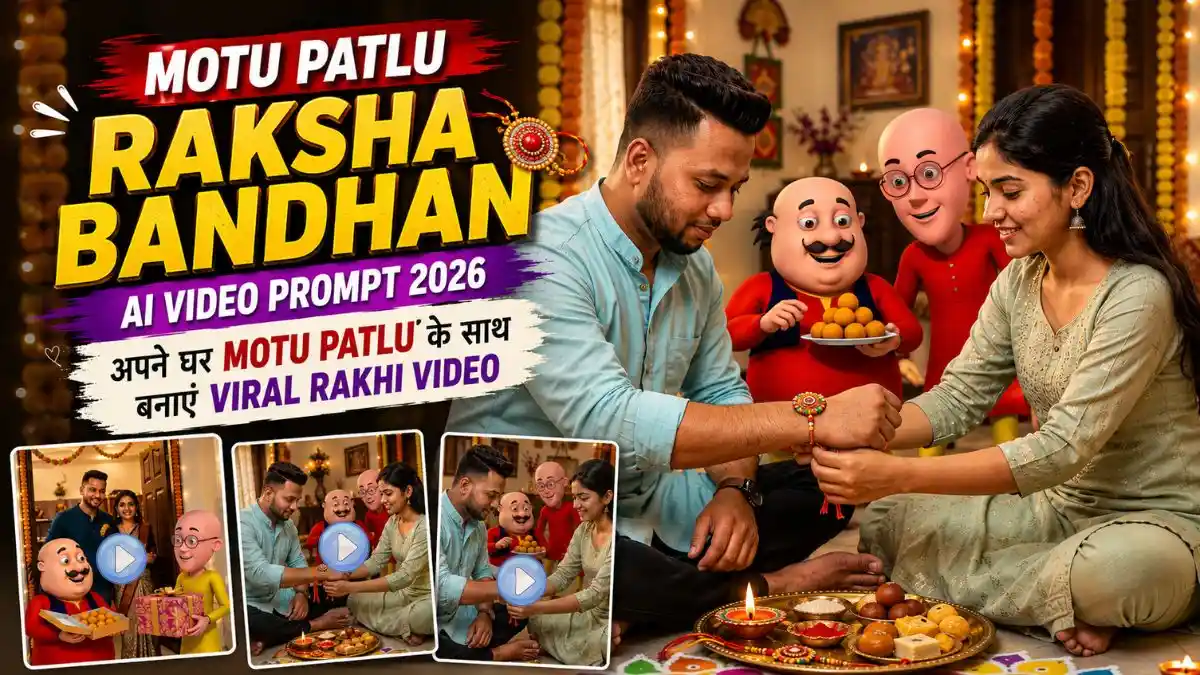
नमस्कार दोस्तों, मैं Lavit! सोचिए Raksha Bandhan पर Sister अपने Brother को Rakhi बांध रही हो, आसपास पूरी Family बैठी हो और तभी Celebration में Motu और Patlu भी आपके घर के मेहमान बनकर शामिल हो जाएं। Motu की नजर Rakhi से ज्यादा मिठाइयों पर हो और Patlu उसे बार-बार रोक रहा हो—ऐसी Video सामान्य Raksha Bandhan Edit से काफी अलग दिखाई दे सकती है।
इसी Idea पर मैंने यह Motu Patlu Raksha Bandhan AI Video Prompt तैयार किया है। इसमें सिर्फ Motu-Patlu को Festival Background में खड़ा नहीं करना है, बल्कि Brother, Sister, Family और Motu-Patlu सभी एक ही छोटी Story का हिस्सा रहेंगे।
इस लेख में पहले Raksha Bandhan की Base Photo बनाने का Prompt मिलेगा और फिर उसी Photo को Funny Family AI Video में बदलने का पूरा तरीका। और साथ में उन छोटी Settings और Fixes के बारे में भी बताऊंगा जो Final Video को ज्यादा Natural और Cinematic बनाने में काम आ सकती हैं।
Motu Patlu Raksha Bandhan AI Video में क्या खास होगा?
इस तरह की Video में सबसे जरूरी चीज सिर्फ Motu-Patlu को Scene में जोड़ना नहीं है। Brother-Sister का Face natural रखना, Rakhi बांधने वाले Hands सही दिखाना और Video के दौरान Motu-Patlu की Character Consistency बनाए रखना Final Result पर काफी असर डालता है। इसलिए पहले एक साफ और सही Base Image तैयार करना बेहतर रहता है।
इसके लिए आपको Brother-Sister की एक Clear Reference Photo और ऐसा AI Tool चाहिए जो Reference Image के साथ Photo Generate कर सके। पहले Raksha Bandhan का Base Scene तैयार करेंगे और फिर उसी Image को Image-to-Video AI Tool में Animate करेंगे। आगे इसी के लिए Photo और Video दोनों के Copy-Paste Prompts दिए गए हैं।
Step 1: Motu Patlu के साथ Raksha Bandhan AI Photo बनाएं
सबसे पहले एक Base Photo बनाएंगे जिसमें Brother-Sister Rakhi Celebrate कर रहे हों और Motu-Patlu भी उनके साथ मौजूद हों। इसके लिए ChatGPT या Gemini AI इस्तेमाल कर सकते हैं।
- ChatGPT या Gemini AI खोलें और Image Generation वाला Option चुनें।
- Brother और Sister की Clear Face Photos Upload करें।
- नीचे दिया Motu Patlu Raksha Bandhan AI Photo Prompt Copy करके Paste करें।
- Generate पर Click करें और Image तैयार होने दें।
- Result में Brother-Sister का Face, Hands, Rakhi और Motu-Patlu ध्यान से Check करें।
- Face सही न आए तो उसी Prompt से 1–2 Variations Generate करके सबसे Natural Image चुनें।
Tip: Video के लिए वही Image चुनें जिसमें Brother-Sister का Face Reference Photo जैसा Real और Natural दिखाई दे।
1. Motu Patlu Raksha Bandhan AI Photo Prompt: Motu-Patlu Rakhi Gift लेकर घर आते हैं
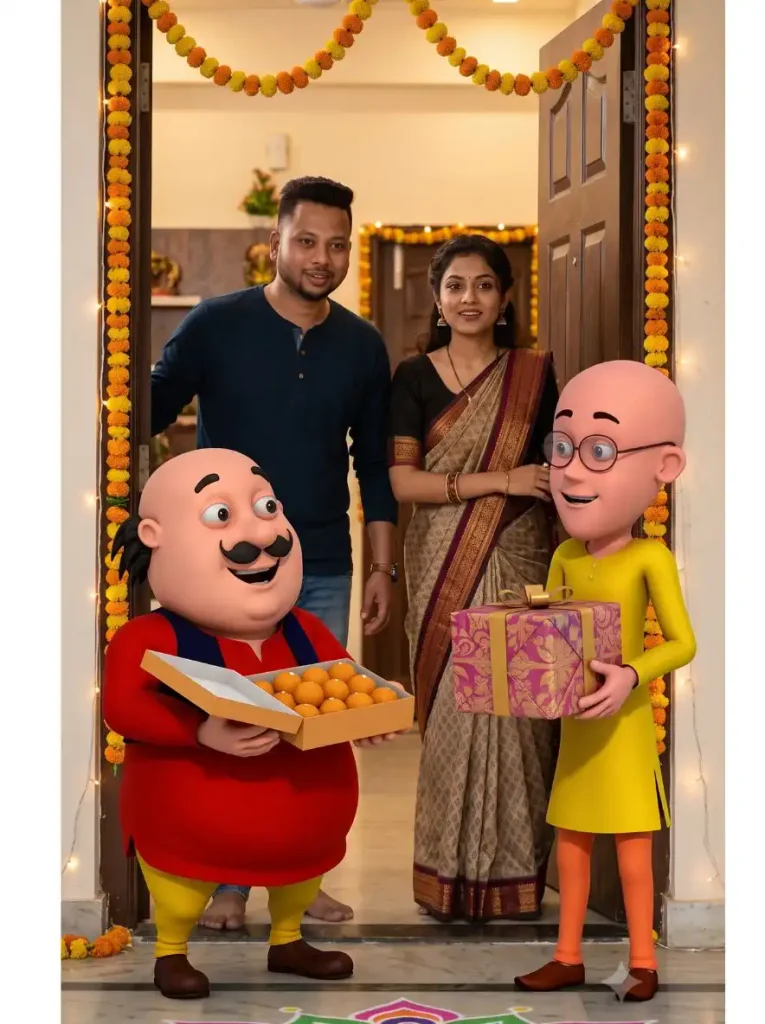
Step 2: अब Photo को Raksha Bandhan AI Video में बदलें
Base Photo तैयार होने के बाद अब उसे Gemini या Flow AI की मदद से Short Raksha Bandhan Video में बदलेंगे।
- Gemini या Flow AI खोलें और Image-to-Video Option चुनें।
- Step 1 में बनाई गई Final Raksha Bandhan Photo Upload करें।
- नीचे दिया Motu Patlu Raksha Bandhan AI Video Prompt Copy करके Paste करें।
- Video को 9:16 Vertical रखें और Generate करें।
- Final Video में Brother-Sister का Face, Rakhi Action और Motu-Patlu की Movement Check करें।
- Result सही न आए तो उसी Image और Prompt से एक और Variation Generate करें।
Tip: 8–10 Second की Short Clip रखें और बहुत ज्यादा Actions एक साथ न दें। इससे Face और Characters ज्यादा Consistent रह सकते हैं।
1. Motu Patlu Raksha Bandhan AI Video Prompt: Motu-Patlu Rakhi Gift लेकर घर आते हैं
Prompt:
यह भी देखे:- Motu Patlu Shop Promotion AI Video New Prompt
इसी तरह 2 और Motu Patlu Raksha Bandhan AI Videos बनाएं
ऊपर वाले तरीके से पहली Video बनाने के बाद आप इसी Concept को दो और मजेदार Scenes में Try कर सकते हैं। नीचे मैंने 2 अलग AI Photo Prompts और उनके Matching Video Prompts दिए हैं।
तरीका वही रहेगा—पहले दिए गए Photo Prompt से Base Image बनाएं, फिर उसके नीचे मौजूद Video Prompt से उसी Image को Animate करें। इन दोनों Scenes में Motu-Patlu के Actions और Dialogue अलग रखे गए हैं, ताकि हर Video एक जैसी न लगे और Raksha Bandhan की छोटी Funny Story जैसा Feel दे।
2. Motu Patlu Raksha Bandhan AI Photo Prompt: बहन भाई को राखी बांधती है
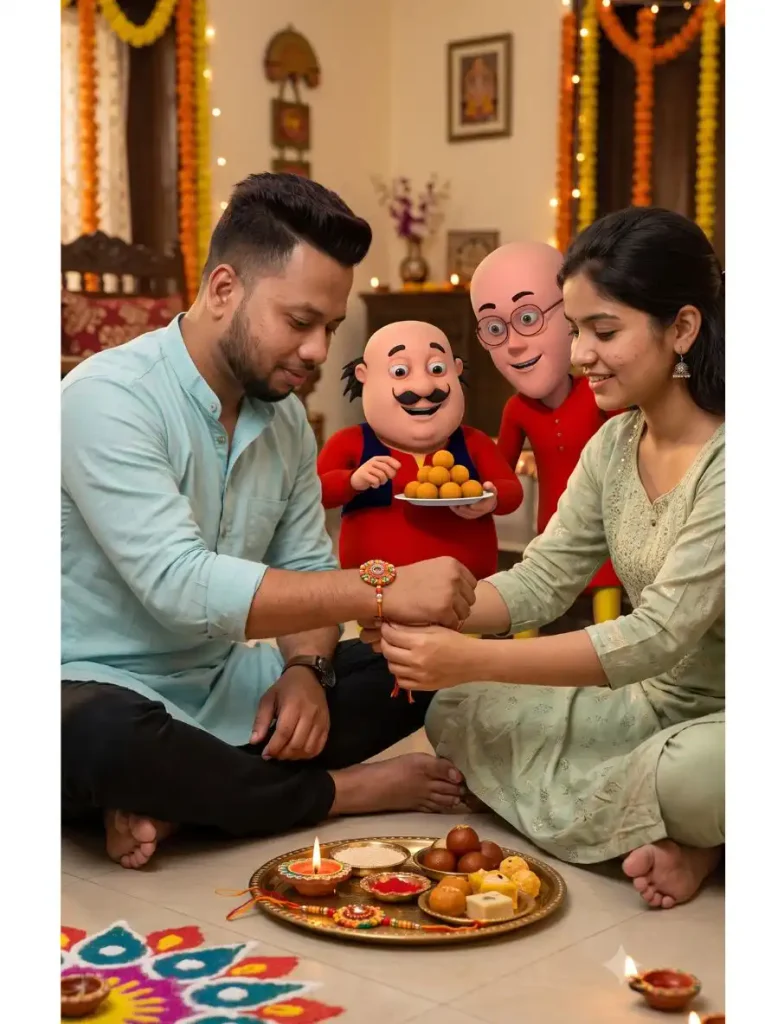
इस Scene में Patlu का सिर्फ एक छोटा Dialogue रखा गया है:
2. Motu Patlu Raksha Bandhan AI Video Prompt: बहन भाई को राखी बांधती है
यह भी देखे:- Oggy Cartoon AI Video Editing Prompt
3. Sister Motu को भी Rakhi बांधती हुई, Motu Patlu Raksha Bandhan AI Photo Prompt
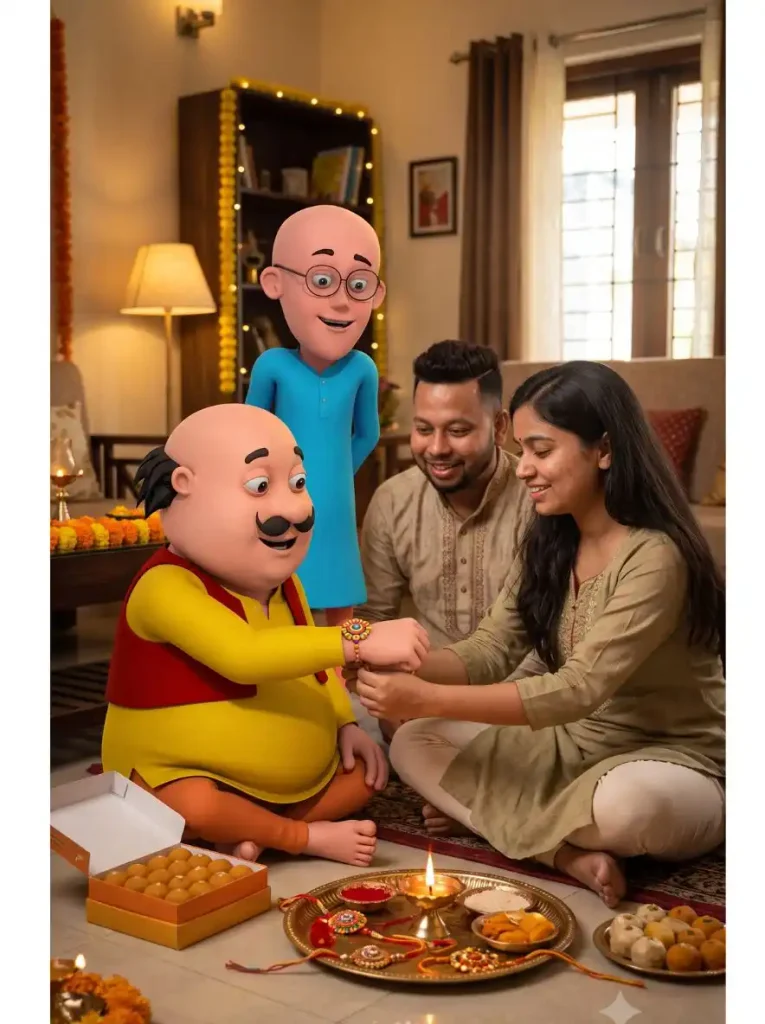
3. Motu Patlu Raksha Bandhan AI Video Prompt: Sister Motu को भी Rakhi बांधती है
बेहतर Result के लिए ये Tips जरूर Follow करें
अगर पहली Generation सही न आए तो Prompt बार-बार बदलने के बजाय उसी Prompt से दूसरा Variation Try करें।
- Brother-Sister की Clear और HD Photo ही Upload करें। Blur या Low-Quality Photo से Face बदल सकता है।
- Photo बनाते समय Prompt में दिया गया Face Lock वाला पूरा हिस्सा जरूर रखें, उसे हटाकर या छोटा करके Paste न करें।
- Image Generate होने के बाद Face, Hands और Rakhi Zoom करके Check करें। Face Reference जैसा न हो तो उसी Image से Video न बनाएं।
- Video बनाने के लिए हमेशा सबसे साफ और Natural Face वाली Final Image इस्तेमाल करें।
- Video Prompt को पूरा Copy-Paste करें। खासकर Face Lock, Character Consistency और Negative Instructions को Remove न करें।
- एक Clip में बहुत ज्यादा Actions Add न करें। Short और Simple Movement से Face और Motu-Patlu ज्यादा Consistent रह सकते हैं।
YouTube Create से Raksha Bandhan AI Video कैसे बनाएं?
अगर आपके YouTube Create में AI Video Generation / Image-to-Video Feature उपलब्ध है, तो ऊपर दिए गए Prompts को वहां भी Try कर सकते हैं।
- सबसे पहले ऊपर दिए AI Photo Prompt से तैयार की गई Ai image को डाउनलोड करें।
- अब YouTube Create खोलें और AI Video/Create with AI वाला Option चुनें।
- अपनी तैयार Raksha Bandhan Base Image Upload करें।
- उसी Image के नीचे दिया गया Matching Motu Patlu AI Video Prompt पूरा Copy-Paste करें। Face Lock और Character Instructions को हटाएं नहीं।
- Video को 9:16 Vertical Format में Generate करें और Result Check करें।
- इसी तरह बाकी दोनों Photo Prompts से Images बनाकर उनके नीचे दिए Video Prompts से अलग-अलग Clips Generate करें।
Tip: हर Photo के साथ उसी के नीचे वाला Video Prompt इस्तेमाल करें। इससे Rakhi, Motu के Laddoo और Dialogue वाला Scene Prompt के हिसाब से Generate होने की संभावना बेहतर रहती है।
Face Same रखने के लिए क्या करें?
इस तरह की AI Video में सबसे ज्यादा फर्क Reference Photo की Quality से पड़ता है। Brother-Sister की ऐसी Original Photo इस्तेमाल करें जिसमें Face साफ, अच्छी रोशनी में और Front या हल्के 3/4 Angle से दिखाई दे रहा हो। Blur, Filter वाली या बहुत Side-Angle Photo से Face बदलने की संभावना बढ़ सकती है।
Prompt में Face Lock और Identity Preserve जैसी Instructions साफ रखें और “perfect face”, “more handsome” या “beautify face” जैसे Words इस्तेमाल न करें। ये AI को Original Face बदलने के लिए Encourage कर सकते हैं।
मेरी Tip: Video बनाने से पहले Base Image को Zoom करके Face जरूर Check करें। अगर Photo में ही Face Reference जैसा नहीं है, तो उसे Animate करने के बजाय पहले Image दोबारा Generate करें। इससे Final Video में Real और Natural Face बनाए रखने की संभावना बेहतर रहती है।
Raksha Bandhan Reel के लिए Best Settings
Aspect Ratio: 9:16
Video Length: 8–10 Seconds per Clip
Style: Cinematic + Warm Family Look
Camera: Slow Push-in / Gentle Tracking
Dialogue: एक Short Line
Lighting: Warm Indoor Festive Lighting
Music: Soft Indian Festive Instrumental
Video में बहुत तेज Camera Movement न रखें। Raksha Bandhan Family Moment है, इसलिए शुरुआत Emotional और Warm रखें और Comedy Motu के Laddoo वाले Moment से आने दें।
Motu Patlu Raksha Bandhan AI Video क्यों अलग लग सकती है?
आज AI से सामान्य Raksha Bandhan Photo या Video बनाना आसान है, लेकिन सिर्फ Brother-Sister को Festive Background में दिखाने से Result अक्सर बाकी AI Edits जैसा लगने लगता है। इस Motu Patlu Raksha Bandhan AI Video को अलग बनाती है इसकी छोटी सी Story।
पहले Sister Brother को Rakhi बांधती है, फिर अचानक Motu की नजर Laddoo पर पड़ती है और Patlu का Funny Reaction आता है। यानी कुछ Seconds में Rakhi का Emotion, Motu-Patlu की Comedy और एक छोटा Surprise Moment तीनों मिल जाते हैं।
अगर इसमें अपनी Real Brother-Sister Photo इस्तेमाल की जाए और Face Natural रखा जाए, तो Video सिर्फ एक Cartoon Edit नहीं बल्कि अपनी Raksha Bandhan Memory का मजेदार AI Version जैसा महसूस हो सकता है।
FAQs अक्सर पूछे जाने वाले सवाल
Motu Patlu Raksha Bandhan AI Video कैसे बनाएं?
पहले Brother-Sister की Reference Photo से Motu-Patlu और Family वाला Raksha Bandhan Base Image Generate करें। इसके बाद उसी Image को Image-to-Video Tool में Upload करके ऊपर दिया Video Prompt इस्तेमाल करें।
क्या अपनी Photo से यह Video बनाई जा सकती है?
हाँ, Reference Image Support करने वाले AI Tool में Brother और Sister की Clear Photos इस्तेमाल की जा सकती हैं। Final identity consistency Tool और Source Photo की Quality पर निर्भर करेगी।
Family Members भी Video में रख सकते हैं?
हाँ। Parents और Grandparents को Background में रखा जा सकता है, लेकिन बहुत ज्यादा लोगों को एक Frame में डालने पर AI के लिए Faces Consistent रखना मुश्किल हो सकता है।
Motu Patlu का Face Video में क्यों बदल जाता है?
लंबी Generation, बहुत सारे Actions या तेज Movement Character Consistency खराब कर सकते हैं। Short Clips और Simple Actions आमतौर पर बेहतर Result देते हैं।
Raksha Bandhan Reel के लिए कितनी लंबी Video बनाएं?
एक Generation को लगभग 8–10 Seconds रखना Practical है। Long Video चाहिए तो 2–3 Short Clips Generate करके उन्हें बाद में जोड़ सकते हैं।
निष्कर्ष
इस Motu Patlu Raksha Bandhan AI Video Prompt का मजेदार हिस्सा सिर्फ Motu और Patlu को Raksha Bandhan Background में जोड़ना नहीं है। Idea यह है कि ऐसा लगे जैसे दोनों सच में आपके घर Festival मनाने आए हैं।
Sister Brother को Rakhi बांध रही हो, Family साथ बैठी हो, Motu की नजर Laddoo पर हो और Patlu उसे मजेदार तरीके से टोक दे—इतनी छोटी Story भी एक Normal Festival Edit को ज्यादा Entertaining बना सकती है।
पहले एक साफ और Consistent Base Image तैयार करें। उसके बाद Short Actions वाली Video Clips Generate करें और जरूरत पड़े तो उन्हें जोड़कर Final Reel बनाएं। अगर आप इस Prompt से Video बनाते हैं तो Comment में जरूर बताएं कि आपका Motu Patlu Rakhi Video Result कैसा आया। और अगर यह तरीका पसंद आया हो तो इसे अपने Brother-Sister या दोस्तों के साथ Share जरूर करें, ताकि वे भी अपनी Raksha Bandhan की ऐसी मजेदार AI Video बना सकें।
नीच लिखे अन्य लेख भी देखे आपको जरूर पसंद आएंगे:-