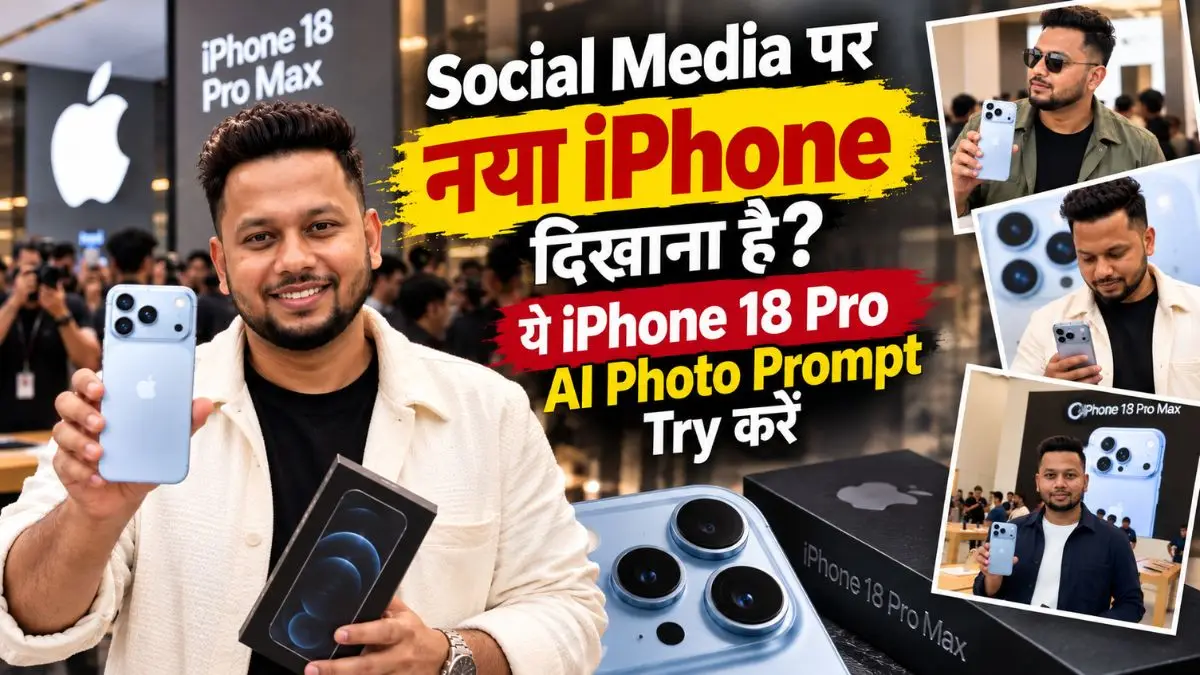
दोस्तों, नया iPhone 18 Pro और iPhone 18 Pro Max आते ही Social Media पर इनका look चर्चा में है। लेकिन सोचिए, अगर आपकी भी ऐसी real photo दिखे जिसमें नया iPhone हाथ में हो और पीछे पूरा launch-event जैसा माहौल—तो देखने वाला एक बार जरूर सोचेगा, “भाई, नया iPhone ले भी लिया?”
इसी तरह की realistic photos बनाने के लिए यहां मैंने iPhone 18 Pro AI Photo Prompt दिए हैं। अपनी photo और नए iPhone की reference image लगाकर आप Launch Event, Unboxing, First Buyer और Flagship Store जैसे अलग-अलग looks बना सकते हैं और Social Media पर दोस्तों को चौंका सकते हैं।
सबसे जरूरी बात—इन prompts में Face Lock + Phone Design Lock दोनों रखे गए हैं, ताकि photo में चेहरा आपका ही लगे और AI नए iPhone को किसी पुराने model में न बदल दे।
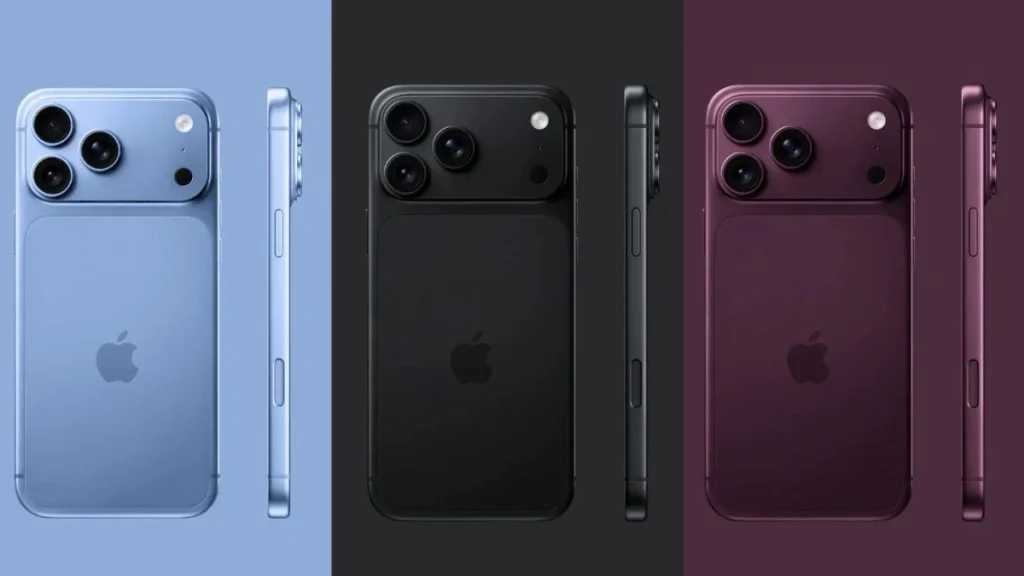
⚠️ सबसे जरूरी बात: इस लेख में दी गई iPhone 18 Pro/Pro Max की reference mobile image को पहले download करें और AI में अपनी photo के साथ जरूर upload करें। आपकी Photo = Face Reference और Mobile की Photo = Phone Design Reference रखें। सिर्फ “iPhone 18 Pro हाथ में दे दो” लिखने पर AI पुराने iPhone जैसा camera design बना सकता है या lenses/flash की position बदल सकता है।
iPhone 18 Pro AI Photo बनाने से पहले ये 2 Images तैयार रखें
इन prompts को ChatGPT और Gemini दोनों में इस्तेमाल किया जा सकता है, जहां multiple reference images उपलब्ध हों।
पहली Image – आपकी Photo: Face साफ दिखाई देना चाहिए। Heavy beauty filter, blur, sunglasses या बहुत छोटा face avoid करें।
दूसरी Image – Phone Reference: इस लेख में दी गई नए iPhone की साफ rear-view image इस्तेमाल करें। Camera panel, lenses, flash और sensors जितने साफ दिखेंगे, Gemini iPhone 18 Pro Prompt या ChatGPT में design उतना आसानी से follow होगा।
यही step सबसे important है। नया model होने की वजह से केवल उसका नाम लिखकर AI से सही hardware design की उम्मीद करना मुझे reliable नहीं लगा।
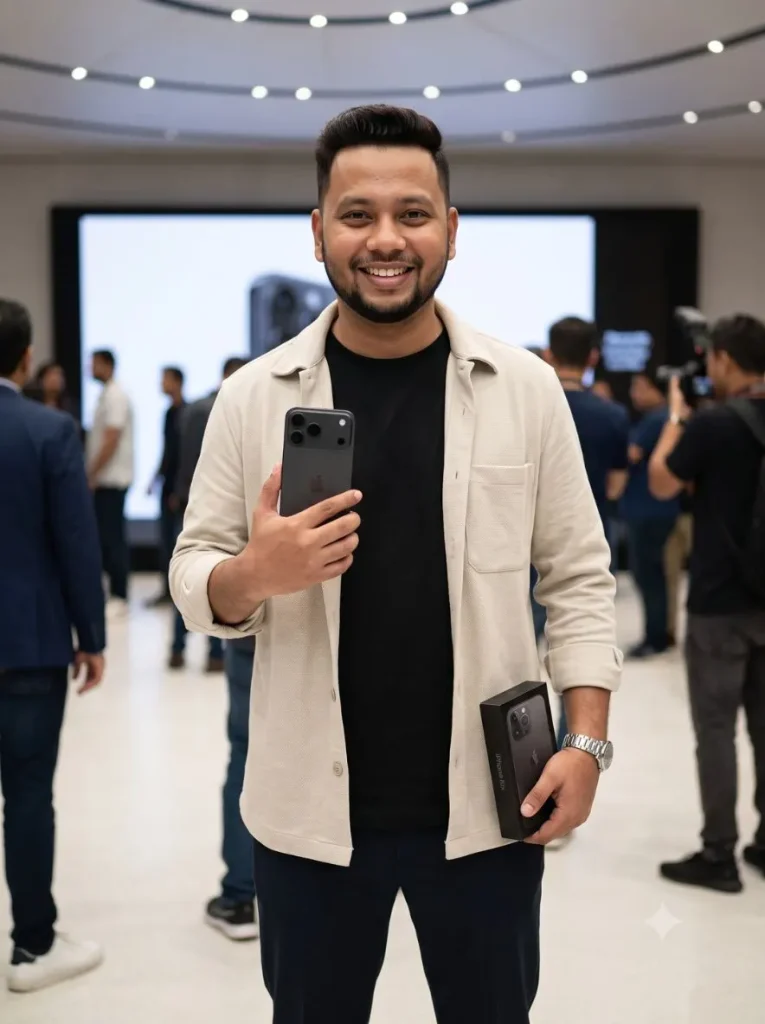
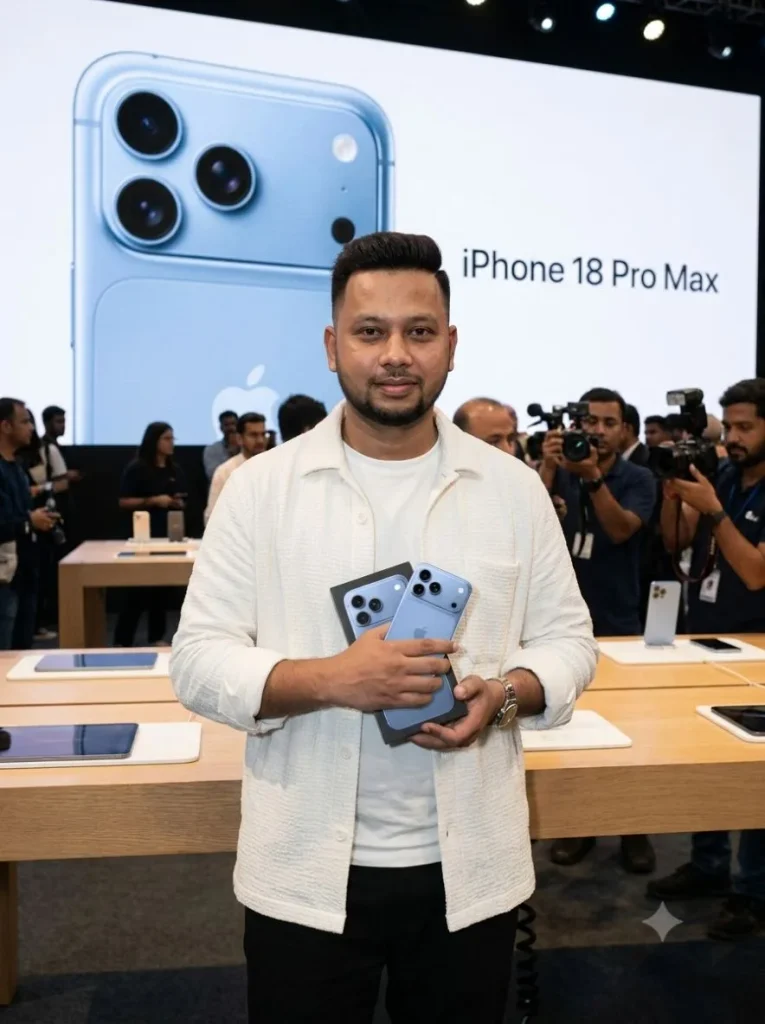
1. नया iPhone और Box हाथ में लेकर Launch-Day Photo
अगर आपको ऐसी photo चाहिए जैसे नया phone मिलने के तुरंत बाद किसी photographer ने आपकी launch venue में तस्वीर खींची हो, तो पहला iPhone 18 Pro AI Photo Prompt सबसे useful है।
इसमें phone right hand में rear side camera की तरफ रहता है और दूसरे हाथ में retail box। मैंने pose जानबूझकर simple रखा है, क्योंकि phone और box को face के बहुत पास रखने पर fingers या product design बिगड़ने की संभावना बढ़ती है।
Use TWO separate uploaded references with completely different purposes: REFERENCE 1 — HUMAN PHOTO: use the uploaded person’s photograph ONLY for the person’s exact facial identity. REFERENCE 2 — PHONE PHOTO: use the uploaded iPhone reference image ONLY for the exact physical design, rear camera layout, proportions, body shape and finish of the smartphone. ABSOLUTE HUMAN IDENTITY LOCK: The generated person must remain unmistakably the SAME real human from the uploaded portrait. Preserve the exact face shape, forehead, eyes, eyebrows, nose, lips, cheeks, jawline, ears, skin tone, apparent age, beard/moustache pattern if present, hairline and recognizable identity. Preserve natural facial asymmetry, pores, under-eye texture, tiny skin imperfections and realistic hair strands. DO NOT beautify, reshape, smooth, reconstruct, stylize or reinterpret the face. No model-like artificial face, no plastic skin, no beauty filter, no excessive sharpening and no fake AI glow. The result must look like an ordinary real person photographed with a professional camera. COMPLETELY CHANGE the original outfit, pose and background. Dress the person in a premium modern outfit: black relaxed-fit crew-neck T-shirt, open light-beige textured overshirt, tailored dark trousers, clean premium sneakers and a minimal metal wristwatch. Do NOT retain clothing from the human reference photo. Create a highly realistic professional launch-day photograph. Show the person standing naturally inside a sophisticated flagship technology launch venue, genuinely happy after receiving the new iPhone 18 Pro Max. He proudly holds the PHONE in his RIGHT HAND at approximately upper-chest level with its BACK FACING THE CAMERA so the complete rear design is clearly visible. In his LEFT HAND he holds the matching premium smartphone retail box. Keep both hands naturally separated so neither the phone nor box covers his face. CRITICAL PHONE DESIGN LOCK — reproduce the smartphone design shown in REFERENCE 2, NOT an older familiar iPhone design. The rear must have the SAME distinctive WIDE HORIZONTAL RAISED CAMERA PANEL extending across almost the entire upper width of the phone. Place THREE large individual camera lenses together toward the LEFT portion of this wide panel, matching the reference arrangement. Keep the flash and additional dark circular sensor toward the RIGHT side of the same horizontal panel. Below the camera panel, maintain the large clean uninterrupted rear-glass area. Preserve the reference phone’s flat premium side rails, rounded corners, slim profile, realistic lens size and overall proportions. DO NOT convert this design into the small square camera island found on older iPhone Pro models. DO NOT generate an iPhone 15 Pro-style compact triangular camera bump. The WIDE FULL-WIDTH HORIZONTAL CAMERA BAR/PANEL from REFERENCE 2 is a NON-NEGOTIABLE visual feature. Use the BLACK/DARK finish shown in the right-side example of the phone reference. The smartphone should be large Pro-Max size and prominent enough that its distinctive camera panel is immediately recognizable. Make the scene look like authentic professional press photography rather than AI artwork: realistic neutral indoor lighting, accurate natural skin tone, subtle shadows, genuine skin pores, slight natural facial imperfections, individual beard/hair texture, realistic fabric folds and believable hands. Give him a small spontaneous happy smile rather than a perfect commercial-model smile. Background: elegant modern product-launch venue, large softly blurred presentation screen, realistic attendees and photographers in the distance, subtle ceiling lights and natural event bokeh. Keep it premium but believable — NO sci-fi environment, neon fantasy or excessive cinematic effects. Shot on a professional full-frame camera, 50mm lens look, eye-level perspective, realistic exposure, natural depth of field, authentic press-event photography, thigh-up composition, sharp facial identity and clearly detailed smartphone. STRICT NEGATIVE: old iPhone camera design, small square camera bump, iPhone 15 Pro-style phone, incorrect camera panel, generic smartphone, tiny phone, hidden phone, phone facing the wrong direction, duplicate phone, extra lenses, malformed hands, extra fingers, AI face, altered identity, beautified face, porcelain skin, waxy skin, excessive skin smoothing, fake facial symmetry, glamour retouching, cartoon look, CGI look, artificial HDR or copied original clothing. 3:4 vertical, ultra-photorealistic.
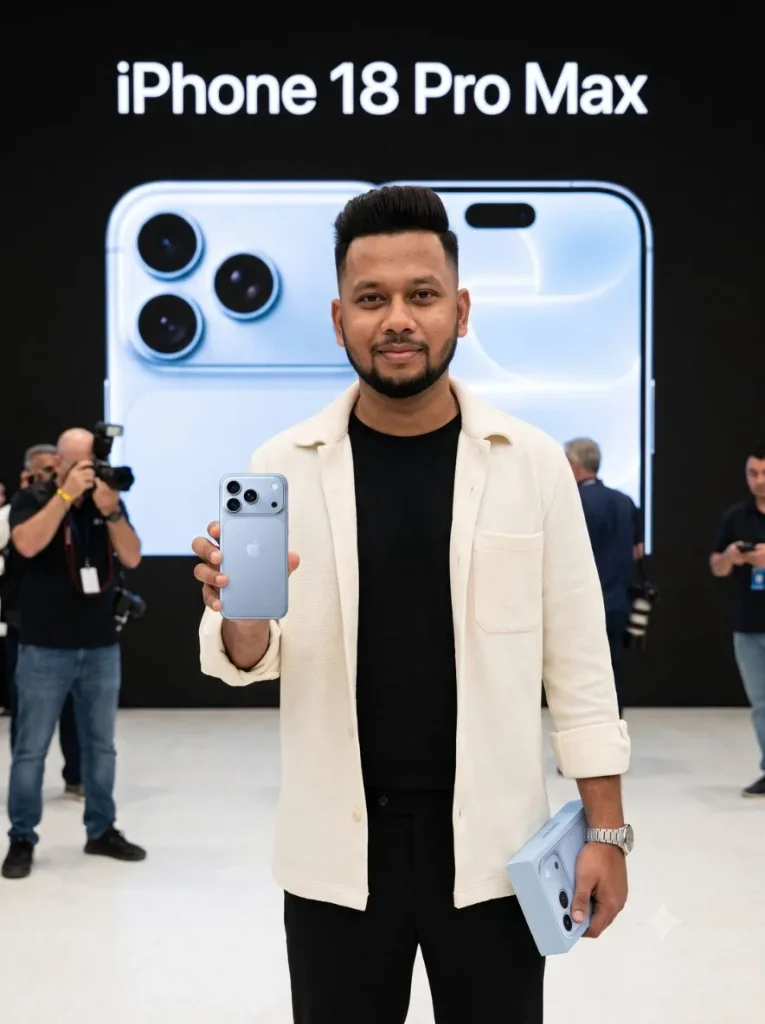
2. iPhone Launch Stage के सामने Professional Press Photo
ये ChatGPT iPhone Photo Prompt उन लोगों के लिए अच्छा है जिन्हें सिर्फ phone पकड़कर खड़ी साधारण photo नहीं, बल्कि proper launch-event feel चाहिए।
Background में बड़ा product screen रहता है और उसी phone का rear design दिखाई देता है। यहां खास बात ये है कि prompt handheld phone के साथ stage पर दिख रहे phone को भी उसी reference से match करवाता है।
Use the TWO uploaded images as mandatory visual references. The uploaded PERSON IMAGE is the ONLY reference for the human identity. The uploaded PHONE IMAGE is the ONLY reference for the smartphone. Do not reinterpret either reference. PERSON — ABSOLUTE IDENTITY PRESERVATION: Reproduce the exact same recognizable person from the uploaded PERSON IMAGE. Preserve the actual facial geometry and identity: exact face shape, forehead, eye shape and spacing, eyebrows, nose shape, lips, cheeks, jawline, ears, skin tone, apparent age, hairline, hairstyle and facial hair. Preserve the person’s real skin characteristics including pores, natural asymmetry, under-eye texture, small marks and normal imperfections. Do NOT improve the face. Do NOT beautify the face. Do NOT make him younger. Do NOT smooth the skin. Do NOT reshape the jaw, nose, eyes or lips. Do NOT create a new facial expression that changes his recognizable facial structure. Do NOT generate an AI-model version of him. Do NOT replace or reconstruct his face. He must immediately look like the SAME REAL PERSON in the uploaded PERSON IMAGE. Only change his clothes, body pose and environment. Dress him in a premium black crew-neck T-shirt, open cream textured overshirt, tailored black trousers and a simple metal wristwatch. Give him a very subtle, natural happy expression. Keep normal human facial tension and realistic skin. Avoid a large artificial smile. PHONE — ABSOLUTE PRODUCT REFERENCE LOCK: COPY THE PHYSICAL SMARTPHONE SHOWN IN THE UPLOADED PHONE IMAGE AS CLOSELY AS POSSIBLE. The uploaded PHONE IMAGE overrides all prior knowledge about iPhones. Do NOT invent, redesign, simplify, improve or reinterpret ANY part of the smartphone. Match the reference phone’s: • exact rear body shape and proportions • exact color and material • exact camera-platform shape and dimensions • exact number of camera lenses • exact lens positions • exact lens sizes • exact spacing between lenses • exact flash count and position • exact sensor count and position • exact side rails • exact rounded corners • exact rear-panel proportions CRITICAL: The generated phone must contain EXACTLY THE SAME NUMBER OF FLASH ELEMENTS visible in the uploaded PHONE REFERENCE. DO NOT ADD A SECOND FLASH. DO NOT duplicate the flash. DO NOT convert a sensor into another flash. Likewise, do not add an extra camera, extra sensor, extra dot, extra lens or additional hardware. The wide horizontal upper camera platform must retain the SAME geometry shown in the uploaded PHONE IMAGE. DO NOT use the familiar older iPhone square camera island. DO NOT substitute an iPhone 15/16/17-style rear. DO NOT rely on memory of what an iPhone should look like. LOOK AT AND FOLLOW THE UPLOADED PHONE REFERENCE. SCENE: Create a realistic professional press photograph at an iPhone 18 Pro Max launch event. Show the same person standing naturally and happily after receiving the phone. He holds the reference-matched smartphone upright in his RIGHT HAND. The BACK of the phone faces directly toward the camera. Keep the entire rear camera area unobstructed and clearly visible. He holds a simple matching retail box in his LEFT HAND. Behind him is a large professional launch-stage screen. On the screen, display a LARGE product render based on THE SAME UPLOADED PHONE REFERENCE. The background product must have the SAME rear design, SAME cameras, SAME single flash configuration, SAME sensors and SAME proportions as the physical phone in his hand. Add only one clean headline on the stage screen: iPhone 18 Pro Max No other specifications or random text. IMPORTANT PRIORITY ORDER: 1. Exact person’s identity from PERSON IMAGE. 2. Exact smartphone hardware appearance from PHONE IMAGE. 3. Correct human anatomy and realistic photography. 4. Outfit and launch-event environment. If maintaining the references conflicts with styling, ALWAYS preserve the references and simplify the styling. PHOTOGRAPHIC REALISM: Make this look like an actual press photograph of a real human, not AI artwork. Neutral white-balanced event lighting, natural Indian/human skin tone, visible pores, realistic under-eye texture, normal facial asymmetry, individual hair and beard strands, natural shadows and realistic hands. No beauty lighting. No skin retouching. No artificial facial glow. No exaggerated HDR. No CGI skin. No fashion-model facial reconstruction. Use an eye-level professional-camera perspective, approximately 50mm lens look, natural depth of field and thigh-up framing. Keep the real person’s face and handheld phone sharply visible. STRICT FAILURE CONDITIONS: Any changed facial identity = incorrect. Any beautified/reconstructed face = incorrect. Any extra flash = incorrect. Any missing or duplicated sensor = incorrect. Any changed camera arrangement = incorrect. Any older iPhone camera design = incorrect. Any phone different from the uploaded PHONE IMAGE = incorrect. Any different phone shown on the background banner = incorrect. Any extra phone = incorrect. Any malformed hand or extra finger = incorrect. 3:4 vertical photograph.
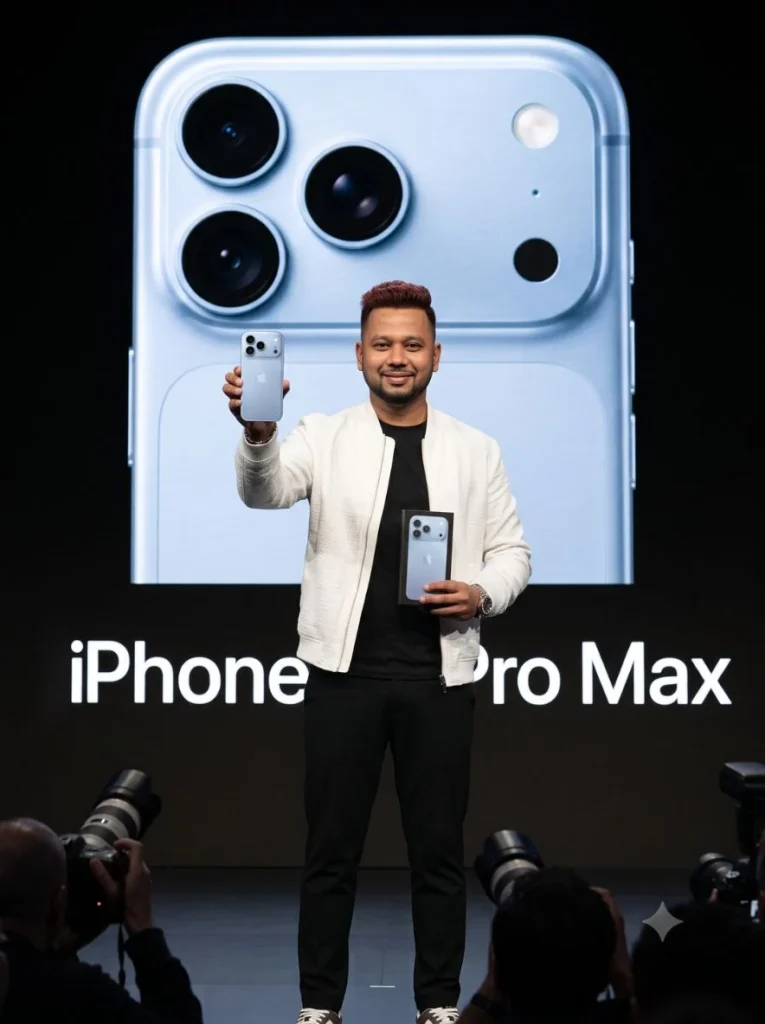
3. Black Suit में iPhone 18 Pro Max Media Photo Call
अगर आपको थोड़ा ज्यादा premium और celebrity launch-event जैसा look पसंद है, तो ये Apple Launch Event AI Photo style सबसे clean लगेगा।
Black suit, media wall, सामने photographers और हाथ में नया phone इसे सामान्य AI portrait से अलग करते हैं। Expression को ज्यादा dramatic नहीं रखा गया है, ताकि face recognizable और natural रहे।
Use TWO uploaded images as mandatory references: PERSON IMAGE exclusively for exact human identity and PHONE IMAGE exclusively for exact smartphone hardware design. ABSOLUTE FACE LOCK: preserve the person’s exact recognizable face, facial proportions, forehead, eyes, eyebrows, nose, lips, cheeks, jawline, ears, skin tone, age, hairline, hairstyle and facial hair. Preserve real pores, natural asymmetry, under-eye texture and minor imperfections. Do NOT beautify, smooth, reshape, reconstruct, regenerate or create an AI-model version of the person. Change the original outfit completely. Dress him in an elegant black tailored suit with a premium black crew-neck T-shirt underneath, clean black trousers, sophisticated shoes and a minimal silver watch. Natural fabric texture, modern understated styling. ABSOLUTE PHONE LOCK: reproduce the PHONE IMAGE as closely as possible. Match its exact rear design, color, proportions, camera-platform shape, exact number/size/position of lenses, exact flash count/location, exact sensors, rails and corners. NO extra flash, extra sensor, extra lens or changed camera geometry. Never substitute an older familiar iPhone design. Create an authentic media photo-call at the iPhone 18 Pro Max launch. The person stands slightly angled toward photographers, looking toward the main camera with a restrained natural happy expression. In his RIGHT HAND he holds the reference-matched phone vertically beside his chest, BACK fully facing the camera. In his LEFT HAND he holds its retail box slightly lower. Behind him is an elegant black product-launch media wall with a huge image of the SAME reference phone and large clean text: “iPhone 18 Pro Max” Keep the design minimal, expensive and professional. Add softly blurred press cameras and photographers at the foreground edge to make it feel like a genuine media event. Real press photography, neutral white-balanced lighting, realistic human skin, visible pores, natural shadows, no artificial facial glow, no beauty lighting, no CGI appearance. 50mm professional-camera look, eye-level angle, sharp face and handheld product. If styling conflicts with either uploaded reference, preserve the references and simplify the styling. Changed identity, altered phone, additional flash, changed sensors, old camera bump, different banner phone or duplicate hardware = incorrect. 3:4 vertical.
4. Box खोलते ही First iPhone Unboxing Moment
सिर्फ closed box पकड़ने के बजाय अगर actual first-unboxing moment चाहिए, तो ये iPhone Unboxing AI Photo prompt try करें।
इस scene में box पहले से open है और phone उसके ठीक ऊपर हाथ में रहता है। इससे viewer को तुरंत समझ आता है कि व्यक्ति ने अभी नया phone निकाला है, लेकिन complex opening action न होने से hands और product design को stable रखने में मदद मिलती है।
Use TWO uploaded images as mandatory and independent visual references. IMAGE 1 = PERSON REFERENCE. Use it ONLY for the exact identity and natural appearance of the person. IMAGE 2 = PHONE REFERENCE. Use it ONLY for the exact physical design and appearance of the smartphone. IMPORTANT: Do not reinterpret either reference. Reference accuracy has higher priority than creativity. ABSOLUTE FACE LOCK: The person in the final photograph must be unmistakably the SAME REAL PERSON shown in IMAGE 1. Preserve the exact face shape, forehead proportions, eyes and their spacing, eyebrows, nose, lips, cheeks, jawline, ears, natural skin tone, apparent age, hairline, hairstyle and facial-hair pattern. Preserve genuine human details: natural facial asymmetry, visible pores, under-eye texture, tiny skin imperfections, beard/hair texture and normal skin variation. Do NOT beautify, smooth, reshape, reconstruct, regenerate or reinterpret the face. Do not make the person younger, more symmetrical or model-like. No AI face, waxy skin, glamour retouching or artificial facial glow. Change ONLY his clothing, body pose and environment. Dress him in a premium navy-blue textured overshirt worn open over a clean white crew-neck T-shirt, tailored beige trousers and a minimal metal wristwatch. Natural fabric folds and realistic fit. ABSOLUTE PHONE DESIGN LOCK: The smartphone in the final image must visually match IMAGE 2 as closely as possible. COPY THE PHONE FROM IMAGE 2 — DO NOT DESIGN A NEW PHONE. Preserve exactly: – same outer body shape and proportions – same rear-panel design – same color and material finish – same camera-platform shape and size – same camera-platform position – same number of camera lenses – same lens sizes – same lens positions and spacing – same number of flashes – same exact flash position – same number and position of sensors – same side-frame design – same corners and visible hardware CRITICAL: If IMAGE 2 shows ONE flash, the final phone must contain EXACTLY ONE flash. NO second flash. NO duplicated flash. NO extra white circular element. NO extra sensor. NO extra camera. NO moved lens. NO altered camera platform. Do not use your memory of older iPhones. IMAGE 2 is the ONLY authority for the phone’s appearance. SCENE — KEEP THIS EXACT CONCEPT: Create a candid professional press photograph at a premium iPhone 18 Pro Max launch event. The person has JUST OPENED his new iPhone 18 Pro Max retail box for the first time and is experiencing the first-buyer moment. He is standing naturally beside a premium product-display counter. In his LEFT HAND, he holds the OPEN retail box naturally at approximately waist/chest height, clearly suggesting that he has just unboxed the device. In his RIGHT HAND, he holds the PHONE FROM IMAGE 2 immediately above and slightly beside the opened box, as though he has just taken it out. IMPORTANT: although this is an unboxing moment, DO NOT reconstruct or redesign the phone because of the action. Treat the smartphone as the exact reference product simply being held in a new scene. Keep the phone upright and almost perfectly rear-facing toward the camera. Its BACK must be clearly visible. Use only a very slight natural perspective angle so the reference phone’s proportions and hardware remain recognizable. Do NOT dramatically rotate, tilt or perspective-warp the phone. His fingers should grip only the lower side edges and must NOT cover any camera, flash or sensor. He looks toward the phone with a genuine restrained expression of happiness and excitement, like someone seeing his newly purchased flagship phone for the first time. Keep the facial movement subtle enough to preserve his exact identity. BACKGROUND — SAME LAUNCH EVENT LOOK: Behind him is a large premium iPhone 18 Pro Max launch display. The display contains a LARGE professional rear-view hero render of the SAME PHONE DESIGN FROM IMAGE 2. The phone shown on the launch display must visually match IMAGE 2 as well — same camera platform, same lenses, same flash count, same flash position and same sensors. Beside the giant product render, show only one clean, large headline: iPhone 18 Pro Max No specifications, random marketing text or gibberish. Add softly blurred attendees, media photographers, premium display tables and subtle event lighting in the background. The overall scene should feel like a genuine first-day product launch captured by a professional press photographer — not a staged AI advertisement. HUMAN REALISM: Use neutral, realistic event lighting. Preserve the person’s real natural skin tone. Show pores, subtle under-eye detail, normal skin texture and individual hair strands. No beauty lighting. No orange cinematic grading. No excessive HDR. No skin smoothing. No artificial sharp eyes. No perfect commercial-model smile. No CGI appearance. Professional full-frame press photography, 50mm lens look, eye-level camera, realistic exposure, natural depth of field and believable shadows. Keep the PERSON’S FACE and the HANDHELD PHONE clearly recognizable and detailed. PRIORITY ORDER: 1. Exact identity from IMAGE 1. 2. Exact handheld phone from IMAGE 2. 3. Exact phone design repeated on background launch display. 4. Original first-buyer/unboxing scene. 5. Outfit and lighting. If any styling instruction conflicts with reference accuracy, simplify the styling — NEVER change the face or phone. STRICT FAILURE CONDITIONS: Changed face = incorrect. AI-looking or beautified face = incorrect. Changed phone design = incorrect. Different camera platform = incorrect. Extra flash = incorrect. Second flash = incorrect. Extra lens or sensor = incorrect. Changed lens placement = incorrect. Different phone on background display = incorrect. Older iPhone design = incorrect. Duplicate handheld phone = incorrect. Malformed hands = incorrect. 3:4 vertical composition, approximately thigh-up framing.
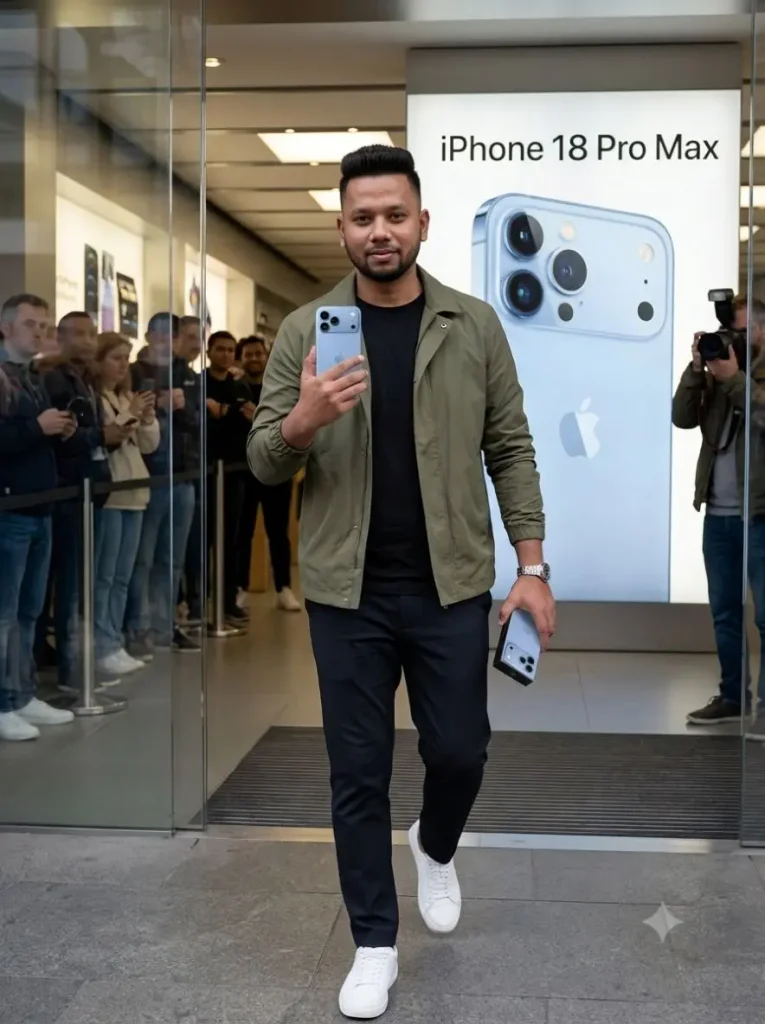
5. Flagship Store से नया iPhone लेकर बाहर निकलते हुए Photo
मुझे इन सभी scenes में यह concept सबसे current लगा। Person flagship store से नया phone खरीदकर बाहर निकल रहा है, सामने photographers हैं और हाथ में phone तथा box साफ दिखाई देते हैं।
यानी ये सिर्फ New iPhone Holding Photo Prompt नहीं रहता—पूरा first-day buyer moment बन जाता है। Social Media post या launch-day concept image के लिए यह काफी attention-grabbing look दे सकता है।
Use TWO uploaded images as mandatory visual references: PERSON IMAGE = the sole and authoritative reference for the person’s identity, face, skin characteristics, hair and facial hair. PHONE IMAGE = the sole and authoritative reference for the smartphone’s visible physical appearance. IMPORTANT: This is a RE-STAGING task, not a character redesign and not a product-design task. Place the same recognizable person and the same reference smartphone into the new scene described below. ================================================== PERSON REFERENCE — MAXIMUM IDENTITY PRESERVATION ================================================== Keep the person unmistakably identical to PERSON IMAGE. Preserve the stable identity characteristics visible in PERSON IMAGE: exact overall face shape, forehead proportions, eye shape and spacing, eyebrow structure, nose structure, mouth/lip proportions, cheek structure, jawline, chin, ears, natural skin tone, apparent age, hairline, hairstyle, hair density, beard/moustache pattern and facial-hair density. Preserve real human characteristics from the reference: natural left-right facial asymmetry, skin pores, under-eye texture, fine lines, small marks, uneven skin texture, individual beard hairs, individual hair strands and normal human imperfections. DO NOT create a cleaner, more attractive or more symmetrical version of him. DO NOT: beautify, face-swap, reconstruct, regenerate, reshape, retouch, smooth, de-age, change facial proportions, change eye size, change nose shape, change jaw, change lips, change skin tone, or give him an AI-model appearance. The face must look like the SAME REAL PERSON photographed on another occasion. EXPRESSION: Do not force a large new smile. Keep his facial geometry close to PERSON IMAGE and introduce only a VERY SMALL natural pleased expression — subtle mouth-corner movement and relaxed eyes. Identity preservation is more important than showing excitement. ================================================== CLOTHING ================================================== Change ONLY the clothing, pose and environment. Dress him in: stylish olive-green lightweight jacket, premium plain black T-shirt, dark tailored trousers, clean white sneakers, simple metal wristwatch. Do not borrow clothing from PERSON IMAGE. ================================================== PHONE REFERENCE — MAXIMUM VISUAL PRESERVATION ================================================== Treat PHONE IMAGE as the authoritative visual source for the smartphone. DO NOT generate the phone according to the words “iPhone 18 Pro Max.” Instead, reproduce the visible smartphone from PHONE IMAGE as faithfully as possible and place that reference-matched product into the person’s hand. PHONE IMAGE overrides learned knowledge, assumptions and familiar iPhone designs. Preserve all visible product characteristics from PHONE IMAGE: same outer silhouette, same height-to-width proportions, same thickness impression, same corner radius, same rear-panel shape, same color, same finish, same side-frame appearance, same camera-platform outline, same camera-platform size, same camera-platform position, same camera-lens count, same lens sizes, same lens positions, same lens spacing, same flash count, same flash position, same sensor count, same sensor positions, and same relative spacing between every visible hardware element. ZERO HARDWARE INVENTION. Do not add anything that is not visible in PHONE IMAGE. If PHONE IMAGE has one flash: GENERATE EXACTLY ONE FLASH. Never create two flashes. Never duplicate the flash. Never turn a sensor into a white flash. Never add an extra circular element. Never add an extra lens. Never move a lens or sensor. Do not “improve” or redesign the camera system. Do not substitute an older familiar iPhone. ================================================== PHONE ORIENTATION ================================================== Place the reference-matched phone in his RIGHT HAND near chest height. The BACK OF THE PHONE faces the camera almost perfectly straight-on. Keep the rear surface nearly parallel to the camera sensor. Use minimal perspective distortion. Do not rotate the phone into a dramatic three-quarter angle. Do not tilt it heavily. Do not hide any part of the camera system. His fingers grip only the LOWER SIDE EDGES of the device. No finger may overlap a lens, flash, sensor or camera platform. Make the phone clearly visible and large enough to compare visually with PHONE IMAGE. ================================================== SCENE — DO NOT CHANGE THIS CONCEPT ================================================== Create a realistic launch-day press photograph OUTSIDE a large premium flagship smartphone store. The person has just purchased the new iPhone 18 Pro Max and is naturally walking out through the flagship store entrance. Keep the walking movement very subtle — one natural forward step only — so his face, hands and phone remain sharp and structurally stable. He looks toward the press camera with a restrained, genuine pleased expression. RIGHT HAND: the exact reference-matched smartphone at chest height, rear facing the camera. LEFT HAND: a premium retail phone box held naturally and separately. Do not place another physical smartphone inside or around the box. Behind him is the large glass-front flagship store with realistic reflections. Include: launch-day visitors behind barriers, a few press photographers, subtle crowd activity, premium storefront architecture, and natural daylight. Keep all background people secondary and softly out of focus. The main person remains dominant in the frame. ================================================== LAUNCH POSTER ================================================== Behind the person is a huge illuminated launch poster. The poster clearly reads: iPhone 18 Pro Max The poster also contains a large rear-view product image based on PHONE IMAGE. IMPORTANT: The poster phone must use the SAME visible camera architecture as PHONE IMAGE: same camera platform, same lens count, same flash count, same sensors, same component positions. Do not invent an alternative phone design for the poster. However, if reproducing a second detailed phone causes ANY conflict with the accuracy of the HANDHELD PHONE, prioritize the handheld phone. Simplify or softly defocus the poster product image rather than altering the handheld reference phone. ================================================== REAL HUMAN PHOTOGRAPHY ================================================== The result must resemble a genuine news/press photograph of a real person attending a real product launch. Use neutral natural daylight mixed subtly with realistic storefront lighting. Maintain the person’s real complexion from PERSON IMAGE. No beauty lighting. No orange cinematic grade. No artificial skin glow. No HDR face. No waxy skin. No porcelain texture. No excessive facial sharpness. No CGI appearance. Preserve pores, small imperfections, natural shadows and realistic skin transitions. Realistic hands with correct anatomy and natural fingernails. Professional full-frame press-camera appearance, 50mm lens, eye-level viewpoint, realistic exposure, moderate natural depth of field, approximately thigh-up framing. ================================================== STRICT PRIORITY ORDER ================================================== 1. PERSON IMAGE facial identity. 2. PHONE IMAGE physical design. 3. Exact lens / flash / sensor configuration. 4. Natural human appearance. 5. Store-exit scene. 6. Outfit. 7. Background styling. If a lower-priority instruction threatens a higher-priority reference, SIMPLIFY THE LOWER-PRIORITY ELEMENT. Never sacrifice the face or handheld phone for styling. ================================================== FAILURE CONDITIONS ================================================== Different-looking person = FAILED. Beautified or AI-generated-looking face = FAILED. Changed facial proportions = FAILED. Changed skin tone = FAILED. Different smartphone silhouette = FAILED. Changed camera platform = FAILED. Changed lens arrangement = FAILED. Extra camera = FAILED. Extra flash = FAILED. Duplicated flash = FAILED. Moved flash = FAILED. Extra sensor = FAILED. Older iPhone camera design = FAILED. Hand covering camera hardware = FAILED. Duplicate handheld smartphone = FAILED. Malformed hand = FAILED. 3:4 vertical professional press photograph.
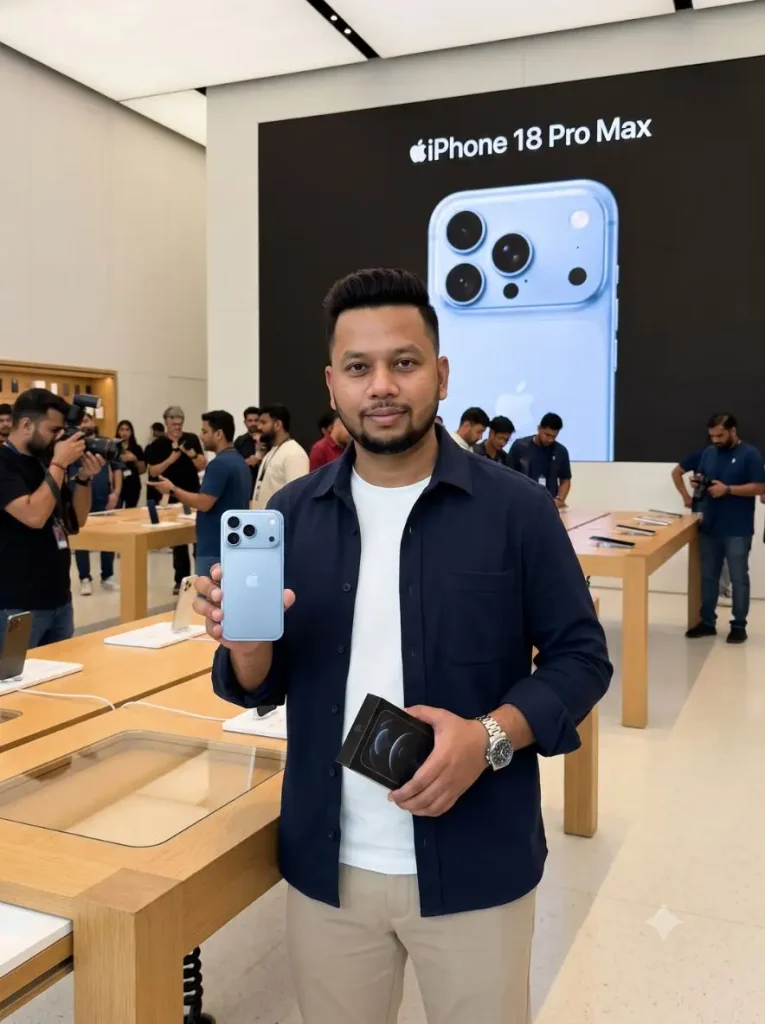
6. Flagship Store के अंदर New iPhone Buyer Photo
अगर बाहर का crowd वाला scene नहीं चाहिए तो ये iPhone 18 Pro Max AI Image ज्यादा clean option है।
Person premium display table के पास phone और box लेकर खड़ा रहता है, जबकि पीछे launch screen और store activity दिखाई देती है। इसका फायदा यह है कि subject और mobile दोनों frame में बड़े और साफ रखे जा सकते हैं।
Use TWO uploaded images as strict visual references. PERSON IMAGE = exact human identity only. PHONE IMAGE = exact smartphone appearance only. ABSOLUTE FACE LOCK: Keep the person unmistakably identical to PERSON IMAGE. Preserve exact facial proportions, eyes, nose, lips, jawline, skin tone, age, hairline, hairstyle and facial hair, including natural pores, asymmetry and under-eye texture. Do not beautify, smooth, reshape, reconstruct or reinterpret the face. Keep only a subtle natural smile. ABSOLUTE PRODUCT LOCK — HIGHEST PRIORITY: Do NOT generate or redesign an iPhone from memory. Visually preserve and reproduce the smartphone shown in PHONE IMAGE as the same physical product. Match its exact silhouette, proportions, color, rear panel, camera-platform shape and size, lens count, lens sizes, lens positions, flash count and position, sensors, spacing, corners and side frame. Do not add, remove, move, duplicate or reinterpret ANY visible hardware. If PHONE IMAGE contains one flash, there must be EXACTLY ONE flash. The words “iPhone 18 Pro Max” must NEVER influence or alter the reference phone design. Create a realistic professional launch-day photograph INSIDE a bright premium flagship smartphone store. The person stands beside a wooden-and-glass display table, holding the reference phone upright in his RIGHT HAND at chest height. Keep the phone almost perfectly straight and BACK FACING THE CAMERA, with fingers gripping only its lower edges so every camera, flash and sensor remains visible. In his LEFT HAND he holds a black retail box. Dress him in a navy premium overshirt, plain white T-shirt, beige tailored trousers and a silver wristwatch. Behind him is a busy launch-day store with wooden display tables, customers and photographers. Add a huge black presentation screen with the clean text “iPhone 18 Pro Max”. Show a large phone image on this screen ONLY if it can remain identical to PHONE IMAGE; otherwise use a softly blurred/cropped product visual rather than inventing a different design. Natural daylight-balanced store lighting, genuine human skin texture, realistic hands, authentic press photography, 50mm lens, eye-level view, 3:4 vertical. STRICT PRIORITY: 1. Exact PHONE IMAGE design. 2. Exact PERSON IMAGE identity. 3. Scene and outfit. Different camera platform = FAILED. Extra or moved lens = FAILED. Extra flash = FAILED. Changed sensor = FAILED. Older iPhone design = FAILED. Changed face = FAILED.
ChatGPT और Gemini में इन Prompts को कैसे Use करें?
Process बहुत simple है, लेकिन दोनों reference images सही जगह देना सबसे जरूरी है।
पहले ChatGPT या Gemini खोले और अपनी clear portrait upload करें।
उसके बाद इस article में दी गई iPhone 18 pro की reference image को डाउनलोड करके Ai Tool में upload करें।
पसंद वाला iPhone 18 Pro AI Photo Prompt copy-paste करें।
प्रॉम्प्ट पेस्ट करने के बाद Generate विकल्प पर क्लिक करें कुछ सेकेंड मे आपकी फोटो तैयार हो जाएगी।
Generate होने के बाद सबसे पहले face और phone का rear camera design compare करें।
एक छोटी detail गलत हो तो पूरी image regenerate करने के बजाय उसी हिस्से को correct करवाएं।
ChatGPT और Gemini iPhone 18 Pro Prompt दोनों में basic idea यही रहेगा—AI को phone अपनी memory से invent नहीं करना है, बल्कि uploaded reference को follow करना है।
Face सही है लेकिन iPhone का Design बदल रहा है?
इस trend में मुझे यही problem सबसे important लगी। कई बार व्यक्ति एकदम सही बन जाता है, लेकिन phone पुराने Pro model जैसा दिखने लगता है या flash/lens extra बन जाता है।
ऐसी स्थिति में नई generation शुरू करने से पहले अपनी phone reference image फिर से attach/check करें। खासकर ये देखें कि rear camera area साफ और बड़ा दिखाई दे रहा हो।
अगर बाकी image अच्छी है तो सिर्फ phone वाले हिस्से को correct करवाएं। पूरी photo बदलवाने पर सही बना face भी दोबारा बदल सकता है।
iPhone तो Real लग रहा है, लेकिन Face AI वाला? ये गलती न करें
कई बार iPhone 18 Pro AI Photo Prompt से phone एकदम सही बन जाता है, लेकिन ज्यादा smooth skin, perfect smile और extra sharp eyes चेहरे को AI-generated बना देते हैं।
इससे बचने के लिए ऐसी reference photo दें जिसमें natural skin texture, eyes और पूरा face साफ दिखाई दे। Beauty filter वाली selfie से बचें और prompt में expression हल्का ही रखें। मेरे test में natural pores + छोटी smile + normal skin imperfections रखने पर Launch-Day Photo ज्यादा असली photograph जैसी लगती है।
AI बार-बार पुराने iPhone जैसा बना रहा है? ये तरीका Try करें
नया model होने की वजह से AI कई बार iPhone 18 Pro की reference image देने के बाद भी camera design बदल सकता है। मेरे test में पूरी image दोबारा generate कराने के बजाय सिर्फ phone को correct करवाना ज्यादा useful रहा।
अगर face, pose और background सही हैं, तो उन्हें बिल्कुल न बदलें। उसी image में phone वाली reference दोबारा देकर सिर्फ mobile का camera panel, lenses, flash और sensors match करवाएं। इससे सही बना face बचा रहता है और केवल गलत phone design पर correction होता है।
एक चीज खास ध्यान रखें: reference image में phone का rear design बड़ा और साफ दिखाई देना चाहिए। छोटा या angled product photo देने पर AI hardware details ज्यादा आसानी से बदल देता है।
Final Image Publish करने से पहले क्या जरूर देखें?
Final iPhone 18 Pro AI Photo Prompt result में सिर्फ face देखकर image select मत करें। Mobile reference खोलकर side-by-side phone भी compare करें। Camera lenses, flash और sensors की संख्या तथा placement same होनी चाहिए। Hands में extra fingers या fused grip नहीं होना चाहिए और box हवा में floating जैसा नहीं लगे।
अगर AI ने background में गलत product render बना दिया है लेकिन हाथ वाला phone सही है, तो handheld phone को बचाएं और background product visual को simplify करवाएं। और अगर आप ऐसी image Social Media या article में इस्तेमाल कर रहे हैं, तो उसे AI-generated concept image के रूप में साफ बताना बेहतर है—ऐसा impression न दें कि आपने वास्तव में phone खरीदा या official Apple launch attend किया है।
FAQs
iPhone 18 Pro AI Photo Prompt ChatGPT में चलेगा?
हां, ये prompts ChatGPT के image generation workflow के लिए बनाए गए हैं। अपनी face photo और अलग phone reference दोनों upload करना बेहतर रहेगा।
क्या इन्हें Gemini में भी इस्तेमाल कर सकते हैं?
हां। यही Gemini iPhone 18 Pro Prompt Gemini में भी इस्तेमाल किया जा सकता है, बशर्ते आपके उपलब्ध workflow में reference images support हों।
iPhone का Design बार-बार क्यों बदल रहा है?
नया phone होने पर AI केवल नाम के आधार पर पुराने iPhone patterns बना सकता है। इसलिए इस लेख में दी गई mobile reference image को अपनी photo के साथ जरूर दें।
iPhone 18 Pro Max Photo Editing Prompt में Face Same कैसे रखें?
Clear unfiltered portrait इस्तेमाल करें और prompt में person image को सिर्फ identity reference रखें। Phone की image को अलग product reference के रूप में दें।
कौन-सा Prompt Instagram के लिए सबसे अच्छा रहेगा?
Launch-day holding photo और flagship-store exit वाला New iPhone Holding Photo Prompt सबसे ज्यादा instantly understandable है, जबकि unboxing वाला scene Reel cover या carousel के लिए अच्छा रहेगा।
निष्कर्ष
दोस्तों, अभी iPhone 18 Pro AI Photo Prompt trend में सबसे interesting चीज सिर्फ नया iPhone हाथ में दिखाना नहीं है। असली challenge ऐसी image बनाना है जिसे देखकर phone भी नए model जैसा लगे और आपका face भी किसी AI model में न बदल जाए। इसीलिए मैं दो reference images वाला तरीका recommend करूंगा—अपनी photo सिर्फ face के लिए और इस लेख में दी गई mobile image सिर्फ phone के exact design के लिए।
इनमें से Launch Event, iPhone Unboxing AI Photo, Media Photo Call और Flagship Store वाले looks try करके देखिए। मुझे comments में जरूर बताइए कि आपका phone design पहली generation में सही बना या AI ने camera panel बदल दिया।
नमस्कार! मैं लवित राव हूँ। मैं AI Prompts, Gemini AI, ChatGPT और AI Image Editing पर काम करता हूँ। इस वेबसाइट पर मैं केवल वही प्रॉम्प्ट्स और गाइड्स शेयर करता हूँ जिन्हें मैं खुद टेस्ट करता हूँ, ताकि आपको सही, उपयोगी और आसानी से समझ आने वाली जानकारी मिल सके।