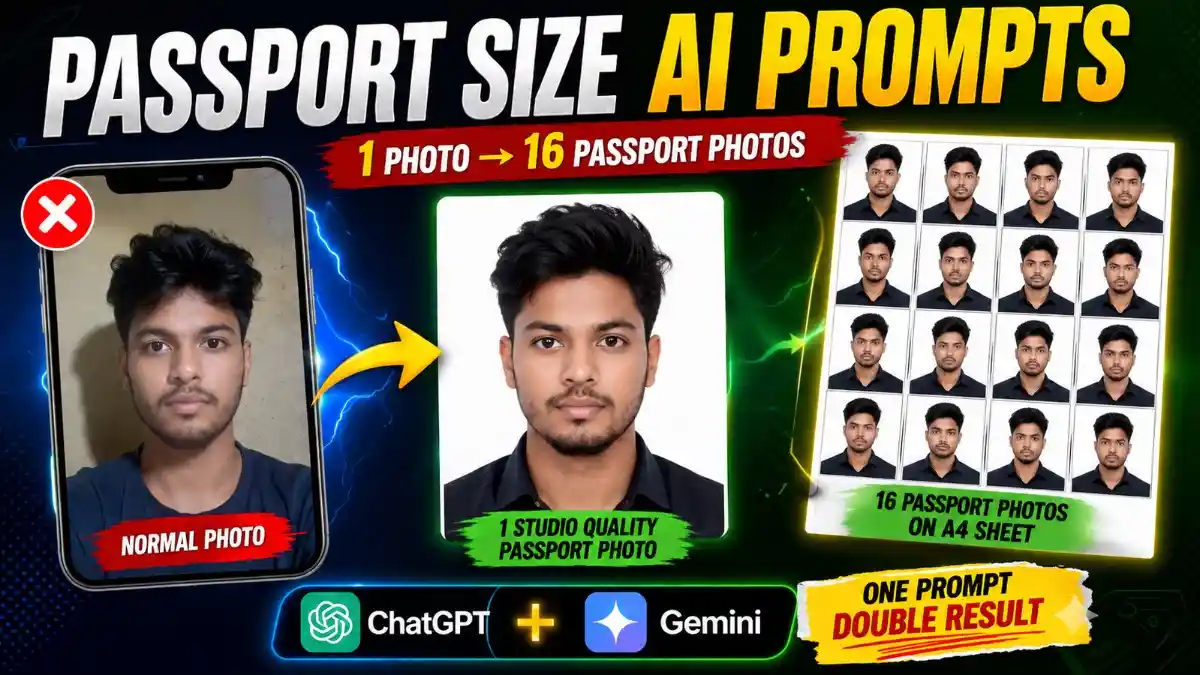
नमस्कार दोस्तों, अगर आपको कभी Online Form भरते समय, किसी सरकारी दस्तावेज़ के लिए या Job Application में Passport Size Photo की जरूरत पड़ी है, तो आप जानते होंगे कि पहले इसके लिए सीधे फोटो स्टूडियो जाना पड़ता था। लेकिन अब AI की वजह से यह पूरा काम पहले से कहीं ज्यादा आसान हो गया है। आज सिर्फ एक सामान्य फोटो और सही Passport Size AI Photo Editing Prompt की मदद से आप अपने मोबाइल पर ही Professional Studio जैसी Passport Size Photo तैयार कर सकते हैं।
यही कारण है कि Passport Size AI Photo Prompt इन दिनों काफी तेजी से लोकप्रिय हो रहा है। बहुत से लोग अपनी पुरानी या सामान्य फोटो को AI की मदद से Professional Passport Photo में बदल रहे हैं। अच्छी बात यह है कि इसके लिए आपको Photo Editing सीखने की भी जरूरत नहीं होती। सही Prompt और एक साफ Reference Photo काफी होती है।
अगर आप किसी पासपोर्ट, वीज़ा, सरकारी दस्तावेज़, Exam परीक्षा या अन्य आधिकारिक आवेदन के लिए फोटो तैयार कर रहे हैं, तो AI से बनाई गई Passport Size Photo का उपयोग करने से पहले संबंधित संस्था की Official Photo Guidelines अवश्य जांच लें। Photo Size, Background Color, Face Position, Head Coverage, Expression और अन्य आवश्यक नियम अलग-अलग संस्थाओं के अनुसार बदल सकते हैं। इसलिए अंतिम फोटो सबमिट करने से पहले यह सुनिश्चित कर लें कि वह संबंधित संस्था द्वारा निर्धारित सभी आधिकारिक मानकों को पूरा करती है।
AI से किसी भी Photo को Professional Passport Photo में बदलें
अगर आपके पास पहले से कोई फोटो है, तो जरूरी नहीं कि वह Passport Style में ही खींची गई हो। आज के AI Image Tools इतने बेहतर हो चुके हैं कि वे सामान्य फोटो को भी Professional Passport Look में बदल सकते हैं।
मान लीजिए आपके पास Outdoor Photo है, किसी पार्क में ली गई तस्वीर है, घर के अंदर क्लिक की गई फोटो है या फिर किसी Group Photo से Crop की गई आपकी तस्वीर है। अगर उसमें आपका चेहरा साफ दिखाई दे रहा है, तो Passport Size AI Photo Editing Prompt की मदद से उसे आसानी से Passport Size Photo में बदला जा सकता है।
यही वजह है कि आज Passport Size AI Photo Prompt सिर्फ AI Creators ही नहीं, बल्कि Students, Job Seekers और उन लोगों के बीच भी तेजी से इस्तेमाल किया जा रहा है जिन्हें समय-समय पर Digital Passport Photo की जरूरत पड़ती है।
Passport Size AI Photo Editing Prompt
Studio Quality Passport Size AI Photo Prompt
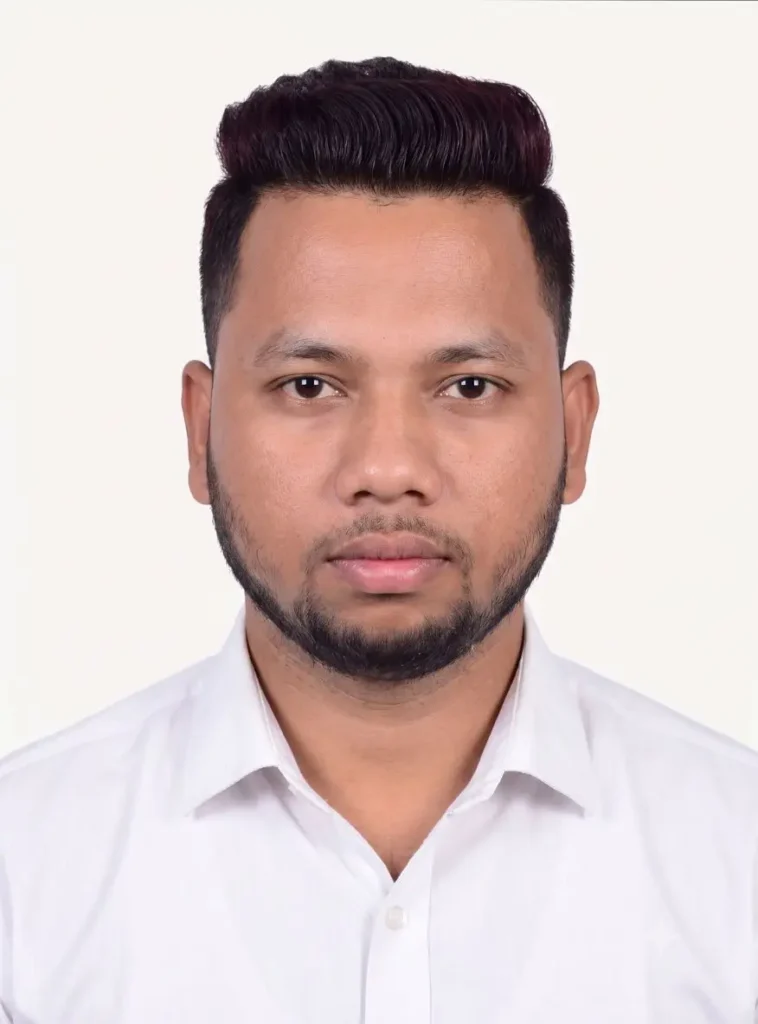
मैंने इस Prompt को ChatGPT और Gemini, दोनों पर इस्तेमाल करके देखा। इससे Studio Quality Passport Size Photo तैयार होती है, जिसमें Soft White Background, White Formal Shirt और बिल्कुल Natural Face मिलता है। सही Reference Photo देने पर Result काफी Realistic और Professional दिखाई देता है।
Formal Suit Passport Size AI Photo Prompt
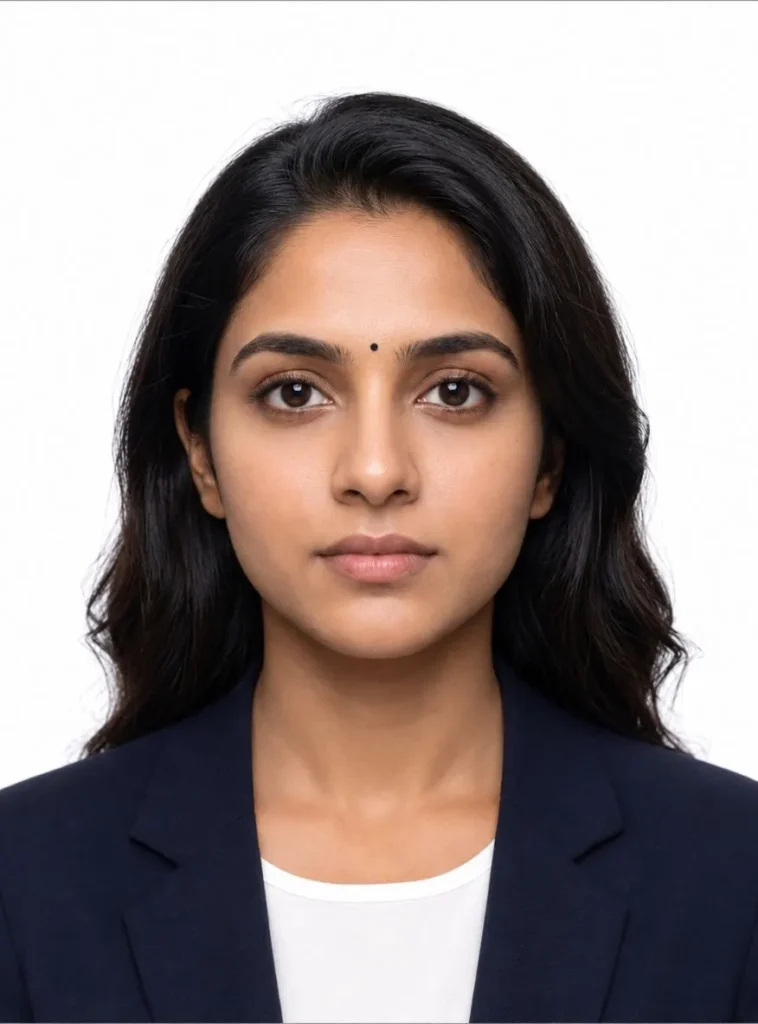
अगर आप ऐसी Passport Size Photo चाहते हैं जो पहली नज़र में किसी Professional Studio में खींची हुई लगे, तो यह Prompt एक बेहतरीन विकल्प है। इसमें AI आपके चेहरे की Natural Identity को बनाए रखते हुए Formal Suit, Plain White Background और Soft Studio Lighting के साथ साफ़ और Professional Portrait तैयार करता है। अच्छी Reference Photo के साथ Final Result काफी Realistic, Sharp और Official Passport Photo जैसा दिखाई देता है।
Official Passport Size Photo with Black Border AI Prompt
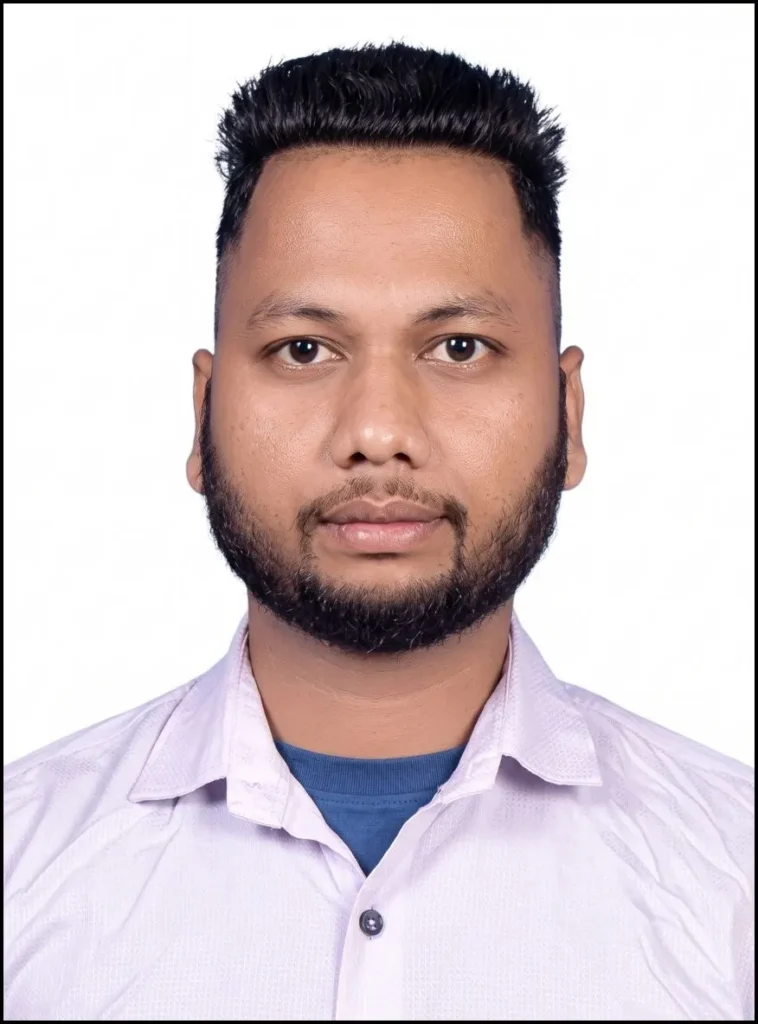
अगर आपको ऐसी Passport Size Photo चाहिए जो Official Document Format के ज्यादा करीब लगे, तो यह Prompt एक अच्छा विकल्प हो सकता है। इसमें AI White Background, चारों तरफ़ Uniform Black Border, Balanced Studio Lighting और Sharp Face Details के साथ Professional Passport Photo तैयार करने की कोशिश करता है। अच्छी Quality की Reference Photo इस्तेमाल करने पर Final Output साफ़, Natural और Print-Ready जैसा दिखाई देता है।
Passport Size AI Photo Editing के फायदे
इस तरीके की सबसे अच्छी बात यही है कि आपको हर बार नई Passport Photo खिंचवाने की जरूरत नहीं पड़ती। कई बार हमारे पास अच्छी फोटो पहले से होती है, लेकिन उसका Background, Dress या Frame Passport Photo के हिसाब से नहीं होता। ऐसे में AI वही फोटो लेकर उसे Professional Studio Style में तैयार कर देता है।
मेरे हिसाब से यही इसकी सबसे बड़ी खासियत है कि आप अलग-अलग तरह की Photos का इस्तेमाल कर सकते हैं। चाहे फोटो बाहर ली गई हो, घर में ली गई हो, किसी ट्रिप की हो या कई महीने पुरानी ही क्यों न हो—अगर Face साफ दिखाई दे रहा है, तो अच्छे Result मिलने की संभावना काफी बढ़ जाती है।
8 Copies Studio Passport Photo Sheet AI Prompt
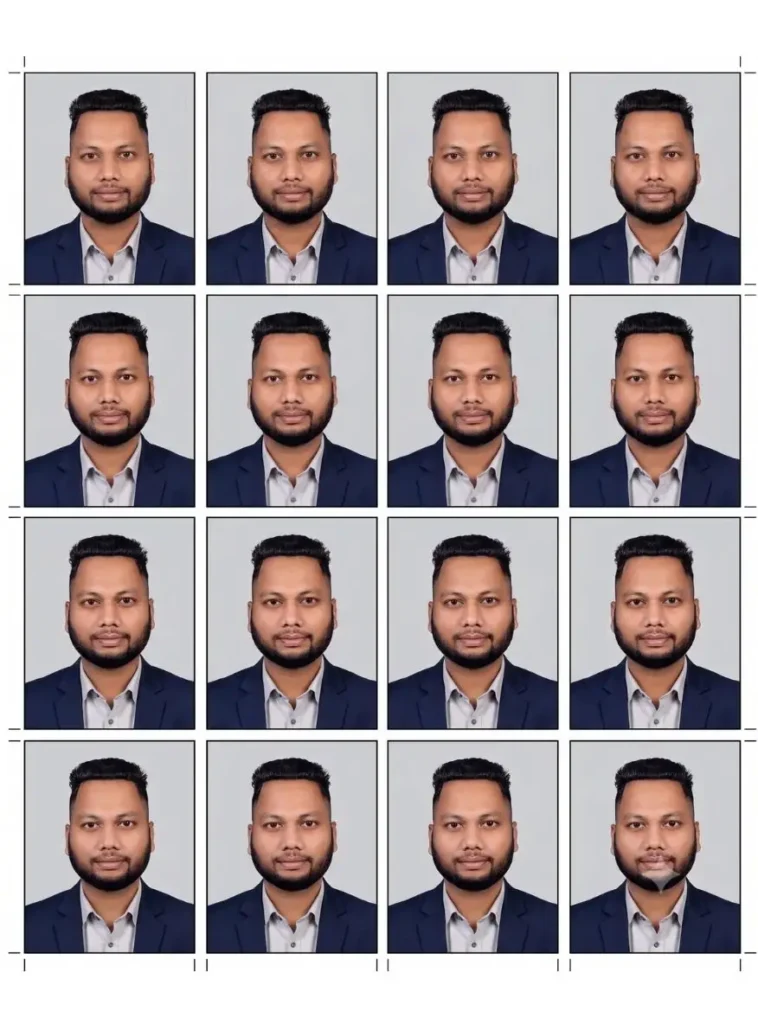
अगर आपको एक ही शीट पर प्रिंट के लिए तैयार कई Passport Size Photos चाहिए, तो यह Prompt काफी उपयोगी है। इससे AI एक Professional Studio की तरह 4×4 Layout में 16 एक जैसी Passport Size Photos तैयार करता है। सही Reference Photo के साथ Final Output साफ़, Print-Ready और बिल्कुल Photo Studio में मिलने वाली Passport Photo Sheet जैसा दिखाई देता है।
Passport Size AI Photo कैसे बनाएं?
इस Photo को बनाने के लिए आप ChatGPT या Gemini, दोनों का इस्तेमाल कर सकते हैं। दोनों Platforms पर तरीका लगभग एक जैसा है, इसलिए अलग-अलग Process याद रखने की जरूरत नहीं पड़ती।
सबसे पहले ChatGPT या Gemini खोलें। New chat विकल्प चुनें, इसके बाद + (Plus) आइकन पर क्लिक करके अपनी साफ Reference Photo Upload करें। अब नीचे दिया गया Passport Size AI Photo Editing Prompt Copy करके Paste करें और Generate पर क्लिक कर दें।
कुछ ही देर में AI आपकी सामान्य फोटो को Professional Passport Style में तैयार कर देगा। यही तरीका Passport Size AI Photo Editing Prompt Gemini और Passport Size AI Photo Editing Prompt ChatGPT दोनों पर आसानी से इस्तेमाल किया जा सकता है।
इस Passport Size AI Photo Editing की मुख्य विशेषताएँ
2026 में AI सिर्फ Background बदलने तक सीमित नहीं है। सही Passport Size AI Photo Editing Prompt इस्तेमाल करने पर AI पूरी Image को Professional तरीके से तैयार करने की कोशिश करता है।
इसमें जरूरत के अनुसार White, Blue या दूसरे Background Color बनाए जा सकते हैं। Face की Lighting को ज्यादा Balanced बनाया जा सकता है, Photo की Framing सुधारी जा सकती है और Overall Image को Studio Quality जैसा Look दिया जा सकता है।
इसी वजह से आज Realistic Passport Size AI Prompt, Official Passport Photo AI Prompt और Trending Passport Photo AI Prompt जैसे Keywords भी तेजी से Search किए जा रहे हैं। क्योंकि लोग चाहते हैं कि बिना Studio जाए उन्हें Professional Quality की Passport Photo मिल जाए।
Passport Size AI Photo Editing Prompt इस्तेमाल करते समय इन बातों का ध्यान रखें
अगर आप पहली बार Passport Size AI Photo Editing Prompt इस्तेमाल कर रहे हैं, तो कुछ छोटी-छोटी बातें पहले से जान लेना आपके लिए फायदेमंद रहेगा। कई बार लोग Prompt सही इस्तेमाल करते हैं, लेकिन Reference Photo सही नहीं होने की वजह से Final Result उम्मीद के मुताबिक नहीं आता।
बेहतर रिज़ल्ट के लिए कोशिश करें कि जिस फोटो को Upload कर रहे हैं उसमें आपका चेहरा साफ दिखाई दे, Light ठीक हो और फोटो बहुत ज्यादा Blur न हो। AI जितनी साफ Reference Photo पाएगा, उतनी ही Natural Passport Size Image तैयार करने की संभावना बढ़ जाती है।
अगर पहली बार में मनचाहा Result नहीं मिलता, तो घबराने की जरूरत नहीं है। कई बार उसी Passport Size AI Photo Prompt को दोबारा Generate करने पर Face Matching, Lighting और Framing पहले से बेहतर दिखाई देती है। इसलिए एक-दो Variations Compare करना हमेशा अच्छा विकल्प रहता है।
Final Image Download करने से पहले क्या Check करें?
Photo Generate होने के बाद उसे सीधे Download करने की बजाय एक बार ध्यान से देख लें।
- क्या Face बिल्कुल Natural दिख रहा है?
- Background आपकी जरूरत के अनुसार है?
- Photo Passport Style में सही Frame हुई है?
- Face पर कहीं Extra Blur या AI Artifact तो नहीं है?
- Lighting और Dress Professional लग रहे हैं?
अगर इनमें से किसी भी जगह आपको कमी महसूस हो, तो उसी Prompt को दोबारा Generate करें। कई बार दूसरा या तीसरा Output पहले से कहीं ज्यादा बेहतर होता है।
👉महत्वपूर्ण सूचना: क्या यह तरीका Official Documents के लिए इस्तेमाल किया जा सकता है?
AI की मदद से तैयार की गई Passport Size AI Photo कई Digital जरूरतों, Online Applications और Personal Use के लिए उपयोगी हो सकती है। हालांकि, यह जरूरी नहीं है कि हर सरकारी विभाग, दूतावास, परीक्षा संस्था या अन्य Official Authority AI-Generated Passport Photo को स्वीकार करे।
अगर आप किसी Passport, Visa, Government Document, Competitive Exam या अन्य आधिकारिक प्रक्रिया के लिए Photo तैयार कर रहे हैं, तो सबसे पहले संबंधित संस्था द्वारा जारी Official Photo Guidelines जरूर पढ़ें। Background Color, Photo Size, Face Position, Dress Code और अन्य Specifications हर संस्था में अलग हो सकती हैं। बेहतर रहेगा कि AI से बनाई गई Photo का उपयोग करने से पहले उसकी सभी Official Requirements से एक बार मिलान कर लें।
यह छोटा-सा कदम आगे चलकर Photo Reject होने जैसी परेशानी से बचा सकता है और आपको सही दस्तावेज़ जमा करने में मदद करेगा।
FAQs – Passport Size AI Photo Editing Prompt
1. Passport Size AI Photo Editing Prompt क्या है?
Passport Size AI Photo Editing Prompt एक विशेष AI Prompt होता है जिसकी मदद से आप अपनी सामान्य फोटो को Professional Studio Style Passport Size Photo में बदल सकते हैं। इसे ChatGPT, Gemini और अन्य AI Image Generation Tools के साथ इस्तेमाल किया जा सकता है।
2. क्या मैं ChatGPT और Gemini दोनों में यह Prompt इस्तेमाल कर सकता हूँ?
हाँ। यह Passport Size AI Photo Editing Prompt ChatGPT और Passport Size AI Photo Editing Prompt Gemini दोनों पर इस्तेमाल किया जा सकता है। अलग-अलग AI Models में Result थोड़ा अलग हो सकता है, इसलिए एक से अधिक Output Compare करना बेहतर रहता है।
3. क्या AI से बनी Passport Size Photo Official Documents के लिए मान्य होती है?
यह संबंधित संस्था के नियमों पर निर्भर करता है। Passport, Visa, Government Documents या Competitive Exams के लिए Photo Upload करने से पहले हमेशा उस संस्था की Official Photo Guidelines जरूर देखें और उसी के अनुसार Photo का उपयोग करें।
4. बेहतर Result के लिए कैसी Reference Photo इस्तेमाल करनी चाहिए?
बेहतर Output के लिए ऐसी Photo चुनें जिसमें आपका चेहरा साफ दिखाई दे, पर्याप्त Lighting हो और Image बहुत ज्यादा Blur न हो। अच्छी Reference Photo से Face Matching और Overall Quality दोनों बेहतर आती हैं।
5. अगर पहली बार में अच्छा Result न मिले तो क्या करें?
ऐसी स्थिति में उसी Passport Size AI Photo Prompt को दोबारा Generate करें। कई बार दूसरा या तीसरा Output Face Matching, Lighting और Framing के मामले में पहले से बेहतर होता है।
6. क्या पुरानी या Casual Photo को भी Passport Size Photo में बदला जा सकता है?
हाँ। अगर आपकी पुरानी या Casual Photo में चेहरा स्पष्ट दिखाई दे रहा है, तो AI उसे भी Professional Passport Style Image में बदल सकता है। हालांकि Final Result आपकी Reference Photo की Quality पर निर्भर करेगा.
निष्कर्ष
अगर आपके पास पहले से कोई साफ फोटो मौजूद है, तो अब Professional Passport Photo बनवाने के लिए हर बार स्टूडियो जाने की जरूरत नहीं है। सही Passport Size AI Photo Editing Prompt और एक अच्छी Reference Photo की मदद से ChatGPT या Gemini पर कुछ ही मिनटों में शानदार Studio Quality Image तैयार की जा सकती है।
मैंने इस लेख में वही आसान तरीका साझा किया है जिसे कोई भी Beginner बिना किसी Editing Experience के Follow कर सकता है। अब नीचे दिए गए Prompt का इस्तेमाल करें, अपनी Photo Generate करें और अलग-अलग Results Compare करके अपने लिए सबसे बेहतर Passport Size Photo चुनें।
नीचे दिए गए हमारे अन्य लेख भी देखे आपको जरूर पसंद आएंगे:-

Ye b mast work kr rha h. Aur b upload kro eshi hi prompts
Jarur bhai ji dhanyawad apna sujhao dene ke liye
Rất cảm ơn những chia sẻ này.