आज के digital दौर में Ambedkar Jayanti AI Image Prompt सिर्फ एक trend नहीं बल्कि एक powerful तरीका बन चुका है, जिससे आप कुछ ही मिनटों में professional-level posters, banners और photos create कर सकते हैं। पहले जहां design बनाने में घंटों लगते थे, वहीं अब सही Ambedkar Jayanti AI Image Prompt की मदद से आप highly realistic और creative visuals बना सकते हैं।
लेकिन सच यही है कि ज्यादातर लोग जब Ambedkar Jayanti AI Image Prompt use करते हैं, तो उनका output उतना impactful नहीं होता—क्योंकि उन्हें सही prompt structure, face consistency और design detailing का पता नहीं होता। अगर आप चाहते हैं कि आपकी images social media पर stand out करें, तो आपको smart तरीके से Ambedkar Jayanti AI Image Prompt का इस्तेमाल करना होगा।
इस guide में आप सीखेंगे कि कैसे एक powerful Ambedkar Jayanti AI Image Prompt का इस्तेमाल करके आप realistic, creative और high-quality images बना सकते हैं—चाहे वो Ambedkar Jayanti poster, Ambedkar Jayanti banner editing, या Ambedkar Jayanti photo editing ही क्यों न हो।
Ambedkar Jayanti AI Image Prompt क्या है?
Ambedkar Jayanti AI Image Prompt एक ऐसा detailed instruction होता है जिसे आप AI tool में डालते हैं ताकि वह आपके लिए Ambedkar Jayanti से जुड़ी images generate कर सके।
एक अच्छा Ambedkar Jayanti AI Image Prompt सिर्फ subject नहीं बताता, बल्कि उसमें lighting, background, pose, emotion और style तक define होते हैं—जिससे output ज्यादा realistic और professional बनता है।
Best Ambedkar Jayanti AI Image Prompt (Copy-Paste Ready)
1. Royal Flag Portrait – Premium Look Prompt
Explanation:
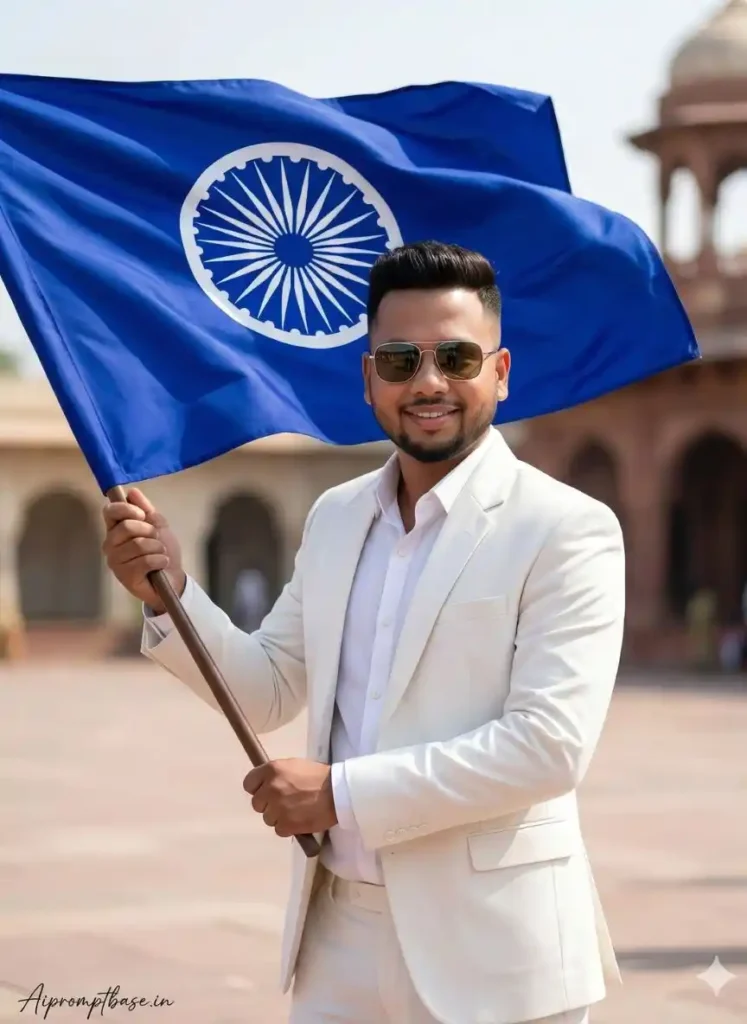
यह Ambedkar Jayanti AI Image Prompt एक strong और powerful personality दिखाने के लिए perfect है। इसमें flag element और premium styling image को royal feel देता है।
Prompt:
FACE LOCK – MUST FOLLOW Use both uploaded reference photos. Face must be 100% exact same — no reshaping, no beautification, no AI modification. Preserve real skin texture, facial structure, hairstyle, age, expression exactly as original. Ultra-HD face clarity, fully human look. High-quality Ultra 8K hyperrealistic portrait of a young man standing proudly holding a large blue flag with a white Ashoka Chakra symbol waving powerfully in the wind. Hairstyle, beard, and face same as the referred image — identical natural features, sharp jawline, and confident expression, hyper-stylish and attractive look. He is dressed in a full luxurious white outfit — white blazer, white shirt, and white trousers, giving an elegant and premium. ASPECT RATIO: 3:4 vertical TEXT / SIGNATURE: Add “Aipromptbase.in” bottom-left, handwritten signature-style, thin cursive strokes, small size, subtle premium elegance, white/soft off-white.
2. Luxury Sofa Portrait – Classic Tribute Style
Explanation:
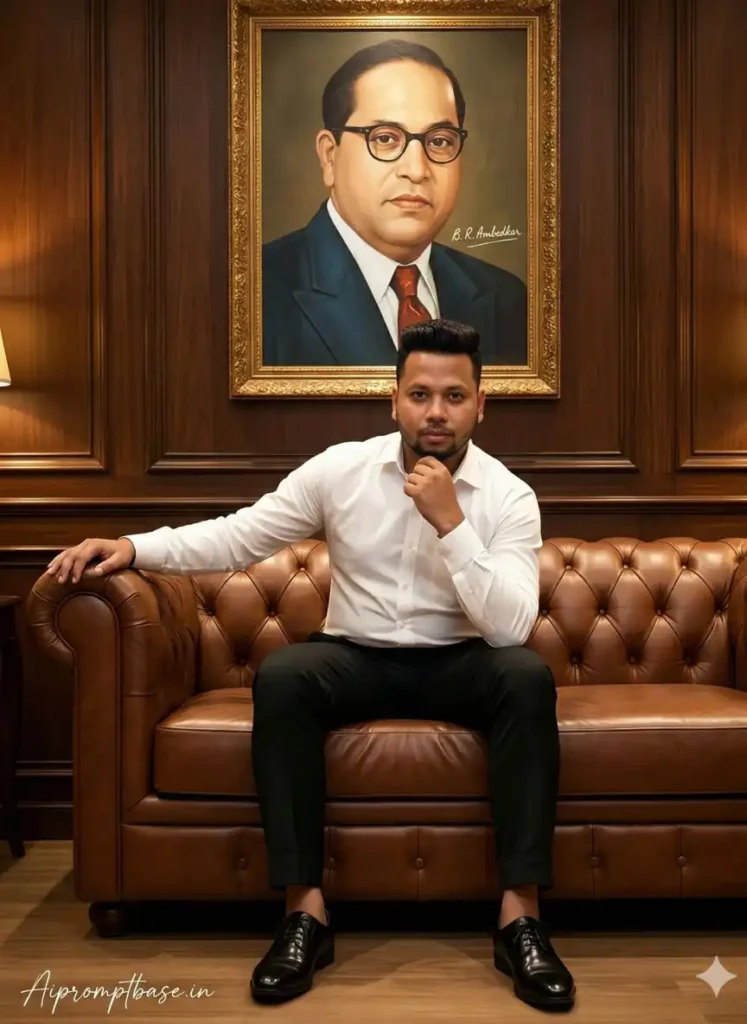
यह prompt एक classy और intellectual vibe देता है, जो Dr Ambedkar Jayanti images prompt के लिए ideal है।
Prompt:
FACE LOCK – MUST FOLLOW Use both uploaded reference photos. Face must be 100% exact same — no reshaping, no beautification, no AI modification. Preserve real skin texture, facial structure, hairstyle, age, expression exactly as original. Ultra-HD face clarity, fully human look. A confident young man sitting on a luxurious brown leather sofa, dressed in a crisp white shirt, black fitted trousers, and polished black formal shoes. He poses elegantly with one hand near his face and the other resting on the sofa arm. The background features a dark wooden panelled wall, softly lit with warm ambient light, and a grand framed portrait of Dr Babasaheb Ambedkar hanging above, adding a scholarly and royal atmosphere. Add stylish signature text:- B. R. Ambedkar ASPECT RATIO: 3:4 vertical TEXT / SIGNATURE: Add “Aipromptbase.in” bottom-left, handwritten signature-style, thin cursive strokes, small size, subtle premium elegance, white/soft off-white.
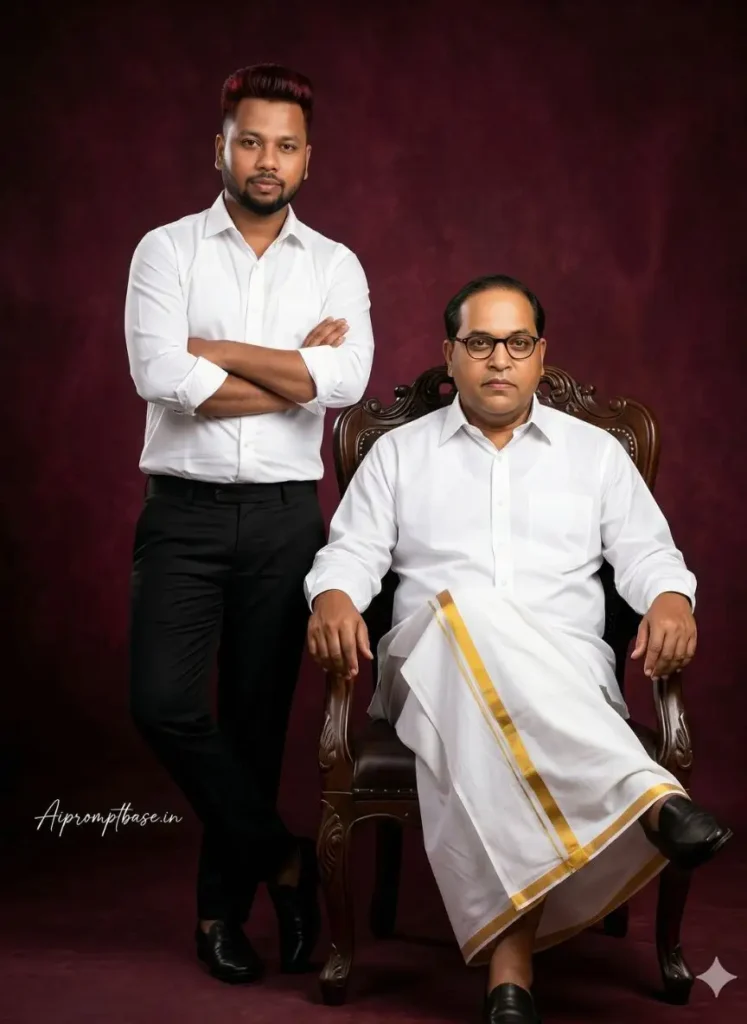
3. Father-Son Tribute Portrait – Emotional Concept
Explanation:
यह Ambedkar Jayanti AI Image Prompt emotional connection create करता है और tribute-based Ambedkar Jayanti photo editing के लिए best है।
Prompt:
FACE LOCK – MUST FOLLOW Use both uploaded reference photos. Face must be 100% exact same — no reshaping, no beautification, no AI modification. Preserve real skin texture, facial structure, hairstyle, age, expression exactly as original. Ultra-HD face clarity, fully human look. A professional full-body studio portrait of a father and son. On the right, the father is Dr Bhim Rav Ambedkar majestically in a dark wooden ornate chair, legs crossed, wearing a crisp white shirt and a traditional white veshti (vasti) with a gold border. On the left, the son stands leaning slightly against the chair with his arms crossed, wearing a white shirt and black trousers. Both look directly at the camera with confident expressions. ASPECT RATIO: 3:4 vertical TEXT / SIGNATURE: Add “Aipromptbase.in” bottom-left, handwritten signature-style, thin cursive strokes, small size, subtle premium elegance, white/soft off-white.
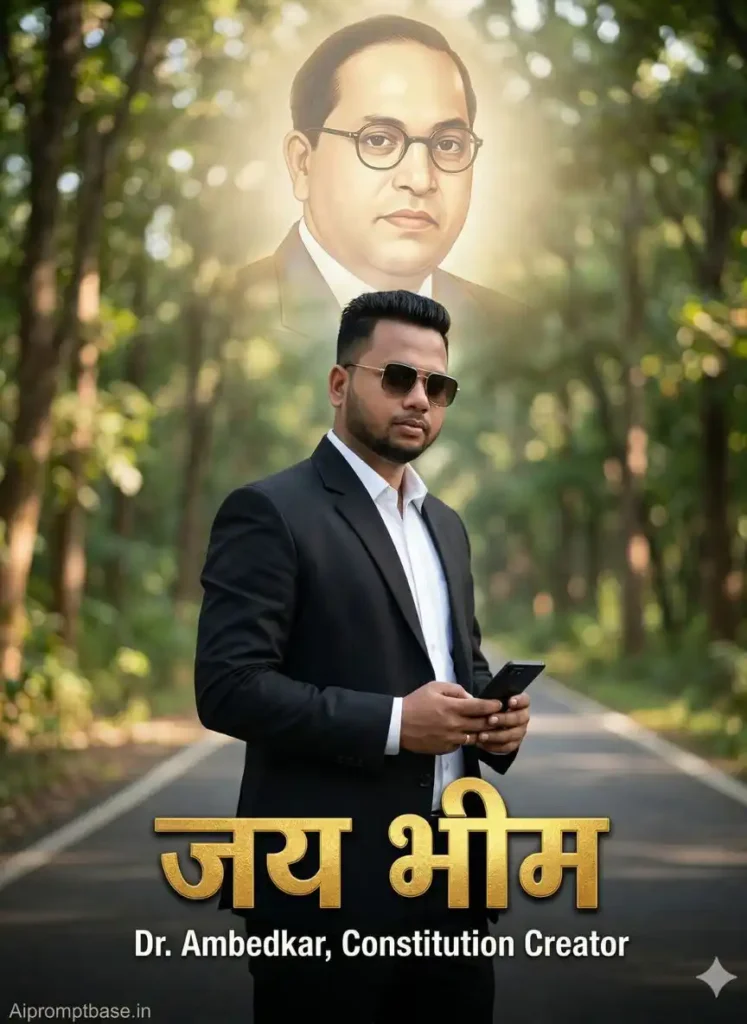
4. Cinematic Road Poster – Modern Tribute Design
Explanation:
यह prompt modern और cinematic look देता है, जो Ambedkar Jayanti banner editing के लिए perfect है।
Prompt:
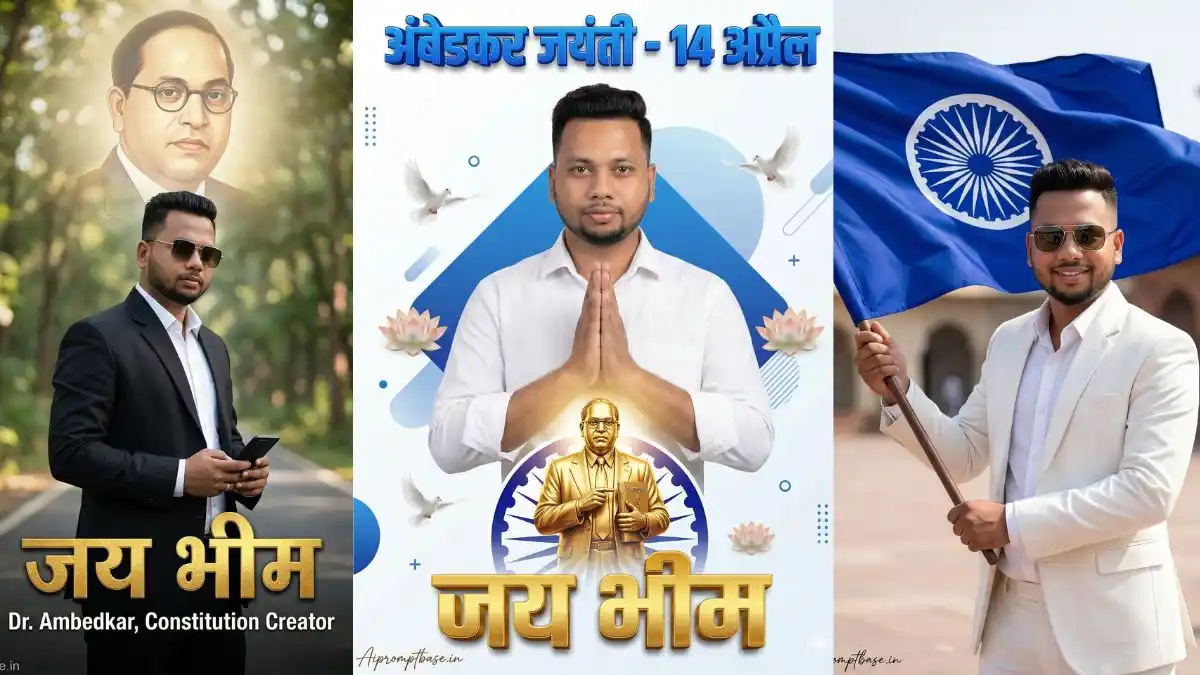
A stylish cinematic portrait of a confident Indian man standing on a road in a forest background, wearing a black suit, white shirt, sunglasses, holding a phone in hand, full body pose, modern fashion look, shallow depth of field, background blur (bokeh), natural lighting, ultra realistic On the side, a soft faded artistic portrait illustration of Dr. B. R. Ambedkar, blended into the background with a glowing effect, slightly transparent, creating a tribute poster composition Typography text: “Jai Bhim” in bold elegant Hindi font, glowing golden color Additional text: “Dr. Ambedkar Constitution Creator” clean modern font FACE LOCK: Use uploaded reference image for the man’s face, preserve exact facial identity, no distortion, high face similarity, identity lock ON, STYLE: cinematic poster, tribute design, professional photo editing, sharp subject focus, smooth background blur, color grading, realistic shadows QUALITY: 4K, ultra HD, highly detailed, sharp focus, professional photography, ASPECT RATIO: 3:4 vertical TEXT / SIGNATURE: Add “Aipromptbase.in” bottom-left, handwritten signature-style, thin cursive strokes, small size, subtle premium elegance, white / soft off-white.
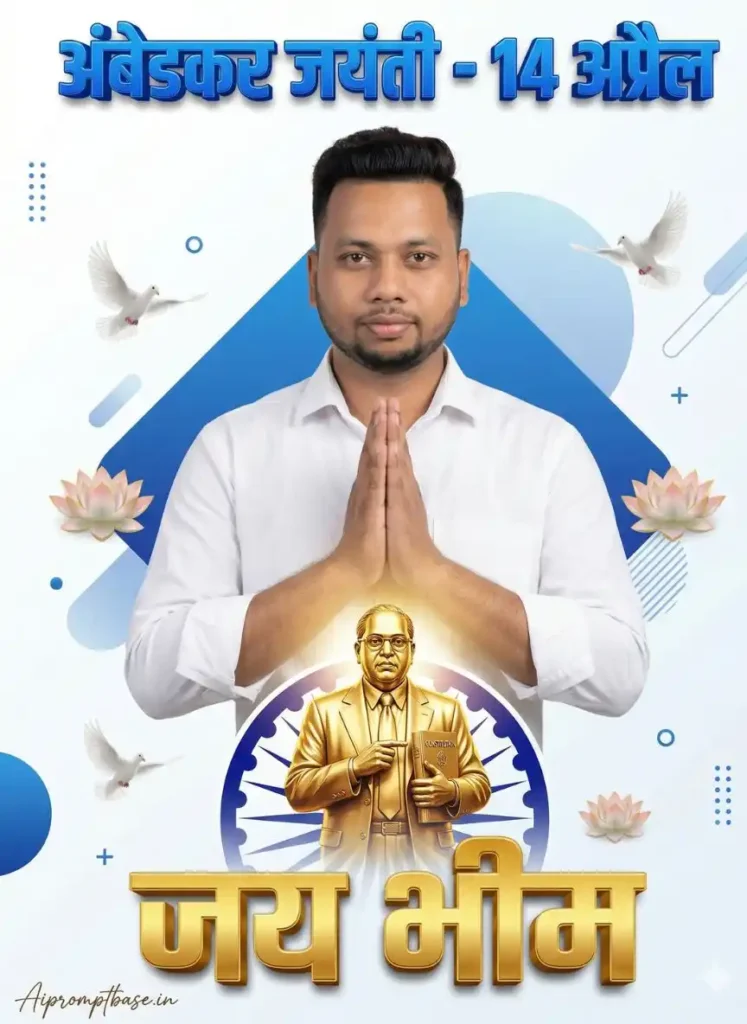
5. Premium Festival Poster – Clean & Professional Design
Explanation:
यह Ambedkar Jayanti HD images prompt एक clean और shareable festival poster बनाता है, जो social media पर viral होने के लिए perfect है।
Prompt:
A premium Ambedkar Jayanti poster design featuring a young Indian man standing in center, hands joined in namaste pose, wearing a clean white shirt, calm and respectful expression, front-facing portrait, perfectly centered composition, Background: clean white and blue modern graphic design with geometric shapes, soft gradients, minimalistic poster style, decorative lotus flowers and flying white doves around, Below the man, a golden statue-style illustration of Dr. B. R. Ambedkar holding the Constitution book, highly detailed, metallic gold finish, glowing effect, placed above an Ashoka Chakra design. Typography (Hindi): Top: “अंबेडकर जयंती – 14 अप्रैल” bold blue 3D font; Bottom: “जय भीम” large golden 3D text. Lighting: soft studio lighting, even light on face, no harsh shadows FACE LOCK: Use uploaded reference image for the man’s face, maintain exact identity, same facial features, no distortion, high similarity, face lock ON STYLE: professional poster design, ultra clean, vector + realistic mix, high-end typography, symmetrical layout, modern Indian festival poster QUALITY: 4K, ultra HD, sharp focus, highly detailed. ASPECT RATIO: 3:4 vertical TEXT / SIGNATURE: Add “Aipromptbase.in” bottom-left, handwritten signature-style, thin cursive strokes, small size, subtle premium elegance, white/soft off-white.
Ambedkar Jayanti AI Image Prompt से AI Image कैसे बनाएं (Step-by-Step Guide)
अगर आप इस लेख में दिए गए Ambedkar Jayanti AI Image Prompt का सही इस्तेमाल करते हैं, तो आप बिना किसी advanced skill के भी professional और realistic images बना सकते हैं। बस नीचे दिए गए steps follow करें:
Step 1: AI Tool Open करें
सबसे पहले कोई भी AI image generator खोलें (जैसे Google Gemini, Leonardo AI, Midjourney या Bing Image Creator)। ये सभी tools Ambedkar Jayanti AI Image Prompt को अच्छे से समझते हैं और high-quality output देते हैं।
Step 2: Reference Images Upload करें (Face Lock के लिए)
जहां भी “FACE LOCK – MUST FOLLOW” लिखा है, वहां आपको अपनी 1–2 clear photos upload करनी होंगी।
- Face clearly visible होना चाहिए
- Blur या low-quality image use ना करें
इससे आपका चेहरा हर image में same रहेगा और identity maintain रहेगा।
Step 3: Prompt Copy-Paste करें
अब इस लेख में दिया गया कोई भी Ambedkar Jayanti AI Image Prompt चुनें और उसे exactly वैसे ही copy करके tool में paste करें।
ध्यान रखें: prompt में कोई बदलाव ना करें, तभी best result मिलेगा।
Step 4: Generate पर क्लिक करें
अब generate button दबाएं और कुछ seconds wait करें। AI आपके Ambedkar Jayanti AI Image Prompt के अनुसार image बना देगा।
Step 5: Result Check करें और Improve करें
अगर face, lighting या background perfect नहीं लग रहा है, तो:
- Same prompt दुबारा try करें
- या minor changes करके improve करें
Step 6: Download और Use करें
जब आपको perfect image मिल जाए, तो उसे download करें और use करें:
- Ambedkar Jayanti photo editing
- Social media posts
- Posters और banners
Quick Tip:
हर बार same reference image और same Ambedkar Jayanti AI Image Prompt structure use करने से आपकी images में consistency बनी रहती है और results ज्यादा realistic आते हैं।
Pro Tips (Best Results के लिए)
अगर आप चाहते हैं कि आपके AI images हर बार professional और realistic दिखें, तो सिर्फ prompt लिखना काफी नहीं है—आपकी approach भी सही होनी चाहिए। ये कुछ practical tips हैं जो आपके results को noticeably improve कर सकते हैं:
- Same reference image हमेशा use करें
Face Lock तभी सही काम करता है जब आप हर बार वही reference image इस्तेमाल करते हैं। इससे face, expressions और identity में consistency बनी रहती है और output बार-बार बदलता नहीं है। - Lighting और background को seriously लें
Realistic feel का सबसे बड़ा secret यही है। Natural lighting, सही shadows और balanced background आपकी image को instantly real बना देते हैं। इन्हें ignore करने से image flat और artificial लगती है। - Detailed prompts लिखें, shortcut से बचें
जितना clear और detailed आपका prompt होगा, उतना ही AI सही समझेगा कि आपको क्या चाहिए। छोटे prompts अक्सर generic output देते हैं, जबकि detailed prompts professional results देते हैं। - हर बार same structure follow करें
Random तरीके से prompts बदलने की बजाय एक fixed structure रखें—जैसे subject + pose + lighting + background + quality। इससे आपकी images में consistency आती है और results ज्यादा predictable हो जाते हैं।
Quick Insight:
AI image generation में magic tool में नहीं, बल्कि आपकी detailing और consistency में होता है। जितना आप इन basics को follow करेंगे, उतना ही output next-level होता जाएगा।
FAQs – Ambedkar Jayanti AI Image Prompt
Q1. क्या Ambedkar Jayanti AI Image Prompt free में use कर सकते हैं?
हाँ, आप कई AI tools में Ambedkar Jayanti AI Image Prompt को free में use कर सकते हैं। हालांकि कुछ platforms में HD या premium output के लिए paid plan भी होता है।
Q2. Face Lock सही से काम क्यों नहीं करता?
Face Lock तभी सही काम करता है जब आप clear और high-quality reference image upload करते हैं। साथ ही हर बार same Ambedkar Jayanti AI Image Prompt structure use करना भी जरूरी होता है।
Q3. क्या मैं इन prompts से Ambedkar Jayanti poster बना सकता हूँ?
बिल्कुल, इस लेख में दिए गए हर Ambedkar Jayanti AI Image Prompt को specially इस तरह design किया गया है कि आप आसानी से professional Ambedkar Jayanti poster बना सकें।
Q4. क्या ये prompts mobile में भी use कर सकते हैं?
हाँ, आप mobile browser या apps के जरिए भी Ambedkar Jayanti AI Image Prompt use करके images बना सकते हैं।
Q5. एक ही face बार-बार कैसे maintain करें?
इसके लिए Face Lock technique use करें और हर बार same reference image + same Ambedkar Jayanti AI Image Prompt structure follow करें।
निष्कर्ष
अगर आप सही तरीके से Ambedkar Jayanti AI Image Prompt का इस्तेमाल करते हैं, तो आप आसानी से stunning और realistic visuals बना सकते हैं—चाहे वह Ambedkar Jayanti poster, banner editing, या photo editing ही क्यों न हो।
Consistency, सही prompts और थोड़ी creativity के साथ आप ऐसे designs बना सकते हैं जो ना सिर्फ professional दिखें बल्कि social media पर भी अलग पहचान बनाएं।
यह भी देखे: